1. Introduzzjoni
The Sonel CMM 30 is an advanced industrial multimeter engineered for versatility, modern functionality, and exceptional durability. This device integrates 11 fundamental measurement functions along with additional features, providing a broad spectrum of applications for professionals. Its robust design includes drop protection and an IP67 rated casing, ensuring reliable performance even in challenging environments.
Key features include a smartphone application for remote reading and data saving via wireless communication, an automatically adjusting backlight for optimal screen visibility, and a built-in flashlight for illumination in dark conditions. This manual provides essential information for the safe and effective use of your CMM 30 multimeter.
2. Informazzjoni dwar is-Sigurtà
Always adhere to the following safety precautions to prevent electric shock, injury, or damage to the meter or equipment under test.
- Read and understand all instructions and safety information in this manual before operating the meter.
- Tużax il-miter jekk jidher li hu bil-ħsara jew jekk l-insulazzjoni fuq il-wajers tat-test tkun kompromessa.
- Dejjem skonnettja l-enerġija miċ-ċirkwit u armi l-kurrent kollu ta' vultaġġ għoli.tage capacitors before making resistance, continuity, diode, or capacitance measurements.
- Oqgħod attent meta taħdem bil-voltag'il fuq minn 30V AC RMS, 42V peak, jew 60V DC. Dawn il-volumitages joħolqu periklu ta' xokk.
- Teċċedix il-limiti massimi tad-dħul għal kwalunkwe funzjoni.
- Kun żgur li s-swiċċ tal-funzjoni jkun fil-pożizzjoni korretta għall-kejl mixtieq qabel ma tqabbad il-wajers tat-test maċ-ċirkwit.
- Ibdel il-batteriji hekk kif jidher l-indikatur ta' batterija baxxa biex tiżgura qari preċiż.
- Tħaddimx il-miter f'ambjenti b'gass, fwar jew trab splussiv.
3. Kontenut tal-Pakkett
Verify that all items listed below are present and undamaged upon opening the package:
- Sonel CMM 30 Industrial Multimeter
- Wavel tat-Test (Aħmar u Iswed)
- Temperature Probe (K-type thermocouple)
- 4 x Batteriji AAA (installati minn qabel jew separati)
- Manwal għall-Utent (dan id-dokument)
Jekk xi oġġetti huma nieqsa jew bil-ħsara, jekk jogħġbok ikkuntattja lill-fornitur tiegħek immedjatament.
4. Prodott Aktarview
Familiarize yourself with the components of your Sonel CMM 30 multimeter:
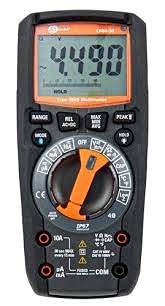
Figura 4.1: Quddiem view of the Sonel CMM 30 Industrial Multimeter. This image displays the device's main components, including the digital display, the central rotary function switch, and the various input terminals for test leads.
4.1. Wiri
The large LCD shows measurement readings, units, function indicators, and battery status. It features an automatic backlight that adjusts to ambient light conditions for optimal visibility.
4.2. Swiċċ tal-Funzjoni Rotary
This central switch is used to select the desired measurement function (e.g., Voltage, Current, Resistance, Capacitance, Temperature, Frequency).
4.3. Buttuni tal-Funzjoni
Various buttons provide additional controls and features:
- FIRXA: Toggles between manual and automatic ranging.
- MODALITÀ: Selects sub-functions within a main rotary switch position (e.g., AC/DC voltage, Dajowd/Kontinwità).
- ŻOMM: Jiffriża l-qari attwali tal-wiri.
- MASSIMU/MINIMU/MEDJA: Jirreġistra qari massimu, minimu u medju.
- REL: Relative mode, subtracts a stored value from subsequent measurements.
- Bluetooth/Light: Activates Bluetooth connectivity for the smartphone app and controls the built-in flashlight.
4.4. Input Jacks
These are the connection points for the test leads:
- COM: Common terminal for the black test lead.
- VΩHzCAP°C: Input għal voltage, resistance, frequency, capacitance, and temperature measurements (red test lead).
- mAµA: Input għal milliampere u mikroampkejl tal-kurrent hemmhekk (wajer tat-test aħmar).
- 10A: Input for up to 10 Ampkejl tal-kurrent hemmhekk (wajer tat-test aħmar).
5. Setup
5.1. Installazzjoni tal-batterija
The Sonel CMM 30 requires 4 AAA batteries. These may be pre-installed or included separately.
- Kun żgur li l-multimetru huwa MITFI.
- Sib il-kompartiment tal-batterija fuq wara tal-miter.
- Uża tornavit biex tħoll il-vit(i) li jassiguraw l-għatu tal-batterija.
- Neħħi l-għatu tal-batterija.
- Insert the 4 AAA batteries, observing the correct polarity (+ and -) as indicated inside the compartment.
- Replace the battery cover and tighten the screw(s) securely.
Nota: Always use fresh batteries of the same type. Remove batteries if the meter is not used for an extended period to prevent leakage.
6. Istruzzjonijiet Operattivi
6.1. Tixgħil / Mitfi
Turn the rotary function switch from the OFF position to any desired measurement function to power on the meter. To power off, turn the switch back to the OFF position.
6.2. Basic Measurement Procedures
Before any measurement, ensure the test leads are correctly inserted into the appropriate input jacks for the selected function.
6.2.1. TitjiratagKejl elettroniku (AC/DC)
- Insert the black test lead into the COM jack and the red test lead into the VΩHzCAP°C jack.
- Turn the rotary switch to the V~ (AC Voltage) jew V- (Volum DCtage) position. If both are combined, use the MODE button to select AC or DC.
- Connect the test leads in parallel across the circuit or component to be measured.
- Aqra l-voltagIl-valur fuq il-wiri.
6.2.2. Kejl tal-Kurrent (AC/DC)
Attenzjoni: Never connect the meter in parallel for current measurement. Always connect in series with the circuit.
- Insert the black test lead into the COM jack. For currents up to 10A, insert the red test lead into the 10A jack. For smaller currents (mA/µA), insert the red test lead into the mAµA jack.
- Turn the rotary switch to the A~ (AC Current) or A- (DC Current) position, or the mA/µA position as appropriate. Use the MODE button to select AC or DC if needed.
- Open the circuit where current is to be measured and connect the meter in series.
- Aqra l-valur attwali fuq id-displej.
6.2.3. Kejl tar-Reżistenza
- Insert the black test lead into the COM jack and the red test lead into the VΩHzCAP°C jack.
- Turn the rotary switch to the Ω (Resistance) position.
- Ensure the circuit or component is de-energized before connecting the test leads across it.
- Aqra l-valur tar-reżistenza fuq il-wiri.
6.2.4. Kejl tal-Kapaċitanza
- Insert the black test lead into the COM jack and the red test lead into the VΩHzCAP°C jack.
- Turn the rotary switch to the CAP (Capacitance) position.
- Ensure the capacitor is fully discharged before connecting the test leads across it.
- Aqra l-valur tal-kapaċitanza fuq il-wirja.
6.2.5. Kejl tat-Temperatura
- Insert the temperature probe into the VΩHzCAP°C and COM jacks, observing polarity if applicable.
- Turn the rotary switch to the °C/°F (Temperature) position.
- Poġġi l-ponta tas-sonda tat-temperatura fuq jew viċin l-oġġett li trid titkejjel it-temperatura tiegħu.
- Aqra l-valur tat-temperatura fuq id-displej.
6.3. Karatteristiċi Avvanzati
6.3.1. True RMS Measurement
The CMM 30 features True RMS for AC voltage and current measurements, providing accurate readings for non-sinusoidal waveforms.
6.3.2. Wireless Communication and Smartphone App
The CMM 30 can connect wirelessly to a smartphone application, allowing for remote reading and saving of measurements. This is particularly useful in hard-to-reach or hazardous locations.
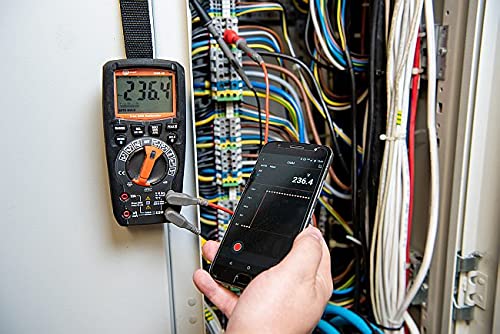
Figure 6.1: The Sonel CMM 30 Multimeter connected to an electrical panel, demonstrating its wireless communication feature. A smartphone displays the measurement reading remotely, highlighting the convenience for inaccessible areas.
Biex tuża din il-karatteristika:
- Download the official Sonel CMM app from your smartphone's app store.
- Ippermetti Bluetooth fuq l-ismartphone tiegħek.
- Press the Bluetooth button on the multimeter to activate its wireless communication.
- Follow the app's instructions to pair with your CMM 30 and begin remote monitoring.
6.3.3. Flashlight inkorporat
The integrated flashlight assists in illuminating measurement areas, especially in low-light conditions. Activate it by pressing the dedicated light button.
6.4. Durability and IP67 Rating
The CMM 30 is designed with an IP67 rating, signifying its protection against dust ingress and immersion in water up to 1 meter for 30 minutes. This makes it suitable for demanding industrial environments.
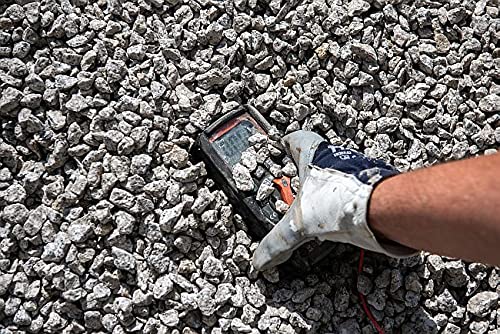
Figure 6.2: The Sonel CMM 30 Multimeter partially submerged in gravel, illustrating its robust construction and resistance to dust and debris, a testament to its IP67 rating.

Figure 6.3: The Sonel CMM 30 Multimeter creating a splash as it impacts a muddy puddle, demonstrating its exceptional water resistance and ability to withstand harsh, wet conditions.
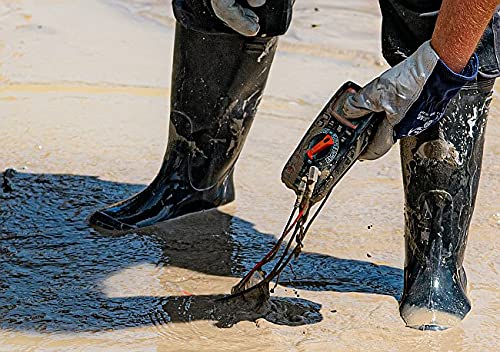
Figure 6.4: A person, wearing protective boots and gloves, retrieves the Sonel CMM 30 Multimeter from a muddy environment. This image emphasizes the device's resilience and ease of handling even after exposure to challenging conditions.
7. Manutenzjoni
7.1. Tindif
Imsaħ il-marka tal-miterasing b'reklamaramp drapp u deterġent ħafif. Tużax abrażivi jew solventi. Kun żgur li l-miter ikun niexef għalkollox qabel l-użu.
7.2. Sostituzzjoni tal-batterija
Refer to Section 5.1 for battery replacement instructions. Replace batteries promptly when the low battery indicator appears on the display.
7.3. Ħażna
When not in use for extended periods, store the multimeter in a dry, cool place, away from direct sunlight and extreme temperatures. Remove the batteries to prevent leakage.
8 Issolvi l-problemi
| Problema | Kawża Possibbli | Soluzzjoni |
|---|---|---|
| Il-miter ma jixgħelx. | Batteriji mejta jew installati ħażin. | Iċċekkja l-polarità tal-batterija jew ibdel il-batteriji. |
| L-ebda qari jew murija "OL" (Overload). | Funzjoni magħżula ħażin; ċirkwit miftuħ; il-kejl jaqbeż il-medda. | Select correct function; check circuit continuity; switch to a higher range or auto-range. |
| Qari mhux preċiż. | Batterija baxxa; wajers/ġakkijiet tat-test maħmuġin; interferenza esterna. | Ibdel il-batteriji; naddaf il-wajers/jacks; żomm 'il bogħod minn kampi elettromanjetiċi qawwija. |
| Kwistjonijiet ta 'konnessjoni Bluetooth. | Bluetooth not enabled on meter/phone; app issues; distance. | Ensure Bluetooth is on; restart app/phone; reduce distance between devices. |
9. Speċifikazzjonijiet
| Karatteristika | Speċifikazzjoni |
|---|---|
| Brand | Sonel |
| Numru tal-Mudell | SON001 |
| Kulur | Iswed |
| Piż tal-oġġett | 418 g |
| Dimensjonijiet tal-Pakkett | 30 x 15 x 10 ċm |
| Batteriji | 4 batteriji AAA meħtieġa (inklużi) |
| Funzjonijiet tal-Kejl | AC / DC Voltage, AC/DC Current, Resistance, Capacity, Temperature, Duty Cycle, Frequency |
| Li jvarjaw | Manwal u Awtomatiku |
| RMS Veru | Yes (for AC voltage u kurrenti) |
| Klassifikazzjoni tal-Protezzjoni tad-Dħul (IP). | IP67 |
| Konnettività | Wireless (Smartphone App) |
| Karatteristiċi Addizzjonali | HOLD function, Built-in flashlight, Backlight auto-adjustment |
10. Garanzija u Appoġġ
10.1. Informazzjoni dwar Garanzija
Sonel products are manufactured to high standards and are warranted against defects in materials and workmanship for a period specified by your regional distributor from the date of purchase. This warranty does not cover damage caused by misuse, unauthorized modification, accident, or neglect. Please retain your proof of purchase for warranty claims.
10.2. Appoġġ Tekniku
For technical assistance, troubleshooting beyond this manual, or warranty inquiries, please contact your local Sonel distributor or the authorized service center. Contact information can typically be found on the Sonel official webis-sit jew permezz tal-punt tax-xiri tiegħek.
When contacting support, please have your product model number (SON001) and purchase date readily available.


