EVGA Supernova 1000 P6 Power Supply User Manual
Model: 220-P6-1000-X1
Introduzzjoni
This manual provides detailed instructions for the installation, operation, and maintenance of your EVGA Supernova 1000 P6 Power Supply. Please read this manual thoroughly before installation and keep it for future reference.

Image: The EVGA Supernova 1000 P6 power supply unit shown alongside its retail packaging.
Informazzjoni u Protezzjonijiet dwar is-Sigurtà
WARNING: Improper installation or use can result in serious injury or damage to your system components. Always consult a qualified technician if you are unsure about any steps.
- Ensure the power supply is disconnected from the AC power outlet before installation or removal.
- Tiftaħx il-provvista tal-enerġija casing. There are no user-serviceable parts inside, and opening it voids the warranty.
- Installa l-provvista tal-enerġija f'żona ventilata sew, 'il bogħod minn sorsi ta' sħana u umdità.
- Use only the modular cables provided with your EVGA Supernova P6 power supply. Using incompatible cables can damage the PSU and connected components.
- This product is designed for use with personal computers. Do not use it for industrial or other non-specified applications.
Karatteristiċi ta' Protezzjoni Avvanzata:
The EVGA Supernova P6 series incorporates multiple protection mechanisms to safeguard your system:
- OVP (Over Voltage Protezzjoni)
- OCP (Protezzjoni Over Current)
- SCP (Short Circuit Protection)
- UVP (Taħt Voltage Protezzjoni)
- OTP (Protezzjoni mit-Temperatura Eċċessiva)
- Dual OPP (Over Power Protection - Hardware + Firmware)

Image: A graph demonstrating the Hardware OPP (135% max wattage) and Firmware OPP (125% max wattage) mechanisms, showing their respective response times for system protection.
Kontenut tal-Pakkett
Ivverifika li l-oġġetti kollha huma preżenti fil-pakkett tiegħek:
- EVGA Supernova 1000 P6 Power Supply Unit
- Modular Cable Set (including ATX 24-pin, EPS/CPU, PCIe, SATA, Peripheral cables)
- Kurdun tal-Enerġija AC
- Viti tal-Immuntar
- Power ON Self Tester
- Manwal għall-Utent (dan id-dokument)

Immaġni: Komprensiva view of the modular cables, mounting screws, and power ON self tester included with the EVGA Supernova P6 power supply.
Prodott Overview
The EVGA Supernova 1000 P6 is a fully modular power supply designed for high performance and efficiency.

Immaġni: Minn fuq għal isfel view of the power supply, highlighting the clearly labeled modular ports for various cables such as MB, VGA, CPU, SATA, and Peripheral.
Karatteristiċi ewlenin:
- Ċertifikat 80 PLUS Platinum: Ensures high energy efficiency, reducing heat and operating costs.
- Disinn Kompletament Modulari: Allows for cleaner cable management and improved airflow within your PC case.
- Kondensaturi 100% Ġappuniżi: Provides long-term reliability and stability.
- Fann tal-Bearings Fluwidi Dinamiċi (FDB): Offers quiet operation and extended lifespan.
- EVGA ECO Mode: Enables silent operation at low to medium loads by stopping the fan.
- Daqs kompatt: The P6 series features a compact 140mm size, making it suitable for various PC builds.

Image: An infographic detailing essential features of the power supply, including 80 PLUS Platinum certification, fully modular design, 100% Japanese capacitors, flat cables, and a full suite of protections.
Next Generation Platform:
The Supernova P6 utilizes a full-bridge LLC Resonant Converter and DC-DC design, leading to superior voltage regulation and extremely low ripple and noise, ensuring stable power delivery to your components.

Image: Comparative graphs illustrating the improved voltage regulation and reduced +12V ripple and noise performance of the 1000P6 model compared to the 1000P2.
Setup u Installazzjoni
- Ipprepara s-Sistema Tiegħek:
- Turn off your computer and unplug the AC power cord from the wall outlet.
- Iftaħ il-każ tal-kompjuter tiegħek.
- If replacing an old PSU, disconnect all cables from the old power supply and remove it from the case.
- Install the New PSU:
- Carefully slide the EVGA Supernova 1000 P6 into the power supply bay of your computer case.
- Waħħal il-provvista tal-enerġija mal-kaxxa billi tuża l-viti tal-immuntar provduti.
- Qabbad il-Kejbils Modulari:
- Connect the necessary modular cables to the power supply first. Refer to the labels on the PSU for correct port identification (e.g., MB for motherboard, VGA for graphics cards, CPU for CPU power).
- Connect the other end of each cable to the corresponding component in your system (motherboard, graphics card(s), SSDs/HDDs, etc.).
- Kun żgur li l-konnessjonijiet kollha huma sodi u siguri.
- Ġestjoni tal-Kejbil:
- Irrota l-kejbils b'mod pulit biex ittejjeb il-fluss tal-arja u l-estetika fil-kaxxa tiegħek.
- Passi Finali:
- Agħlaq il-każ tal-kompjuter tiegħek.
- Qabbad il-korda tal-enerġija AC mal-provvista tal-enerġija u mbagħad ma' żbokk tal-ħajt.
- Ixgħel il-kompjuter tiegħek.
Istruzzjonijiet Operattivi
Power ON Self Tester:
The included Power ON Self Tester allows you to verify the basic functionality of your power supply before installing it into your system. Simply plug the 24-pin ATX cable into the tester and then into the power supply. Connect the AC power cord and flip the PSU's power switch to ON. If the PSU fan spins briefly and the tester's LED lights up, the basic power delivery is functional.
EVGA ECO Mode:
The EVGA Supernova 1000 P6 features an ECO mode switch on the rear of the unit. This mode allows the power supply fan to remain off during low to medium loads, providing silent operation. The fan will automatically activate when the load increases or internal temperatures rise to maintain optimal cooling.
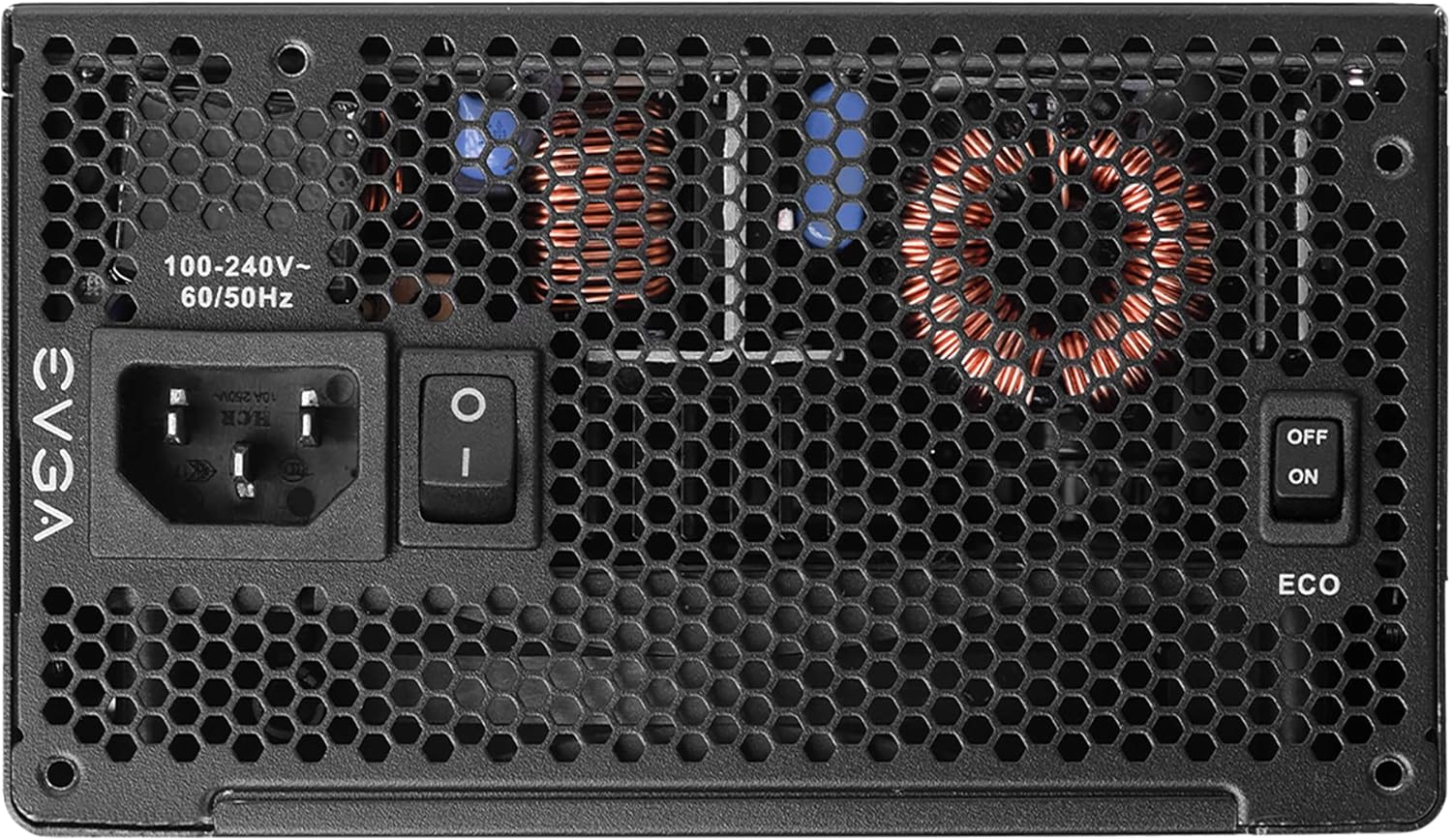
Image: The rear panel of the power supply, clearly showing the main power switch and the toggle switch for activating or deactivating the EVGA ECO mode.
- ECO Mode ON: Fan operates only when necessary (recommended for quiet operation).
- ECO Mode OFF: Fan spins continuously, regardless of load (may result in slightly higher noise levels).

Image: An infographic highlighting the compact size of the P6 series compared to P2, and a graph illustrating the ultra-quiet operation of the 135mm FDB fan with EVGA ECO Mode enabled, showing noise levels relative to load.
Manutenzjoni
To ensure the longevity and optimal performance of your EVGA Supernova 1000 P6 power supply, follow these maintenance guidelines:
- Żommha Nadif: Periodically clean dust from the power supply's fan intake and exhaust vents using compressed air. Ensure the system is powered off and unplugged before cleaning.
- Żgura Fluss ta' l-Ajru Proper: Make sure your PC case has adequate airflow to prevent heat buildup around the power supply.
- Evita tagħbija żejda: Do not exceed the power supply's rated wattage. Ensure your system's total power consumption is within the PSU's capacity.
- Kontrolli regolari: Occasionally check cable connections to ensure they remain secure.
Issolvi l-problemi
| Problema | Kawża Possibbli | Soluzzjoni |
|---|---|---|
| Il-provvista tal-enerġija ma tixgħelx. |
|
|
| Is-sistema tiġġarraf jew terġa' tibda taħt tagħbija. |
|
|
| Fan is noisy or not spinning. |
|
|
Speċifikazzjonijiet
Detailed technical specifications for the EVGA Supernova 1000 P6 Power Supply:
| Karatteristika | Dettall |
|---|---|
| Numru tal-Mudell | 220-P6-1000-X1 |
| Wattage | 1000 Watts |
| Klassifikazzjoni 80 PLUS | Platinum (92% efficiency or higher under typical loads) |
| Fattur tal-Formola | ATX |
| Metodu tat-tkessiħ | Arja (Fann tal-Bearings Fluwidi Dinamiċi) |
| Dimensjonijiet (L x W x H) | 3.4 x 5.9 x 5.5 pulzieri (86.4 x 150 x 140 mm) |
| Piż | 7.57 liri (3.44 kg) |
| Input Voltage | 100-240V~ |
| Frekwenza tad-dħul | 50/60Hz |
| Kondensers | 100% Kondensers Ġappuniżi |
| Protezzjonijiet | OVP, OCP, SCP, UVP, OTP, Dual OPP |

Image: The side panel of the power supply displaying its electrical specifications label, including AC input, DC output voltages, maximum currents, and combined wattage.

Image: A table summarizing the various protection features integrated into the power supply, such as Over VoltagProtezzjoni minn Kurrent Żejjed (OVP), Protezzjoni minn Kurrent Żejjed (OCP), u Protezzjoni minn Temperatura Żejjed (OTP).
Garanzija u Appoġġ
EVGA provides a comprehensive warranty for the Supernova 1000 P6 power supply.
- Perjodu ta' Garanzija: This product typically comes with a 10-year warranty from the date of purchase. Please refer to the official EVGA webis-sit għall-aktar termini u kundizzjonijiet tal-garanzija attwali u dettaljati.
- Reġistrazzjoni: It is highly recommended to register your product on the EVGA website shortly after purchase to ensure full warranty coverage.
- Appoġġ Tekniku: For technical assistance, troubleshooting beyond this manual, or warranty claims, please visit the official EVGA support websit jew ikkuntattja lis-servizz tal-konsumatur tagħhom.
- Manwal Uffiċjali għall-Utent: A PDF version of the user manual can often be found on the EVGA product page or support section. A direct link to the PDF provided in the product data is hawn.
For the latest support information and contact details, please visit the official EVGA websit: www.evga.com


