1. Introduzzjoni
The AZDOME Mirror Dash Cam PG02S is an advanced vehicle recording system designed to enhance driving safety and provide comprehensive video evidence. This manual provides detailed instructions for the proper installation, operation, and maintenance of your device.
2. Karatteristiċi ewlenin
- High-Definition Dual Camera System: Equipped with a 1440P front camera and a 1080P rear camera, both featuring a 170° wide-angle lens for comprehensive coverage and super sharp video recording.
- Kontroll tal-Vuċi Intelliġenti: Offers hands-free operation with intuitive voice commands, allowing you to control essential functions safely while driving.
- Split-Screen Display & GPS Functionality: Fl-istess ħin view front and rear camera feeds on the screen. Integrated GPS records real-time location, driving track, and speed for detailed journey logs.
- Superior Night Vision & WDR Technology: Utilizes an advanced Sony sensor and Wide Dynamic Range (WDR) to capture clear videos with enhanced detail in low-light conditions and manage varying light intensities effectively.
- Reġistrazzjoni f'Loop u Assistenza għall-Ipparkjar: Ensures continuous recording by overwriting old footage (locked accident videos are protected). The parking assistance feature provides guide lines for safer reversing.
- Disinn Durabbli: The rear camera boasts IP68 waterproof rating and anti-fog/dust properties, ensuring reliable performance in various weather conditions.
3. Kontenut tal-Pakkett
Jekk jogħġbok iċċekkja l-kontenut tal-pakkett bir-reqqa meta tiftaħ il-kaxxa. Jekk xi oġġetti huma nieqsa jew bil-ħsara, ikkuntattja l-appoġġ għall-klijenti.
- AZDOME Mirror Dash Cam Unit
- Kamera ta 'wara bil-Cable
- Modulu GPS
- Kejbil tal-Enerġija (Ċarġer tal-Karozza)
- Ċineg/Faxex tal-Immuntar
- Manwal għall-Utent
- Karta MicroSD ta' 32GB (tista' tvarja skont il-pakkett)

Immaġni: Fuqview of the AZDOME Mirror Dash Cam PG02S and its included accessories, such as the main mirror unit, rear camera, GPS antenna, and a 32GB microSD card.
4. Setup u Installazzjoni
4.1 Installazzjoni tal-Unità Prinċipali
- Secure the mirror dash cam over your vehicle's existing rearview mera billi tuża ċ-ċineg tal-gomma pprovduti. Kun żgur li hija mwaħħla sew u ma tostakolax il-vista tiegħek view.
- Connect the power cable to the dash cam's power input port and route it neatly along the windshield trim to the vehicle's cigarette lighter socket.
- Insert the MicroSD card into the designated slot on the dash cam. Ensure it is inserted correctly until it clicks into place.
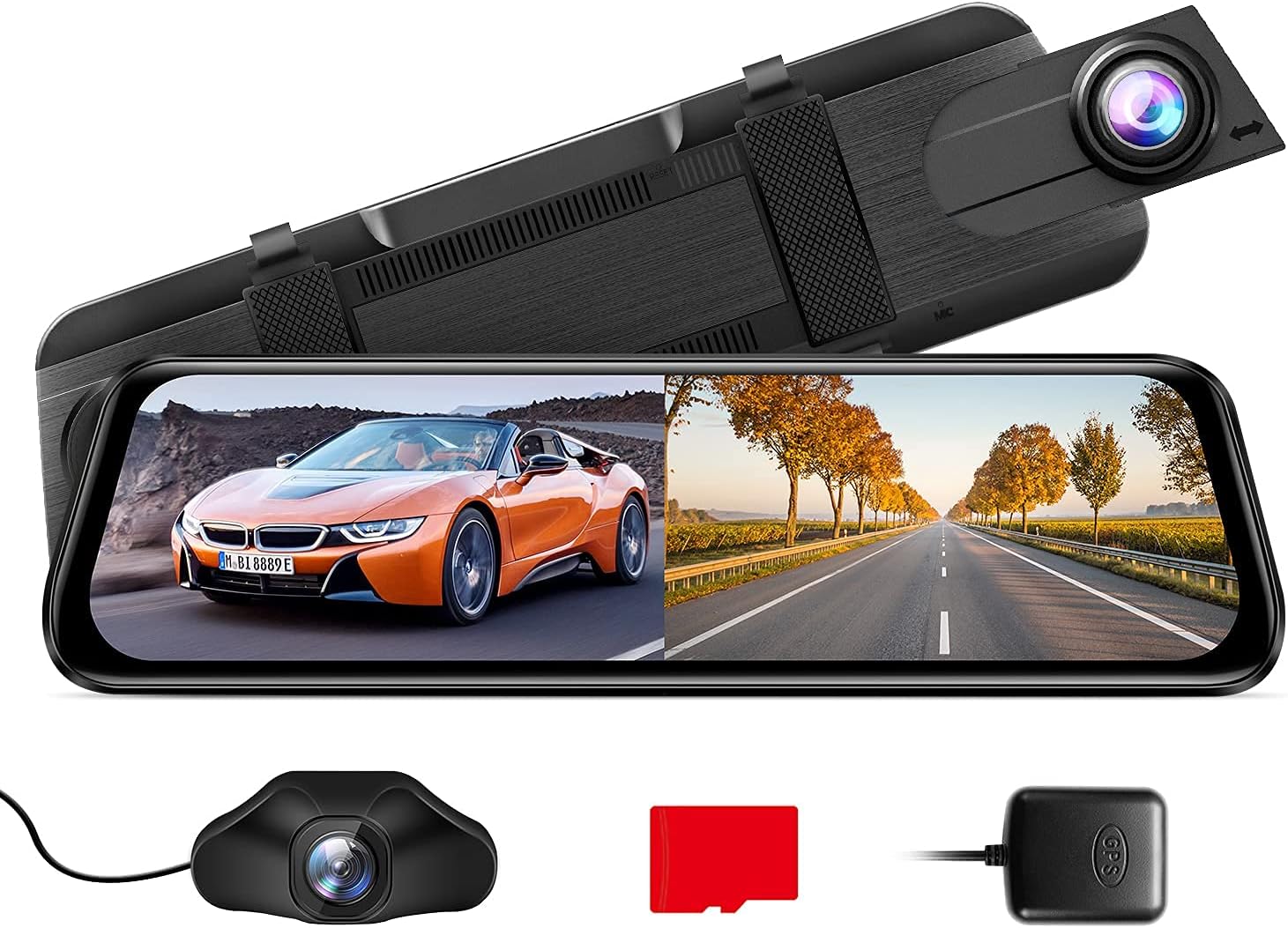
Image: The AZDOME Mirror Dash Cam PG02S main unit, designed to clip over the existing rearview mirror, displaying a split view tat-triq 'il quddiem u warajha.
4.2 Installazzjoni tal-Kamera ta 'wara
- Mount the rear camera at the back of your vehicle, typically above the license plate or inside the rear window, ensuring a clear view.
- Connect the rear camera cable to the rear camera input port on the main dash cam unit.
- Route the rear camera cable discreetly along the vehicle's interior trim to the main unit. If connecting to reverse lights for parking assistance, consult a professional.
4.3 Konnessjoni tal-Modulu tal-GPS
- Connect the GPS module to the dedicated GPS port on the dash cam.
- Position the GPS module on your dashboard or windshield where it has a clear view tas-sema għal riċeviment ottimali tas-sinjal.
5. Istruzzjonijiet Operattivi
5.1 Tixgħel/Jitfi
Id-dash cam tixgħel awtomatikament u tibda tirrekordja meta l-ignition tal-vettura tiegħek tinxtegħel. Tintefa awtomatikament meta l-ignition tintefa.
5.2 Kontroll tal-Vuċi Intelliġenti
The PG02S supports voice commands for hands-free operation. Speak clearly and directly towards the device.
- "Open Recording": Starts video recording.
- "Turn off Display": Turns off the screen while recording continues.
- "Turn off Recording": Stops video recording.
- "Lock the video": Protects the current recording from being overwritten.
- "Ħu Ritratt": Jaqbad immaġni wieqfa.
- "Show front camera": Displays only the front camera view.
- "Show rear camera": Displays only the rear camera view.

Image: An illustration of a driver utilizing the smart voice control feature to operate the dash cam hands-free, showing example commands like "Open screen" and "Lock The Video".
5.3 Display Modes and Touch Screen Operation
The device features a responsive touch screen. You can switch between display modes (front view, wara view, split-screen) by swiping on the screen or using on-screen icons. Adjust settings and review footage directly on the touch screen.

Image: A hand interacting with the touch screen of the AZDOME Mirror Dash Cam, demonstrating its intuitive user interface for controlling recording and viewgħażliet.
5.4 Parking Assistance System
When the vehicle is put into reverse (if the rear camera is wired to the reverse light), the screen will automatically display the rear view with parking guide lines. These lines assist in safe parking maneuvers.

Image: The dash cam display showing the reversing aid system with green and red parking guide lines overlaid on the rear camera feed, assisting with safe parking.
6. Manutenzjoni
- Tindif: Use a soft, dry cloth to clean the dash cam screen and lenses. Avoid using abrasive cleaners or solvents.
- Karta MicroSD: Format the MicroSD card regularly (e.g., once a month) to ensure optimal performance and prevent data corruption. Back up important videos before formatting. Replace the card if it shows signs of degradation.
- Aġġornamenti tal-Firmware: Periodically check the AZDOME official website for available firmware updates. Updates can improve performance and add new features. Follow the instructions provided with the firmware carefully.
- Rear Camera Durability: The rear camera is IP68 waterproof. However, regular checks for dirt or debris on the lens will ensure clear footage.

Image: A comparison illustrating the superior clarity of the Mirror Dash Cam PG02S streaming media view in rainy or foggy conditions compared to a traditional rearview mirror, highlighting its IP68 waterproof and anti-fog features.
7 Issolvi l-problemi
| Problema | Kawża / Soluzzjoni Possibbli |
|---|---|
| Id-dash cam ma tixgħelx. | Check the power connection to the cigarette lighter socket. Ensure the vehicle's ignition is on. Test the power cable in another vehicle or with another compatible device. |
| Ir-reġistrazzjoni tieqaf ħesrem. | The MicroSD card may be full or corrupted. Format the MicroSD card. Ensure you are using a high-speed (Class 10 or U3) MicroSD card. |
| Video footage hija mċajpra jew mhux ċara. | Clean the camera lenses. Ensure the protective film has been removed from the lenses. Check if the camera is securely mounted and not vibrating. |
| Is-sinjal tal-GPS huwa dgħajjef jew ma jinstabx. | Ensure the GPS module is placed in an open area with a clear view of the sky (e.g., dashboard). Avoid placing it under metallic objects or tinted windows that block signals. |
| Il-kontroll tal-vuċi mhux qed jirrispondi. | Speak clearly and at a normal volume. Ensure there is no excessive background noise. Check if the voice control feature is enabled in the settings. |
8. Speċifikazzjonijiet
| Karatteristika | Dettall |
|---|---|
| Mudell | PG02S |
| Riżoluzzjoni tal-Kamera ta 'quddiem | 1440P (2.5K HD) |
| Riżoluzzjoni tal-Kamera ta 'wara | 1080P |
| Angolu tal-Lenti | Dual 170° Wide Angle |
| Metodu ta' Kontroll | Voice, Touch Screen |
| Viżjoni bil-lejl | Super Night Vision with Sony Sensor |
| Karatteristiċi Speċjali | WDR, Loop Recording, G-Sensor, Parking Monitor, GPS, Split-Screen Display |
| Rear Camera Water Resistance | IP68 |
| L-Ewwel Data Disponibbli | 16 ta’ Awwissu, 2021 |

Image: An illustration detailing the 2.5K UHD recording capability of the front camera (1440P) and the 1080P recording of the rear camera, emphasizing high-resolution capture.

Image: A visual representation of the dash cam's super night vision capability, showing a clear image of a busy street at night, supported by WDR, F/1.8 Aperture, and a 6-glass lens.
9. Garanzija u Appoġġ
For detailed warranty information, product registration, and technical support, please refer to the official AZDOME webis-sit jew ikkuntattja lis-servizz tal-klijenti tagħhom direttament.
Tista 'wkoll iżżur il- AZDOME Store on Amazon għal aktar informazzjoni dwar il-prodott u riżorsi ta' appoġġ.


