Introduzzjoni
This manual provides instructions for setting up, operating, and maintaining your HP 235 Wireless Keyboard and Mouse Combo. Please read this guide thoroughly before using the product to ensure proper functionality and longevity.
Kontenut tal-Pakkett
- HP Wireless Keyboard
- HP Wireless Mouse
- Riċevitur Wireless tat-Tip A tal-USB
- AA Batteries (pre-installed or included separately)
Setup
Follow these steps to set up your HP 235 Wireless Keyboard and Mouse Combo:
- Daħħal Batteriji: If not already installed, open the battery compartments on the underside of both the keyboard and the mouse. Insert the AA batteries, ensuring correct polarity. Close the compartments.
- Qabbad ir-Riċevitur USB: Locate an available USB Type-A port on your computer. Insert the USB wireless receiver into the port. Your computer should automatically detect the device.
- Qawwa Mixgħul: Turn on the keyboard and mouse using their respective power switches, usually located on the underside. The devices should connect automatically to the receiver.

It-tħaddim tat-Tastiera
The HP 235 Wireless Keyboard features a standard layout with additional function keys.
- Ċwievet Standard: Use the alphanumeric keys for typing text and numbers.
- Ċwievet tal-Funzjoni (F1-F12): Dawn iċ-ċwievet jista' jkollhom funzjonijiet sekondarji (eż., kontroll tal-volum, daqq tal-midja, aġġustament tal-luminożità) meta jiġu ppressati flimkien mal-buttuna Fn key. Refer to your computer's documentation for specific Fn key combinations.
- Tastiera numerika: The dedicated numeric keypad on the right provides quick entry for numbers and calculations. Ensure Num Lock is active for numeric input.
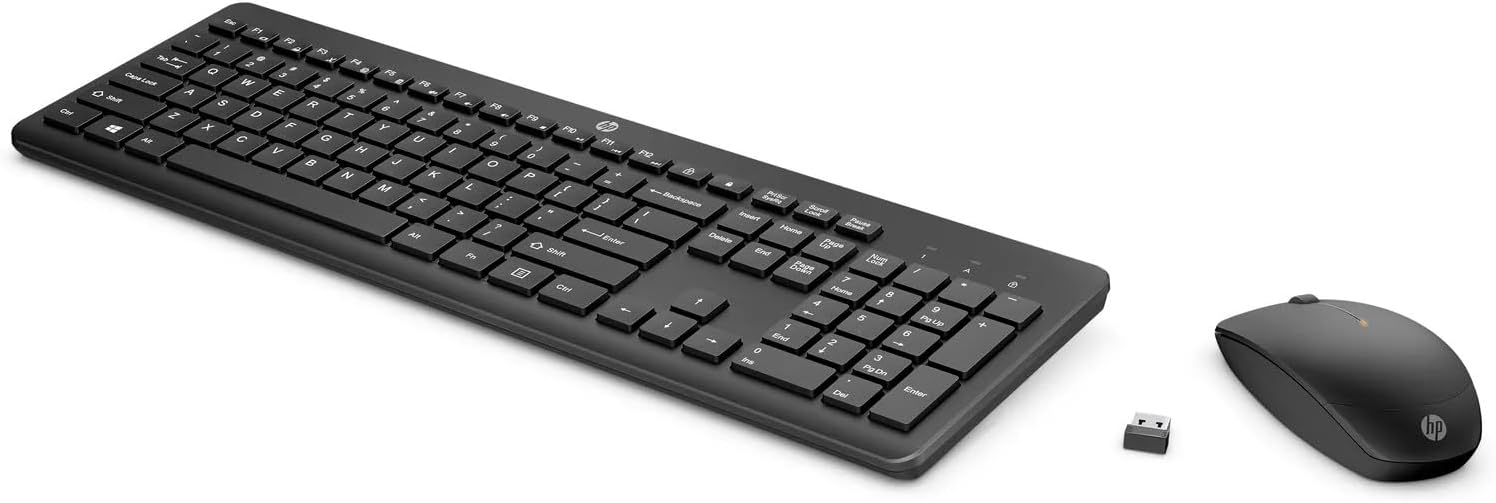
Tħaddim tal-Maws
The HP 235 Wireless Mouse provides precise cursor control.
- Buttuna tax-Xellug: Primary click function, typically used for selecting items or opening applications.
- Buttuna tal-lemin: Secondary click function, typically used for context menus.
- Scroll Wheel: Roll the wheel to scroll through documents or web paġni. Ir-rota tal-iscroll tista' tiffunzjona wkoll bħala buttuna tan-nofs tal-ikklikkjar.
Manutenzjoni
Proper maintenance ensures the longevity of your wireless combo.
- Tindif: Uża drapp artab u niexef biex tnaddaf l-uċuħ tat-tastiera u l-maws. Għal ħmieġ iebes, nixxef ftit.ampLaħlaħ id-drapp bl-ilma. Evita kimiċi ħarxa jew materjali li joborxu.
- Sostituzzjoni tal-batterija: When performance degrades (e.g., delayed response, intermittent connection), replace the batteries in both the keyboard and mouse with new AA batteries. Dispose of old batteries according to local regulations.
- Ħażna: When not in use for extended periods, turn off the devices to conserve battery life. Store the USB receiver in a safe place, possibly inside the mouse's battery compartment if available.
Issolvi l-problemi
If you encounter issues with your HP 235 Wireless Combo, try the following solutions:
| Problema | Soluzzjoni |
|---|---|
| It-tastiera/maws ma jirrispondix |
|
| Konnessjoni intermittenti |
|
| Il-cursor tal-maws huwa erratiku jew mhux qed jiċċaqlaq bla xkiel |
|
Speċifikazzjonijiet
- Ditta: HP
- Mudell: 235
- Teknoloġija tal-Konnettività: Wireless (USB Type A receiver)
- Kompatibilità tas-Sistema Operattiva: Windows 10
- Piż tal-oġġett: Madwar 1.83 libbra (0.83 kg)
- Dimensjonijiet tal-Prodott (LxWxH): Madwar 18 x 8.8 x 1.9 pulzieri (45.7 x 22.4 x 4.8 cm)
- Sors tal-Enerġija: Imħaddem bil-batterija (batteriji AA)
Garanzija u Appoġġ
For warranty information and technical support, please visit the official HP support website or contact HP customer service. Keep your purchase receipt for warranty claims.
Tista' ssib aktar informazzjoni u riżorsi ta' appoġġ fuq www.hp.com/support.