1. Introduzzjoni
This manual provides detailed instructions for the assembly, operation, maintenance, and troubleshooting of your Oversteel ULTIMET Professional Gaming Chair. Please read this manual thoroughly before assembly and use to ensure proper function and safety.
2. Twissijiet tas-Sigurtà
- Kun żgur li l-komponenti kollha huma mwaħħla sew qabel l-użu.
- Toqgħodx fuq is-siġġu.
- Tużax is-siġġu jekk xi partijiet ikunu bil-ħsara jew neqsin. Ikkuntattja l-appoġġ għall-klijenti għal partijiet ta' sostituzzjoni.
- Żomm lit-tfal u l-annimali domestiċi 'l bogħod waqt l-assemblaġġ. Partijiet żgħar jistgħu joħolqu periklu ta' fgar.
- Evita li tesponi s-siġġu għad-dawl tax-xemx dirett jew għal temperaturi estremi biex tevita d-degradazzjoni tal-materjal.
- The maximum weight capacity for this chair is 120 kg (264 lbs). Do not exceed this limit.
3. Kontenut tal-Pakkett
Jekk jogħġbok ivverifika li l-partijiet kollha huma preżenti qabel tibda l-assemblaġġ. Jekk xi partijiet huma nieqsa jew bil-ħsara, jekk jogħġbok ikkuntattja l-appoġġ għall-klijenti.
- Serħ id-dahar
- Bażi tas-Sedil
- Armrests (2)
- Gas Lift Cylinder (Class 3)
- Qoxra tal-Lift tal-Gass
- Star Base (Nylon, 350mm)
- Xandara (5)
- Mekkaniżmu ta 'Mejjel
- Kuxxin tal-għonq
- Kuxxin Lumbari
- Kit tal-Ħardwer (viti, woxers, ċavetta Allen)
4. Istruzzjonijiet tal-Assemblea
Follow these steps carefully to assemble your Oversteel ULTIMET Gaming Chair.
- Waħħal ir-Roti mal-Bażi tal-Istilla: Daħħal kull waħda mill-ħames roti fit-toqob fit-tarf tal-bażi tal-istilla sakemm tikklikkjaw f'posthom sew.
- Daħħal il-Gass Lift: Poġġi ċ-ċilindru tal-irfigħ tal-gass fit-toqba taċ-ċentru tal-bażi tal-istilla. Għattih bl-għatu tal-irfigħ tal-gass.
- Attach Tilt Mechanism to Seat Base: Align the tilt mechanism with the pre-drilled holes on the underside of the seat base. Ensure the front of the mechanism faces the front of the seat. Secure with screws and washers from the hardware kit.
- Waħħal id-Dirgħajn mal-Bażi tas-Sedil: Secure the armrests to the sides of the seat base using the provided screws. Do not overtighten initially to allow for minor adjustments.
- Waħħal id-Dahar tas-Sedil mal-Bażi tas-Sedil: Align the backrest brackets with the mounting points on the seat base and armrests. Secure with screws. Once all screws are in place, tighten all armrest and backrest screws firmly.
- Qabbad is-Sedil mal-Lift tal-Gass: Carefully place the assembled seat onto the gas lift cylinder, ensuring the center hole of the tilt mechanism aligns with the top of the gas lift. Apply gentle downward pressure to secure.
- Waħħal il-Kuxxini: Position the neck cushion and lumbar cushion as desired. The lumbar cushion typically attaches with straps around the backrest.

Immaġni: Ġenb view of the chair, illustrating the recline mechanism and armrest attachment points.
5. Istruzzjonijiet Operattivi
Your Oversteel ULTIMET Gaming Chair offers several adjustment options for personalized comfort.
5.1. Aġġustament tal-Għoli
To adjust the chair's height, locate the lever on the right side, beneath the seat. While seated, pull the lever up to lower the chair. To raise the chair, stand up and pull the lever up. Release the lever at the desired height.
5.2. Inklinazzjoni tad-dahar
The backrest can recline up to 180 degrees. Locate the recline lever on the right side of the chair, near the seat. Pull the lever up and lean back to recline. Release the lever to lock the backrest in position. To return to an upright position, pull the lever and lean forward.
5.3. Armrest Adjustment (2D)
The armrests are 2D adjustable, meaning they can be adjusted in height and angle.
- Għoli: Press the button on the side of each armrest and move the armrest up or down. Release the button to lock.
- Angolu: Rotate the top of the armrest pad left or right to adjust its angle.
5.4. Tilt Mechanism
The chair features a tilt mechanism at the base. A knob beneath the seat (usually at the front) controls the tension of the tilt. Turn clockwise to increase tension (making it harder to tilt) and counter-clockwise to decrease tension (making it easier to tilt). A separate lever (often the same as the height adjustment lever, pushed inwards) can lock or unlock the tilt function.

Immaġni: Quddiem view of the Oversteel ULTIMET Gaming Chair, highlighting its ergonomic features and adjustable components.
6. Manutenzjoni
Proper care will extend the life of your gaming chair.
- Tindif: For the breathable fabric, use a soft cloth dampened with mild soap and water. Avoid harsh chemicals or abrasive cleaners. Spot clean as needed.
- Spezzjoni: Iċċekkja l-viti u l-boltijiet kollha perjodikament biex tiżgura li huma ssikkati. Erġa' ssikkahom jekk meħtieġ.
- Xandara: Naddaf ir-roti regolarment biex tneħħi t-trab u l-fdalijiet li jistgħu jfixklu l-moviment bla xkiel.
- Evita tagħbija żejda: Taqbiżx il-kapaċità ta 'piż massimu ta' 120 kg.
7 Issolvi l-problemi
If you encounter issues with your chair, refer to the following common problems and solutions.
- Is-Siġġu Jegħreq jew Ma Jżommx l-Għoli:
Kawża Possibbli: Gas lift cylinder malfunction.
Soluzzjoni: Ensure the height adjustment lever is fully engaged. If the problem persists, the gas lift may need replacement. Contact customer support. - It-Tbandil tas-Siġġu:
Kawża Possibbli: Viti maħlula jew assemblaġġ irregolari.
Soluzzjoni: Check and tighten all assembly screws, especially those connecting the seat to the backrest and the tilt mechanism. Ensure the chair is on a flat, even surface. - Ir-Roti Mhux Jirruljaw Bla Xkiel:
Kawża Possibbli: Debris fir-roti jew roti bil-ħsara.
Soluzzjoni: Remove any hair or debris from the caster wheels. If casters are damaged, they may need replacement. - Backrest Does Not Recline or Lock:
Kawża Possibbli: Recline mechanism obstruction or malfunction.
Soluzzjoni: Ensure the recline lever is fully engaged. Check for any obstructions. If the mechanism is faulty, contact customer support.
8. Speċifikazzjonijiet
| Karatteristika | Dettall |
|---|---|
| Brand | Azzar żejjed |
| Mudell | ULTIMET (NAT-OV-ULTIMET-FBBLACK) |
| Kulur | Black (Available in other colors: Black-White, Black-Blue, Grey-Grey, Grey-White, Grey-Blue) |
| Materjal | Premium breathable fabric, High-density foam, Nylon frame |
| Kapaċità Max Piż | 120 kg (264 lbs) |
| Lift tal-gass | Klassi 3 |
| Bażi | 350mm Nylon Star Base |
| Casters | 50mm |
| Armrests | 2D Adjustable (Height and Angle) |
| Imdendel tad-dahar | Sa 180 grad |
| Aċċessorji Inklużi | Customizable Neck Cushion, Lumbar Cushion |
8.1. Dimensjonijiet

Image: Chair dimensions in inches.
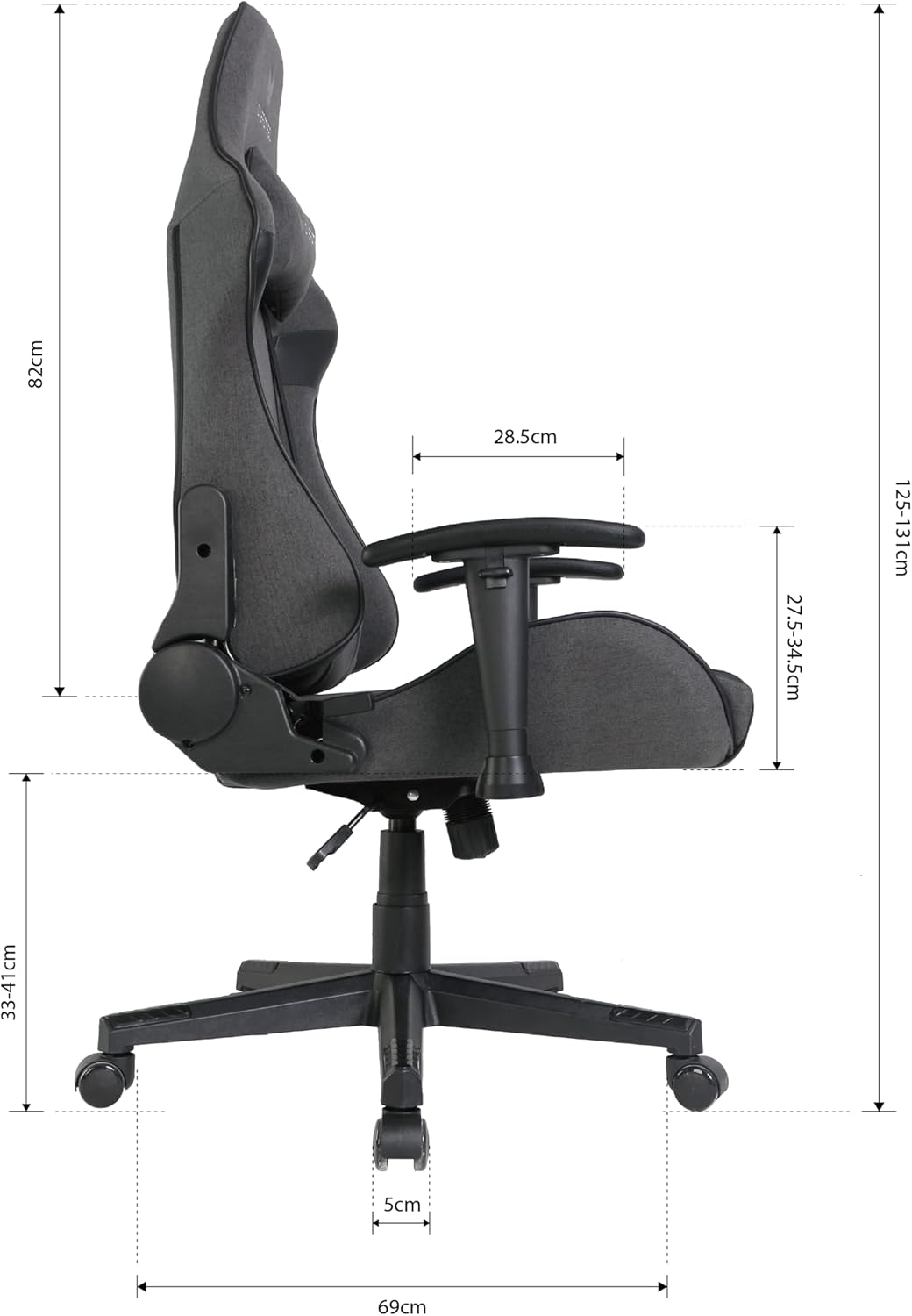
Image: Chair dimensions in centimeters.
- Overall Product Dimensions (approx.): 69 cm (D) x 55.5 cm (W) x 131 cm (H)
- Seat Height Range: 33 cm - 41 cm
- Għoli tad-dahar: 82 ċm
- Piż tal-oġġett: 19.5 kg
9. Informazzjoni dwar Garanzija
The Oversteel ULTIMET Professional Gaming Chair comes with a garanzija ta 'sena mid-data tax-xiri. Din il-garanzija tkopri difetti fil-manifattura u difetti fil-materjal taħt użu normali. Ma tkoprix ħsara li tirriżulta minn użu ħażin, inċidenti, modifiki mhux awtorizzati, jew xedd u kedd normali. Jekk jogħġbok żomm il-prova tax-xiri tiegħek għal talbiet ta' garanzija.
10. Appoġġ għall-Klijent
For any questions, assistance with assembly, troubleshooting, or warranty claims, please contact Oversteel customer support through your retailer or the official Oversteel website. Please have your model number (NAT-OV-ULTIMET-FBBLACK) and proof of purchase ready when contacting support.


