Introduzzjoni
Thank you for choosing the ieGeek 2K Magnetic Base WiFi Security Camera S2. This camera offers advanced features such as 2K resolution, color night vision, 300° pan, Wi-Fi 6 connectivity, AI/PIR motion detection, and two-way audio. This manual will guide you through the installation, operation, and maintenance to ensure optimal performance and security for your home or property.
X'hemm fil-Kaxxa
Jekk jogħġbok iċċekkja l-kontenut tal-pakkett tiegħek biex tiżgura li l-oġġetti kollha huma preżenti:
- ieGeek Camera S2
- Manwal għall-Utent
- Muntatura tal-Kamera Manjetika
- Bażi manjetika
- Cable tal-Iċċarġjar tal-USB-C
- Screw Bag (3 x Screws & Nuts)
- Adeżiv 3M

Image: All components included in the ieGeek S2 camera package.
Prodott Overview
Komponenti tal-Kamera

Quddiem view: Ultra HD lens, spotlight, PIR sensor.

Lura view: Speaker grille, QR code for setup.
Karatteristiċi Ewlenin
- Vidjo 2K Ultra HD: Jaqbad ikel ċar u dettaljattage.
- 300° Pan Field of View: Offerti panoramiċi views, covering a wide area.
- Konnettività tal-Wi-Fi 6: Provides faster and more reliable image transfer, reduced interference, and enhanced security.
- Viżjoni bil-lejl bil-kulur: See in full color even in low-light conditions up to 10 meters.
- AI/PIR Motion Detection: Advanced detection system recognizes individuals and sends real-time alerts (0.2s to 3s).
- Sirena tal-allarm: Automatically or manually trigger a siren to deter intruders.
- Awdjo f'żewġ direzzjonijiet: Built-in microphone and speaker for real-time conversations.
- 100% Wire-Free & Rechargeable Battery: Easy installation without cables, suitable for both indoor and outdoor use.
- IP65 Reżistenti għat-Temp: Iddisinjat biex jiflaħ diversi kundizzjonijiet tat-temp.
Setup u Installazzjoni
Iċċarġjar Inizjali
Before first use, ensure the camera is fully charged using the provided USB-C cable. A standard 5V USB power adapter (not included) is required.
Installazzjoni u Konnessjoni tal-App
- Step 1: Download the ieGeek Cam App. Fittex għal "ieGeek Cam" on your smartphone's app store (Android 5.0+ or iOS 8.0+).
- Step 2: Connect to 2.4GHz Wi-Fi. Ensure your camera is within range of a 2.4GHz Wi-Fi network for initial setup.
- Step 3: Start Recording. Follow the in-app instructions to pair your camera and begin monitoring.
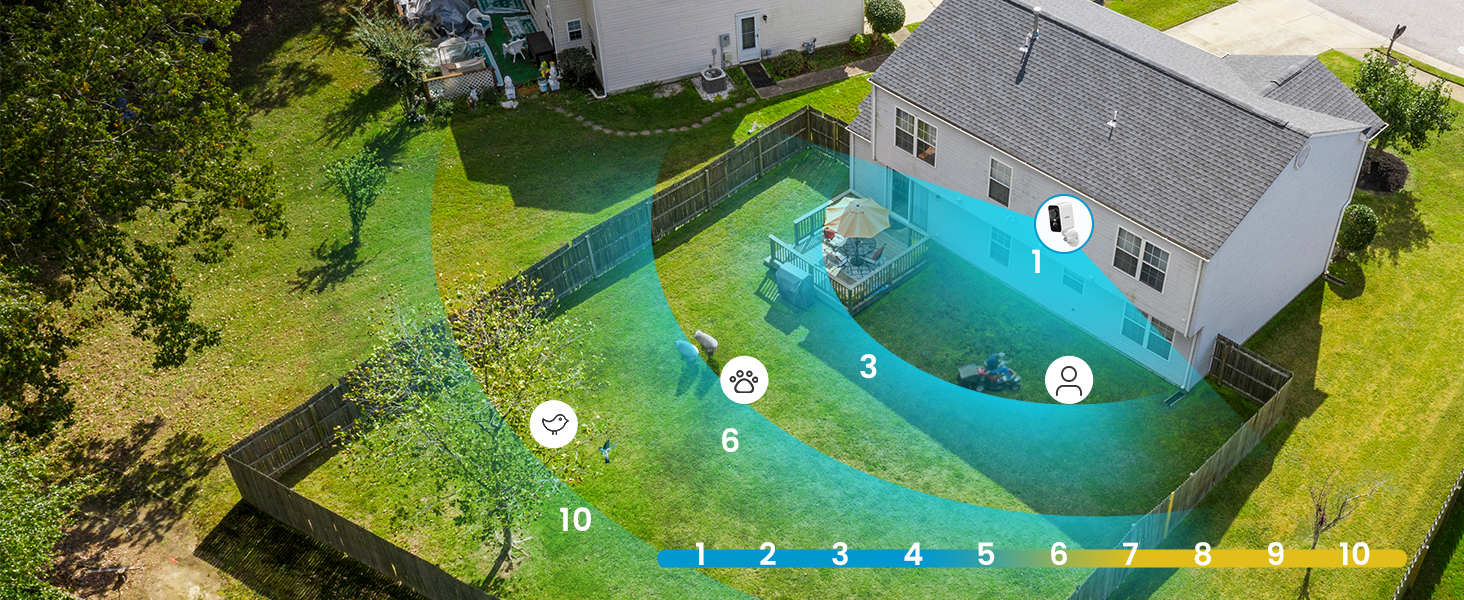
Image: Simplified setup process using the ieGeek Cam app.
Għażliet ta 'Immuntar
The ieGeek S2 camera offers flexible installation with its magnetic base. You can choose between adhesive mounting or screw mounting:
- Method 1: Adhesive Mounting (Tool-free).
- Install the 3M adhesive on a clean, flat wall surface.
- Allow the adhesive to rest for 8 hours to achieve optimal adhesion before attaching the magnetic base.
- Fix the magnetic base to the adhesive.
- Waħħal il-kamera mal-bażi manjetika.
- Method 2: Screw Mounting.
- Drill three holes in the desired location.
- Fix the magnetic camera mount to the wall using the provided screws and nuts.
- Waħħal il-kamera mal-muntatura manjetika.
The magnetic base allows for easy removal of the camera for recharging or repositioning.

Image: Magnetic base for easy, tool-free installation.

Image: Two installation methods for the ieGeek S2 camera.
Istruzzjonijiet Operattivi
Live View u Daqq
Aċċessa xandiriet ta' vidjows diretti u ikel irreġistrattage through the ieGeek Cam app. The app supports simultaneous viewing of up to 4 cameras and allows sharing access with family members.
300° Pan Control
Utilize the in-app controls to remotely adjust the camera's horizontal viewing angle up to 300°, ensuring comprehensive coverage without blind spots.

Image: The camera's 300° pan capability provides wide area surveillance.
2K Ultra HD and Color Night Vision
The camera records in 2K resolution, providing sharp images. With its color night vision feature, you can see clear, full-color images even at night, up to 10 meters. Infrared night vision is also available.

Image: 2K 3MP HD image quality for clear details.

Image: Color night vision provides clear, vibrant images in low light.
AI/PIR Motion Detection and Alarm
The camera's advanced AI/PIR detection system identifies human shapes, reducing false alarms. Upon detection, you receive real-time alerts (0.2s to 3s) on your phone. You can also configure the camera to automatically trigger a siren or a strong light alarm to deter intruders.

Image: AI recognition minimizes false alarms by focusing on human shapes.

Image: PIR motion detection with siren and light alarm for immediate deterrence.
Awdjo Two-Way
Communicate directly with visitors or deter unwanted guests using the camera's integrated microphone and speaker. This feature allows for real-time, two-way conversations through the app.

Image: Two-way audio for real-time communication.
Għażliet ta' Ħażna
The camera supports local storage via a Micro SD card (up to 128GB, not included). Additionally, a free 6-second loop cloud storage is available through the ieGeek Cam app.

Image: Storage options including Micro SD card and cloud storage.
Manutenzjoni
- Iċċarġjar tal-batterija: Recharge the camera battery as needed. The magnetic base allows for easy removal for charging.
- Tindif: Imsaħ il-lenti u l-korp tal-kamera perjodikament b'ċarruta ratba u damp drapp biex tneħħi t-trab u l-fdalijiet. Evita kimiċi ħarxa.
- Protezzjoni tat-Temp: While the camera is IP65 weatherproof, ensure it is installed in a location that minimizes direct exposure to extreme weather conditions for prolonged durability.
Issolvi l-problemi
- Kamera ma tikkonnettjax mal-Wi-Fi:
- Kun żgur li n-netwerk Wi-Fi tiegħek huwa 2.4GHz. Il-kamera ma tappoġġjax Wi-Fi ta' 5GHz.
- Check the Wi-Fi signal strength at the camera's installation location.
- Ivverifika li l-password tal-Wi-Fi li daħħalt fl-app hija korretta.
- Erġa' ibda r-router u l-kamera tiegħek.
- Drenaġġ Eċċessiv tal-Batterija:
- Frequent motion detection events, especially in high-traffic areas, can increase battery consumption. Adjust motion detection sensitivity and detection zones in the app.
- Live viewing for extended periods also consumes more battery.
- Ensure the camera is fully charged before deployment.
- Allarmi Foloz:
- Adjust the AI/PIR detection sensitivity in the app.
- Define specific detection zones to exclude areas with irrelevant movement (e.g., trees swaying, distant traffic).
- Kun żgur li l-lenti tal-kamera hija nadifa u ħielsa minn ostakli.
- Kwalità Fqira tal-Immaġni:
- Iċċekkja l-veloċità tal-konnessjoni tal-internet tiegħek.
- Kun żgur li l-lenti tal-kamera hija nadifa.
- Ivverifika li l-kamera hija ssettjata għal riżoluzzjoni ta' 2K fis-settings tal-app.
For further assistance, please refer to the ieGeek Cam app's help section or contact ieGeek customer support.
Speċifikazzjonijiet
| Karatteristika | Speċifikazzjoni |
|---|---|
| Riżoluzzjoni ta' Reġistrazzjoni tal-Vidjo | 2K |
| Riżoluzzjoni tal-Vidjo Effettiva | 1296p |
| Kulur | Abjad |
| Teknoloġija tal-Komunikazzjoni mingħajr Fili | Wi-Fi (2.4GHz) |
| ViewIng Angolu | 300° (Pan) |
| Medda tal-Viżjoni Lejl | 10 Meters |
| Livell ta 'Reżistenza għall-Ilma | IP65 (Li ma jgħaddix ilma) |
| Materjal | Extra resistant ABS+PC material (heat and rust resistant) |
| Sors tal-Enerġija | Imħaddem bil-batterija (jone tal-litju) |
| Appoġġ tal-Memorja | 32-128GB (Micro SD card) |
| Kompatibilità tas-Sistema Operattiva | Android 5.0+, iOS 8.0+ |
| Dimensjonijiet tal-oġġett (L x W x H) | 17.5 x 6.6 x 5.5 ċm |
Garanzija u Appoġġ
The ieGeek 2K Magnetic Base WiFi Security Camera S2 comes with a Garanzija ta' 2 snin mill-manifattur.
For any questions, technical support, or warranty claims, please contact ieGeek customer service. Their team is available to assist you within 24 hours on business days.
You can find contact information and additional resources within the ieGeek Cam app or on the official ieGeek websit.


