1. Introduzzjoni
This manual provides instructions for the installation and operation of the Thermalright ARGB Fan Hub Controller Rev. A. This device is designed to expand the Addressable RGB (ARGB) lighting capabilities within your PC system, allowing you to connect and synchronize up to 10 ARGB devices. Thermalright is a brand with over 20 years of experience in PC cooling and components, known for its influence in the enthusiast market.
2. Informazzjoni dwar is-Sigurtà
- Ensure proper handling of all components to prevent damage.
- Dejjem skonnettja l-enerġija mill-PC tiegħek qabel ma tinstalla jew tneħħi xi komponenti.
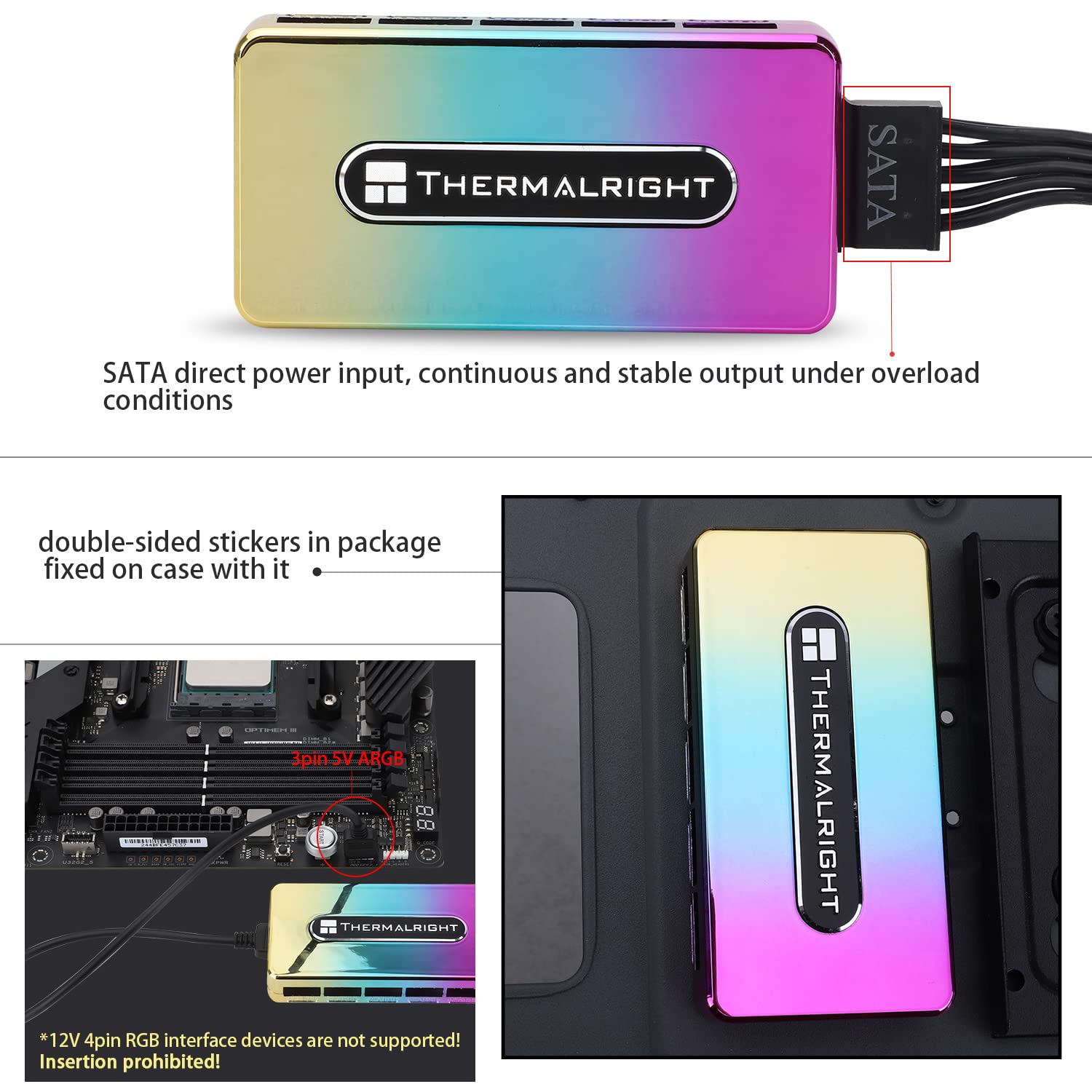
- Importanti: The product supply voltage is 12V. It supports 5V ARGB 3-pin fan light interface connections.
- Twissija: 12V 4-pin RGB interface devices are mhux appoġġjat. Attempting to insert them will cause damage.
- Żomm l-apparat 'il bogħod minn likwidi u temperaturi estremi.
3. Kontenut tal-Pakkett
Ivverifika li l-oġġetti kollha huma preżenti fil-pakkett tiegħek:
- Thermalright ARGB Fan Hub Controller Rev. A
- PWM Signal Cable
- Kejbil tal-Enerġija SATA
- Tejp li jwaħħal b'żewġ naħat għall-immuntar

Image: The Thermalright ARGB Fan Hub Controller Rev. A shown with its included PWM signal cable, SATA power cable, and double-sided adhesive tape.
4. Prodott Aktarview
The Thermalright ARGB Fan Hub Controller Rev. A is a compact device designed to centralize the control of Addressable RGB (ARGB) lighting for up to 10 fans or other ARGB devices. It features a direct SATA power input for stable output under high load and uses a PWM signal cable to connect to your motherboard for synchronization.

Image: The ARGB Fan Hub Controller Rev. A, displaying its dimensions of 90mm (length) x 46mm (width) x 16mm (height).
Immaġni: Close-up view of the 3-pin 5V ARGB ports on the hub, labeled for connection of ARGB fans and light strips.
5. Setup u Installazzjoni
Follow these steps to install your Thermalright ARGB Fan Hub Controller:
- Connect PWM Signal Cable: Connect one end of the PWM signal cable to the PWM INPUT socket on the fan hub. Connect the other end to a FAN socket on your motherboard. This allows the motherboard to control fan speeds.
- Connect SATA Power Cable: Connect the SATA power cable to the hub's SATA input port. Then, connect the other end of the SATA power cable to an available SATA power connector from your power supply unit (PSU). This provides power to the hub and connected ARGB devices.
- Install Fan Cables: Connect your ARGB fan cables to the labeled "FAN" sockets on the hub. Ensure correct orientation. Note that fan speed readings are typically only available from the red-colored socket.
- Immonta l-Hub: Apply the provided double-sided adhesive tape to the back of the fan hub. Choose a suitable, flat location inside your PC case, typically behind the motherboard tray, and firmly press the hub into place.
Video: An installation tutorial demonstrating how to connect the PWM signal cable, SATA power cable, and fan cables to the Thermalright ARGB Fan Hub, and how to mount it inside a PC case.

Image: Illustrates the SATA direct power input to the hub and a warning against connecting 12V 4-pin RGB devices to the 5V ARGB motherboard header.
6. Operating the ARGB Fan Hub
Once installed, the Thermalright ARGB Fan Hub Controller Rev. A will allow your connected ARGB fans and other devices to synchronize their lighting effects with your motherboard. The hub itself does not have controls for adjusting lighting colors or patterns. These adjustments are managed through your motherboard's dedicated ARGB software (e.g., ASUS Aura Sync, MSI Mystic Light Sync, Gigabyte RGB Fusion, ASRock Polychrome Sync) or a separate ARGB controller if your motherboard lacks a 3-pin 5V ARGB header.
7. Manutenzjoni
The Thermalright ARGB Fan Hub Controller Rev. A requires minimal maintenance. To ensure optimal performance and longevity:
- Keep the hub free from dust and debris. Periodically use compressed air to clean around the ports.
- Avoid exposing the device to moisture or corrosive substances.
- Kun żgur li l-konnessjonijiet kollha tal-kejbil jibqgħu sikuri.
8 Issolvi l-problemi
If you encounter issues with your ARGB Fan Hub, consider the following:
- L-ebda Dawl ARGB:
- Check if the SATA power cable is securely connected to both the hub and the PSU.
- Verify that the 3-pin 5V ARGB cables from your fans are correctly inserted into the hub's ports. Ensure no pins are bent or misaligned.
- Confirm that the PWM signal cable is properly connected to both the hub and the motherboard's ARGB header.
- Kun żgur li s-softwer ARGB tal-motherboard tiegħek huwa installat u kkonfigurat b'mod korrett.
- Double-check that you are not attempting to connect 12V 4-pin RGB devices, as these are incompatible and can cause damage.
- Incorrect Fan Speed Readings:
- The hub typically reads fan speed only from the designated red-colored fan socket. Ensure the fan you wish to monitor is connected to this specific port.
- Verify the PWM signal cable connection to the motherboard.
- Konnessjonijiet sfużi: If lights or fans intermittently stop working, check all cable connections (SATA power, PWM signal, and fan ARGB cables) to ensure they are firmly seated.
9. Speċifikazzjonijiet

Image: A table summarizing the key specifications of the Thermalright ARGB Fan Hub Controller Rev. A.
| Karatteristika | Speċifikazzjoni |
|---|---|
| Mudell | ARGB HUB Controller Rev. A (FAN ARGB HUB) |
| Dimensjonijiet (L x W x H) | 90mm x 46mm x 16mm (3.54" x 1.81" x 0.63") |
| Piż | 50g (3.21 uqija) |
| Materjal | Acrylonitrile Butadiene Styrene (ABS) |
| Kulur | Silver Gray (Rainbow color casing) |
| Input tal-Enerġija | SATA |
| Rated Current (per port) | 1A (MAX) |
| Tip ta 'port | +5V 3-pin ARGB |
| Temperatura operattiva | 0°C ~ 75°C |
| Number of ARGB Ports | 10 |
| Voltage | 12 Volts (DC) |
10. Garanzija u Appoġġ
Thermalright products are manufactured to high-quality standards. For warranty information, technical support, or any inquiries regarding your ARGB Fan Hub Controller, please refer to the official Thermalright webis-sit jew ikkuntattja lis-servizz tal-konsumatur tagħhom direttament. Żomm l-irċevuta tax-xiri tiegħek bħala prova tax-xiri għal talbiet ta' garanzija.


