Introduzzjoni
Thank you for choosing the Tribit FlyBuds 3 True Wireless Earbuds. This manual provides detailed instructions on how to set up, operate, maintain, and troubleshoot your earbuds to ensure optimal performance and longevity. Please read this manual carefully before using the product.
Kontenut tal-Pakkett
Jekk jogħġbok iċċekkja l-pakkett għall-oġġetti li ġejjin:
- Tribit FlyBuds 3 True Wireless Earbuds (L/R)
- Kawża tal-Iċċarġjar
- Cable tal-Iċċarġjar tal-USB-C
- Multiple Sizes of Eartips (S/M/L)
- Manwal għall-Utent
Prodott Overview

Figura 1: Tribit FlyBuds 3 Earbuds and Charging Case. This image shows the pink charging case open with one earbud inside and the other earbud outside, displaying its design.
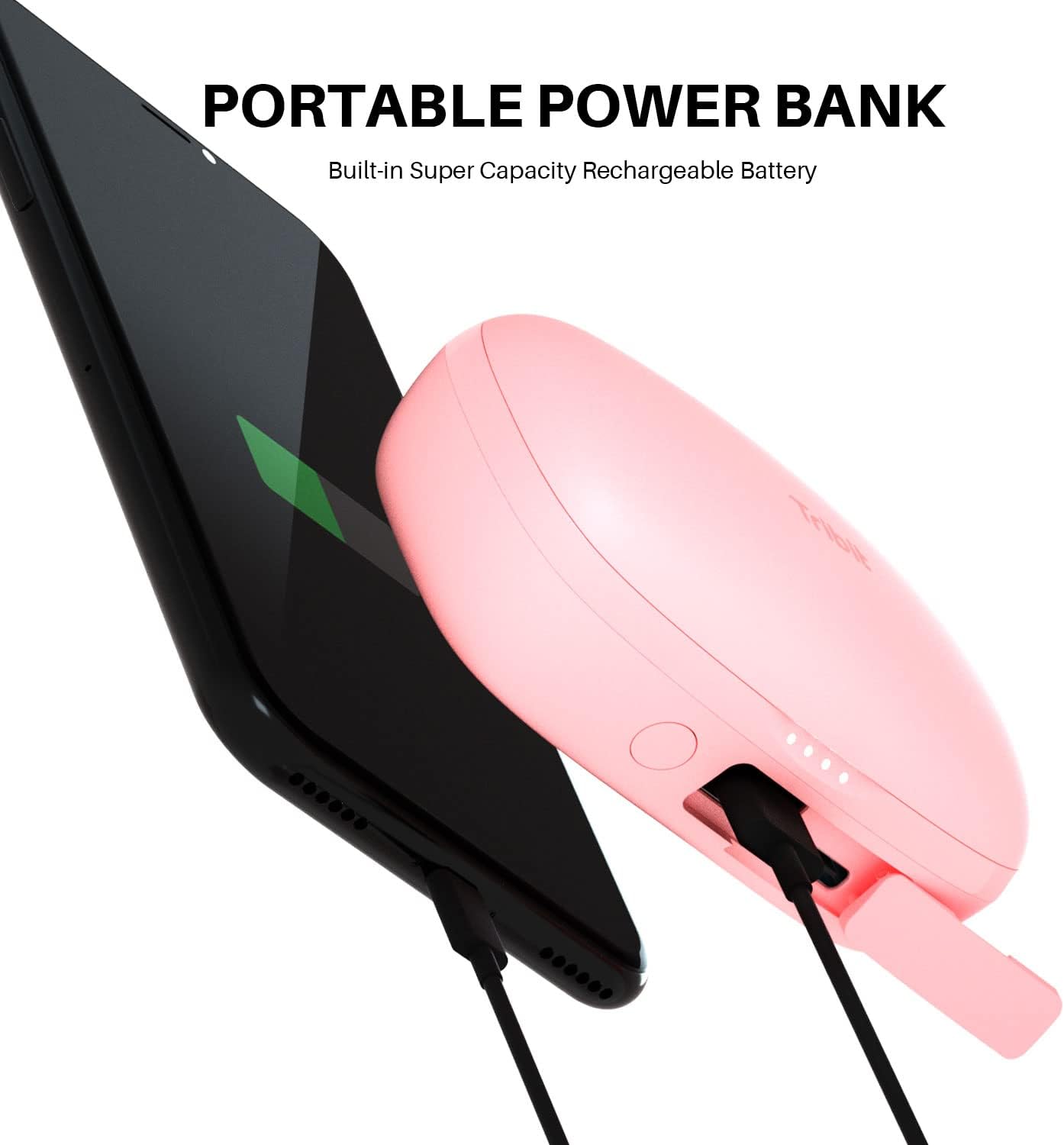
Figura 2: Tribit FlyBuds 3 Charging Case Controls. This image highlights the multi-function button on the charging case, indicating its uses for battery voltage check, re-pairing, and power output.
The Tribit FlyBuds 3 consist of two wireless earbuds and a portable charging case. The charging case not only protects and charges the earbuds but also functions as a power bank for other devices.
- Earbuds: Each earbud features a touch control area for managing playback, calls, and voice assistant.
- Każ tal-Iċċarġjar: Equipped with LED indicators for battery status and a multi-function button for various operations including pairing and power output.
Setup
1. Iċċarġjar tal-Earbuds u l-Kaxxa
Qabel l-ewwel użu, iċċarġja l-earbuds u l-kaxxa tal-iċċarġjar kompletament.
- Iċċarġjar tal-Każ: Connect the USB-C charging cable to the charging port on the case and a power source. The LED indicators on the case will show the charging progress.
- Iċċarġjar tal-Earbuds: Place the earbuds into the charging case. They will automatically begin charging. The case LEDs will indicate the earbuds' charging status.

Figura 3: Long-lasting Battery. This image shows the earbuds inside the charging case, emphasizing the 100 hours of cycle playtime, 20 times recharge capability, and 5 hours of music playtime per charge.
The Tribit FlyBuds 3 offer up to 5 hours of music playback per charge, and the charging case provides an additional 100 hours of playtime, allowing for multiple recharges on the go.
2. Using the Charging Case as a Power Bank
The charging case can also serve as a portable power bank for your smartphone or other small devices.
- Connect your device to the USB-A output port on the charging case using an appropriate cable.
- Press the multi-function button on the case to initiate charging for your connected device.

Figura 4: Portable Power Bank Feature. This image illustrates the Tribit FlyBuds 3 charging case connected via a cable to a smartphone, demonstrating its capability to charge other devices.
3. It-tqabbil mat-Tagħmir Tiegħek
The FlyBuds 3 feature one-step pairing for convenience.
- Tqabbil Inizjali: Open the charging case. The earbuds will automatically enter pairing mode and connect to the last paired device. If no device is found, they will enter discovery mode.
- Connecting to a New Device: With the earbuds in the case and the lid open, press and hold the multi-function button on the charging case for 10 seconds until the LED indicators flash, indicating re-pairing mode. Then, select "Tribit FlyBuds 3" from your device's Bluetooth list.
Operazzjoni
1. L-ilbies tal-Earbuds
For optimal sound quality and comfort, choose the eartips that best fit your ears. Insert the earbuds into your ear canal and gently twist them to secure a snug fit.

Figura 5: Earbud in Ear. This image shows a person wearing one of the pink Tribit FlyBuds 3 earbuds, demonstrating its discreet and comfortable fit.

Figura 6: Close-up of Earbud Fit. A detailed view of the Tribit FlyBuds 3 earbud properly seated in a person's ear, highlighting its ergonomic design.
2. Touch Kontrolli
The Tribit FlyBuds 3 utilize touch controls for various functions. The touch control area is located on the outer surface of each earbud.
| Azzjoni | Funzjoni |
|---|---|
| Tektek Waħda (X/L) | Daqq / Issospendi mużika, Tweġiba / Tmiem is-sejħa |
| Tektek doppju (Earbud tal-lemin) | Track li jmiss |
| Tektek doppju (Earbud tax-Xellug) | Track Preċedenti |
| Tektek triplu (Earbud tal-lemin) | Volum Up |
| Tektek triplu (Earbud tax-Xellug) | Volum 'l isfel |
| Agħfas u Żomm (2s) | Irrifjuta Sejħa, Attiva l-Assistent tal-Vuċi |
Manutenzjoni
Proper maintenance ensures the longevity and performance of your Tribit FlyBuds 3.
- Tindif: Naddaf il-earbuds u l-kaxxa tal-iċċarġjar regolarment b'ċarruta ratba, niexfa u mingħajr suf. Tużax kimiċi ħarxa jew materjali li joborxu.
- Widnejn: Remove and clean the eartips with water and mild soap if necessary. Ensure they are completely dry before reattaching.
- Kuntatti tal-Iċċarġjar: Periodically clean the charging contacts on both the earbuds and inside the case with a dry cotton swab to ensure proper charging.
- Reżistenza għall-Ilma: The FlyBuds 3 boast an IPX8 waterproof rating, meaning they are protected against prolonged immersion in water. However, it is recommended to dry them thoroughly after exposure to water before placing them back in the charging case to prevent damage to the charging contacts.
- Ħażna: Meta ma tkunx qed tużahom, aħżen il-earbuds fil-kaxxa tal-iċċarġjar tagħhom biex tipproteġihom u żżommhom iċċarġjati. Aħżen f'post frisk u niexef 'il bogħod minn temperaturi estremi.
Issolvi l-problemi
If you encounter issues with your Tribit FlyBuds 3, try the following solutions:
- Il-earbuds mhux qed jitqabbdu:
- Kun żgur li ż-żewġ earbuds huma ċċarġjati.
- Place both earbuds back into the charging case, close the lid, and then open it again to re-initiate pairing.
- Forget "Tribit FlyBuds 3" from your device's Bluetooth settings and attempt to re-pair.
- Agħmel reset tal-fabbrika (ara hawn taħt).
- Earbud wieħed biss jaħdem:
- Kun żgur li ż-żewġ earbuds huma ċċarġjati.
- Place both earbuds back into the charging case and close the lid for 5 seconds, then open it again.
- Naddaf il-kuntatti tal-iċċarġjar fuq iż-żewġ earbuds u ġewwa l-kaxxa.
- L-ebda ħoss jew volum baxx:
- Żid il-volum kemm fuq l-apparat tiegħek kif ukoll fuq il-earbuds.
- Kun żgur li l-earbuds huma konnessi sew mat-tagħmir tiegħek.
- Ipprova sors jew applikazzjoni awdjo differenti.
- Kwistjonijiet tal-iċċarġjar:
- Kun żgur li l-kejbil tal-iċċarġjar huwa konness sew.
- Ipprova kejbil tal-iċċarġjar jew adapter tal-enerġija differenti.
- Clean the charging contacts on the earbuds and case.
Irrisettja l-Fabbrika
If the above steps do not resolve the issue, you can perform a factory reset:
- Poġġi ż-żewġ earbuds fil-kaxxa tal-iċċarġjar.
- Press and hold the multi-function button on the charging case for 10 seconds until the LED indicators flash rapidly. This clears the pairing history.
- Remove "Tribit FlyBuds 3" from your device's Bluetooth list.
- Repeat the pairing process as described in the "Setup" section.
Speċifikazzjonijiet
| Karatteristika | Dettall |
|---|---|
| Brand | Tribit |
| Mudell | FlyBuds 3 |
| Teknoloġija tal-Konnettività | Wireless (Bluetooth) |
| Fattur tal-Formola | Fil-widnejn |
| Ħajja tal-Batterija (Earbuds) | Sa 5 sigħat |
| Ħin Totali tal-Logħob (bil-Kaxxa) | Sa 100 sigħat |
| Livell ta 'Reżistenza għall-Ilma | IPX8 Waterproof |
| Metodu ta' Kontroll | Mess |
| Użi Speċifiċi Għall-Prodott | Films u Logħob |
Garanzija u Appoġġ
Tribit products are designed with quality and reliability in mind. For information regarding warranty coverage and customer support, please refer to the warranty card included in your product packaging or visit the official Tribit website. If you experience any issues not covered in this manual, please contact Tribit customer service for assistance.
Tribit Official Websit: www.tribit.com


