1. Introduzzjoni
The Magene S3+ is a versatile outdoor/indoor speed and cadence sensor designed for cycling. It utilizes both Bluetooth and ANT+ wireless technologies, making it compatible with a wide range of bike computers, smartwatches, and cycling applications such as Onelap, Wahoo Fitness, Zwift, and Strava. This manual provides detailed instructions for the setup, installation, operation, and maintenance of your S3+ sensor.

Figure 1: Magene S3+ Speed/Cadence Sensor
2. Kontenut tal-Pakkett
Malli tiftaħ il-pakkett, ivverifika li l-komponenti kollha huma preżenti:
- 1x Magene S3+ Sensor Unit
- 1x Flat Rubber Pad (for sensor mounting)
- 1x Small Rubber Elastic Ring (for crank arm mounting)
- 1x Large Rubber Elastic Ring (for hub mounting)
- 1x CR2032 Battery (pre-installed in sensor)
- Manwal għall-Utent (dan id-dokument)
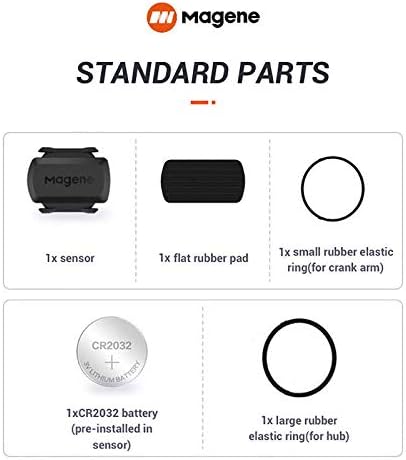
Figure 2: Standard parts included with the Magene S3+ sensor.
3. Setup
3.1 Battery Installation and Mode Switching
The Magene S3+ sensor comes with a pre-installed CR2032 battery. Before first use, you must remove the insulating sheet from the battery compartment. The sensor operates in two modes: Speed Mode and Cadence Mode. A single sensor can only operate in one mode at a time. To switch between modes, remove and re-install the battery.
- Dawl aħmar: Indicates Cadence Mode.
- Dawl aħdar: Indicates Speed Mode.
After re-installing the battery, observe the LED indicator. If it flashes red, the sensor is in Cadence Mode. If it flashes green, it is in Speed Mode. If the desired mode is not active, remove and re-insert the battery again until the correct color flashes.

Figure 3: Instructions for switching between Speed and Cadence modes by re-installing the battery.
Note: If you require both speed and cadence data simultaneously, two S3+ sensors are needed (one configured for speed, one for cadence).
4. Installazzjoni
The S3+ sensor can be installed on either the wheel hub (for speed) or the crank arm (for cadence).
4.1 Speed Sensor Installation (Green Light)
To install the sensor as a speed sensor:
- Ensure the sensor is in Speed Mode (green light flashes).
- Attach the flat rubber pad to the back of the sensor unit.
- Securely fasten the sensor to the center of your bike's wheel hub using the large rubber elastic ring.
- Turn the wheel to activate the sensor and ensure it can be detected by your device.
Video 1: Magene S3+ Speed Sensor Installation Guide. This video demonstrates how to install the S3+ sensor on the wheel hub for speed tracking.
4.2 Cadence Sensor Installation (Red Light)
To install the sensor as a cadence sensor:
- Ensure the sensor is in Cadence Mode (red light flashes).
- Attach the flat rubber pad to the back of the sensor unit.
- Securely fasten the sensor to the inside of your bike's crank arm using the small rubber elastic ring.
- Turn the crank to activate the sensor and ensure it can be detected by your device.
Video 2: Magene S3+ Cadence Sensor Installation Guide. This video demonstrates how to install the S3+ sensor on the crank arm for cadence tracking.
5. Operation and Connectivity
The Magene S3+ sensor supports both Bluetooth and ANT+ connectivity.
5.1 Connecting to a Smartphone App (Bluetooth)
To connect your S3+ sensor to a smartphone application (e.g., Onelap, Wahoo Fitness, Zwift, Strava):
- Ensure the sensor is awake by spinning the wheel or crank arm (depending on its configured mode). The sensor will automatically enter a sleep state after 1 minute of inactivity to save power.
- Open your preferred cycling application on your smartphone.
- Navigate to the sensor pairing or device connection section within the app.
- Fittex għal the S3+ sensor within the app. Do not attempt to pair the sensor directly through your phone's Bluetooth settings; it must be discovered and connected via the application itself.
- Select the Magene S3+ sensor from the list of available devices to establish a connection.
Note: When using Bluetooth, one sensor can only connect to one app or device concurrently.
5.2 Connecting to a Bike Computer (ANT+/Bluetooth)
The S3+ sensor can also connect to bike computers that support ANT+ or Bluetooth protocols (e.g., Garmin, Bryton, iGPSPORT).
- Ensure the sensor is awake by spinning the wheel or crank arm.
- On your bike computer, go to the sensor pairing or add device menu.
- Select to search for new sensors (Speed or Cadence, depending on your S3+ configuration).
- Once detected, select the S3+ sensor to pair.
Note: When using ANT+, the sensor can be connected to multiple devices simultaneously.

Figure 4: The S3+ sensor supports both ANT+ and Bluetooth for broad compatibility.

Figura 5: Eżamples of compatible devices and applications for the Magene S3+ sensor.
6. Manutenzjoni
6.1 Sostituzzjoni tal-batterija
The S3+ sensor uses a standard CR2032 coin cell battery. When the battery is low, the sensor's performance may be affected, or it may stop transmitting data. To replace the battery:
- Carefully twist open the battery compartment cover on the back of the sensor.
- Neħħi l-batterija CR2032 l-antika.
- Insert a new CR2032 battery with the positive (+) side facing upwards.
- Close the battery compartment cover securely, ensuring a tight seal to maintain water resistance.
The battery life is approximately 500 hours of use.
6.2 Tindif u Ħażna
The Magene S3+ sensor has an International Protection Rating of IP66, meaning it is dust-tight and protected against powerful water jets. While it is water-resistant, it is not designed for submersion.
- Wipe the sensor clean with a soft, damp drapp wara l-użu.
- Evita li tuża tindif jew solventi li joborxu.
- Aħżen is-sensor f'post frisk u niexef meta ma jkunx qed jintuża.

Figure 6: The S3+ sensor offers long battery life and IP66 water resistance.
7 Issolvi l-problemi
- Sensor Mhux Rilevat:
- Ensure the sensor is awake by spinning the wheel or crank arm.
- Check if the battery insulating sheet has been removed.
- Replace the battery if it's low or depleted.
- For smartphone apps, ensure you are searching for the sensor within the app itself, not through the phone's general Bluetooth settings.
- Verify that the sensor is correctly installed and securely attached.
- Incorrect Mode (Speed/Cadence):
- Remove and re-install the battery to switch modes. Observe the LED color (Red for Cadence, Green for Speed).
- Kwistjonijiet ta' Konnessjoni Bluetooth:
- Remember that a single sensor can only connect to one Bluetooth device/app at a time. Disconnect from other devices if necessary.
- Kun żgur li l-Bluetooth tal-ismartphone tiegħek huwa attivat.
- Sensor Enters Sleep Mode Too Quickly:
- The S3+ sensor automatically enters sleep mode after 1 minute of being stationary to conserve power. This is normal behavior. Simply start moving the wheel or crank to wake it up.
8. Speċifikazzjonijiet
| Isem tal-Mudell | S3+ |
| Tip tas-Sensor | Speed Sensor, Cadence Sensor (Dual Mode) |
| Konnettività | Bluetooth, ANT+ |
| Tip ta 'batterija | CR2032 Lithium Manganese Dioxide |
| Ħajja tal-batterija | Appross. 500 sigħat |
| Dimensjonijiet (LxWxH) | 1.17" x 0.33" x 1.51" (29.8mm x 8.4mm x 38.3mm) |
| Piż | 9 Gramm |
| Klassifikazzjoni li ma jgħaddix ilma minnha | IP66 |
| Temperatura operattiva | -68°F sa 122°F (-20°C sa 50°C) |

Figure 7: Detailed dimensions and specifications of the Magene S3+ sensor.
9. Garanzija u Appoġġ
For warranty information and customer support, please refer to the official Magene website or contact the seller directly. Keep your purchase receipt as proof of purchase for any warranty claims.
Official Magene Store: Magene Amazon Store


