Introduzzjoni
The Anova Precision Smart Oven is a versatile countertop appliance designed to bring professional-grade cooking capabilities to your home kitchen. It combines convection, steam, bake, broil, roast, and dehydrate functions, offering precise temperature control for a wide range of culinary tasks. This manual provides essential information for the safe and effective operation and maintenance of your Anova Precision Smart Oven.
For optimal performance and longevity, please read this manual thoroughly before first use and retain it for future reference.
Informazzjoni dwar is-Sigurtà
Dejjem segwi l-prekawzjonijiet bażiċi ta' sigurtà meta tuża apparati elettriċi biex tnaqqas ir-riskju ta' nar, xokk elettriku, u korriment lil persuni.
- Tmissx uċuħ sħan. Uża manki jew pumi.
- Biex tipproteġi kontra xokk elettriku, tgħaddasx il-korda, il-plakek, jew l-apparat fl-ilma jew f'likwidu ieħor.
- Superviżjoni mill-qrib hija meħtieġa meta xi apparat jintuża minn jew ħdejn it-tfal.
- Spluggja mill-iżbokk meta ma tkunx qed tuża u qabel tnaddaf. Ħallih jiksaħ qabel ma tpoġġi jew tneħħi l-partijiet.
- Tħaddim l-ebda apparat b'korda jew plagg bil-ħsara, jew wara li l-apparat ma jaħdimx jew ikun ġie bil-ħsara b'xi mod.
- L-użu ta' aċċessorji aċċessorji mhux rakkomandati mill-manifattur tal-apparat jista' jikkawża korrimenti.
- Tużax barra.
- Tħallix il-korda tistrieħ fuq it-tarf tal-mejda jew tal-bank, jew tmiss uċuħ sħan.
- Tpoġġix fuq jew ħdejn burner tal-gass sħun jew elettriku, jew f'forn imsaħħan.
- Għandha tintuża kawtela kbira meta tiċċaqlaq apparat li jkun fih żejt jaħraq jew likwidi oħra jaħarqu.
- Tużax l-apparat għal użu ieħor minbarra dak maħsub.
Komponenti Matulview
Familiarize yourself with the main components of your Anova Precision Smart Oven:
- Kavità tal-Forn: The main cooking chamber.
- Tank tal-Ilma: Removable tank for steam generation. Located on the side.
- Panel tal-Kontroll: Digital display and knobs for setting temperature, time, and cooking modes.
- Sonda tal-Ikel: Detachable probe for precise internal temperature monitoring.
- Removable Racks: Multiple racks for various cooking needs.
- Taġen tal-ħami: Included pan for general baking and roasting.

Figura 1: Quddiem view of the Anova Precision Smart Oven, showing the main oven cavity, control panel, and side-mounted water tank.

Figura 2: Intern view of the Anova Precision Smart Oven, illustrating the two removable racks and the included baking pan.

Figure 3: A user demonstrating the removal of the clear water tank from the side of the Anova Precision Smart Oven for refilling or cleaning.
Setup
Spakkjar u Tqegħid
- Oħroġ il-forn u l-aċċessorji kollha mill-imballaġġ bir-reqqa.
- Remove any protective film or packaging materials from the oven.
- Place the oven on a stable, level, heat-resistant surface with adequate clearance from walls and other appliances for ventilation. Ensure at least 4 inches of space on all sides and above the oven.
- Kun żgur li s-sokit tal-elettriku huwa faċilment aċċessibbli.
Tindif Inizjali
- Qabel l-ewwel użu, imsaħ in-naħa ta' ġewwa u ta' barra tal-forn b'karta adamp drapp.
- Wash the removable racks, baking pan, and water tank with warm, soapy water. Rinse thoroughly and dry completely.
Preparazzjoni tat-Tank tal-Ilma
- Remove the water tank from its housing on the side of the oven.
- Fill the water tank with distilled water. Do not use tap water as it can lead to mineral buildup.
- Securely reinsert the water tank into its housing until it clicks into place.
Konnessjoni tal-Enerġija
Plug the oven into a grounded electrical outlet. The display will illuminate, indicating the oven is ready for use.
Istruzzjonijiet Operattivi
Control Panel Matulview
The Anova Precision Smart Oven features an intuitive control panel with a digital display and rotary knobs for setting cooking parameters. The display shows temperature, time, and current cooking mode.
Connecting to the Anova App
For enhanced control and access to a recipe library, download the Anova Oven app on your smartphone. Follow the in-app instructions to connect your oven via Wi-Fi.
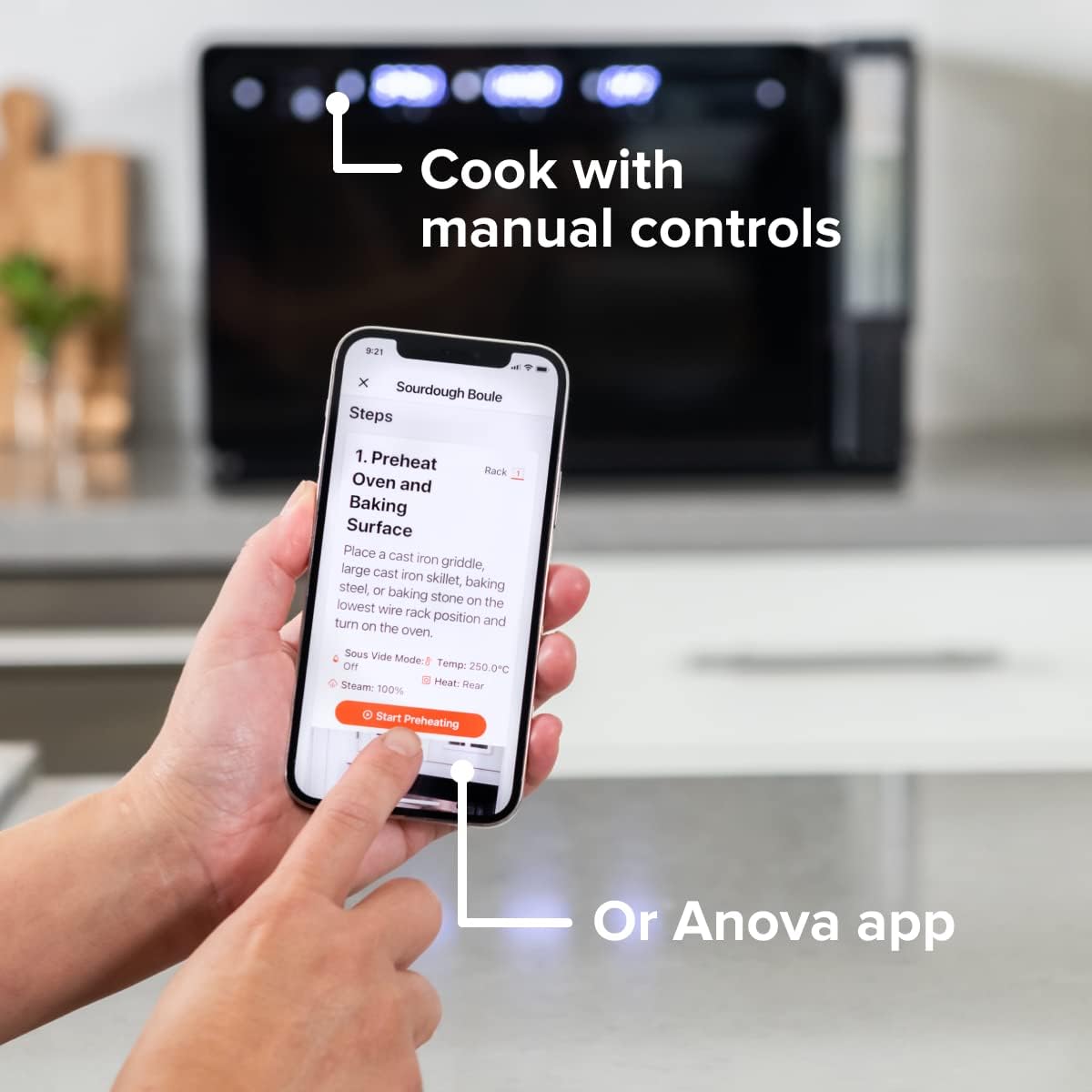
Figure 4: A user interacting with the Anova app on a smartphone, demonstrating remote control capabilities for the oven.
Basic Cooking Modes
The oven offers several cooking modes:
- Konvezzjoni: Uses a fan to circulate hot air for even cooking and browning.
- Fwar: Injects steam into the oven cavity, ideal for baking bread, steaming vegetables, or sous vide style cooking.
- Combi (Convection + Steam): Combines hot air and steam for moist interiors and crispy exteriors.
- Bake/Xwi: Standard oven functions for baking and roasting.
- Broil: High heat from the top element for searing and browning.
- Iddeidra: Low heat and fan circulation for drying foods.
Setting a Program (Manual Control)
- Turn the mode knob to select your desired cooking mode.
- Adjust the temperature using the temperature knob.
- Issettja l-ħin tat-tisjir billi tuża l-buttuna tal-ħin.
- Agħfas il-buttuna Start/Pause biex tibda t-tisjir.
- To use the food probe, insert it into the thickest part of your food before starting. The oven will cook until the target internal temperature is reached.
Modalità Sous Vide
The Anova Precision Oven can achieve sous vide style results without a water bath. Use the steam function and the food probe to cook food to a precise internal temperature, ensuring tenderness and juiciness.
Steam Injection for Baking
For perfect breads with crispy crusts and soft interiors, utilize the steam injection feature. Ensure the water tank is filled before starting a steam-assisted baking program.

Figure 5: Two loaves of freshly baked bread, showcasing the results of steam injection for a perfect crust and crumb. The Anova Precision Smart Oven is visible in the background.
Manutenzjoni u Tindif
Regular cleaning and maintenance will ensure the longevity and optimal performance of your Anova Precision Smart Oven.
Tindif ta 'Kuljum
- After each use, allow the oven to cool completely.
- Imsaħ l-uċuħ ta 'ġewwa u ta' barra b'adamp drapp u deterġent ħafif. Evita prodotti tat-tindif li joborxu jew spondi tal-għorik.
- Remove and clean the racks and baking pan with warm, soapy water.
- Empty and rinse the water tank after each use, especially if using steam functions. Allow it to air dry before reinserting.
Descaling (Steam Function Users)
If you frequently use the steam function, mineral buildup may occur. The oven may indicate when descaling is needed. Refer to the Anova app or online resources for detailed descaling instructions using a descaling solution.
Ħażna
When not in use for extended periods, ensure the oven is clean and dry. Store it in a cool, dry place.
Issolvi l-problemi
This section addresses common issues you might encounter with your Anova Precision Smart Oven.
| Problema | Kawża Possibbli | Soluzzjoni |
|---|---|---|
| Oven not turning on. | Mhux imdaħħal fil-plagg; mitfitage; is-circuit breaker qata'. | Kun żgur li l-forn huwa pplaggjat sew f'sokit li jaħdem. Iċċekkja s-circuit breaker tad-dar. |
| Ma jiġi prodott l-ebda fwar. | Water tank empty or not properly seated; mineral buildup. | Fill water tank with distilled water and ensure it is correctly inserted. Perform descaling if necessary. |
| L-ikel mhux qed jissajjar b'mod uniformi. | Improper rack placement; overcrowding; fan obstruction. | Refer to recipe for recommended rack position. Avoid overcrowding the oven. Ensure nothing obstructs the convection fan. |
| Problemi bil-konnessjoni tal-Wi-Fi. | Password tal-Wi-Fi mhux korretta; router wisq 'il bogħod; interferenza fin-netwerk. | Double-check Wi-Fi password. Move oven closer to router or use a Wi-Fi extender. Restart oven and router. |
If the problem persists after attempting these solutions, please contact Anova Customer Support.
Speċifikazzjonijiet
- Ditta: Anova Kulinarja
- Isem tal-Mudell: Forn ta 'preċiżjoni
- Numru tal-Mudell tal-Oġġett: AN900-10
- Dimensjonijiet tal-Prodott: 18"D x 22"W x 14"H
- Piż tal-oġġett: 59 liri
- Kulur: Iswed
- Tip ta' Kontroll: Pum
- Sors tal-Enerġija: Elettriku
- Komponenti Inklużi: Water tank, pan, temp probe
- Karatteristika Speċjali: Programmabbli
Garanzija u Appoġġ
The Anova Precision Smart Oven comes with a manufacturer's warranty. Please refer to the warranty card included with your product or visit the official Anova Culinary websit għal termini u kundizzjonijiet dettaljati tal-garanzija.
For technical support, troubleshooting assistance, or to inquire about replacement parts, please contact Anova Customer Support:
- Appoġġ onlajn: Żur il- Anova Culinary Store on Amazon jew l-uffiċjal tagħhom websit.
- Gwida għall-Utent (PDF): Gwida komprensiva għall-utent hija disponibbli biex titniżżel minn din il-link.

Figure 6: The Anova Precision Smart Oven integrated with a smart home assistant (Alexa), demonstrating its connectivity features.


