1. Introduzzjoni
The ION Audio Boombox Deluxe Stereo is a versatile audio system designed to provide a range of listening experiences. It combines classic audio playback options with modern connectivity, featuring an AM/FM radio, a cassette player, Bluetooth streaming, and USB/Micro SD card playback. This manual provides detailed instructions for setting up, operating, and maintaining your device.

Figura 1: Quddiem view of the ION Audio Boombox Deluxe Stereo, showcasing its dual speakers, cassette deck, and radio tuner display.
2. X'hemm fil-Kaxxa
- Boombox Deluxe Unit
- Kejbil tal-Enerġija
- Gwida Quickstart
3. Setup
3.1 L-Ixgħel tal-Unità
The Boombox Deluxe can be powered using the included AC power cable or by batteries for portable use. Insert the AC power cable into the AC IN port on the back of the unit and plug it into a standard wall outlet. For battery operation, open the battery compartment (typically on the bottom or back) and insert the required D-cell batteries (not included), ensuring correct polarity.
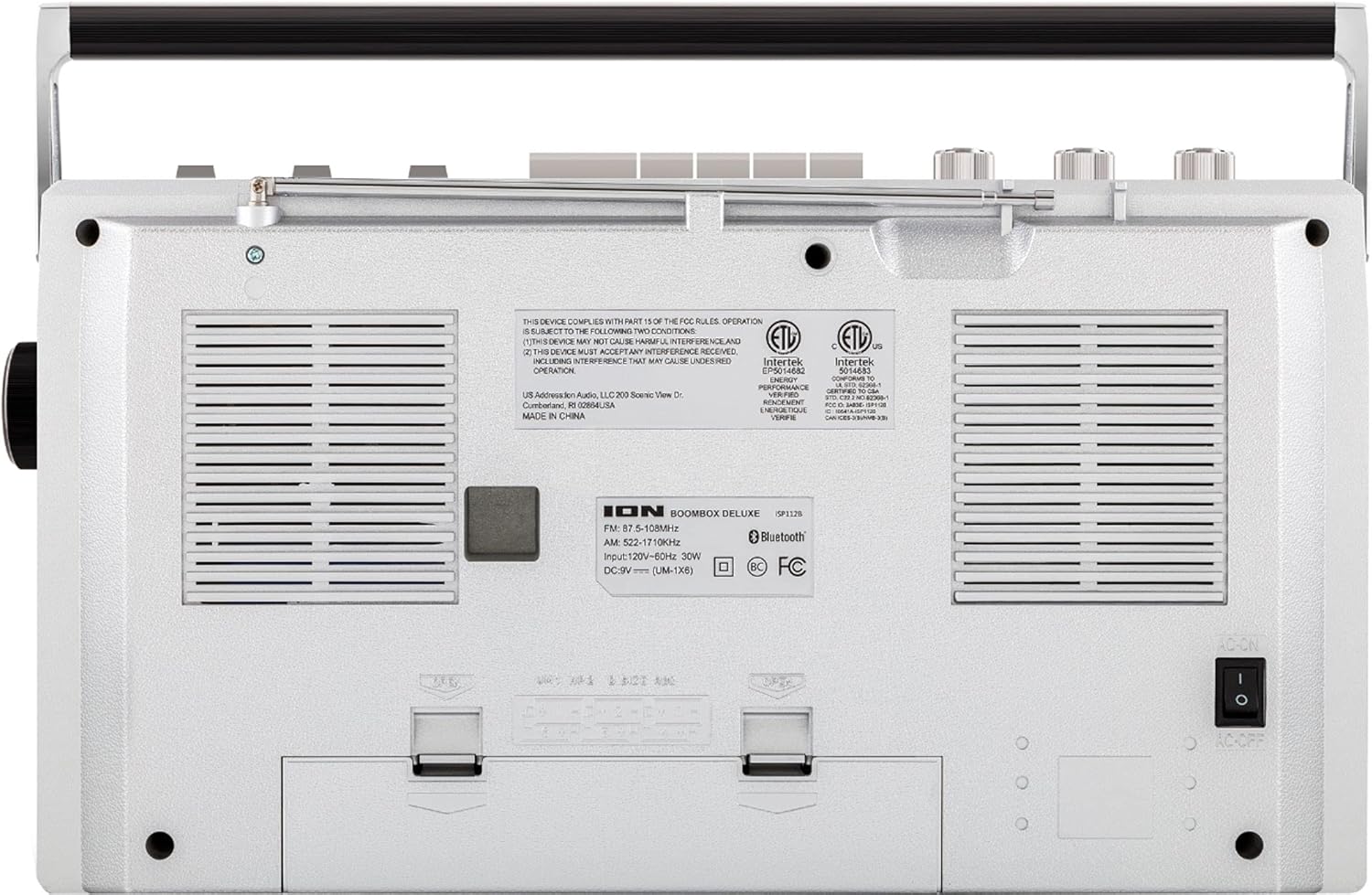
Figure 2: Rear panel of the Boombox Deluxe, highlighting the AC power input and battery compartment location.
3.2 Aġġustament tal-Antenna
For optimal AM/FM radio reception, extend the telescopic antenna located on the top of the unit. Adjust its position for the clearest signal.
4. Istruzzjonijiet Operattivi
4.1 Kontrolli Ġenerali
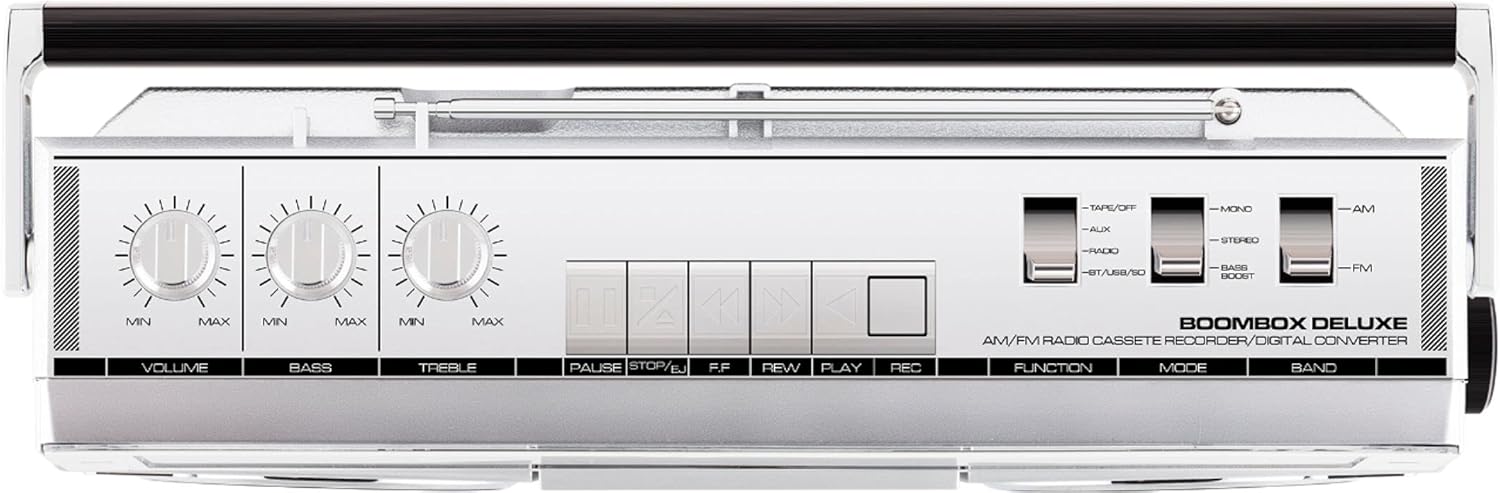
Figure 3: Top panel controls, including Volume, Bass, Treble knobs, and cassette playback buttons.
- Buttuna tal-Volum: Jaġġusta l-livell ġenerali tal-ħruġ tal-ħoss.
- Pum tal-bass: Jaġġusta l-ħruġ tal-awdjo ta' frekwenza baxxa.
- Pum tat-Triple: Jaġġusta l-ħruġ tal-awdjo ta' frekwenza għolja.
- Swiċċ tal-Funzjoni: Selects between Tape/Off, Aux, Radio, and BT/USB/SD modes.
- Swiċċ tal-Modalità: Selects between Mono, Stereo, and Bass Boost audio modes.
- Band Switch: Jagħżel bejn il-frekwenzi tar-radju AM u FM.
4.2 Operazzjoni tar-Radju
- Issettja l- Funzjoni Switch to 'Radio'.
- Issettja l- Swiċċ tal-Banda to 'AM' or 'FM'.
- Uża l- Buttuna tal-Irfinar to select your desired radio station. The frequency will be displayed on the tuner scale.
4.3 Tħaddim tal-Plejer tal-Cassettes
- Issettja l- Funzjoni Switch to 'Tape/Off'.
- Agħfas il- Waqqaf / Eject buttuna biex tiftaħ il-kompartiment tal-cassette.
- Insert a cassette tape with the open edge facing upwards. Close the compartment.
- Agħfas il- Play buttuna biex tibda daqq.
- Użu Rewind (REW) u Avvanza 'l Quddiem (FF) buttuni biex tinnaviga t-tejp.
- Agħfas Waqfa to temporarily stop playback. Press again to resume.
- Agħfas Waqqaf / Eject to stop playback and eject the tape.
- To record, ensure the Funzjoni Switch is set to 'Tape/Off' and press the Rekord (REK) buttuna simultanjament mal- Play buttuna.
4.4 Konnettività Bluetooth

Figure 4: Side panel with USB and Micro SD card slots, and playback controls for digital media.
- Issettja l- Funzjoni Switch to 'BT/USB/SD'. The unit will enter Bluetooth pairing mode, indicated by a flashing LED.
- On your Bluetooth-enabled device (e.g., smartphone, tablet), search for 'ION Boombox Deluxe' in the Bluetooth settings.
- Select 'ION Boombox Deluxe' to pair. Once connected, a confirmation tone will sound, and the LED will stop flashing.
- You can now stream audio from your device to the Boombox Deluxe. Use your device's controls or the boombox's playback buttons (Play/Pause, Next/Previous Track) for media control.
Daqq ta' 4.5 USB/Micro SD
- Issettja l- Funzjoni Switch to 'BT/USB/SD'.
- Insert a USB flash drive or Micro SD card (with compatible audio files) into the respective slot on the side of the unit.
- The unit will automatically detect and begin playing audio files.
- Use the playback control buttons (Play/Pause, Next/Previous Track, Delete) on the side panel to manage your music.
4.6 Input Awżiljarju

Figure 5: Side panel with headphone output and auxiliary input jacks.
- Issettja l- Funzjoni Switch to 'Aux'.
- Qabbad apparat awdjo estern (eż., MP3 player, CD player) mal- KAJN IN jack bl-użu ta' kejbil awdjo ta' 3.5mm (mhux inkluż).
- Audio from the connected device will play through the boombox speakers. Control playback from your external device.
5. Karatteristiċi
- Integrated Stereo System with Dual Speakers
- Streaming mingħajr fili Bluetooth
- Sintonizzatur tar-Radju AM/FM
- Plejer/Reġistratur tal-Cassette
- Daqq tal-Kard USB u Mikro SD
- Auxiliary Input for External Devices
- Adjustable Bass and Treble Controls
- Portable Design with Carry Handle
6. Speċifikazzjonijiet
| Speċifikazzjoni | Dettall |
|---|---|
| Brand | Awdjo ION |
| Mudell | Boombox Deluxe |
| Teknoloġija tal-Konnettività | Bluetooth, USB |
| Tip ta' Kelliem | Stereo |
| Sors tal-Enerġija | Battery Powered (D-cell), AC Power |
| Kulur | Iswed, Fidda |
| Piż tal-oġġett | 8.93 liri |
| Dimensjonijiet tal-Pakkett | 18.1 x 11.1 x 7.6 pulzieri |
7 Issolvi l-problemi
- Ebda Qawwa:
Ensure the AC power cable is securely connected to both the unit and a working power outlet. If using batteries, check that they are inserted correctly and are not depleted. - Riċeviment tar-Radju Fqir:
Fully extend the telescopic antenna and adjust its position. Try relocating the unit to an area with better signal reception, away from potential interference sources like other electronic devices. - Cassette Tape Not Playing/Recording:
Ensure the tape is inserted correctly and the cassette compartment is fully closed. Check that the tape is not tangled or damaged. For recording, ensure both Play and Record buttons are pressed simultaneously. - Bluetooth Mhux Konnessjoni:
Make sure the Boombox Deluxe is in 'BT/USB/SD' mode and in pairing mode (flashing LED). Ensure Bluetooth is enabled on your external device and it is within range (typically 30 feet). Try unpairing and re-pairing the device. - No Sound from USB/Micro SD:
Verify that the USB drive or Micro SD card is inserted correctly and contains compatible audio files (e.g., MP3). Ensure the volume is turned up on the boombox.
8. Manutenzjoni
- Tindif: Uża drapp artab u niexef biex tnaddaf il-barra tal-unità. Tużax prodotti tat-tindif likwidi jew solventi.
- Kura tal-Cassette Deck: Naddaf ir-ras tat-tejp u r-rombli tal-għafsa perjodikament b'tajjara tal-qoton ħafifa.ampened with isopropyl alcohol to ensure optimal playback and recording quality.
- Ħażna tal-batterija: Jekk l-unità ma tkunx se tintuża għal perjodu twil ta' żmien, neħħi l-batteriji biex tevita t-tnixxija u l-ħsara.
9. Garanzija u Appoġġ
This product is offered as an Amazon Renewed item. Amazon Renewed products are professionally inspected and tested to work and look like new. If you are not satisfied with your purchase, renewed products are eligible for replacement or refund under the Amazon Renewed Guarantee. For specific details regarding the Amazon Renewed Guarantee, please refer to the Amazon Renewed program terms and conditions on the Amazon websit.
For further assistance or technical support, please contact ION Audio customer service or refer to their official websit għal riżorsi ta' appoġġ.


