1. Introduzzjoni
This manual provides detailed instructions for the installation, operation, and maintenance of your HARFO D02 Smart Deadbolt. The HARFO D02 is an advanced 4-in-1 keyless entry door lock designed for enhanced security and convenience in homes and offices. It offers multiple unlocking methods including fingerprint, passcode, access card, and traditional key.
Please read this manual carefully before installation and use to ensure proper functionality and to maximize the lifespan of your smart deadbolt. Keep this manual for future reference.
2. Prodott Aktarview u Karatteristiċi
The HARFO D02 Smart Deadbolt combines modern design with robust security features, providing a versatile access solution.
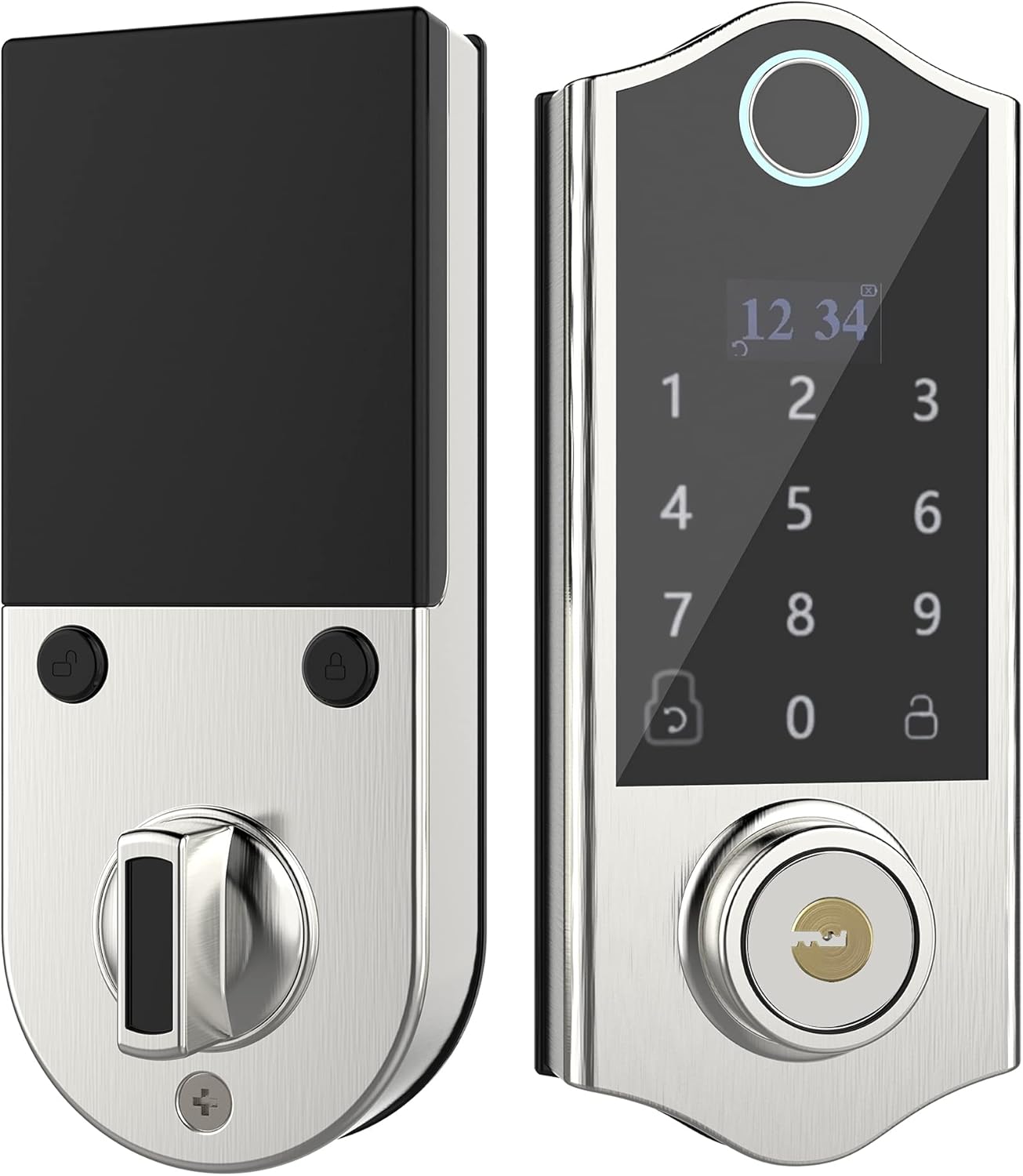
Immaġni: Quddiem u wara view of the HARFO D02 Smart Deadbolt, showcasing its sleek silver finish and integrated keypad and fingerprint sensor on the exterior unit, and the thumb-turn on the interior unit.
Karatteristiċi ewlenin:
- Metodi ta' Ftuħ 4 f'1: Fingerprint, Passcode, Access Card, and Mechanical Key.
- Intuitive OLED Display: Provides clear visual guidance for programming and operation.
- Gwida tal-Vuċi: Assists users through the setup and programming process.
- Advanced Fingerprint Sensor: Fast and secure recognition system.
- Anti-peep Touchscreen: Supports virtual passwords to prevent unauthorized viewing of your code.
- Hidden Backup Key Hole: Provides traditional key access for emergencies.
- Micro USB Emergency Power: Allows temporary power supply in case of battery depletion.
- Qfil awtomatiku: Configurable auto-lock feature (5-20 seconds).
- High User Capacity: Jappoġġja sa 300 utent.
- Adjustable for Left & Right Doors: Easily configured to fit various door orientations.

Image: A visual representation of the four unlocking methods: entering a password on the keypad, swiping an access card, using a fingerprint, and inserting a physical key.

Image: An infographic detailing various features of the HARFO D02 lock, including its voice guide, OLED display, advanced fingerprint sensor, anti-peep touchscreen, and emergency power options.
3. Speċifikazzjonijiet
| Speċifikazzjoni | Valur |
|---|---|
| Brand | HARFO |
| Mudell | D02 |
| Tip Lock | Deadbolt tat-tastiera |
| Karatteristiċi Speċjali | Fingerprint, Touchscreen, Voice Guide, OLED Display |
| Kulur | Fidda |
| Firxa tal-Ħxuna tal-Bieb | 1 3/8 inch to 2 3/16 inch (35mm-55mm) |
| Sors tal-Enerġija | 4 x 1.5V AA Dry Batteries (not included) |
| Qawwa ta' Emerġenza | Mikro USB |
| Piż tal-oġġett | 1 Lira |
| Dimensjonijiet tal-Pakkett | 9.25 x 7.64 x 4.02 pulzieri |
| Protokoll tal-Konnettività | Wi-Fi (for potential future features, not for direct app control) |

Image: Detailed dimensions of the HARFO D02 Smart Deadbolt, including overall height (168mm / 6-3/5"), and depth measurements for the exterior and interior units, along with the compatible door thickness range of 35-55mm (1-3/8" ~ 2-3/16").
4. Gwida għall-Installazzjoni (Setup)
The HARFO D02 Smart Deadbolt is designed for easy installation without the need for drilling additional holes for standard door preparations.
4.1 Before Installation:
- Ensure your door thickness is within the supported range: 1 3/8 inch to 2 3/16 inch (35mm-55mm).
- Iġbor l-għodda meħtieġa: tornavit Phillips.
- Do not install batteries until the lock is fully installed.
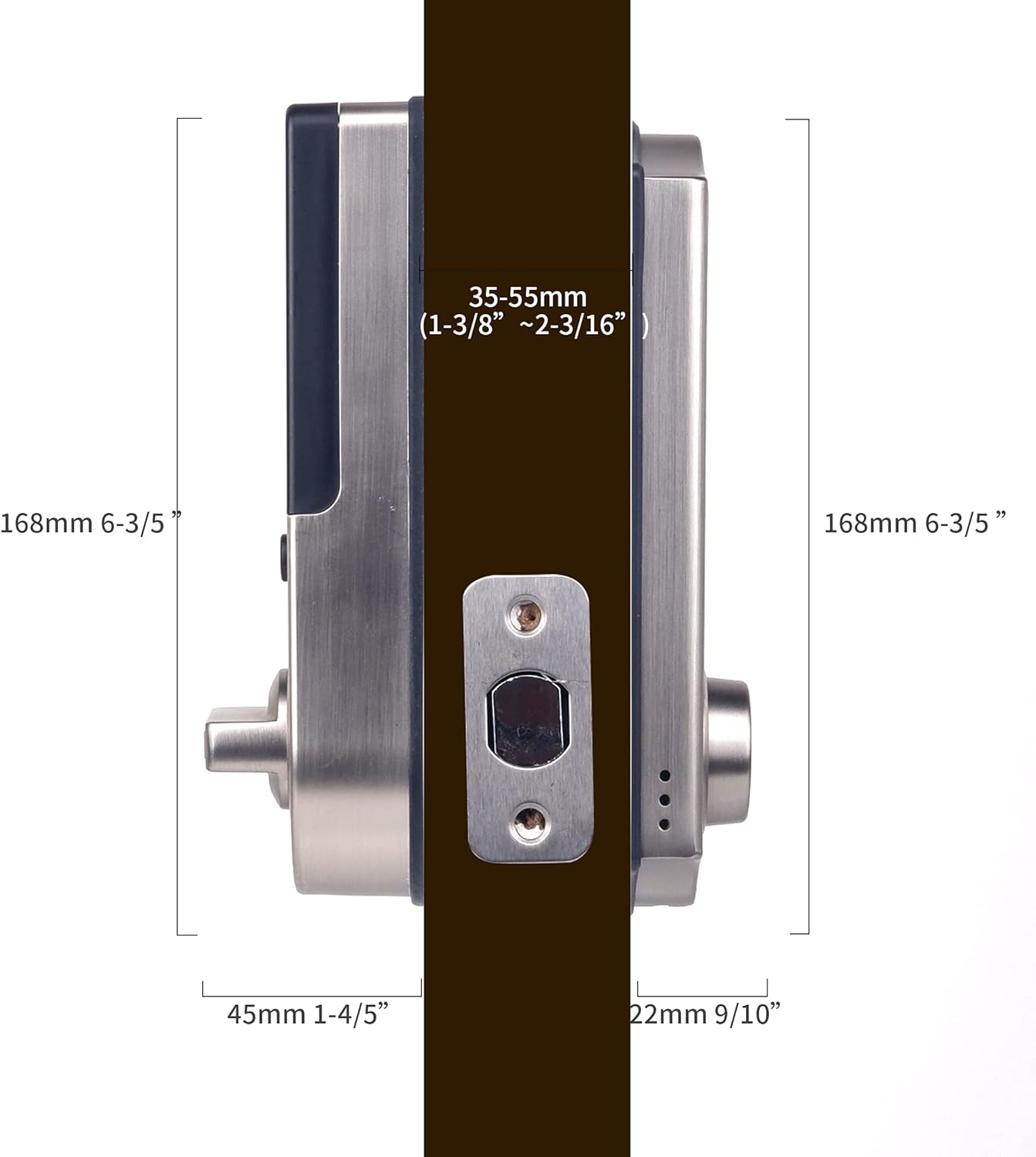
Image: A visual demonstrating the straightforward installation process of the HARFO D02 Smart Deadbolt, emphasizing that no additional drilling is required.
4.2 Adjusting for Left or Right Handed Doors:
The HARFO D02 is compatible with both left-handed and right-handed doors. You will need to adjust the rotary knob and the 'L/R Button' on the interior unit to match your door's orientation.
- Locate the rotary knob and the L/R button on the interior assembly.
- Follow the instructions provided by the voice guide during initial setup or refer to the detailed steps in the full user manual for specific adjustment procedures.
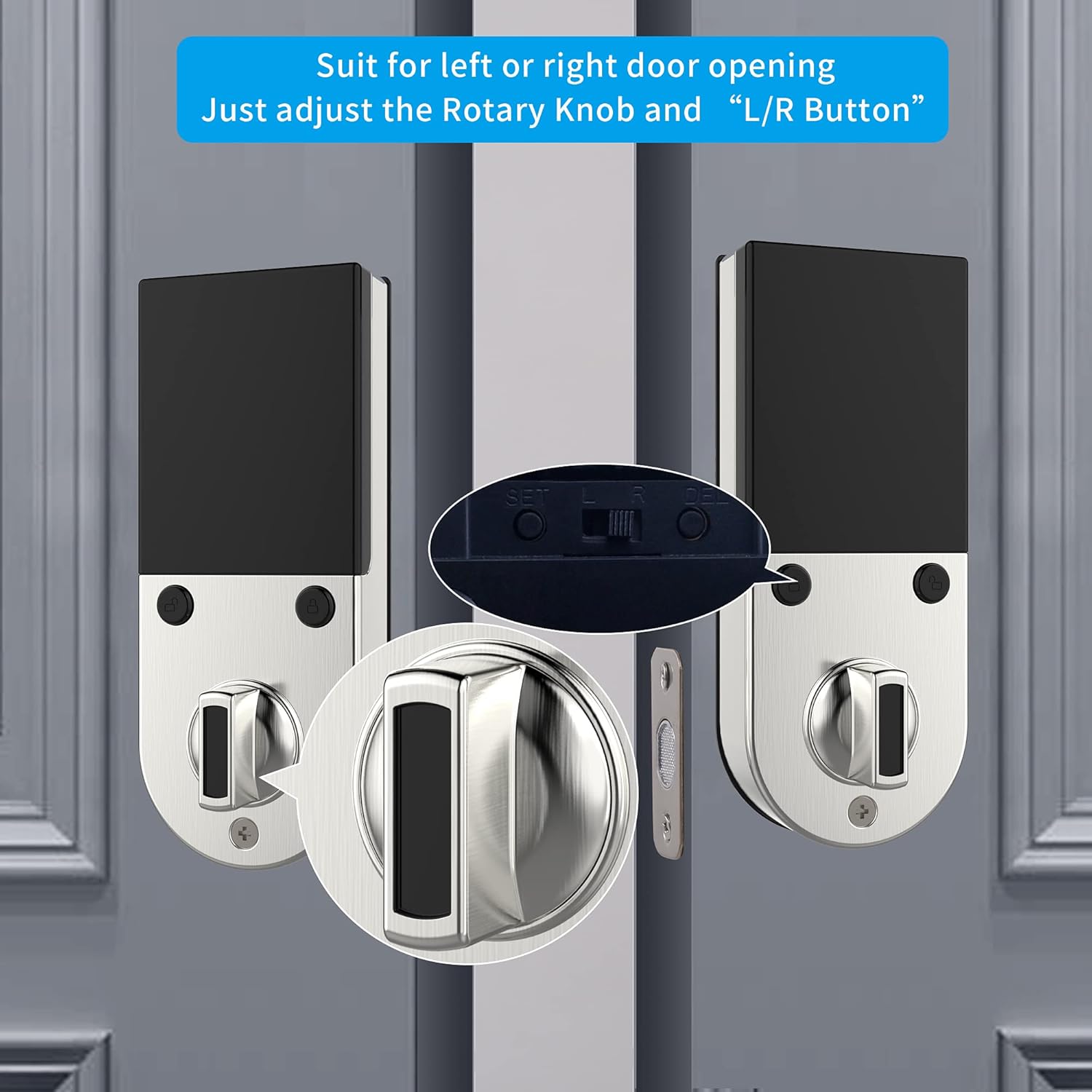
Immaġni: Close-up view illustrating the rotary knob and the L/R button on the interior side of the lock, which are used to configure the deadbolt for either left-handed or right-handed door installations.
4.3 Installazzjoni Pass Pass:
- Installa l-lukkett tad-deadbolt fit-tarf tal-bieb.
- Install the exterior assembly, ensuring the spindle passes through the latch.
- Install the mounting plate on the interior side.
- Qabbad il-kejbil mill-assemblaġġ ta 'barra mal-assemblaġġ ta' ġewwa.
- Waħħal l-assemblaġġ intern mal-pjanċa tal-immuntar.
- Insert 4 AA dry batteries into the battery compartment.
- Perform the door handing identification process as prompted by the voice guide.
For a detailed visual guide, please refer to the installation video provided by HARFO (if available on the product page or manufacturer's websit).
5. Istruzzjonijiet Operattivi
The HARFO D02 Smart Deadbolt offers multiple convenient ways to lock and unlock your door.
5.1 Initial Setup and Programming:
Upon first power-up, the lock will guide you through the initial setup using its OLED display and voice prompts. This includes setting the master code and performing door handing identification.
- Follow the voice guide to set up your master passcode. This code is essential for all programming functions.
- The voice guide will prompt you to register fingerprints, passcodes, and access cards for regular users.
5.2 Unlocking the Door:
- Marka tas-swaba ': Poġġi s-saba' rreġistrat tiegħek fuq is-senser tal-marki tas-swaba'. Is-serratura tinfetaħ malli jiġi rikonoxxut b'suċċess.
- Passcode: Enter your registered passcode on the touchscreen keypad, followed by the '#' key.
- Karta ta' Aċċess: Present your registered access card to the card reader area on the lock.
- Ċavetta Mekkanika: Insert the physical key into the hidden keyhole and turn to unlock.
- Password Virtwali: To enhance security, you can enter random digits before or after your actual passcode. For example, if your passcode is 123456, you can enter **123456** or 7891234560. This prevents others from guessing your code by observing finger movements.

Image: A visual explanation of the virtual password feature, showing how random digits can be added before or after the actual passcode to obscure it from onlookers.
5.3 Locking the Door:
- Qfil awtomatiku: The lock can be set to automatically lock after a configurable delay (5-20 seconds) once the door is closed.
- Qfil Manwali: Press and hold the '#' key on the keypad, or use the thumb-turn on the interior unit.

Image: An icon representing the automatic locking feature, indicating a configurable delay of 5 to 20 seconds before the deadbolt automatically engages.
5.4 Emergency Access:
- Backup Key: Always keep at least one physical key in a safe place outside your home for emergency access.
- Micro USB Emergency Power: If the batteries are completely drained, connect a standard Micro USB power bank to the Micro USB port located on the bottom of the exterior unit to temporarily power the lock and gain entry.

Immaġni: Close-up view highlighting the hidden backup keyhole and the Micro USB port on the exterior unit of the HARFO D02 Smart Deadbolt, used for emergency access and power.
6. Manutenzjoni
6.1 Sostituzzjoni tal-batterija:
The HARFO D02 Smart Deadbolt requires 4 x 1.5V AA dry batteries. Rechargeable batteries are not recommended as their typical voltage (1.2V) may not provide optimal performance.
- The lock will provide a low battery warning via the OLED display and voice prompt when batteries are running low. Replace all four batteries promptly when this warning appears.
- To replace batteries, remove the battery cover on the interior unit, replace old batteries with new ones, and reattach the cover.

Image: A visual icon representing a low battery warning, prompting the user to replace the batteries in the smart deadbolt.
6.2 Tindif:
- Wipe the lock's surface with a soft, dry cloth.
- Evita li tuża prodotti tat-tindif li joborxu, solventi, jew kimiċi ħarxa, għax dawn jistgħu jagħmlu ħsara lill-finitura u lill-komponenti elettroniċi.
- Keep the fingerprint sensor and touchscreen clean and free of debris for optimal performance.
7 Issolvi l-problemi
If you encounter issues with your HARFO D02 Smart Deadbolt, please refer to the following common solutions:
| Problema | Kawża Possibbli | Soluzzjoni |
|---|---|---|
| Is-serratura ma tirrispondix / M'hemmx enerġija. | Batteriji mbattla. | Replace all 4 AA dry batteries. Use Micro USB emergency power to gain entry if needed. |
| Il-marka tas-swaba' mhux rikonoxxuta. | Is-saba' huwa maħmuġ/imxarrab, is-senser huwa maħmuġ, jew il-marka tas-swaba' mhux irreġistrata sew. | Ensure finger and sensor are clean and dry. Try a different registered finger. Re-register fingerprint if issue persists. |
| Il-kodiċi tal-password mhux qed jaħdem. | Incorrect passcode entered, or passcode not registered. | Verify the correct passcode. Ensure you are pressing '#' after the code. Try using the virtual password feature. Re-register passcode if necessary. |
| Is-serratura ma tissakkarx/tiftaħx bla xkiel. | Misalignment of lock components or door frame. Incorrect door handing setting. | Check door and frame alignment. Ensure the deadbolt latch moves freely. Verify the L/R button setting is correct for your door. |
| Voice guide is unclear or not working. | Volume setting too low or a temporary glitch. | Adjust volume settings (refer to full manual). Remove and reinsert batteries to reset the lock. |
If the problem persists after trying these solutions, please contact HARFO customer support for further assistance.
8. Garanzija u Appoġġ
HARFO stands behind the quality of its products. For specific warranty information regarding your D02 Smart Deadbolt, please refer to the warranty card included with your product or visit the official HARFO websit.
Appoġġ għall-Klijent:
If you have any questions, require technical assistance, or need to report an issue, please contact HARFO customer support through the following channels:
- Websit: Visit the official HARFO websit għal FAQs, riżorsi ta' appoġġ, u formoli ta' kuntatt.
- Email: Refer to your product packaging or the HARFO websit għall-indirizz elettroniku tal-appoġġ għall-klijenti.
- Telefon: Check the HARFO website for available customer service phone numbers.
Please have your product model (D02) and purchase information ready when contacting support to ensure efficient service.


