1. Introduzzjoni
Thank you for choosing the HOMCOM Computer Desk with Hutch. This manual provides essential information for the safe assembly, proper use, and maintenance of your new home office workstation. Please read all instructions carefully before beginning assembly and retain this manual for future reference.

Stampa 1.1: Quddiem view of the HOMCOM Computer Desk with Hutch.
2. Informazzjoni dwar is-Sigurtà
- Dejjem arma l-iskrivanija fuq wiċċ artab u nadif biex tevita l-grif.
- Kun żgur li l-viti u l-qafliet kollha jkunu ssikkati sew qabel l-użu. Iċċekkja perjodikament u erġa' ssikka kif meħtieġ.
- Tgħabbix iżżejjed l-ixkafef jew il-kxaxen. Qassam il-piż b'mod uniformi.
- Żomm il-partijiet żgħar 'il bogħod mit-tfal waqt l-assemblaġġ biex tevita perikli ta' fgar.
- Din l-iskrivanija hija ddisinjata għall-użu fuq ġewwa biss.
- Anti-Toppling Design: For safety, it is highly recommended to attach the desk to a wall using the included anti-toppling fittings to prevent accidental tipping, especially in households with children or pets.

Image 2.1: Detail of the anti-toppling design, showing the bracket for wall attachment.
3. Kontenut tal-Pakkett
Before assembly, verify that all parts and hardware are present. Refer to the parts list provided in your product packaging. If any components are missing or damaged, please contact customer support.
4. Istruzzjonijiet tal-Assemblea
Assembly of the HOMCOM Computer Desk with Hutch requires two people and typically takes several hours. All necessary assembly tools are included. Follow the step-by-step diagrams and instructions provided in your product packaging for detailed guidance.
Assemblea Matulview Video
Vidjo 4.1: Overview of the HOMCOM Computer Desk and its features, demonstrating its functionality and storage options. This video can assist in understanding the assembled product.
Passi Ewlenin tal-Assemblaġġ:
- Iftaħ u Identifika l-Partijiet: Lay out all components and hardware. Cross-reference with the parts list.
- Assemble Base Desk: Begin with the main desk frame, attaching side panels and the tabletop.
- Installa l-Kxaxen u l-Kabinetti: Assemble drawer boxes and install drawer slides. Attach cabinet doors and hinges.
- Arma l-Hutch: Construct the hutch frame, including shelves and cabinet doors.
- Waħħal il-Hutch mal-Iskrivanija: Carefully place and secure the hutch onto the main desk unit.
- Aġġustamenti Finali: Ensure all connections are tight and the desk is stable. Attach anti-toppling hardware to the wall.
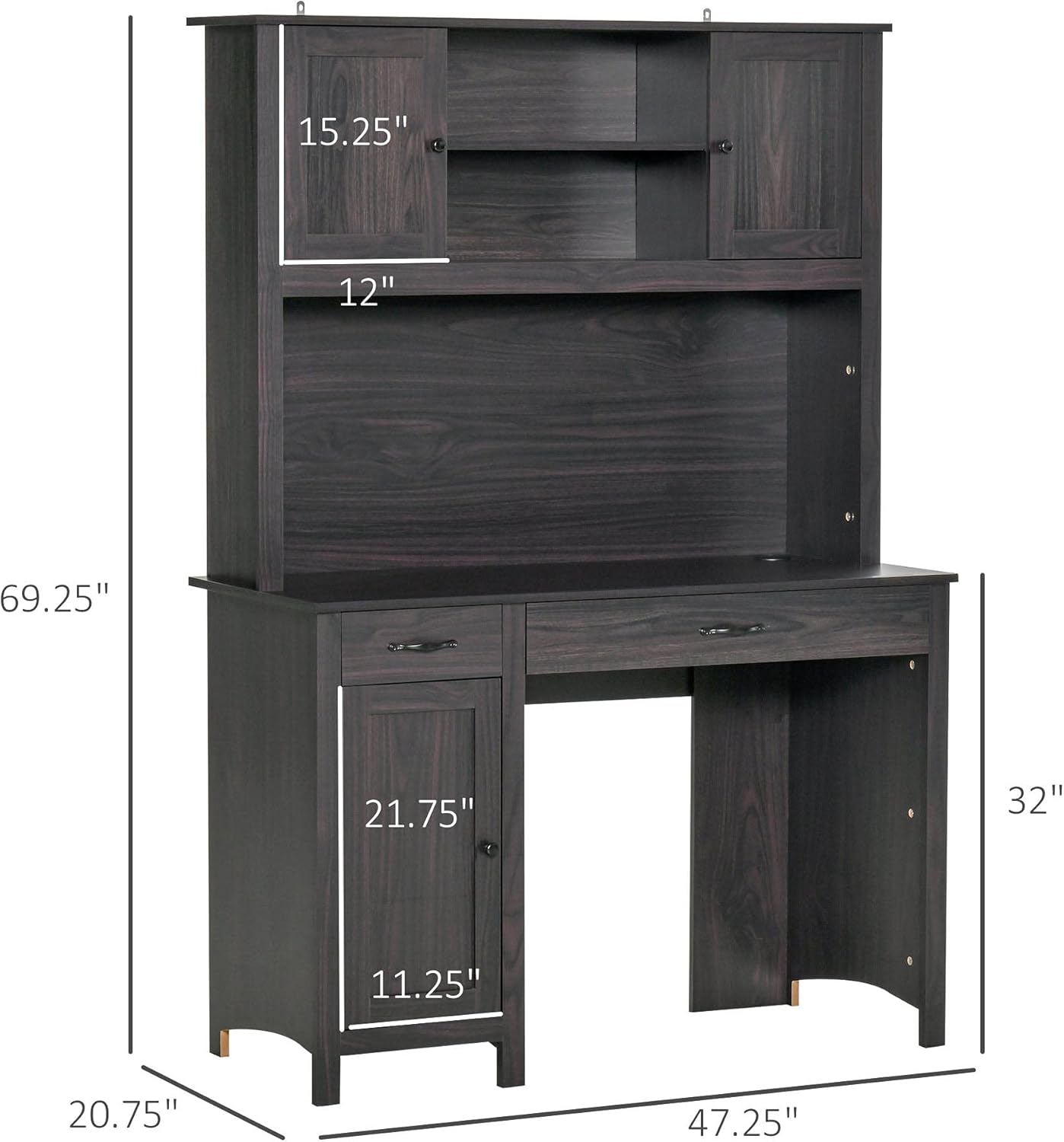
Image 4.1: Dimensional diagram of the desk, useful for planning placement.
5. Istruzzjonijiet Operattivi (Użu)
The HOMCOM Computer Desk with Hutch is designed for efficient home office use, offering various storage solutions.
- Wiċċ tax-Xogħol: Utilize the spacious tabletop for your computer, monitor, keyboard, and other work essentials.
- Hutch Storage: The upper hutch features open shelves and small cabinets for books, decorative items, or office supplies.
- Kxaxen: The desk includes multiple drawers for organizing smaller items, documents, or personal belongings.
- Kabinett tal-qiegħ: A lower cabinet provides enclosed storage for larger items or a computer tower.
- Ġestjoni tal-Kejbil: Use the integrated cable grommet on the desktop to keep wires organized and tidy.

Immaġni 5.1: Fuqview tal-iskrivanija ample storage space, including shelves, cabinets, and drawers.

Image 5.2: Details of the cable grommet for wire organization and the design of the handles and knobs.

Stampa 5.3: View of an open drawer, illustrating its capacity.
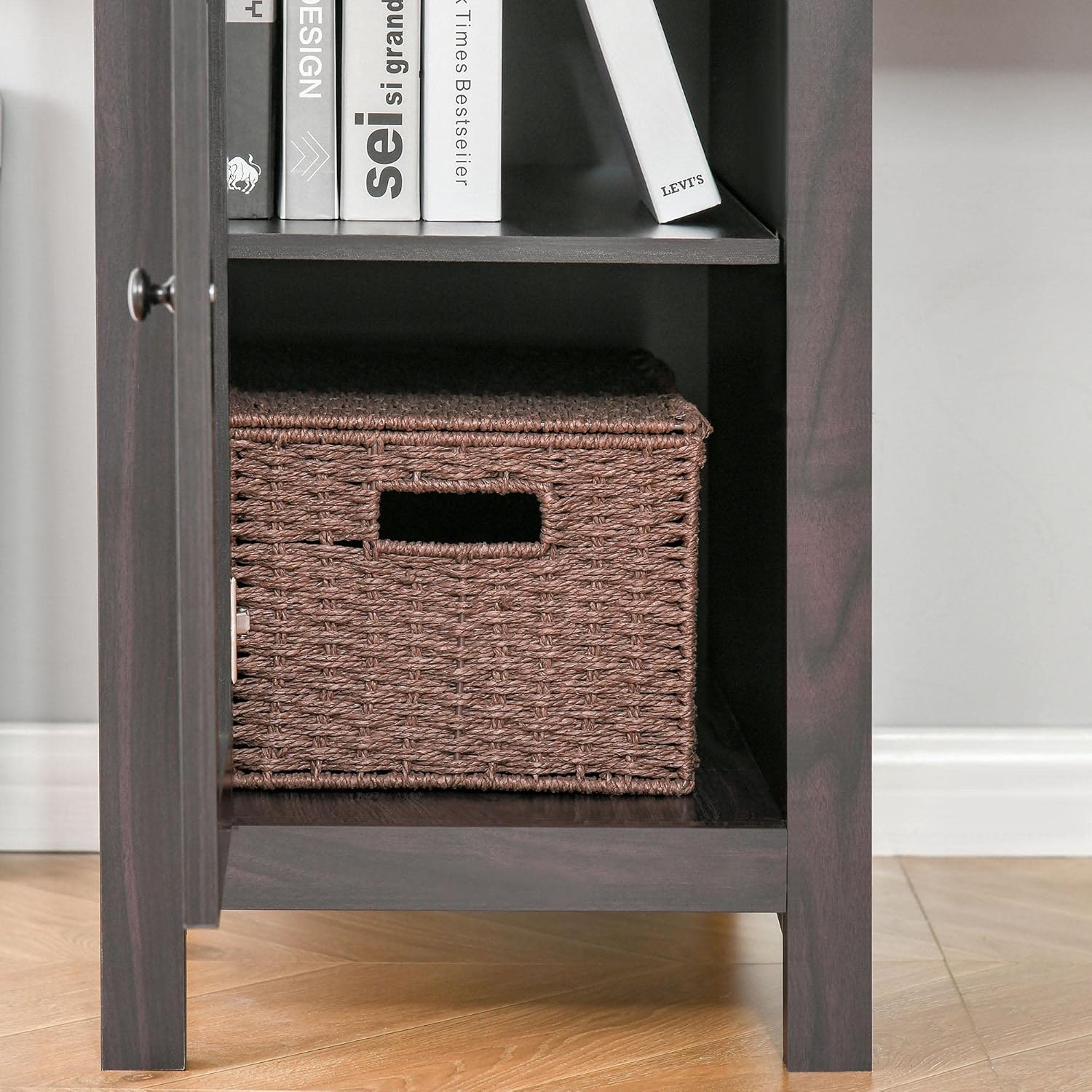
Stampa 5.4: View of the open bottom cabinet, showing its internal storage configuration.
6. Manutenzjoni
- Tindif: Imsaħ l-uċuħ b'artab, damp drapp. Evita kimiċi ħarxa jew prodotti tat-tindif li joborxu li jistgħu jagħmlu ħsara lill-finitura.
- It-tfarfir: Regularly dust the desk to prevent buildup.
- Tixrid: Clean spills immediately to prevent staining or damage to the engineered wood.
- Iċċekkja tal-Hardware: Periodically inspect all screws and fasteners to ensure they remain tight. Re-tighten if necessary to maintain stability.
- Evita dawl tax-xemx dirett: Espożizzjoni fit-tul għad-dawl tax-xemx dirett tista' tikkawża telf ta' kulur jew tneħħir tal-kulur.

Image 6.1: Detail of the wood grain finish, emphasizing the need for proper care.
7 Issolvi l-problemi
- L-iskrivanija hija Wobbly: Ensure all screws and bolts are fully tightened. Check that the desk is on a level surface. Adjust furniture glides if applicable.
- Il-kxaxen ma jiżżerżqux bla xkiel: Verify that drawer slides are correctly installed and aligned. Check for any obstructions in the tracks.
- Partijiet Neqsin: If any parts are missing upon unboxing, do not proceed with assembly. Contact customer support with your product model and a description of the missing parts.
- Ħsara Matul it-Tbaħħir: If the product arrived damaged, document the damage with photos and contact customer support immediately.
8. Speċifikazzjonijiet
| Karatteristika | Dettall |
|---|---|
| Brand | HOMCOM |
| Mudell | Computer Desk with Hutch B099NMN963 |
| Forma | Rettangolari |
| Disinn ta' l-Iskrivanija | Desk tal-Kompjuter |
| Dimensjonijiet tal-Prodott (P x W x H) | 20.75"D x 47.25"W x 69.25"H |
| Materjal Bażi | Injam Inġinerija |
| Tip ta 'Materjal ta' Fuq | Injam Inġinerija |
| Numru ta 'Kxaxen | 3 |
| Użi Rakkomandati | Ħidma |
| Piż tal-oġġett | 121 Liri |
| UPC | 842525155007 |
| Materjal tal-Hutch | Injam Inġinerija |
| Assemblea Meħtieġa | Iva |
| Nies Rakkomandati għall-Assemblea | 2 |
| Jinkludi l-Għodod tal-Assemblea Kollha | Iva |
| Kulur ta 'fuq | Dark Coffee Wood Grain |
| Ħxuna tal-mejda | 0.5 Pulzier |
| Number Of Enclosed Shelves | 3 |
| Number Of Open Shelves | 2 |
| Tip ta 'Immuntar | Mejda |
| Għażliet ta' Ħażna | Iva |
9. Garanzija u Appoġġ
For warranty information, product support, or to order replacement parts, please refer to the warranty card included with your purchase or visit the official HOMCOM website. Please have your model number (B099NMN963) and purchase date ready when contacting support.
Tista 'wkoll iżżur il- Ħanut HOMCOM fuq Amazon għal aktar informazzjoni.


