1. Introduzzjoni
This manual provides detailed instructions for the CooSpo BC200 GPS Bike Computer. The BC200 is a versatile device designed to track and record your cycling data, offering precise GPS positioning, extensive data display options, and compatibility with various external sensors. Please read this manual thoroughly before using your device to ensure proper operation and maintenance.

Stampa 1.1: The CooSpo BC200 GPS Bike Computer displaying its main menu interface.
2. X'hemm fil-Kaxxa
Ivverifika li l-komponenti kollha huma preżenti fil-pakkett:
- CooSpo BC200 Bike Computer
- Manwal għall-Utent
- Bracket tal-Immonta ta 'quddiem
- Kejbil tal-Iċċarġjar USB (mhux elenkat espliċitament iżda implikat għal apparat rikarikabbli)
3. Karatteristiċi tal-prodott
- Pożizzjonament Preċiż tal-GPS: Supports 3 global positioning modes (GPS / GPS & BEIDOU / GPS & GLONASS) for precise data worldwide.
- Large Display & Auto Backlight: Features a 2.6-inch anti-glare LCD screen with FSTN technology for clear readability in various lighting conditions. Automatic backlight activation based on ambient light.
- ANT+ & BLE Sensor Compatibility: Connects to multiple external sensors including heart rate monitors, speed sensors, cadence sensors, and power meters.
- Multi-Data Display & Customization: Displays over 70 cycling data types. Offers 5 customizable pages, each configurable to show 2 to 9 data types.
- Strava Synchronization: Upload .Fit files to Strava via USB connection to a PC or wirelessly through the CoospoRide App.
- Klassifikazzjoni IP67 li ma jgħaddix ilma minnha: Designed to withstand water splashes and rain, ensuring durability in various weather conditions.
- Ħajja twila tal-batterija: Jipprovdi sa 36-il siegħa ta' tħaddim b'ċarġ wieħed.
- Multi-Bike Support: Save and switch between parameters for up to 3 different bicycles.

Stampa 3.1: The BC200's 2.6-inch anti-glare LCD screen with automatic backlight for clear visibility day and night.
4. Setup
4.1 Initial GPS Positioning
- For the first use, ensure you are in an open outdoor area.
- Power on the device. The initial GPS positioning may take 3 to 5 minutes.
- Once positioned, the device will display accurate GPS data.

Stampa 4.1: The BC200 utilizes multiple satellite systems (GPS, BEIDOU, GLONASS) for accurate global positioning.
4.2 Immuntar tal-Apparat
Use the provided front mount bracket to securely attach the BC200 to your bicycle's handlebars.
- Attach the bracket to your handlebar using the appropriate fasteners.
- Align the BC200 with the bracket and twist to lock it into place.
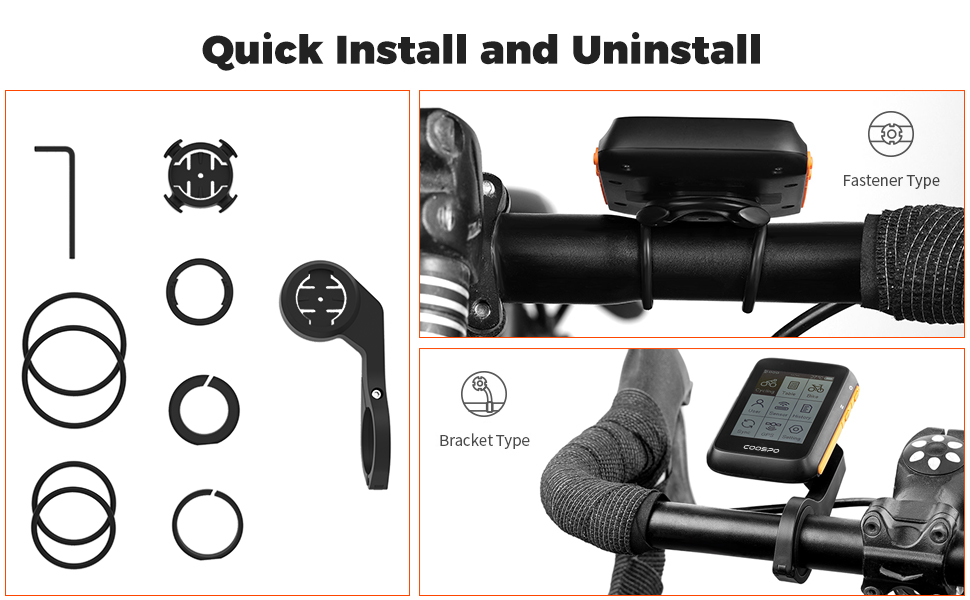
Stampa 4.2: Visual guide for quick installation and uninstallation of the BC200 on a handlebar mount.
5. Istruzzjonijiet Operattivi
5.1 Navigazzjoni Bażika
The BC200 is operated using its side buttons. Refer to the device's screen for on-screen prompts and menu navigation.
5.2 Personalizzazzjoni tal-Wiri
The BC200 allows you to customize up to 5 display pages, each showing between 2 and 9 data types. This enables you to prioritize the information most relevant to your ride.

Stampa 5.1: Various customizable data display layouts on the BC200 screen, showing speed, distance, time, heart rate, power, cadence, altitude, temperature, and calories.
5.3 Settings tal-Lingwa
The device supports multiple languages. Navigate to the settings menu to select your preferred language.

Stampa 5.2: The BC200's language selection menu, showing options like English, Spanish, German, French, Portuguese, Russian, and Turkish.
6. It-tqabbil tas-sensuri
The CooSpo BC200 is compatible with ANT+ and Bluetooth Low Energy (BLE) sensors, allowing you to connect various external devices for enhanced data tracking.
6.1 Compatible Sensors
- Monituri tar-rata tal-qalb
- Sensuri tal-Veloċità
- Sensuri tal-Kadenza
- Miters tal-Enerġija
6.2 Proċess ta' Tqabbil
- Ensure your external sensor is active and within range of the BC200.
- Navigate to the 'Sensor' menu on your BC200.
- Select 'Add Sensor' or 'Scan' to search for available devices.
- Choose your sensor from the list and confirm pairing.

Stampa 6.1: The BC200 displaying data while connected to various external sensors such as heart rate monitors, speed sensors, cadence sensors, and power meters via Bluetooth and ANT+.
7. Sinkronizzazzjoni tad-Data
The BC200 allows you to synchronize your cycling data with third-party platforms like Strava for analysis and sharing.
7.1 Sync to Strava
You can upload your ride data (.Fit files) to Strava using two methods:
- Permezz tal-USB: Connect the BC200 to your PC using a USB cable and manually upload the .Fit file to Strava.
- Permezz tal-App CoospoRide: Synchronize the .Fit file to Strava through the CoospoRide application on your smartphone.

Stampa 7.1: Data flow from the BC200 to Strava, showing options for synchronization through the CoospoRide App on a phone or direct USB connection to a PC.
7.2 CoospoRide App
The CoospoRide App provides additional functionalities, including quick device setup, recording and analysis of cycling activity records, and firmware updates.

Stampa 7.2: The CoospoRide App interface, showing options for bike computer settings, sensor binding, and activity tracking.
8. Manutenzjoni
- Tindif: Imsaħ l-apparat b'artab, damp drapp. Evita li tuża kimiċi ħarxa jew tindif li joborxu.
- Reżistenza għall-Ilma: The BC200 has an IP67 waterproof rating, meaning it is protected against dust and temporary immersion in water. It is suitable for use in rain but should not be submerged for extended periods.
- Iċċarġjar: Recharge the device using the provided USB cable. Ensure the charging port is dry before connecting the cable.
- Ħażna: Aħżen l-apparat f'post frisk u niexef meta ma jkunx qed jintuża.

Stampa 8.1: The BC200 demonstrating its IP67 waterproof capability under water spray.
9 Issolvi l-problemi
If you encounter issues with your CooSpo BC200, refer to the following common solutions:
- L-Apparat Mhux Jixgħel: Kun żgur li l-apparat ikun iċċarġjat kompletament. Qabbad ma' sors ta' enerġija u stenna ftit minuti qabel ma tipprova tixgħelu mill-ġdid.
- Kwistjonijiet tas-Sinjal tal-GPS: Kun żgur li tinsab f'żona miftuħa fil-beraħ b'dawl ċar view of the sky. The first positioning may take longer. If issues persist, try restarting the device.
- Sensur Mhux Qed Jikkonnettja: Check that the sensor is active, has sufficient battery, and is within range. Ensure no other devices are interfering with the connection. Try re-pairing the sensor through the device's menu.
- Data Not Syncing to Strava: Verify your internet connection. For USB sync, ensure the cable is properly connected and your computer recognizes the device. For app sync, ensure the CoospoRide App is updated and correctly linked to your Strava account.
- L-iskrin mhux qed jirrispondi: If the screen is frozen, try performing a soft reset by holding down the power button for an extended period (e.g., 10-15 seconds) until the device restarts.
10. Speċifikazzjonijiet
| Karatteristika | Speċifikazzjoni |
|---|---|
| Numru tal-Mudell | BC200 |
| Brand | CooSpo |
| Daqs tal-Iskrin | 2.6 Pulzier |
| Tip ta' Skrin | LCD |
| Teknoloġija tal-Konnettività | ANT+, Bluetooth |
| Tip tas-Sensor | Sensor tal-GPS |
| Klassifikazzjoni tal-Protezzjoni Internazzjonali | IP67 |
| Tip ta 'batterija | Lithium-ion (1 Lithium metal battery included) |
| Ħajja tal-batterija | Sa 36 sigħat |
| Tip ta 'Immuntar | Muntaġġ tal-manubriju |
| Tip ta' Materjal | Poliester |
| Kulur | Oranġjo |
11. Garanzija u Appoġġ
CooSpo is committed to providing excellent customer service and product support.
- Appoġġ għall-Utent: 24/7 free user support is available.
- Ritorni: Returns and full refunds are provided for any reason within 30 days of purchase.
- Garanzija: Replacement will be provided for related quality issues within 1 year of purchase.
For further assistance, please contact CooSpo customer service.


