1. Introduzzjoni
Grazzi tax-xiriasing the VILINICE 6500 Lumens 720P Native Portable Projector. This manual provides essential information for the safe and efficient operation of your device. Please read it thoroughly before use and retain it for future reference.
2. Informazzjoni dwar is-Sigurtà
To ensure safe operation and prolong the lifespan of your projector, please observe the following safety precautions:
- Timblokkax il-fetħiet tal-ventilazzjoni. Kun żgur li jkun hemm fluss tal-arja adegwat madwar il-proġettazzjoni biex tevita li ssaħħan iżżejjed.
- Evita espożizzjoni diretta għad-dawl tal-lenti tal-proġettazzjoni. Id-dawl qawwi jista’ jikkawża għeja jew ħsara lill-għajnejn.
- Do not place the projector in unstable locations. Ensure it is on a flat, stable surface to prevent falls.
- Żomm il-proġettur 'il bogħod mill-ilma, l-umdità, u materjali fjammabbli.
- Uża biss l-adapter tal-enerġija li jiġi mal-proġettur.
- Tippruvax issewwi l-proġettur int stess. Irreferi għal kull manutenzjoni f'idejn persunal kwalifikat.
- Skonnettja l-proġettur waqt maltempati bis-sajjetti jew meta ma jintużax għal perjodi twal.
3. Kontenut tal-Pakkett
Jekk jogħġbok iċċekkja l-kontenut tal-pakkett malli tiftaħ. Jekk xi oġġetti huma nieqsa jew bil-ħsara, ikkuntattja l-appoġġ għall-klijenti.
- VILINICE 6500 Lumens 720P Native Portable Projector
- Kontroll mill-bogħod
- Kejbil tal-Enerġija
- Cable HDMI
- AV Cable
- Manwal għall-Utent
- 100-inch Projector Screen (as indicated in product images)
4. Prodott Aktarview
Iffamiljarizza ruħek mal-komponenti u l-interfaċċji tal-proġettazzjoni.

Image: The VILINICE projector shown with its remote controls, highlighting its compact design.
4.1 Quddiem u Ġenb View
- Lenti tal-Projezzjoni: Titfa' l-immaġni fuq l-iskrin.
- Ċirku tal-Fokus: Aġġusta ċ-ċarezza tal-immaġni.
- Keystone Correction Ring: Corrects trapezoidal image distortion.
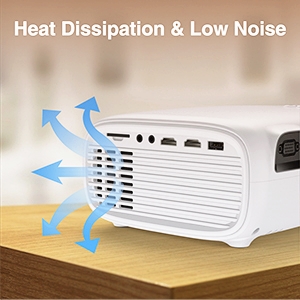
- Ftuħ tal-ventilazzjoni: For heat dissipation. Do not block.

Image: The projector's rear and side panels displaying multiple connectivity options including AV, AUX, HDMI, USB, VGA, and SD card slot.
4.2 Rear and Side Interfaces
- Port AV: Għall-konnessjoni ta' apparati eqdem permezz ta' kejbil AV.
- AUX (Audio Out) Port: Għall-konnessjoni ta' kelliema esterni jew headphones.
- Portijiet HDMI (x2): Għall-konnessjoni ta' apparati bħal laptops, consoles tal-logħob, jew TV sticks.
- Portijiet USB (x2): For connecting USB drives to play media or power devices.
- Port VGA: For connecting computers with a VGA output.
- Slot tal-Kard SD: Biex iddoqq il-midja direttament minn SD card.
- Input ta' Enerġija: Tqabbad mal-adapter tal-enerġija.
5. Setup
5.1 Placement and Projection
Position the projector on a stable surface. The optimal projection distance and screen size can vary. Ensure the projector is perpendicular to the screen for the best image quality.

Image: The projector set up for an outdoor movie night, demonstrating its portability and the included 100-inch screen.
The projector also features a mounting hole for ceiling or tripod installation.
Immaġni: Dettaljata view of the projector's mounting hole, suitable for various installation methods.
5.2 Konnessjoni tal-Enerġija
Qabbad il-kejbil tal-enerġija mad-dħul tal-enerġija tal-proġettazzjoni u mbagħad waħħalha f'sokit tal-enerġija.
5.3 Korrezzjoni tal-Fokus u l-Keystone
After powering on, adjust the focus ring on the projector lens until the image is clear. If the image appears trapezoidal, use the keystone correction ring to adjust it to a rectangular shape.

Image: Visual guide demonstrating how to adjust the focus and keystone correction for a clear and properly shaped image.
5.4 Apparat li jgħaqqad
Il-proġettazzjoni tappoġġja diversi sorsi ta' input:
- HDMI: Connect laptops, TV sticks, gaming consoles (PS4, Xbox), or DVD players using an HDMI cable.
- USB: Insert a USB disk to play photos, videos, or music directly.
- VGA: Qabbad kompjuters jew laptops eqdem permezz ta' kejbil VGA.
- TA’: Connect legacy devices like VCRs or older DVD players.
- Karta SD: Insert an SD card into the slot to access media files.
- Smartphones: For smartphone connectivity, an external MHL HDMI adapter (not included) may be required.
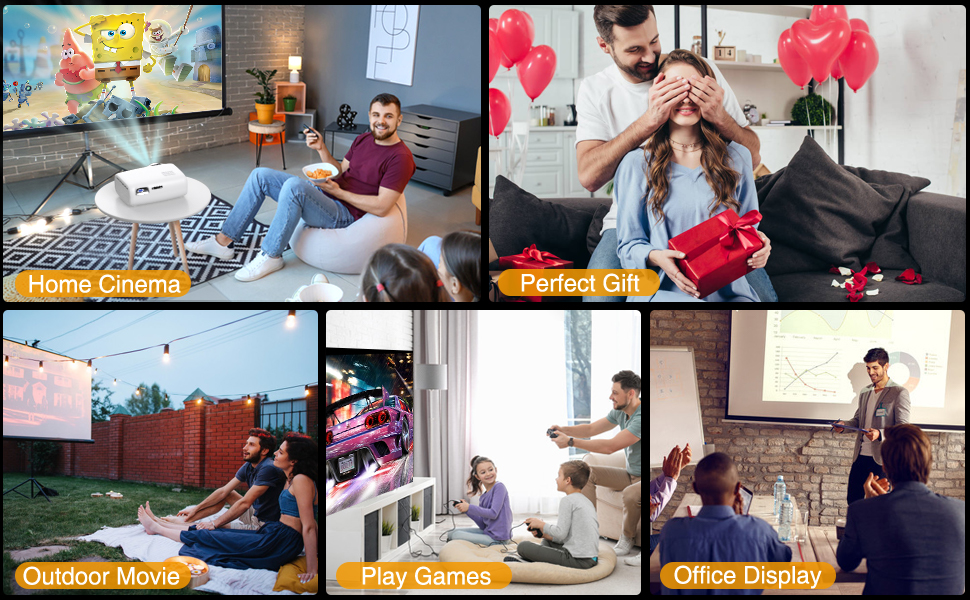
Image: Illustration of connecting a smartphone or laptop to the projector, emphasizing ease of use.
6. Operazzjoni
6.1 Tixgħel/Jitfi
Agħfas il-buttuna tal-qawwa fuq il-proġettazzjoni jew il-kontroll remot biex tixgħel jew titfi l-apparat.
6.2 Għażla tas-Sors tal-Input
Use the "Source" button on the remote control or the projector's control panel to select the desired input source (HDMI1, HDMI2, USB, VGA, AV, SD Card).
6.3 Aġġustament tas-Settings
Navigate the on-screen menu using the remote control to adjust various settings:
- Settings tal-Istampa: Adjust brightness, contrast, color, and aspect ratio.
- Settings tal-ħoss: Control volume and audio modes. The projector features a built-in HiFi stereo speaker for an immersive audio experience.
- Funzjoni Żum: The projector supports a 100%-75% zoom function, allowing you to adjust the screen size without moving the projector.
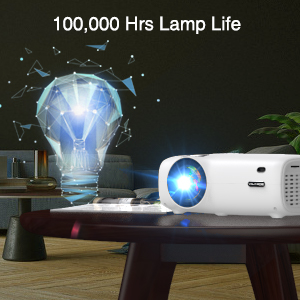
Image: Visual representation of the projector's zoom function, showing how the image size can be reduced from 100% to 75%.

Image: A family enjoying a movie projected by the VILINICE projector, highlighting the built-in HiFi stereo speaker for a great auditory experience.
7. Manutenzjoni
Proper maintenance ensures optimal performance and longevity of your projector.
- Tindif tal-Lenti: Use a soft, lint-free cloth and lens cleaning solution specifically designed for optical lenses. Do not use abrasive cleaners.
- Tneħħija tat-Trab: Regularly clean the projector's exterior with a soft, dry cloth. Use a can of compressed air to gently clear dust from ventilation openings.
- Ħażna: Meta ma tkunx qed tuża l-proġettazzjoni, aħżenha f'post frisk u niexef, 'il bogħod mix-xemx diretta u minn temperaturi estremi.
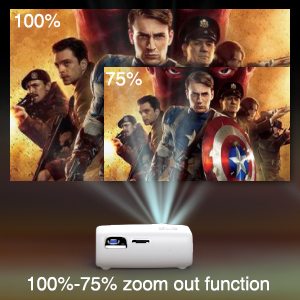
Image: Illustration of the projector's heat dissipation system, designed for efficient cooling and low noise operation.
The projector is designed with a long-lasting lamp ħajja sa 100,000 siegħa.

Image: A visual representation emphasizing the projector's extended lamp lifespan of 100,000 hours.
8 Issolvi l-problemi
Jekk tiltaqa' ma' problemi, irreferi għall-problemi u s-soluzzjonijiet komuni li ġejjin:
- Ebda Qawwa:
- Kun żgur li l-kejbil tal-enerġija huwa konness sew kemm mal-proġettazzjoni kif ukoll mas-sokit tal-enerġija.
- Iċċekkja jekk l-iżbokk tad-dawl huwiex funzjonali.
- Ebda Immaġni:
- Verify the input source is correctly selected (e.g., HDMI1, USB).
- Check the connection cable (HDMI, VGA, AV) between the projector and the source device.
- Kun żgur li l-apparat tas-sors ikun mixgħul u qed joħroġ sinjal.
- Immaġni mċajpra:
- Aġġusta ċ-ċirku tal-fokus fuq il-lenti tal-proġekter.
- Kun żgur li d-distanza tal-projezzjoni hija fil-medda rakkomandata.
- Clean the projector lens if it is dirty.
- Trapezoidal Image:
- Adjust the keystone correction ring until the image is rectangular.
- Ensure the projector is placed on a flat surface and is perpendicular to the screen.
- Ebda Ħsejjes:
- Żid il-volum kemm fuq il-proġettazzjoni kif ukoll fuq l-apparat tas-sors.
- Check if external speakers are connected and properly functioning.
- Ensure the audio output settings on the source device are correct.
9. Speċifikazzjonijiet
Below are the technical specifications for the VILINICE 6500 Lumens 720P Native Portable Projector:
| Karatteristika | Speċifikazzjoni |
|---|---|
| Brand | VILINICE |
| Riżoluzzjoni tal-Wiri | Native 1280 x 720 (720P) |
| Riżoluzzjoni Appoġġjata | 1080P Full HD |
| Luminożità | 6500 Lumens |
| Tip ta 'Wiri | LCD |
| Teknoloġija tal-Konnettività | HDMI, MHL, USB, VGA |
| Karatteristika Speċjali | Portable, 100%-75% Zoom Function |
| Tip ta' Kelliem | Built-In, Surround (HiFi Stereo) |
| Lamp Ħajja | Sa 100,000 sigħat |
| Piż tal-oġġett | 4.92 liri |
| Dimensjonijiet tal-Prodott | 12.6 x 5.51 x 8.27 pulzieri |
10. Garanzija u Appoġġ
VILINICE products come with a standard manufacturer's warranty. For detailed warranty information, product support, or technical assistance, please refer to the warranty card included in your package or visit the official VILINICE website. Do not attempt to open or modify the projector, as this may void your warranty.


