1. Informazzjoni Importanti dwar is-Sigurtà
Before operating the Matrix Fitness TF50 Treadmill, please read and understand all safety instructions. Failure to follow these instructions may result in injury or damage to the equipment.
- Ikkonsulta Tabib: Dejjem ikkonsulta ma' professjonist fil-qasam tal-kura tas-saħħa qabel tibda xi programm ġdid ta' eżerċizzju.
- Superviżjoni: Dan l-apparat mhuwiex maħsub għall-użu minn persuni b’kapaċitajiet fiżiċi, sensorji jew mentali mnaqqsa, jew b’nuqqas ta’ esperjenza u għarfien, sakemm ma jkunux ingħataw superviżjoni jew istruzzjoni dwar l-użu tal-apparat minn persuna responsabbli għas-sigurtà tagħhom. It-tfal għandhom ikunu sorveljati biex jiżguraw li ma jilagħbux bl-apparat.
- Waqfien ta' Emerġenza: Familiarize yourself with the safety key and its function. Always attach the safety key clip to your clothing during operation. In case of an emergency, pulling the safety key will immediately stop the treadmill.
- Poġġiment xieraq: Place the treadmill on a level, stable surface with adequate clearance around it (at least 6 feet behind and 2 feet on each side). Do not place on thick carpet as it may interfere with ventilation.
- Korda tal-Enerġija: Ensure the power cord is not pinched or damaged. Do not use extension cords. Plug directly into a grounded outlet.
- Manutenzjoni: Agħmel manutenzjoni regolari kif deskritt f'dan il-manwal biex tiżgura tħaddim sikur.
WARNING: To reduce the risk of electric shock, fire, and serious injury, read all instructions before using this equipment.
2. Prodott Aktarview
The Matrix Fitness TF50 Treadmill with XUR 22" Touchscreen Console is designed to provide a club-quality workout experience in a home environment. It features a robust frame, a spacious running deck, and an interactive console for diverse training options.
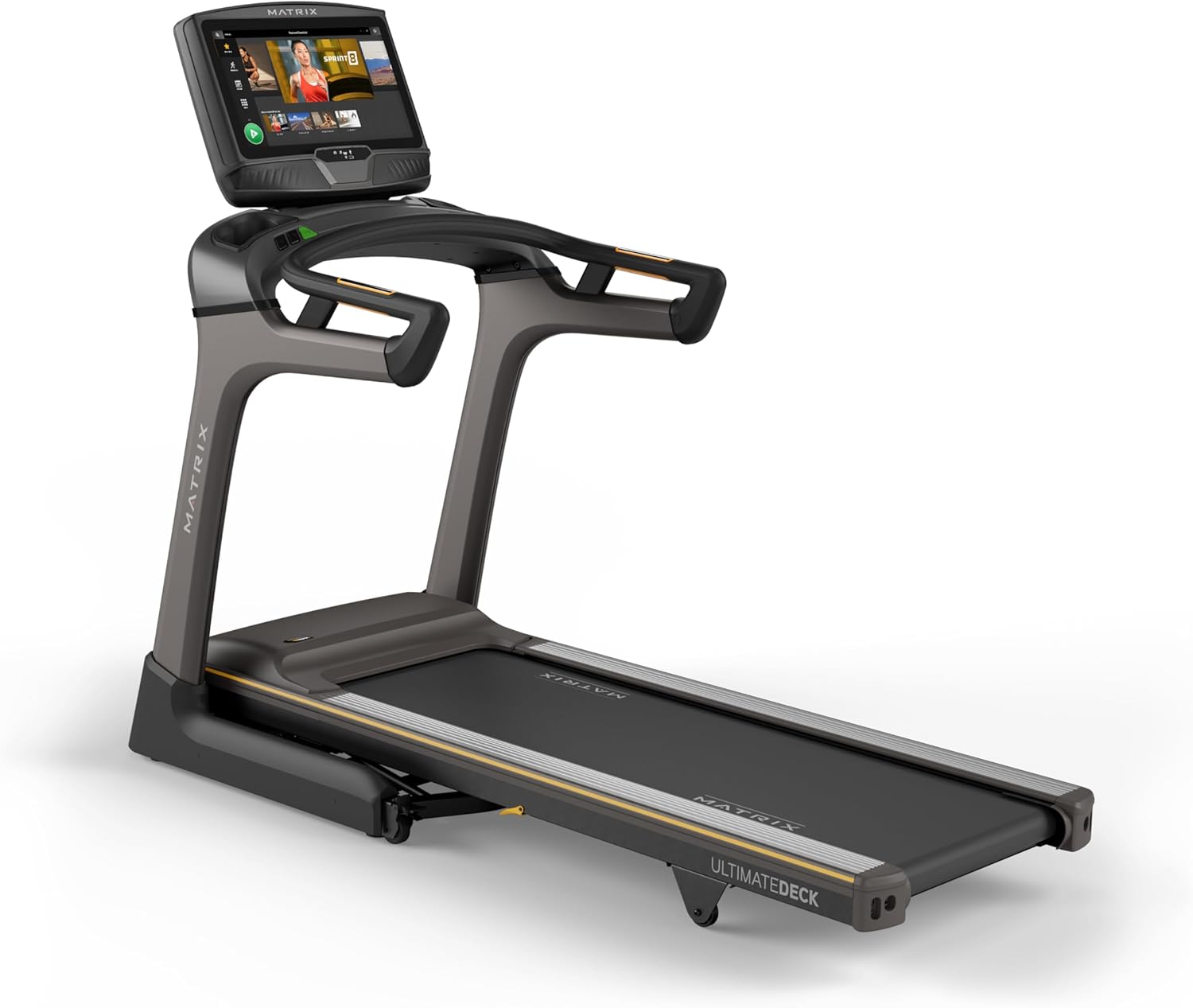
Immaġni: Quddiem view of the Matrix Fitness TF50 Treadmill, showcasing the 22-inch touchscreen console and the running deck.
Karatteristiċi Ewlenin
- XUR 22" Touchscreen Console: Offers streaming apps, iFIT integration, virtual active programs, and performance tracking.
- Johnson Drive System: A quiet, durable, and responsive motor for consistent performance.
- Ultimate Deck System: Provides industrial-grade cushioning for a comfortable running experience.
- Disinn tat-tiwi: Near 90-degree folding for space-saving storage.
- Expanded Running Surface: 20" x 60" deck accommodates various stride lengths.
- Speed and Incline: 0.5-12.5 mph speed range and 0-15% incline for versatile workouts.

Image: Diagram highlighting key features of the TF50 Treadmill, including its folding design, 20"x60" Ultimate Deck System, quiet DC motor, 0-15% incline range, 0.5-12.5 mph speed range, and industrial-grade cushioning.
3. Setup u Assemblea
The Matrix Fitness TF50 Treadmill requires assembly. It is recommended to have two people for assembly due to the size and weight of the components. Ensure all parts listed in the hardware kit are present before beginning.
3.1 Spakkjar u Tqegħid
- Neħħi l-komponenti kollha mill-imballaġġ bir-reqqa. Żomm il-materjali tal-imballaġġ sakemm l-assemblaġġ ikun komplut.
- Place the treadmill in a location that meets the recommended clearance requirements: at least 6 feet (1.8 meters) behind the treadmill and 2 feet (0.6 meters) on each side.
- Ensure the surface is level and stable. Avoid placing on thick carpet that could obstruct ventilation.
3.2 Passi tal-Assemblea
Refer to the included assembly guide for detailed, step-by-step instructions and diagrams. General steps include:
- Attach the upright masts to the treadmill frame.
- Secure the console base and handlebars to the masts.
- Connect all necessary cables between the console and the frame.
- Install any remaining covers or accessories.
3.3 Konnessjoni tal-Enerġija
- Ensure the treadmill is turned off before plugging it in.
- Plug the power cord directly into a dedicated, grounded electrical outlet. Do not use extension cords or adapters.
- Turn on the main power switch, usually located near the front of the treadmill base.
4. Istruzzjonijiet Operattivi
This section details how to operate your Matrix Fitness TF50 Treadmill and utilize its features.
4.1 Konsola Fuqview (XUR 22" Touchscreen)
The XUR console provides access to various workout programs, entertainment apps, and performance data.

Image: Close-up of the XUR 22-inch touchscreen console, highlighting its extra-large HD display, streaming app capabilities (Netflix, YouTube, Spotify), Virtual Active Sprint 8 and iFIT integration, Bluetooth FTMS, integrated HDMI, 13 metric-driven programs, and Bluetooth HR strap connectivity.
- Qawwa Mixgħul: Once plugged in and the main power switch is on, the console will power up.
- Setup Inizjali: Follow the on-screen prompts to connect to Wi-Fi, set up user profiles, and activate any included subscriptions like iFIT.
- Navigazzjoni: Use the touchscreen to navigate through menus, select workouts, and access applications.

Image: The main workout screen of the XUR console, displaying various workout options and a 'Sprint 8' program tile.

Image: The entertainment apps screen on the XUR console, showing icons for Netflix, YouTube, Spotify, Facebook, Twitter, Instagram, and other applications.
4.2 Tibda Taħriġ
- Waħħal iċ-Ċavetta tas-Sigurtà: Clip the safety key to your clothing. The treadmill will not operate without the safety key in place.
- Select Program/Mode: From the console, choose a quick start, a pre-programmed workout, an iFIT workout, or a virtual active route.
- Ibda: Press the START button on the console. The belt will begin to move at a low speed.
- Aġġusta l-Veloċità u l-Inklinazzjoni: Use the speed and incline buttons on the console or handlebars to adjust your workout intensity.

Image: Close-up of the treadmill handlebars, showing integrated speed and incline control buttons for easy adjustments during a workout.
4.3 Twaqqif ta' Workout
- Waqfien Normali: Press the STOP button on the console. The belt will gradually slow down and stop.
- Waqfien ta' Emerġenza: Iġbed iċ-ċavetta tas-sigurtà mill-console. It-treadmill jieqaf immedjatament.
4.4 Tiwi u Ħażna
The TF50 Treadmill features an easy-folding design for convenient storage.
- Ensure the treadmill is stopped and powered off.
- Carefully lift the running deck until it locks into the upright position.
- To unfold, gently push the deck release lever and slowly lower the deck to the floor.

Image: The Matrix TF50 Treadmill shown in its folded, upright position, demonstrating its space-saving design.

Image: A woman demonstrating the folding mechanism of the treadmill, lifting the running deck into its upright storage position.
5. Manutenzjoni
Manutenzjoni regolari tiżgura l-lonġevità u l-prestazzjoni ottimali tat-treadmill tiegħek.
5.1 Tindif
- Kuljum: Wipe down the console and handlebars with a soft, damp Ċarruta wara kull użu. Evita prodotti tat-tindif li joborxu jew umdità eċċessiva.
- Kull ġimgħa: Vacuum around and under the treadmill to prevent dust and debris buildup.
5.2 Manutenzjoni taċ-Ċinturin tat-Tmexxija
- Lubrikazzjoni: The Ultimate Deck System is designed for low maintenance. Refer to the full product manual for specific lubrication schedules, if any. Over-lubrication can cause damage.
- Tension and Alignment: Periodically check the running belt for proper tension and alignment. If the belt slips or drifts to one side, consult the full manual for adjustment procedures or contact customer support.

Image: A cutaway diagram illustrating the multi-layered cushioning of the Ultimate Deck System, designed for impact absorption.
5.3 Motor Compartment
- Kontroll Annwali: Annually, or as needed, unplug the treadmill and carefully remove the motor cover. Vacuum any dust or debris from the motor area. Do not touch any electrical components. Replace the cover securely.

Immaġni: Maqtugħ view of the Johnson Drive System motor, showing its internal components and design for quiet and responsive operation.
6 Issolvi l-problemi
This section provides solutions to common issues you might encounter with your TF50 Treadmill. For more complex problems, contact Matrix Fitness customer support.
| Problema | Kawża Possibbli | Soluzzjoni |
|---|---|---|
| It-treadmill ma jixgħelx. | Power cord not plugged in; Main power switch off; Circuit breaker tripped. | Ensure power cord is securely plugged in. Turn on the main power switch. Check household circuit breaker. |
| Iċ-ċinturin tal-ġiri ma jiċċaqlaqx. | Safety key not in place; Emergency stop activated; Motor issue. | Ensure safety key is fully inserted. Check if emergency stop button is pressed. If problem persists, contact support. |
| Console is unresponsive or frozen. | Software glitch; Temporary electrical issue. | Turn off the main power switch, wait 30 seconds, then turn it back on. If issue continues, contact support. |
| Iċ-ċinturin tal-ġiri jiżloq jew joqgħod lura. | Belt tension too loose; Belt lubrication needed. | Refer to the full manual for belt tension adjustment. Check lubrication schedule. |
If you encounter an issue not listed here or if the suggested solutions do not resolve the problem, please contact Matrix Fitness customer support.
7. Speċifikazzjonijiet
Detailed technical specifications for the Matrix Fitness TF50 Treadmill with XUR Console.

Image: Diagram showing the dimensions of the Matrix TF50 Treadmill: 81 inches (D) x 35 inches (W) x 62 inches (H).
| Karatteristika | Speċifikazzjoni |
|---|---|
| Brand | Matriċi |
| Isem tal-Mudell | Matrix Fitness TF50 Treadmill |
| Console | Skrin tattili XUR ta' 22" |
| Dimensjonijiet tal-Prodott (LxWxH) | 81" x 35" x 62" |
| Daqs mitwi | 42" x 35" x 76" |
| Piż tal-oġġett | 310 Liri |
| Piż Massimu tal-Utent | 400 Liri |
| Wiċċ tat-Tlielaq (Tul tal-Gverta x Wisa') | 60" x 20" |
| Veloċità Massima | 12.5 Mil fis-Siegħa |
| Veloċità Minima | 0.5 Mil fis-Siegħa |
| Inklinazzjoni Massima Perċentwalitage | 15% |
| Qawwa tal-Mutur | 3.25 Horsepower |
| Materjal | Azzar Liga |
| Sors tal-Enerġija | Corded Elettriku |
| Teknoloġija tal-Konnettività | HDMI, USB, WiFi, Bluetooth |
| Metriċi Mkejla | Distance, Speed, Incline, Calories, Time |
| Assemblea Meħtieġa | Iva |
| UPC | 763165008938 |
8. Garanzija u Appoġġ
Matrix Fitness provides comprehensive warranty coverage for the TF50 Treadmill.
8.1 Informazzjoni dwar Garanzija
- Qafas: Garanzija tul il-ħajja
- Motor and Cushioning: Garanzija tul il-ħajja
- Parts (Console): 5 snin
- Labor (Console): 1 sena
- Parts (Frame): 7 snin
- Labor (Frame): 2 snin
Please retain your proof of purchase for warranty claims. Warranty terms may vary by region. For full details, refer to the warranty card included with your product or visit the official Matrix Fitness websit.
8.2 Appoġġ għall-Klijent
For technical assistance, parts, or service inquiries, please contact Matrix Fitness customer support. Have your model number (TF50 Treadmill with XUR) and serial number ready when contacting support.
Żur il- Matrix Fitness Store on Amazon għal aktar informazzjoni jew biex issib id-dettalji ta' kuntatt.


