Introduzzjoni
The Glorious Model O Wireless Gaming Mouse is engineered for competitive gaming, offering an ultra-lightweight design, lag-free 2.4GHz wireless connectivity, and extensive customization options. Its ambidextrous form factor ensures comfort for various grip styles, while the durable construction is built to withstand intense gaming sessions.
X'hemm fil-Kaxxa
- Glorious Model O Wireless Gaming Mouse
- USB-C Ascended Paracord Charging Cable
- USB Extender Dongle
- Glorious G-Skates Premium Mouse Feet
Setup
1. Iċċarġjar tal-Maws
Connect the included USB-C Ascended Paracord Charging Cable to the front of the mouse and to a USB port on your computer or a power adapter. The mouse can be used while charging.
2. Konnessjoni bla fili
Insert the USB extender dongle into an available USB port on your computer. The mouse will automatically connect via 2.4GHz wireless for a lag-free experience.
3. Software Installation (Glorious CORE)
For advanced customization of DPI settings, RGB lighting, and button functions, download and install the Glorious CORE software from the official Glorious website. This software allows you to tailor the mouse to your specific gaming style and preferences.

Image: Glorious Model O Wireless Gaming Mouse, showcasing its honeycomb design and vibrant RGB lighting.
Vidjo: Viżjoni ta' 360 grad view of the Glorious Model O Wireless mouse with its RGB lighting active, demonstrating its design and aesthetic features.
Tħaddim tal-Maws
1. Funzjonijiet tal-buttuna
- Ikklikkja fuq ix-Xellug/Lemin: Funzjonijiet standard tal-maws.
- Scroll Wheel: Għall-funzjonalità tal-iscrolljar u l-ikklikkja tan-nofs.
- Buttuna DPI: Located behind the scroll wheel, allows for on-the-fly DPI adjustments.
- Buttuni tal-ġenb: Programmabbli għal diversi azzjonijiet jew shortcuts fil-logħba.
2. Aġġustament tad-DPI
The mouse features a maximum DPI of 19,000 and a tracking speed of 400 IPS. Use the dedicated DPI button to cycle through preset DPI stages. Dawn stages can be customized via the Glorious CORE software to match your precision needs.
3. RGB Customization
The Model O Wireless offers 16.8 million customizable colors. You can quickly adjust RGB lighting effects directly on the mouse using button combinations, or for deeper customization, utilize the Glorious CORE software to create personalized lighting profiles.

Image: The Glorious Model O Wireless mouse illuminated with its customizable RGB lighting, highlighting the side strips and scroll wheel.
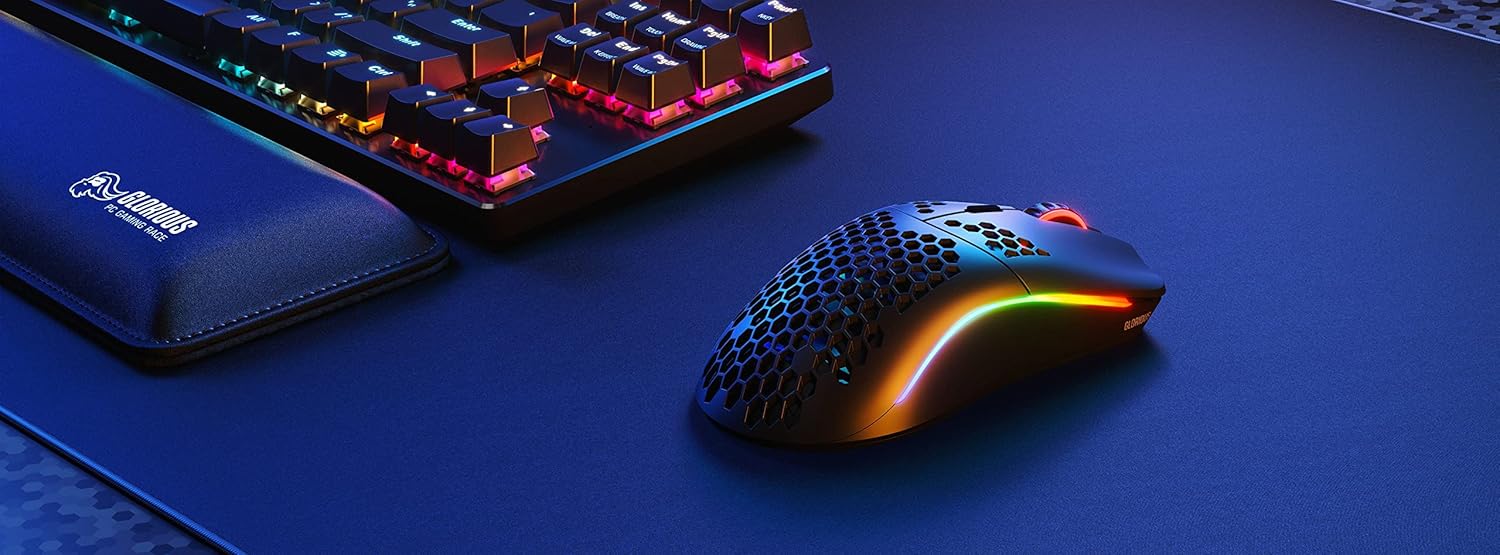
Image: A diagram detailing the technical specifications of the Model O Wireless, including dimensions, weight, DPI, and battery life.
Manutenzjoni
Tindif
To maintain optimal performance, regularly clean your mouse. Use a soft, dry cloth to wipe down the surface. For the honeycomb shell, a can of compressed air can help remove dust and debris. Avoid using harsh chemicals or abrasive materials.
G-Skates Care
The Glorious G-Skates Premium Mouse Feet are designed for smooth glide. Keep them clean and free of debris. If they become worn, replacement G-Skates can be purchased separately.
Issolvi l-problemi
For common issues such as connectivity problems, unresponsive buttons, or RGB lighting malfunctions, please refer to the official Troubleshooting Guide. This comprehensive PDF document provides detailed solutions and steps to resolve most issues.
Speċifikazzjonijiet
| Karatteristika | Dettall |
|---|---|
| Sensor | Glorious BAMF |
| Piż | 2.4 uqija (madwar 69g) |
| Max DPI | 19,000 |
| Veloċità tat-Traċċar (IPS) | 400 |
| Ir-Rata tal-Votazzjoni | Sa 1,000Hz |
| Konnettività bla fili | 2.4GHz Lag-Free Wireless |
| Max Battery Life | Up to 71 Hours (with RGB off) |
| Swiċċijiet | Omron (ikklassifikat għal 20M klikks) |
| Saqajn-Saqajn | G-Skates Premium PTFE |
| Dimensjonijiet (LxWxH) | 5 x 2.6 x 0.1 pulzieri |
| Sistema Operattiva | Windows, Mac, u Linux |
Garanzija u Appoġġ
The Glorious Model O Wireless Gaming Mouse comes with a 2-Sena Garanzija. Glorious offers hassle-free return and replacement on all Glorious electronic devices. For any questions or concerns, please visit the official Glorious support page or contact their customer service team.


