1. Introduzzjoni
Thank you for choosing OhO Smart Glasses, Model A8 PRO. These innovative sunglasses combine polarized UV400 protection lenses with an open-ear Bluetooth speaker system, allowing you to enjoy audio and manage calls while remaining aware of your surroundings. This manual provides essential information for setup, operation, maintenance, and troubleshooting to ensure optimal performance and longevity of your device.

Figure 1: OhO Smart Glasses Model A8 PRO, featuring a brown frame and black polarized lenses.
2. Kontenut tal-Pakkett
Jekk jogħġbok ivverifika li l-oġġetti kollha huma preżenti fil-pakkett tiegħek:
- OhO Smart Glasses (Model A8 PRO)
- Kejbil tal-Iċċarġjar (USB Tip-Ċ)
- Drapp tat-Tindif
- Kawża Protettiva
- Manwal għall-Utent
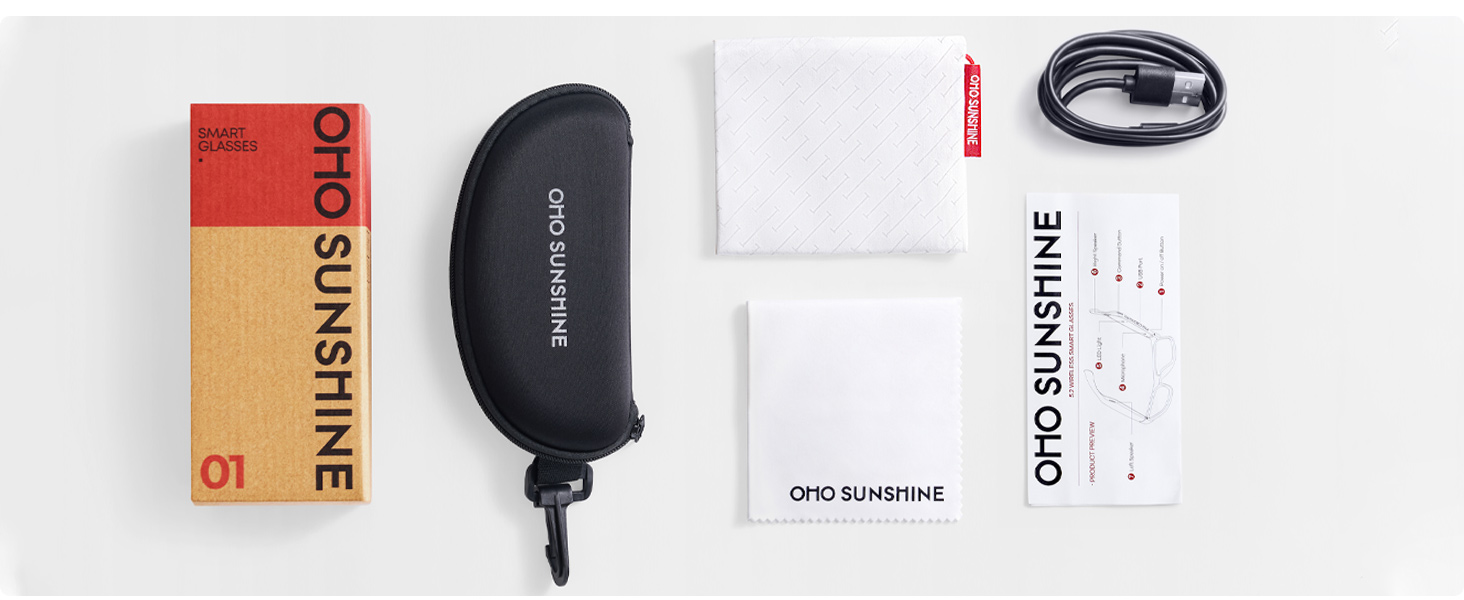
Figure 2: Included accessories with your OhO Smart Glasses.
3. Setup
3.1 Iċċarġjar tan-Nuċċali
Before first use, fully charge your OhO Smart Glasses. The glasses are equipped with a rechargeable Lithium Metal battery.
- Locate the USB Type-C charging port on the glasses frame.
- Connect the provided USB Type-C cable to the charging port.
- Qabbad it-tarf l-ieħor tal-kejbil ma' adapter tal-enerġija USB standard (mhux inkluż) jew mal-port USB tal-kompjuter.
- The indicator light will show charging status (refer to LED indicator section for details). A full charge typically takes approximately 2 hours.

Figure 3: USB Type-C charging cable for your device.
3.2 Tqabbil tal-Bluetooth
To connect your OhO Smart Glasses to your smartphone or other Bluetooth-enabled device:
- Ensure the glasses are charged and powered off.
- Press and hold the power button on the glasses until the LED indicator flashes rapidly (usually blue and red), indicating pairing mode.
- On your smartphone, navigate to the Bluetooth settings and turn Bluetooth on.
- Fittex għal available devices. The glasses will appear as 'OhO Smart Glasses' or a similar name.
- Select the glasses from the list to pair. Once connected, the LED indicator will typically show a slow blue flash or turn off, and you may hear an audible confirmation.
Figure 4: OhO Smart Glasses utilize Bluetooth 5.2 for stable connectivity.
4. Istruzzjonijiet Operattivi
4.1 Power On/Off
- Qawwa Mixgħul: Press and hold the power button for approximately 3 seconds until the LED indicator lights up and you hear a power-on prompt.
- Itfi: Press and hold the power button for approximately 5 seconds until the LED indicator turns off and you hear a power-off prompt.
4.2 Daqq tal-Awdjo
Once paired with your device, you can stream audio directly to your glasses' open-ear speakers.
- Play/Pawsa: Short press the multi-function button (often the same as the power button or a dedicated play/pause button).
- Track li jmiss: Agħfas darbtejn il-buttuna multi-funzjoni.
- Track preċedenti: Agħfas tliet darbiet il-buttuna multi-funzjoni.
- Volum 'il fuq: Agħfas il-buttuna tal-volum up.
- Volum 'l isfel: Agħfas il-buttuna 'l isfel tal-volum.

Figure 5: Open-ear speaker system integrated into the glasses frame.
4.3 Ġestjoni tas-Sejħiet
The integrated microphone allows for hands-free phone calls.
- Irrispondi Sejħa: Agħfas qasir il-buttuna multi-funzjoni meta tidħol telefonata.
- Tmiem Sejħa: Agħfas qasir il-buttuna multi-funzjoni waqt telefonata.
- Irrifjuta Sejħa: Agħfas u żomm il-buttuna multi-funzjoni għal żewġ sekondi meta tidħol telefonata.
4.4 Kontroll tal-Vuċi
Activate your device's voice assistant (Siri, Google Assistant, Cortana) for hands-free commands.
- Attiva l-Assistent tal-Vuċi: Double-press the multi-function button (or refer to specific model instructions if different).

Figure 6: Hands-free voice control for convenient interaction.
5. Manutenzjoni
5.1 Tindif
- Uża d-drapp tat-tindif provdut biex timsaħ bil-mod il-lentijiet u l-qafas.
- Għal tbajja’ iebsa, uża sprej għat-tindif tal-lentijiet iddisinjat speċifikament għall-nuċċalijiet. Evita kimiċi ħarxa jew materjali li joborxu.
- Do not submerge the glasses in water. While they offer some water resistance (IP44), direct submersion can cause damage.
5.2 Ħażna
- Meta ma tkunx qed tuża n-nuċċalijiet, aħżenhom fil-kaxxa protettiva tagħhom biex tevita l-grif u l-ħsara.
- Avoid exposing the glasses to extreme temperatures (hot or cold) or direct sunlight for extended periods, as this can affect battery life and frame integrity.
5.3 Kura tal-Batterija
- Biex ittawwal il-ħajja tal-batterija, evita li tiċċarġja kompletament il-batterija ta' spiss.
- Charge the glasses regularly, even if not used for a long time, to maintain battery health.
6 Issolvi l-problemi
| Problema | Kawża Possibbli | Soluzzjoni |
|---|---|---|
| Ma tistax tixgħel | Batterija baxxa | Iċċarġja l-nuċċalijiet kompletament. |
| Ma nistax nqabbad permezz tal-Bluetooth | Glasses not in pairing mode; Bluetooth off on device; already paired to another device | Ensure glasses are in pairing mode. Turn Bluetooth on your device. Disconnect from other devices. |
| L-ebda ħoss | Volume too low; not connected; audio source issue | Increase volume on glasses and connected device. Verify Bluetooth connection. Check audio source. |
| L-assistent tal-vuċi ma jirrispondix | Incorrect activation; device settings | Ensure correct button press for activation. Check voice assistant settings on your connected device. |
7. Speċifikazzjonijiet
- Mudell: A8 PRO
- Ditta: OhO xemx
- Dimensjonijiet tal-Prodott: 6.3 x 5.71 x 1.85 pulzieri
- Piż tal-oġġett: 1.28 uqija
- Verżjoni Bluetooth: 5.2
- Batterija: 1 batterija tal-Lithium Metal (inkluża)
- Ħajja tal-batterija: Up to 10 hours of audio playback (approximate)
- Tip ta' Lenti: Polarized, 100% UV400 Protection, Impact Resistant (ANSI/ISEA Z87.1-2015 standard)
- Awdjo: Open-ear speaker system, HD Microphone
- Kontroll: Voice control compatible with Siri, Cortana, Google Now
- Port tal-Iċċarġjar: USB Tip-Ċ
- Reżistenza għall-Ilma: IP44 (reżistenti għat-titjir)

Figure 7: Key features including UV400 protection and glare blocking.
8. Garanzija u Appoġġ
For warranty information or technical support, please refer to the documentation included with your purchase or contact OhO sunshine customer service directly. Details for contacting support can typically be found on the manufacturer's websit jew permezz tal-bejjiegħ bl-imnut tiegħek.


