1. Introduzzjoni
This manual provides essential information for the proper use and understanding of the uxcell Flexible Flat Ribbon Cable with Extension Connector. This product is designed for high-density electronic applications, commonly found in various LCD screens and digital devices.
The Flexible Flat Cable (FFC) is characterized by its extremely thin, flat design, making it suitable for compact electronic assemblies. Each end of the cable is reinforced with a stiffener to facilitate easier and more secure insertion into connectors.
This specific set includes a 25-pin FFC with a 0.3mm pitch and a length of 120mm, along with an extension connector board. The FFC is of 'A type', meaning the pins on both ends are on the same side.
2. Speċifikazzjonijiet tal-Prodott
| Karatteristika | Dettall |
|---|---|
| FPC Type | A type (Pin on the Same Side) |
| Labar | 25 Pin |
| Żift | 0.3mm |
| Flat Cable Length | 120mm (4.72 pulzieri) |
| Cable Size (L*W) | 120 x 8 mm / 4.72 x 0.31 pulzier |
| Board Size (L*W*H) | 21 x 16 x 1.15 mm / 0.83 x 0.63 x 0.05 pulzier |
| Materjal Estern | Plastik |
| Kulur tal-Cable | Brown, Copper Tone |
| Kulur tal-Bord | Aħdar |
| Dimensjonijiet tal-Prodott | 0.83 x 0.63 x 0.05 pulzieri; 0.21-il uqija |
| Numru tal-Mudell tal-Oġġett | a21031100ux0244 |

Figure 2.1: Visual representation of the cable's key specifications including length, pitch, and pin count.
3. Setup u Installazzjoni
The uxcell Flexible Flat Ribbon Cable with Extension Connector is designed for straightforward installation in compatible electronic devices. Follow these steps for proper setup:
- Identifika l-Punti ta' Konnessjoni: Locate the FFC connector on your device's circuit board and the corresponding slot on the uxcell extension connector board.
- Ipprepara l-Konnettur: If the extension connector has a locking mechanism (e.g., a flip-up or slide-out tab), gently open it to prepare for cable insertion.
- Insert the FFC: Carefully align the flexible flat cable with the connector slot. Ensure the metallic contacts on the FFC are facing the correct direction (usually downwards, towards the circuit board, or as indicated by the connector design). The stiffener at the end of the FFC aids in insertion.
- Sikura l-Konnessjoni: Once the FFC is fully inserted into the connector, gently close the locking mechanism (if applicable) to secure the cable in place. Ensure the cable is seated firmly and evenly.
- Connect the Extension Board: Repeat the process to connect the other end of the FFC to the extension connector board, or connect the extension connector board to another FFC or device as intended.

Figure 3.1: Illustration demonstrating the process of flipping up the connector tab to insert the flexible flat cable.
Nota Importanti: Always handle FFCs and their connectors with care to avoid bending or damaging the pins or the cable itself. Improper insertion can lead to poor contact or damage to the components.
4. Operazzjoni u Funzjonalità
The uxcell Flexible Flat Ribbon Cable with Extension Connector serves as a crucial component for extending or adapting connections in electronic circuits, particularly those utilizing FFC interfaces. Its primary function is to provide a reliable electrical pathway between two points, often bridging a gap or converting a connection type.
- Trażmissjoni tas-Sinjal: The cable facilitates the transmission of electrical signals between connected components, such as LCD screens, digital cameras, camcorders, laptops, and monitors.
- Ottimizzazzjoni tal-Ispazju: Its flat and flexible design allows for routing in tight spaces where traditional round cables would be impractical, contributing to compact device designs.
- Connection Adaptation: The extension connector board can act as an adapter, converting a 51-pin seat (original design) to a 25-pin converter seat, as specified for this product, enabling compatibility between different pin configurations.

Figure 4.1: The uxcell FFC and extension connector assembled, ready for integration into an electronic system.
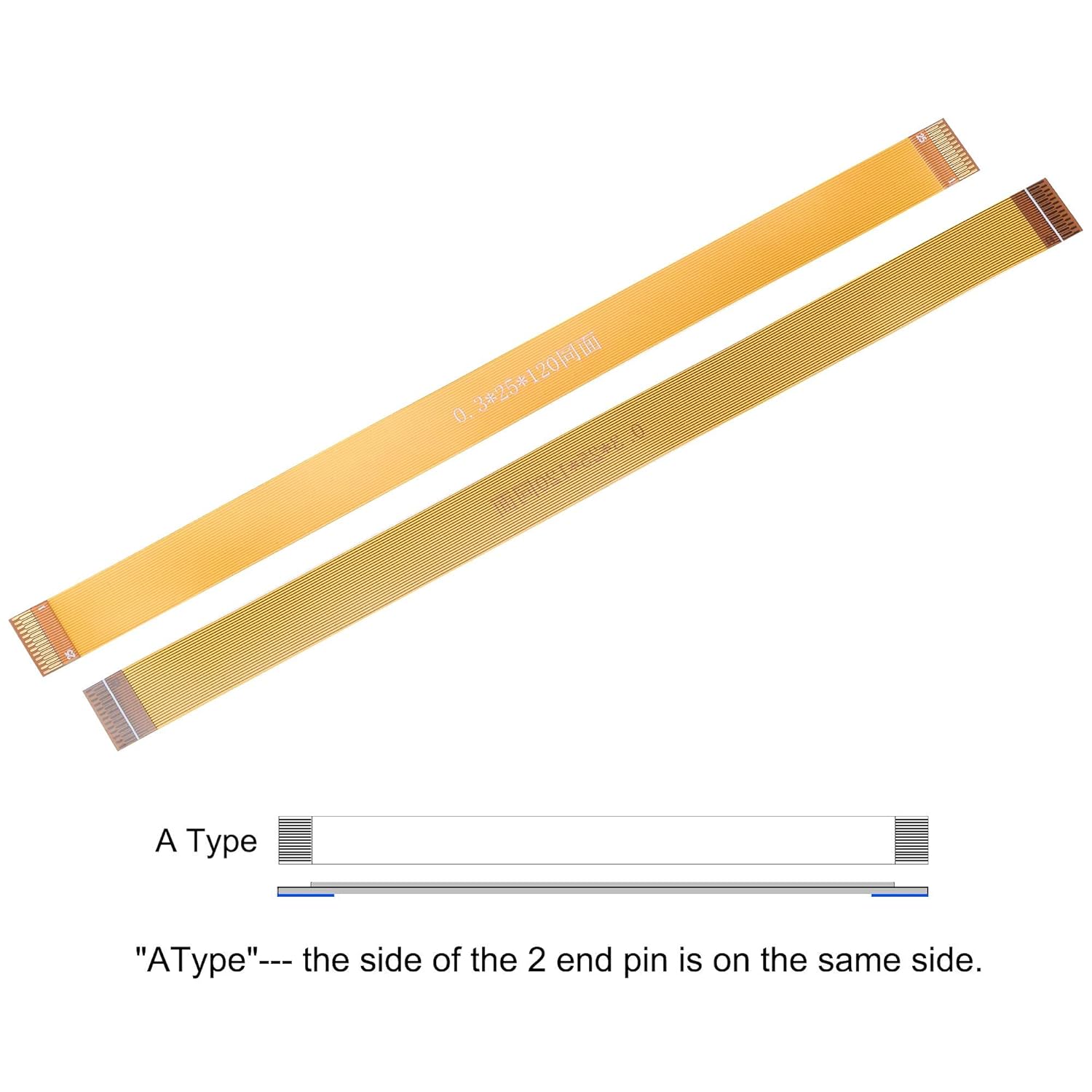
Figure 4.2: Explanation of the 'A Type' FFC, indicating that the pins on both ends are oriented on the same side.
5. Kura u Manutenzjoni
To ensure the longevity and reliable performance of your uxcell Flexible Flat Ribbon Cable and Extension Connector, observe the following care guidelines:
- Immaniġġja b'Kura: Avoid sharp bends, twists, or excessive pulling on the flexible flat cable, as this can damage the internal conductors.
- Żomm Nadif: Ensure the metallic contacts on the FFC and within the connectors are free from dust, dirt, and moisture. Use a soft, dry, lint-free cloth or compressed air for cleaning if necessary. Avoid using liquid cleaners directly on contacts.
- Ħażna xierqa: When not in use, store the cable and connector in a dry, cool environment, away from direct sunlight and extreme temperatures. Avoid coiling the cable tightly.
- Evita l-Iskarika Statika: When handling, especially during installation, take precautions against electrostatic discharge (ESD) which can damage sensitive electronic components.

Figura 5.1: Dettaljata view of the FFC end, highlighting the reinforced stiffener designed for easier and safer insertion.
6 Issolvi l-problemi
If you encounter issues with the uxcell Flexible Flat Ribbon Cable or Extension Connector, consider the following common troubleshooting steps:
- No Signal/Intermittent Connection:
- Ensure the FFC is fully and correctly seated in both the device's connector and the extension connector.
- Verify that the connector's locking mechanism (if present) is securely closed.
- Check for any visible damage to the FFC (e.g., creases, tears, bent pins) or the connector.
- Clean the contacts on the FFC and within the connector using a suitable method (e.g., compressed air, lint-free cloth).
- Incorrect Pin Orientation:
- Confirm that the FFC is inserted with the correct pin orientation. For 'A type' cables, pins are on the same side. Refer to your device's documentation for specific orientation requirements.
- Ħsara Fiżika:
- If the cable or connector shows signs of physical damage (e.g., frayed wires, cracked plastic), it may need replacement.
If the issue persists after performing these checks, consult the documentation for the device you are connecting the cable to, or seek assistance from a qualified technician.
7. Garanzija u Appoġġ
Specific warranty details for this product are not provided within this manual. For information regarding warranty coverage, returns, or technical support, please refer to the product listing on the retailer's website or contact uxcell directly through their official channels.
You can often find additional support and product information by visiting the official uxcell store on Amazon: uxcell Amazon Store.
