1. Introduzzjoni
Grazzi tax-xiriasing the EARISE D61 Plus Bluetooth Speaker. This manual provides important information regarding the safe operation, setup, and maintenance of your device. Please read it thoroughly before use and retain it for future reference.

Image 1.1: The EARISE D61 Plus Bluetooth Speaker, showcasing its portable design and integrated RGB lighting.
2. Informazzjoni Importanti dwar is-Sigurtà
- Do not expose the speaker to water or excessive moisture, as it is not waterproof.
- Evita temperaturi estremi, dawl tax-xemx dirett, jew sorsi ta’ sħana.
- Do not disassemble, repair, or modify the device. Refer all servicing to qualified personnel.
- Uża biss il-kejbil tal-iċċarġjar u l-adapter tal-enerġija speċifikati.
- Żomm il-kelliem 'il bogħod mit-tfal u l-annimali domestiċi.
- Do not operate the speaker at excessively high volumes for prolonged periods to prevent hearing damage.
3. Kontenut tal-Pakkett
Jekk jogħġbok iċċekkja l-pakkett għall-oġġetti li ġejjin:
- EARISE D61 Plus Bluetooth Speaker
- Cable tal-Iċċarġjar tal-USB
- Manwal għall-Utent (dan id-dokument)
Jekk xi oġġetti huma nieqsa jew bil-ħsara, jekk jogħġbok ikkuntattja l-appoġġ għall-klijenti.
4. Prodott Aktarview
Iffamiljarizza ruħek mal-komponenti u l-kontrolli tal-ispiker.
Stampa 4.1: Quddiem view of the EARISE D61 Plus speaker, highlighting the control panel and speaker grille.
4.1 Pannell tal-Kontroll u Portijiet

Image 4.2: Diagram illustrating the various input options and features of the speaker, including USB, TF card, AUX, Microphone, Bluetooth, and FM radio.
- MODE/LIGHT Button: Short press to switch between input modes (Bluetooth, AUX, USB, TF, FM). Long press to change light effects.
- M-/V- Button: Short press for previous track (in music modes) or previous station (in FM mode). Long press to decrease volume.
- MSCAN/TWS Button: Short press to Play/Pause (in music modes) or auto-scan FM stations (in FM mode). Long press to activate TWS pairing.
- M+/V+ Button: Short press for next track (in music modes) or next station (in FM mode). Long press to increase volume.
- Port USB: Għall-plejbek ta' flash drive tal-USB.
- Slott tal-Karta TF: Għall-plejbek ta' karta TF (MicroSD).
- Input AUX: Għall-konnessjoni ta' apparati awdjo esterni permezz ta' kejbil awdjo ta' 3.5mm.
- Input MIC: Għall-konnessjoni ta 'mikrofonu.
- Port tal-Iċċarġjar: Għall-iċċarġjar tal-batterija interna tal-ispiker.
5. Setup
5.1 Iċċarġjar tal-Ispeaker
Before first use, fully charge the speaker. Connect the provided USB charging cable to the speaker's charging port and the other end to a USB power adapter (not included) or a computer's USB port. The charging indicator will illuminate during charging and turn off when fully charged.

Image 5.1: Visual representation of the speaker being charged, indicating battery status.
5.2 Tixgħel/Jitfi
Press and hold the Power button (often integrated with the MODE button or a separate switch, refer to physical device for exact location) to turn the speaker ON or OFF. A sound prompt will indicate the power status.
5.3 Tqabbil tal-Bluetooth
- Ensure the speaker is powered on and in Bluetooth mode (indicated by a voice prompt or flashing LED). If not, short press the MODE/LIGHT button to switch to Bluetooth mode.
- Ippermetti l-Bluetooth fuq l-apparat mobbli tiegħek (smartphone, tablet, eċċ.).
- Fittex għal available Bluetooth devices. You should see "EARISE D61 Plus" in the list.
- Select "EARISE D61 Plus" to connect. Once paired, a confirmation sound will be heard.
- The speaker will automatically reconnect to the last paired device when in Bluetooth mode, if the device is within range and Bluetooth is enabled.
Tqabbil ta' 5.4 TWS (Stereo Wireless Veru)
To achieve stereo sound, you can pair two EARISE D61 Plus speakers together.

Image 5.2: Illustration of two EARISE D61 Plus speakers connected via TWS for a stereo audio experience, controlled by a single smartphone.
- Ensure both EARISE D61 Plus speakers are powered on and in Bluetooth mode, but not yet connected to any device.
- On one of the speakers (this will be the primary speaker), long press the MSCAN/TWS button. You will hear a prompt indicating TWS pairing mode.
- Iż-żewġ kelliema jfittxu u jikkonnettjaw ma' xulxin awtomatikament. Ħoss ta' konferma jindika tqabbil b'suċċess tat-TWS.
- Once paired, the primary speaker will be ready for Bluetooth connection to your mobile device. Follow the steps in "5.3 Bluetooth Pairing" to connect your device to the primary speaker.
- L-awdjo issa se jindaqq b'mod stereo miż-żewġ kelliema.
- To disconnect TWS, long press the MSCAN/TWS button on either speaker.
6. Istruzzjonijiet Operattivi
6.1 Għażla tal-Modalità
Agħfas qasir il- MODALITÀ / DAWL button to cycle through available input modes: Bluetooth, AUX, USB, TF Card, FM Radio.
6.2 Audio Playback (Bluetooth, USB, TF Card, AUX)
- Play/Pawsa: Agħfas qasir il- MSCAN/TWS buttuna.
- Track li jmiss: Agħfas qasir il- M+/V+ buttuna.
- Track preċedenti: Agħfas qasir il- M-/V- buttuna.
- Volum 'il fuq: Agħfas fit-tul il- M+/V+ buttuna.
- Volum 'l isfel: Agħfas fit-tul il- M-/V- buttuna.
6.3 Tħaddim tar-Radju FM
- Aqleb għall-modalità FM billi tuża l- MODALITÀ / DAWL buttuna.
- Agħfas qasir il- MSCAN/TWS button to automatically scan and save available FM stations. The speaker will play the first saved station.
- Stampa qasira M+/V+ or M-/V- biex tinnaviga bejn stazzjonijiet salvati.
6.4 Effetti tad-Dawl RGB
The speaker features dynamic RGB lighting. Long press the MODALITÀ / DAWL button to cycle through different light modes or turn the lights off.
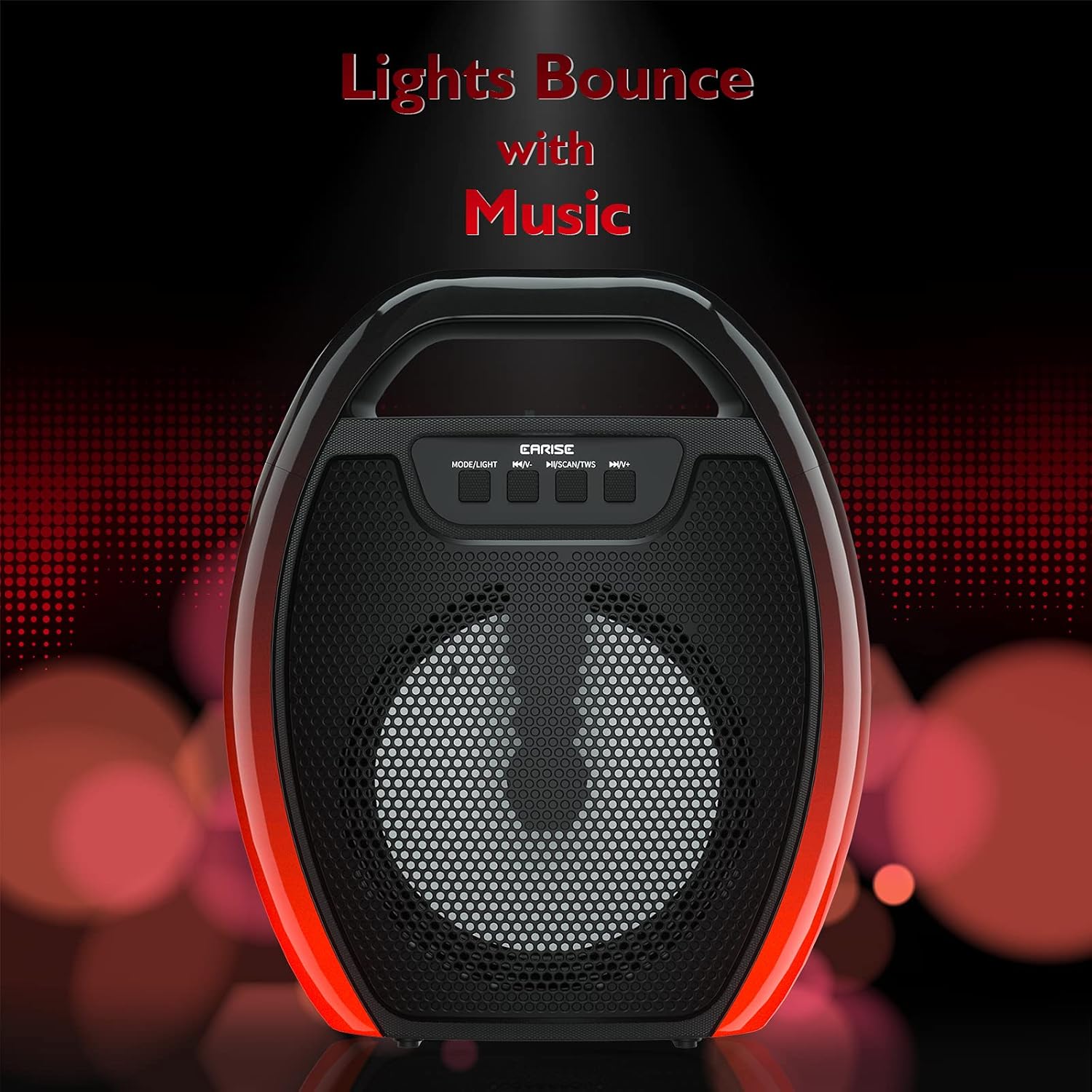
Image 6.1: The speaker displaying its light effects, which can synchronize with music playback.
6.5 Input tal-mikrofonu
Connect a wired microphone (not included) to the MIC input port for karaoke or public address functions. Adjust the microphone volume using the connected microphone's controls or the speaker's main volume controls.
7. Manutenzjoni
- Tindif: Uża drapp artab u niexef biex tnaddaf l-ispiker. Tużax prodotti tat-tindif likwidi jew aerosols.
- Ħażna: Aħżen l-ispiker f'post frisk u niexef 'il bogħod mix-xemx diretta u minn temperaturi estremi.
- Kura tal-batterija: To prolong battery life, fully charge the speaker before long periods of inactivity and recharge it at least once every three months. Avoid completely draining the battery frequently.
8 Issolvi l-problemi
| Problema | Kawża Possibbli | Soluzzjoni |
|---|---|---|
| L-ispiker ma jixgħelx. | Batterija baxxa; Il-buttuna tal-qawwa mhux ippressata sew. | Charge the speaker; Press and hold the Power button for a few seconds. |
| Ma tistax tqabbad permezz tal-Bluetooth. | Speaker not in pairing mode; Device Bluetooth off; Speaker too far from device; Already connected to another device. | Ensure speaker is in Bluetooth pairing mode; Turn on Bluetooth on your device; Move device closer to speaker; Disconnect from other devices. |
| L-ebda ħoss. | Volum baxx wisq; Modalità ta' input mhux korretta; L-apparat mhux qed idoqq l-awdjo. | Increase speaker and device volume; Switch to correct input mode (Bluetooth, AUX, etc.); Ensure audio is playing on your device. |
| It-tqabbil tat-TWS ifalli. | Speakers too far apart; One speaker already paired to a device; Not in TWS pairing mode. | Ensure speakers are close; Disconnect both speakers from any devices; Long press MSCAN/TWS on one speaker to initiate TWS pairing. |
| Id-dwal RGB mhux qed jaħdmu. | Lights turned off; Malfunction. | Long press MODE/LIGHT button to cycle through light modes; If issue persists, contact support. |
9. Speċifikazzjonijiet
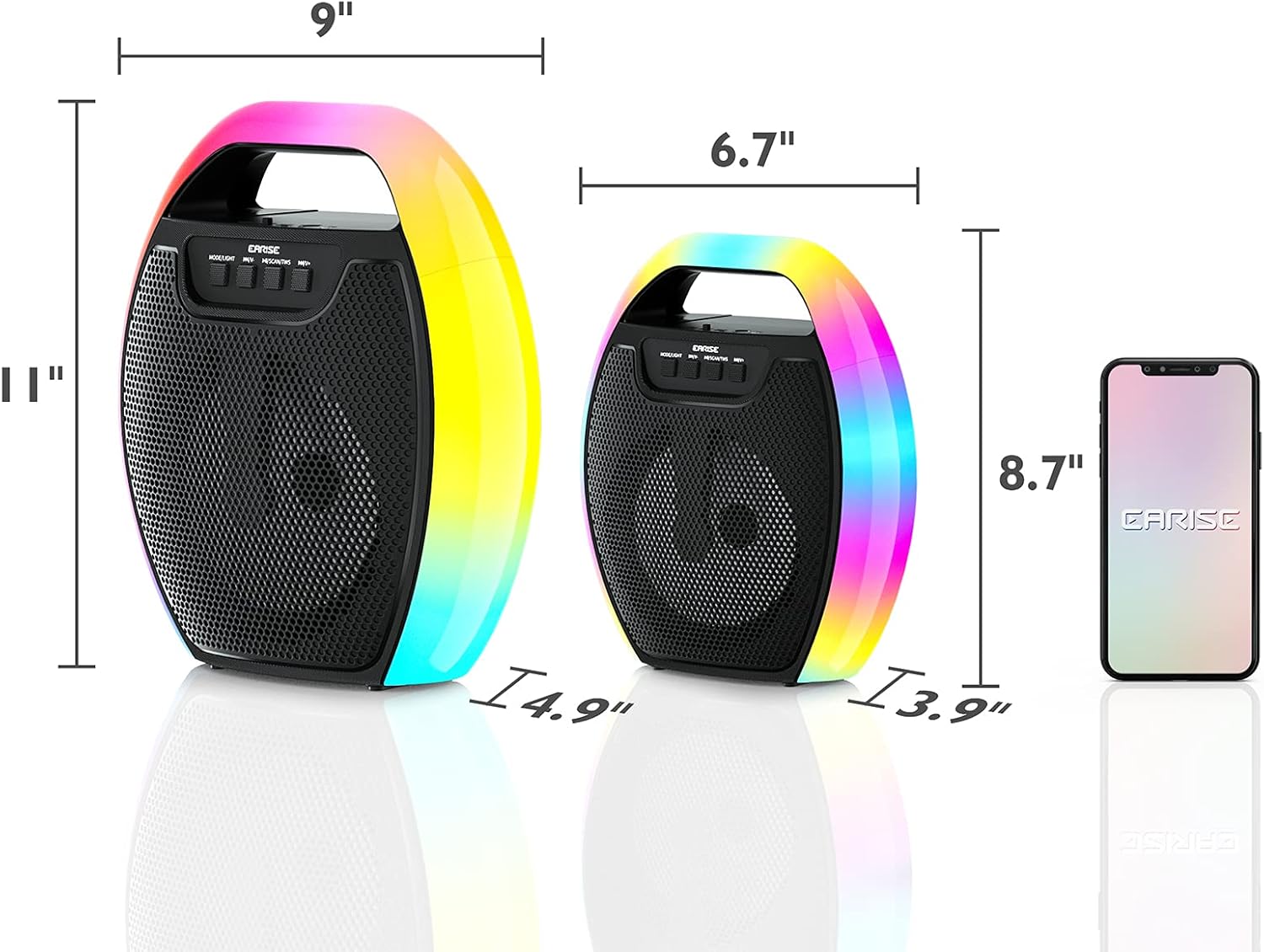
Image 9.1: Product dimensions of the EARISE D61 Plus speaker.
| Karatteristika | Dettall |
|---|---|
| Isem tal-Mudell | D61 Plus |
| Brand | QUDDIEM |
| Teknoloġija tal-Konnettività | Bluetooth, Auxiliary (3.5mm), USB, TF Card, FM Radio |
| Modalità tal-Ħruġ tal-Awdjo | Stereo (bit-TWS) |
| Tip ta' Kelliem | Speaker ta 'barra li jinġarr |
| Daqs tal-Kelliem | 4 Pulzier |
| Sors tal-Enerġija | Mħaddma bil-batterija |
| Ħajja tal-batterija | Up to 12 Hours (actual playtime varies with volume and light usage) |
| Waterproof | Nru |
| Dimensjonijiet tal-Prodott | 9 x 5 x 11 pulzieri (L x W x H) |
| Piż tal-oġġett | 2.28 liri |
| Karatteristiċi Speċjali | RGB Lights, TWS Pairing, Portable |
10. Garanzija u Appoġġ
EARISE products are designed and manufactured to the highest quality standards. For information regarding warranty coverage, technical support, or service inquiries, please refer to the warranty card included with your purchase or visit the official EARISE websit.
Jekk jogħġbok żomm il-prova tax-xiri tiegħek għal pretensjonijiet ta' garanzija.


