Introduzzjoni
Thank you for choosing the PHEANOO D6 Sound Bar System. This 2.1 channel soundbar with a dedicated wired subwoofer is designed to enhance your audio experience, providing clear dialogue, powerful bass, and immersive sound for your home entertainment. This manual provides detailed instructions for setup, operation, maintenance, and troubleshooting to ensure optimal performance and longevity of your device.
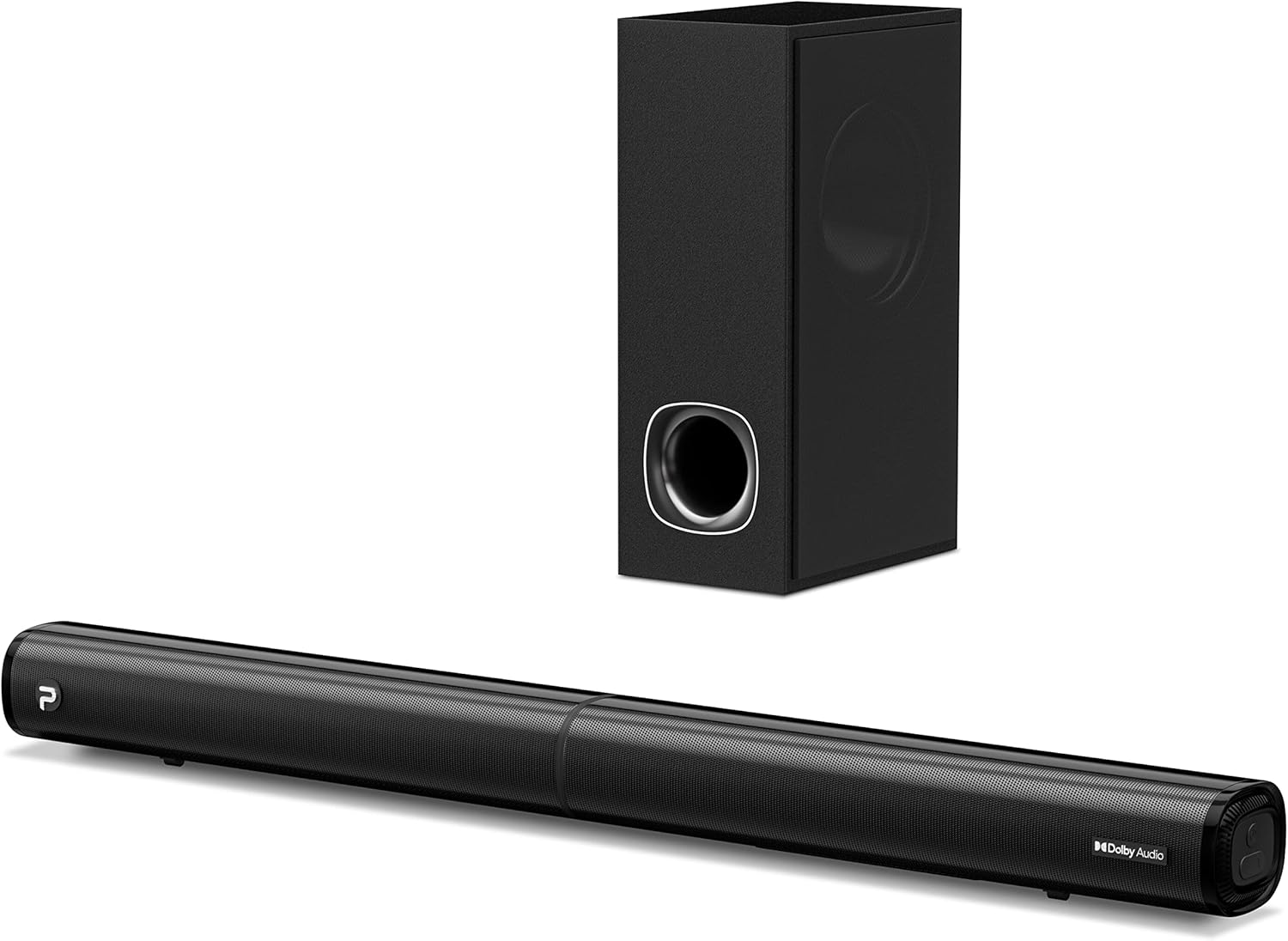
Image: The PHEANOO D6 Sound Bar and its accompanying wired subwoofer, showcasing id-disinn iswed eleganti tagħhom.
X'hemm fil-Kaxxa
Jekk jogħġbok iċċekkja l-kontenut tal-pakkett bir-reqqa. Jekk xi oġġetti huma nieqsa jew bil-ħsara, ikkuntattja l-appoġġ għall-klijenti.
- Soundbar and Wired Subwoofer
- Cable HDMI
- Kejbil tal-awdjo RCA
- Wall Mount Kit (screws and anchors)
- Kontroll mill-bogħod (batteriji mhux inklużi)
- Adapter tal-Enerġija

Image: All components included in the PHEANOO D6 Sound Bar package, laid out for clear identification, including the soundbar, subwoofer, cables, remote, and wall mount kit.
Setup
1. Assembling the Soundbar (Detachable Design)
The PHEANOO D6 soundbar features a unique detachable design for flexible placement. Follow these steps to assemble it:
- Align the audio connector from one half of the soundbar with the corresponding port on the other half.
- Gently push the two halves together until they click into place.
- Twist the two halves to secure the connection, ensuring the soundbar is firmly assembled.

Image: A three-step visual guide demonstrating how to connect the two halves of the detachable soundbar, ensuring proper alignment and secure locking.
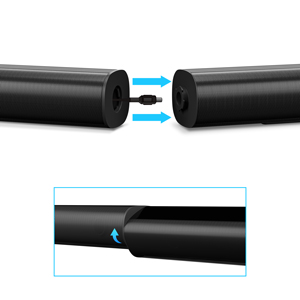
Immaġni: Close-up view of the soundbar's detachable connection point, showing the male and female connectors.
2. Tqabbad is-Subwoofer
Qabbad is-subwoofer bil-fili mas-soundbar billi tuża l-kejbil apposta għas-subwoofer. Kun żgur li l-konnessjoni hija sigura.
3. Għażliet ta' Tqegħid
You can place the soundbar on a tabletop or mount it on a wall.
- Poġġiment fuq il-mejda: Poġġi s-soundbar direttament quddiem it-TV tiegħek, waqt li tiżgura li ma tostakolax is-senser tar-remote tat-TV.
- Immuntar tal-ħajt: Use the included wall mount kit. It is recommended to measure and mark the drilling points accurately, rather than relying solely on the paper stencil, to ensure a level installation.
4. Konnessjonijiet tal-Awdjo
The PHEANOO D6 offers multiple connectivity options. Choose the best one for your device:
- HDMI (ARC): For the best audio quality and control, connect an HDMI cable from the soundbar's HDMI (ARC) port to your TV's HDMI (ARC) port. This allows your TV remote to control the soundbar's volume.
- Ottiċi: Connect an optical cable from the soundbar's Optical port to your TV's Optical Digital Audio Out port.
- AUX: Use the 3.5mm AUX cable to connect to devices with a 3.5mm audio output.
- Bluetooth 5.0: For wireless connection, pair your device via Bluetooth.

Image: The rear panel of the PHEANOO D6 Sound Bar, highlighting the HDMI (ARC), Bluetooth, Optical, and AUX input ports with corresponding icons.

Immaġni: Dettaljata view of the soundbar's input panel, showing the AUX, Optical, and HDMI (ARC) ports clearly labeled.
5. Konnessjoni tal-Enerġija
Connect the power adapter to the soundbar and then plug it into a wall outlet.
Istruzzjonijiet Operattivi
Kontroll mill-bogħod
The included remote control allows you to manage all functions of the soundbar. Insert two AAA batteries (not included) into the remote before use.

Image: The remote control for the PHEANOO D6 Sound Bar, showing its buttons and an indicator light.
Qawwa mixgħul/mitfi
Press the power button on the remote or the soundbar to turn the unit on or off.
Għażla tal-Input
Press the "Input" button on the remote to cycle through available input sources: HDMI (ARC), Optical, AUX, and Bluetooth.
Tqabbil tal-Bluetooth
Biex tgħaqqad apparat Bluetooth:
- Select Bluetooth input on the soundbar. The indicator light will flash.
- Enable Bluetooth on your device (smartphone, tablet, etc.) and search for "PHEANOO D6".
- Select the soundbar from the list to pair. Once connected, the indicator light will be solid.

Image: A smartphone displaying a music app, wirelessly connected to the PHEANOO D6 Sound Bar via Bluetooth, indicated by a Wi-Fi like symbol.
Modi tal-Ħsejjes
The soundbar offers various sound modes to optimize your listening experience:
- Modalità Djalogu: Enhances vocal clarity, making speech easier to understand.
- Modalità Mużika: Ottimizzat għad-daqq tal-mużika, li jipprovdi awdjo bilanċjat.
- Modalità tal-Film: Delivers an immersive cinematic experience with enhanced effects.
- Modalità 3D: Creates a wider, more enveloping soundstage.

Image: Icons representing different sound modes: Dialogue, Music, Movie, and 3D, indicating the soundbar's versatility.
Aġġustament tal-Bass
Use the dedicated bass control buttons on the remote to increase or decrease the subwoofer's output level to your preference.

Image: A close-up of the subwoofer, with a visual effect suggesting powerful bass emanating from it.
Dolby Digital Support
The PHEANOO D6 Sound Bar supports Dolby Digital decoding, providing a rich and dynamic audio experience for compatible content.

Image: A living room setup with the soundbar and TV, overlaid with a grid pattern indicating premium 3D surround sound powered by Dolby Audio.

Image: The Dolby Audio logo accompanied by visual representations of sound waves, emphasizing the enhanced audio quality.
Roku TV Ready
This soundbar is certified to work seamlessly with your Roku TV. Enjoy smooth setup, easy access to sound settings, and compatibility with any Roku TV remote.

Image: A television screen displaying the "Roku TV Ready" setup interface, with the PHEANOO Soundbar and subwoofer positioned below it, illustrating seamless integration.
Manutenzjoni
- Tindif: Use a soft, dry cloth to clean the surfaces of the soundbar and subwoofer. Do not use liquid cleaners or aerosols.
- Ventilazzjoni: Aċċerta ruħek li jkun hemm ventilazzjoni xierqa madwar is-soundbar u s-subwoofer biex tevita li jisħon iżżejjed. Timblokkax xi fetħiet tal-ventilazzjoni.
- Ħażna: Jekk se taħżen l-unità għal perjodu estiż, skonnettjaha mill-elettriku u aħżenha f'post frisk u niexef.
Issolvi l-problemi
| Problema | Kawża Possibbli | Soluzzjoni |
|---|---|---|
| Ebda qawwa | Kejbil tal-enerġija mhux imqabbad; Is-sokit tal-enerġija mhux qed jaħdem. | Kun żgur li l-kejbil tal-enerġija huwa konness sew. Ipprova sokit tal-enerġija differenti. |
| L-ebda ħoss | Input mhux korrett magħżul; Volum baxx wisq; Kejbils mhux imqabbda sew. | Select the correct input source. Increase volume. Check all audio cable connections. |
| Tqabbil Bluetooth falla | Is-soundbar mhux fil-modalità ta' tqabbil; L-apparat wisq 'il bogħod; Interferenza. | Ensure soundbar is in Bluetooth input and indicator is flashing. Move device closer. Turn off other Bluetooth devices. |
| Kwalità tal-ħoss fqira | Incorrect sound mode; Source audio quality is low. | Try different sound modes (Music, Movie, Dialogue). Ensure the audio source is high quality. |
| Il-kontroll mill-bogħod ma jaħdimx | Batteries dead or incorrectly inserted; Obstruction between remote and soundbar. | Ibdel il-batteriji, waqt li tiżgura l-polarità korretta. Neħħi kwalunkwe ostaklu. |
For more detailed troubleshooting, refer to the official Troubleshooting Guide PDF available on the product page or contact PHEANOO customer support.
Speċifikazzjonijiet
| Karatteristika | Dettall |
|---|---|
| Mudell | D6 |
| Brand | PHEANOO |
| Tip ta' Kelliem | Soundbar b'subwoofer bil-fili |
| Konfigurazzjoni tal-Kanal | 2.1 CH |
| Teknoloġija tal-Konnettività | HDMI (ARC), Bluetooth 5.0, Optical, AUX |
| Medda Bluetooth | Up to 100 Meters (approx. 328 feet) |
| Qawwa tal-Ħruġ Massimu tal-Ispeaker | 240 Watts |
| Dimensjonijiet tal-Prodott (Soundbar) | 29.5"W x 2.4"Għ x 2.8"F |
| Piż tal-oġġett | 11.57 Liri |
| Tip ta' Kontrollur | Kontroll mill-bogħod |
| Karatteristiċi Speċjali | Dolby Digital Decoding, Dialogue Enhancement, Bass Adjustable, Detachable Design, Roku TV Ready |
Garanzija u Appoġġ
The PHEANOO D6 Sound Bar System comes with a Garanzija LimitataJekk jogħġbok irreferi għall-karta tal-garanzija inkluża fil-pakkett tiegħek għal termini u kundizzjonijiet speċifiċi.
For technical support, warranty claims, or further assistance, please visit the official PHEANOO website or contact their customer service department. You can also find additional resources like the Gwida għall-Utent (PDF) u Gwida għas-Soluzzjoni tal-Problemi (PDF) onlajn.


