Introduzzjoni
This manual provides detailed instructions for the Google Pixel Buds A-Series wireless earbuds. These earbuds are designed to deliver high-quality audio and feature a comfortable, secure fit with multiple eartip sizes and a stabilizer arc. They are compatible with Android, iOS, and other Bluetooth 4.0+ devices.
X'hemm fil-Kaxxa
- Google Pixel Buds A-Series Earbuds
- Kawża tal-Iċċarġjar
- Cable tal-Iċċarġjar tal-USB-C
- Eartips (Small, Medium, Large)
- Gwida ta' Bidu Mgħaġġel (mhux inkluża f'dan il-manwal diġitali)

Image: Google Pixel Buds A-Series earbuds securely placed within their white charging case, which is open to reveal the earbuds.
Setup
1. Tqabbil Inizjali
For Android Devices (One-Tap Pairing):
- Ensure your Android device is unlocked and has Bluetooth enabled.
- Open the charging case of your Pixel Buds A-Series next to your Android device.
- A pairing notification will appear on your device's screen. Tap to connect.
- Follow any on-screen prompts to complete the setup, including installing the Pixel Buds app for additional features.
For iOS and Other Bluetooth 4.0+ Devices:
- With the earbuds in the charging case, open the lid.
- Press and hold the pairing button on the back of the charging case until the status light begins to pulse white.
- On your device, navigate to Bluetooth settings and select "Pixel Buds A-Series" from the list of available devices.
- Confirm the pairing on your device.
2. Achieving a Secure Fit
The Pixel Buds A-Series come with three sizes of eartips (small, medium, large) and a flexible stabilizer arc to ensure a comfortable and secure fit.
- Experiment with different eartip sizes to find the best seal for your ears. A good seal is crucial for optimal sound quality and bass response.
- Gently insert each earbud into your ear, rotating slightly until the stabilizer arc tucks comfortably into your ear's concha.

Immaġni: Close-up view of a single Google Pixel Bud A-Series earbud, highlighting its ergonomic design, eartip, and stabilizer arc.
Istruzzjonijiet Operattivi
1. Touch Kontrolli
The Pixel Buds A-Series feature touch controls on the outer surface of each earbud.
- Tektek Uniku: Daqq/Pawża l-awdjo, Wieġeb/Tmiem is-sejħa.
- Tektek doppju: Skip forward a track, Decline call.
- Tektek triplu: Skip backward a track.
- Agħfas u żomm: Activate Google Assistant (Android only), or hear notifications.
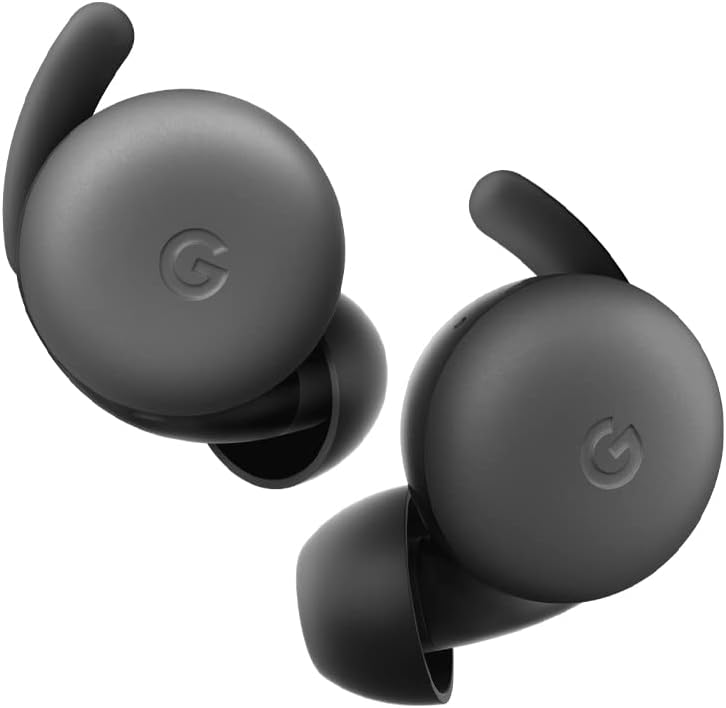
Image: A pair of Google Pixel Buds A-Series earbuds, showcasing their compact design and the 'G' logo on the touch-sensitive surface.
2. Google Assistant Integration
With a compatible Android device, you can access Google Assistant directly from your Pixel Buds A-Series.
- Say "Hey Google" or "Ok Google" to activate the Assistant hands-free.
- Alternatively, press and hold either earbud to speak to Google Assistant.
- You can ask for directions, check weather, control music, or have notifications read aloud.
3. Iċċarġjar
The Pixel Buds A-Series provide up to 5 hours of listening time or 2.5 hours of talk time on a single charge. The charging case extends this to up to 24 hours of total listening time.
- To charge the earbuds, place them inside the charging case. The indicator light on the case will show their charging status.
- To charge the case, connect it to a USB-C power source using the provided cable. The case's indicator light will show its charging status.
Manutenzjoni
1. Tindif
- Regularly clean your earbuds and charging case to maintain performance and hygiene.
- Use a soft, dry, lint-free cloth to wipe the exterior of the earbuds and case.
- For eartips, gently remove them and clean with a mild soap solution and water, then rinse and dry thoroughly before reattaching.
- Evita li tuża materjali li joborxu jew kimiċi ħarxa.
2. Ħażna
- Always store the Pixel Buds A-Series in their charging case when not in use to protect them and keep them charged.
- Aħżen f'post frisk u niexef 'il bogħod minn temperaturi estremi u dawl tax-xemx dirett.
Issolvi l-problemi
If you encounter issues with your Pixel Buds A-Series, try the following steps:
- Ebda Ħoss jew Konnessjoni Intermittenti:
- Kun żgur li ż-żewġ earbuds huma ċċarġjati.
- Check that Bluetooth is enabled on your device and the earbuds are connected.
- Try placing the earbuds back in the case, closing the lid for a few seconds, then reopening to reset the connection.
- Insieh l-apparat fis-settings tal-Bluetooth tat-telefon tiegħek u erġa' qabbadh.
- Ensure your device is within the Bluetooth range (up to 10 meters).
- Earbuds Mhux Jiċċarġjaw:
- Kun żgur li l-kaxxa tal-iċċarġjar innifisha hija ċċarġjata.
- Iċċekkja li l-earbuds huma mqiegħda sew fil-kaxxa tal-iċċarġjar.
- Naddaf il-kuntatti tal-iċċarġjar kemm fuq il-earbuds kif ukoll ġewwa l-kaxxa b'tajjara niexfa tal-qoton.
- Ipprova kejbil USB-C u adapter tal-enerġija differenti.
- Kwalità tal-Ħoss Fqira:
- Ensure you have a secure fit with the correct eartip size.
- Naddaf ix-xibka tal-earbuds u l-eartips.
- Check your device's audio settings and equalizer.
Speċifikazzjonijiet
| Isem tal-Mudell | Pixel Buds A-Series |
| Teknoloġija tal-Konnettività | Mingħajr fili (Bluetooth 5.0) |
| Apparati Kompatibbli | Android, iOS, and Bluetooth 4.0+ devices |
| Ħajja tal-Batterija (Earbuds) | Sa 5 sigħat ta' smigħ, 2.5 sigħat ta' konverżazzjoni |
| Ħajja tal-Batterija (bil-Kaxxa tal-Iċċarġjar) | Up to 24 hours listening |
| Livell ta 'Reżistenza għall-Ilma | Water Resistant (IPx4 rating for earbuds) |
| Tip ta' Kontroll | Touch (Media Control, Google Assistant) |
| Piż tal-oġġett | 1.9 uqija (total) |
| Dimensjonijiet (Earbud) | 0.81 x 1.15 x 0.69 pulzieri |
| Medda ta' Frekwenzi | 20 Hz - 20,000 Hz |
| Medda Bluetooth | 10 Meters |
Garanzija u Appoġġ
For detailed warranty information and customer support, please refer to the official Google Pixel Buds support websit. Tipikament tista' ssib riżorsi ta' appoġġ, FAQs, u għażliet ta' kuntatt fuq g.co/pixelbuds/help.
The Pixel Buds A-Series are designed to be repairable, but any repair, disassembly, or damage may affect the water resistance rating.


