Prodott Overview
The Poly Sync 60 USB/Bluetooth smart speakerphone is designed to provide clear audio for small to medium conference rooms. It features powerful twin speakers and a six-microphone array that focuses on voices while reducing background noise. This allows for natural conversations, even when multiple participants speak simultaneously. The device offers versatile connectivity options, including USB-A, USB-C, and Bluetooth, enabling connection to PCs, Macs, and smartphones. It is powered by an AC adapter, eliminating the need for battery charging during use. For larger spaces, two units can be wirelessly paired to expand voice pickup coverage.
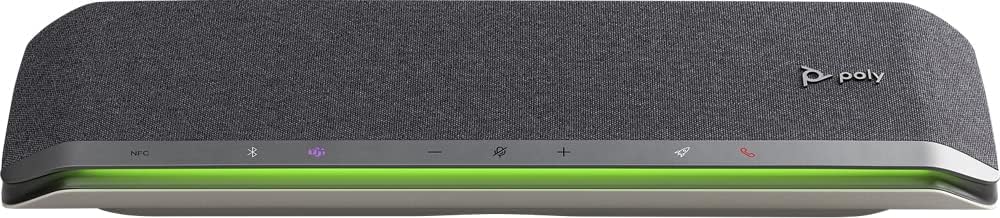
Immaġni: Quddiem view of the Poly Sync 60 Smart Speakerphone, showing the speaker grille, control buttons, and an illuminated LED light bar.
Kontenut tal-Pakkett
- Poly Sync 60 Speakerphone
- Main power supply with global pin adapters
- USB cable with USB-A and USB-C connectors
Karatteristiċi Ewlenin
- Awdjo Avvanzat: Six-microphone steerable array for echo and noise reduction, ensuring clear voice pickup.
- Kelliema Doppji: High-performance speakers deliver rich, clear audio for all participants.
- Mħaddem bl-AC: Operates continuously via AC power, eliminating battery concerns.
- Kapaċità Daisy Chain: Wirelessly pair two units for extended coverage in larger meeting spaces.
- Konnettività flessibbli: Connects to computers via combined USB-A/USB-C cable and to smartphones via Bluetooth.
- USB Video Camera Support: Connect a USB video camera to the speakerphone for combined audio and video with a single cable to the computer.
- Iċċarġjar ta' Apparat Mobbli: Two USB ports allow charging of up to two mobile phones simultaneously.
- Ċertifikat tal-Microsoft Teams: Includes a dedicated Teams button for instant access to the Teams application.
Gwida ta' Setup
1. Konnessjoni tal-Enerġija
Connect the provided main power supply to the Poly Sync 60 and plug it into a wall outlet. The device requires AC power for operation.
2. Connecting to a Computer (PC/Mac)
Use the integrated USB cable to connect the Poly Sync 60 to your computer. The cable supports both USB-A and USB-C ports. Once connected, the device should be recognized automatically by your operating system.
3. Connecting to a Smartphone (Bluetooth)
- Agħfas u żomm il- Buttuna Bluetooth on the Poly Sync 60 until the LED indicator flashes blue.
- On your smartphone, navigate to the Bluetooth settings and select "Poly Sync 60" from the list of available devices.
- Ladarba jkun imqabbad, l-indikatur LED isir blu solidu.
4. Daisy Chain Two Units (Optional)
For expanded audio coverage, two Poly Sync 60 units can be wirelessly paired. Refer to the official Poly support documentation for detailed instructions on how to enable this feature.
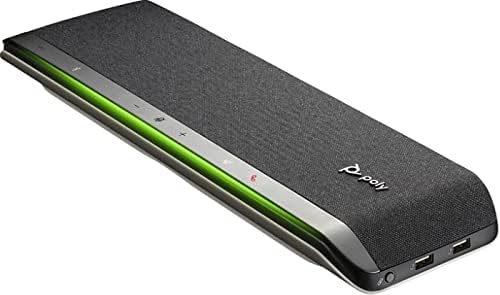
Immaġni: Ġenb view of the Poly Sync 60 Smart Speakerphone, highlighting the USB ports for charging mobile devices and connecting a video camera.
Istruzzjonijiet Operattivi
Kontrolli Bażiċi
- Volum 'il fuq/Niżżel: Uża l- + u - buttuni biex taġġusta l-volum tal-ispiker.
- Ixekkel/Ixekkel: Agħfas il- microphone icon button to mute or unmute the microphone. The LED indicator will change color to show mute status.
- Sejħa Tweġiba/Tmiem: Agħfas il- phone icon button biex iwieġeb jew itemm sejħa.
- Buttuna tat-Timijiet tal-Microsoft: Agħfas il- Teams icon button to launch or interact with the Microsoft Teams application (if certified version).
Iċċarġjar ta' Apparat Mobbli
Connect your mobile phone or other USB-powered device to one of the two USB ports on the Poly Sync 60 to charge it during a meeting.
Manutenzjoni u Kura
- Clean the Poly Sync 60 with a soft, dry, lint-free cloth.
- Do not use abrasive cleaners, solvents, or strong chemicals, as these may damage the device.
- Evita li tesponi l-apparat għal temperaturi estremi, umdità, jew dawl tax-xemx dirett.
- Aħżen l-ispeakerphone f'post frisk u niexef meta ma tkunx qed tuża.
Issolvi l-problemi
- L-ebda Awdjo/Mikrofonu Mhux Jaħdem:
- Ensure the device is powered on and the AC adapter is securely connected.
- Verify that the speakerphone is not muted (check the mute button LED).
- Check the volume levels on both the Poly Sync 60 and your connected computer/smartphone.
- Confirm that the Poly Sync 60 is selected as the audio input/output device in your computer's sound settings or conferencing application.
- Connection Issues (USB):
- Ipprova qabbad il-kejbil USB ma 'port differenti fuq il-kompjuter tiegħek.
- Ibda mill-ġdid il-kompjuter tiegħek.
- Kwistjonijiet ta' Konnessjoni (Bluetooth):
- Ensure Bluetooth is enabled on your smartphone and the Poly Sync 60 is in pairing mode.
- Unpair and then re-pair the device from your smartphone's Bluetooth settings.
- Kun żgur li l-ebda apparat ieħor tal-Bluetooth ma qed jikkawża interferenza.
- Echo or Background Noise:
- Place the speakerphone centrally in the room, away from walls or highly reflective surfaces.
- Kun żgur li l-kamra hija kwieta u ħielsa minn ħsejjes eċċessivi fl-isfond.
Speċifikazzjonijiet Tekniċi
| Karatteristika | Speċifikazzjoni |
|---|---|
| Isem tal-Mudell | Sinkronizzazzjoni 60 |
| Numru tal-Mudell tal-Oġġett | 216873-01 |
| Tip ta' Kelliem | Multimedia |
| Teknoloġija tal-Konnettività | Bluetooth, USB |
| Teknoloġija tal-Komunikazzjoni mingħajr Fili | Bluetooth |
| Medda Bluetooth | 3 Meters |
| Sors tal-Enerġija | Corded Elettriku |
| Qawwa tal-Ħruġ Massimu tal-Ispeaker | 60 Watts |
| Modalità tal-Ħruġ tal-Awdjo | Stereo |
| Surround Sound Channel Konfigurazzjoni | 2.0 |
| Metodu ta' Kontroll | Imbotta Buttuna |
| Dimensjonijiet tal-Prodott | 1.5"D x 15.5"W x 4.8"H |
| Piż tal-oġġett | 2.2 libbra (1000 Gramm) |
| Użi Rakkomandati | Office work, remote work, conference calls, personal entertainment, charging mobile devices |
| Tip ta 'Immuntar | Immonta fuq il-mejda |
| Manifattur | Poly |
| UPC | 017229172517, 197029590572 |
Informazzjoni dwar Garanzija
The Poly Sync 60 Smart Speakerphone comes with a full manufacturer's warranty. For detailed information regarding warranty terms, duration, and claim procedures, please refer to the official Poly webis-sit jew id-dokumentazzjoni tal-garanzija inkluża max-xiri tiegħek.
Appoġġ
For further assistance, product updates, software downloads, or detailed guides, please visit the official Poly support website. You can also contact Poly customer service for technical support or service inquiries.
Politeknika Uffiċjali Websit: www.poly.com