Introduzzjoni
The EGLOO S4 is a versatile 1080P Wi-Fi smart camera designed for comprehensive home monitoring. It functions as a security camera, baby monitor, and pet camera, offering advanced features such as integrated temperature and humidity monitoring, remote appliance control, motion and sound detection with real-time alerts, clear IR night vision, and two-way audio communication. Its wide field of view and digital zoom capabilities provide comprehensive coverage for various indoor environments.
Informazzjoni dwar is-Sigurtà
- Ensure the camera is placed on a stable, flat surface to prevent falling.
- Żomm l-apparat 'il bogħod mill-ilma, umdità, u temperaturi estremi.
- Tippruvax tiżżarma jew issewwi l-apparat int stess. Irreferi għal persunal tas-servizz kwalifikat.
- Uża biss l-adapter tal-enerġija pprovdut biex tevita l-ħsara.
- Keep out of reach of children and pets to avoid accidental damage or injury.
- Evita li tpoġġi l-kamera fid-dawl tax-xemx dirett jew ħdejn sorsi ta’ sħana.
Kontenut tal-Pakkett
Jekk jogħġbok ivverifika li l-oġġetti kollha huma preżenti fil-pakkett tiegħek:
- EGLOO S4 Smart Home Security Camera
- Adapter tal-Enerġija
- Manwal għall-Utent (dan id-dokument)
- Mounting Accessories (if applicable, not specified but common)
Prodott Overview

Quddiem view of the EGLOO S4 camera, showcasing its compact dome design with a black camera head and a light-colored base.

The EGLOO S4 camera held in a hand, illustrating its small and portable size.
Karatteristiċi ewlenin:
- Vidjo 1080P Full HD: Provides clear and detailed video monitoring.
- Sensur tat-Temperatura u l-Umdità: Real-time environmental monitoring.
- Sejbien tal-Mozzjoni u l-Ħoss: Receive instant alerts on your mobile device.
- Motion Tracking (AI Supported): Isegwi awtomatikament il-moviment skopert.
- Remote Appliance Control: Control compatible appliances from anywhere.
- Clear IR Night Vision: Jiżgura l-viżibilità f'kundizzjonijiet ta' dawl baxx.
- Lenti b'Angolu Wiesa' ta' 140°: Joffri qasam wiesa' ta' view.
- Żum Diġitali 8x: Zoom in for closer details.
- Awdjo f'żewġ direzzjonijiet: Ikkomunika ma' individwi jew annimali domestiċi permezz tal-kamera.
- 4-Channel Simultaneous Screen: Monitor multiple cameras or views f'daqqa.
- Setup faċli: Designed for quick and straightforward installation.

Diagram illustrating the key features of the EGLOO S4 camera, including temperature/humidity, motion/sound alerts, motion tracking, 1080P video, and easy setup.

A smartphone screen displaying a 4-channel simultaneous view from the EGLOO S4 camera, highlighting features like night vision, wide angle, digital zoom, and two-way audio.
Gwida ta' Setup
1. Download the EGLOO App:
Fittex għal "EGLOO" in your mobile device's app store (App Store for iOS or Google Play Store for Android) and download the official application. Alternatively, scan the QR code below:

Scan this QR code to quickly download the EGLOO application.
Għal aktar informazzjoni, żur: http://m.site.naver.com/0ZStX
2. Ixgħel il-Kamera:
Connect the provided power adapter to the camera's power port and plug it into a wall outlet. The camera will power on automatically.
3. Add Device in App:
- Open the EGLOO app and create an account or log in.
- Follow the in-app instructions to add a new device. This typically involves selecting your camera model and connecting it to your Wi-Fi network (2.4GHz Wi-Fi is supported).
- Ensure your mobile device is connected to the same Wi-Fi network during the setup process.

A hand holding a smartphone displaying the EGLOO application logo, indicating readiness for setup.
Istruzzjonijiet Operattivi
Live View u Kontrolli:
Once connected, you can access the live video feed from your camera through the EGLOO app. Use the on-screen controls to pan, tilt, and zoom the camera, activate two-way audio, or take snapshots/record video.
Monitoraġġ tat-temperatura u l-umdità:
The EGLOO S4 continuously monitors the ambient temperature and humidity. View real-time data directly within the app to ensure optimal environmental conditions, especially for baby or pet monitoring.
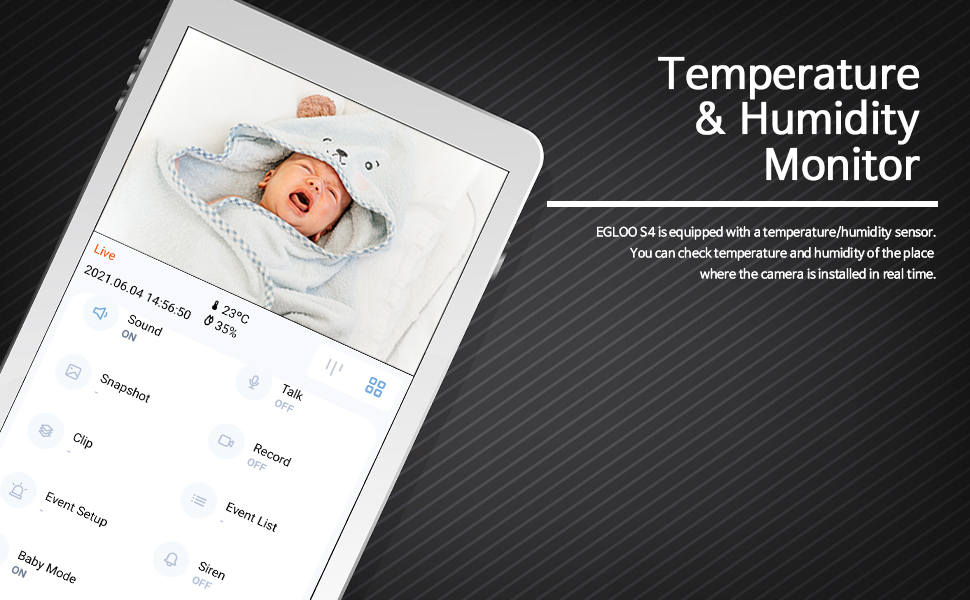
The EGLOO app interface displaying real-time temperature and humidity readings alongside the live camera feed, useful for monitoring a baby's room.
Sejbien tal-Mozzjoni u l-Ħoss:
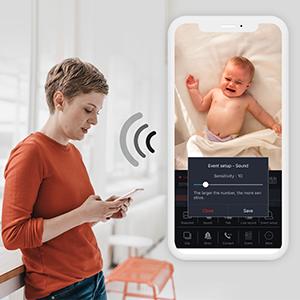
Configure motion and sound detection settings in the app to receive instant push notifications when activity is detected. Adjust sensitivity levels to minimize false alerts.

A woman checking her smartphone, which displays notification alerts from the EGLOO S4 camera for motion and sound detection.
Remote Appliance Control:
The EGLOO S4 can act as a smart remote control for various home appliances. Follow the in-app guide to pair your appliances with the camera for remote operation.

An illustration showing the EGLOO S4 camera positioned in a living room, with lines indicating its ability to connect and control various home appliances remotely.

A smartphone screen displaying controls for an air conditioner, demonstrating the remote appliance control feature of the EGLOO S4 camera.
Viżjoni bil-lejl:
The camera automatically switches to infrared (IR) night vision in low-light conditions, providing clear black-and-white video. The "Night Color" technology enhances visibility.
A split image demonstrating the difference between normal lighting and the clear infrared night vision capability of the camera in a room setting.
Awdjo f'żewġ direzzjonijiet:
Utilize the two-way audio feature to speak through the camera and hear responses. This is ideal for comforting a baby, communicating with a pet, or interacting with family members.
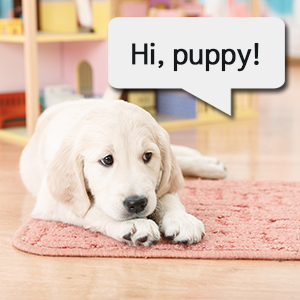
An image of a puppy with a speech bubble saying "Hi, puppy!", illustrating the two-way audio communication feature of the camera for interacting with pets.
Manutenzjoni
- Tindif: Imsaħ il-lenti u l-qafas tal-kamera bil-mod b'ċarruta ratba u niexfa. Tużax kimiċi ħarxa jew prodotti tat-tindif li joborxu.
- Ħażna: If storing the camera for an extended period, disconnect it from power and keep it in a cool, dry place.
- Aġġornamenti tas-Software: Regularly check the EGLOO app for firmware updates to ensure optimal performance and security.
Issolvi l-problemi
| Problema | Kawża Possibbli | Soluzzjoni |
|---|---|---|
| Il-kamera mhux qed tikkonnettja mal-Wi-Fi. | Password tal-Wi-Fi mhux korretta; kamera 'l bogħod wisq mir-router; netwerk Wi-Fi ta' 5GHz. | Verify Wi-Fi password. Move camera closer to router. Ensure you are connecting to a 2.4GHz Wi-Fi network. Restart camera and router. |
| Ma waslu l-ebda notifiki. | App notification settings disabled; phone notification settings disabled; incorrect detection sensitivity. | Check notification settings within the EGLOO app. Verify phone's system notification settings for the EGLOO app. Adjust motion/sound detection sensitivity. |
| Kwalità fqira tal-vidjo. | Weak Wi-Fi signal; insufficient bandwidth. | Ensure strong Wi-Fi signal. Reduce other network activity. Consider moving camera closer to router or upgrading internet plan. |
| Il-kamera ma tirrispondix. | Kwistjoni tal-enerġija; problema tas-softwer. | Unplug the power adapter, wait 10 seconds, then plug it back in to restart the camera. If the issue persists, contact customer support. |
Speċifikazzjonijiet
| Karatteristika | Dettall |
|---|---|
| Isem tal-Mudell | S4 |
| Numru tal-Mudell tal-Oġġett | TSC-221P |
| Teknoloġija tal-Konnettività | Wireless (Wi-Fi) |
| Riżoluzzjoni tal-Qbid tal-Vidjo | 1080p |
| Massimu WebCam Image Riżoluzzjoni | 200 MP |
| Qasam Ta ' View | 360 Grad |
| Zoom Tip | Zoom Diġitali |
| Teknoloġija tad-Dawl Baxx | Kulur bil-lejl |
| Tip ta 'Twissija | Awdjo u Mozzjoni |
| Dimensjonijiet tal-oġġett (L x W x H) | 4.34 x 3.1 x 4.34 pulzieri |
| Piż tal-oġġett | 0.44 Lira (7 uqija) |
| Sors tal-Enerġija | AC Adapter (Batteries Not Required) |
| Klassifikazzjoni tal-Protezzjoni Internazzjonali | IP65 |
| Manifattur | VERU |
Garanzija u Appoġġ
For warranty information and technical support, please refer to the official EGLOO website or contact the manufacturer directly. The installation manual is available as a PDF document for further reference.
Manifattur: VERU
Manwal tal-Installazzjoni (PDF): Niżżel PDF


