1. Introduzzjoni
This manual provides comprehensive instructions for the installation, operation, and maintenance of your CAME AGT A200 S200 wired intercom handset, model 840CA-0010. Please read this manual thoroughly before using the product to ensure proper functionality and safety.
The AGT A200 S200 intercom handset is a wall-mounted device featuring a single button for door opening. It is designed for versatile wall installation, compatible with both horizontal and vertical 503 boxes, as well as Ø 60 mm round boxes. This intercom is specifically compatible with System 200.
2. Informazzjoni dwar is-Sigurtà
- Dejjem skonnettja l-enerġija qabel l-installazzjoni jew il-manutenzjoni.
- L-installazzjoni għandha titwettaq minn tekniku kwalifikat skont il-kodiċijiet elettriċi lokali.
- Tesponix l-apparat għal umdità eċċessiva jew temperaturi estremi.
- Uża biss spare parts u aċċessorji oriġinali.
- Żomm fejn ma jintlaħaqx mit-tfal.
3. Kontenut tal-Pakkett
Jekk jogħġbok ivverifika li l-oġġetti kollha huma preżenti fil-pakkett:
- CAME AGT Intercom Handset (Model 840CA-0010)
- Viti tal-Immuntar u Plugs tal-Ħajt
- Manwal għall-Utent
4. Prodott Aktarview
The CAME AGT intercom handset is designed for clear communication and convenient door release. Below is an image illustrating the product's appearance and key features.
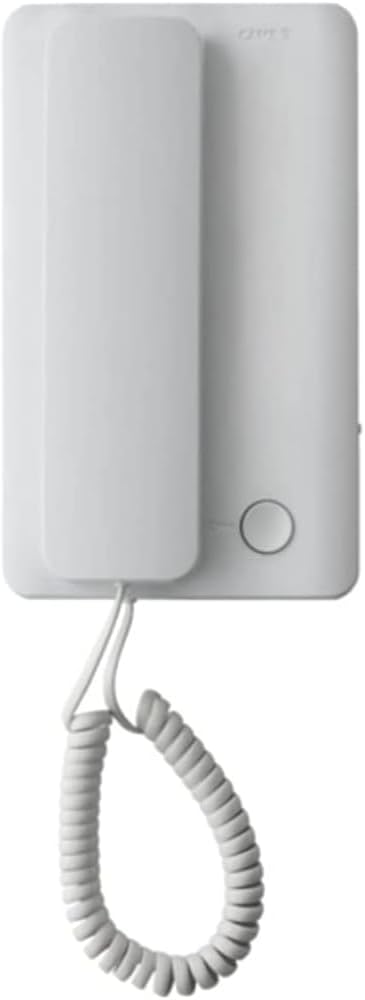
This image displays the CAME AGT intercom handset, featuring a clean white design. The handset is shown hanging from its base unit by a coiled cord. A single circular button is visible on the base unit, typically used for door release.
- Idejn: Used for speaking and listening.
- Unità bażi: Houses the electronics and mounting points.
- Buttuna ta' Ħruġ tal-Bieb: A circular button on the base unit to activate the door lock release.
- Korda Mkebba: Connects the handset to the base unit.
5. Setup u Installazzjoni
The CAME AGT intercom handset is designed for wall-mounted installation. Ensure power is disconnected before proceeding.
- Preparazzjoni: Identify the desired mounting location. The unit is compatible with standard 503 electrical boxes (both horizontal and vertical orientations) and Ø 60 mm round boxes.
- Wiring: Connect the intercom wires from your System 200 to the terminals on the back of the base unit. Refer to your System 200's wiring diagram for specific connections. Ensure all connections are secure and insulated.
- Immuntar: Secure the base unit to the wall box using the provided screws. Ensure the unit is level and firmly attached.
- Handset Connection: Connect the coiled cord from the handset to the designated port on the base unit.
- Qawwa Mixgħul: Once installation is complete and all connections are verified, restore power to the intercom system.
- Ittestjar: Test the intercom by initiating a call from the outdoor unit and verifying two-way audio. Test the door release function.
6. Istruzzjonijiet Operattivi
Using your CAME AGT intercom handset is straightforward:
- Tweġiba għal Sejħa: When the intercom rings, lift the handset from its cradle. You can then speak to the visitor at the outdoor unit.
- Tmiem Sejħa: Place the handset back into its cradle to end the conversation.
- Niftaħ il-Bieb: During a call, or when the intercom is active, press the circular door release button on the base unit to unlock the door.
7. Manutenzjoni u Kura
To ensure the longevity and optimal performance of your intercom handset, follow these simple maintenance guidelines:
- Tindif: Wipe the surface of the handset and base unit with a soft, dry cloth. For stubborn marks, a slightly damp Jista' jintuża drapp b'sapun ħafif, imbagħad tnixxef. Evita prodotti tat-tindif jew solventi li joborxu.
- Kura tal-kurdun: Avoid excessive pulling or twisting of the coiled cord to prevent damage.
- Spezzjoni: Periodically check for any loose connections or visible damage to the unit or wiring.
8 Issolvi l-problemi
If you encounter issues with your intercom, refer to the following common problems and solutions:
| Problema | Kawża Possibbli | Soluzzjoni |
|---|---|---|
| No sound from handset | Loose wiring connection; Power issue; Faulty handset. | Check wiring connections at the base unit and System 200. Verify power supply. If problem persists, contact support. |
| Il-buttuna tal-ftuħ tal-bieb ma taħdimx | Wiring issue to door strike; Faulty button; System 200 issue. | Check wiring to the door strike. Ensure the System 200 is functioning correctly. |
| Komunikazzjoni intermittenti | Loose connections; Interference. | Inspect all wiring connections. Ensure no strong electrical interference sources are nearby. |
Jekk il-problema tippersisti wara li tipprova dawn is-soluzzjonijiet, jekk jogħġbok ikkuntattja l-appoġġ għall-klijenti.
9. Speċifikazzjonijiet
Detailed technical specifications for the CAME AGT Intercom Handset 840CA-0010:
| Karatteristika | Speċifikazzjoni |
|---|---|
| Manifattur | CAME AUTEL STUDIO SR |
| Dimensjonijiet tal-Prodott (L x W x H) | 49 x 11.9 x 28.3 ċm; 230 gramma |
| Referenza tal-Mudell | 840CA-0010 |
| Kulur | Abjad |
| Tip ta' Enerġija | Kejbil Elettriku |
| Batterija(jiet) Inkluża(i) | Nru |
| Batterija(jiet) Meħtieġa | Iva |
| Disponibbiltà ta' Spare Parts | Informazzjoni mhux disponibbli dwar il-partijiet ta' riżerva |
| Apparati Kompatibbli | Sistema 200 |
| Tip tat-Telefon | Bil-fili |
| Tip ta' Dialer | Simple Keypad (referring to the single button) |
| Tip ta' Sistema ta' Tweġiba | Diġitali |
| Operazzjoni b'ħafna linji | Operazzjoni b'linja waħda |
| ID ta' min iċempel | Iva |
10. Garanzija u Appoġġ
For warranty information and technical support, please refer to the documentation provided with your complete intercom system or contact your authorized CAME dealer. Keep your purchase receipt as proof of purchase.
For further assistance, you may visit the official Came websit jew ikkuntattja lid-dipartiment tas-servizz tal-konsumatur tagħhom.


