1. Introduzzjoni
This manual provides detailed instructions for the setup, operation, and maintenance of your JADENS Thermal Shipping Label Printer, model JD-168. Please read this manual thoroughly before using the printer to ensure proper functionality and to maximize its lifespan.
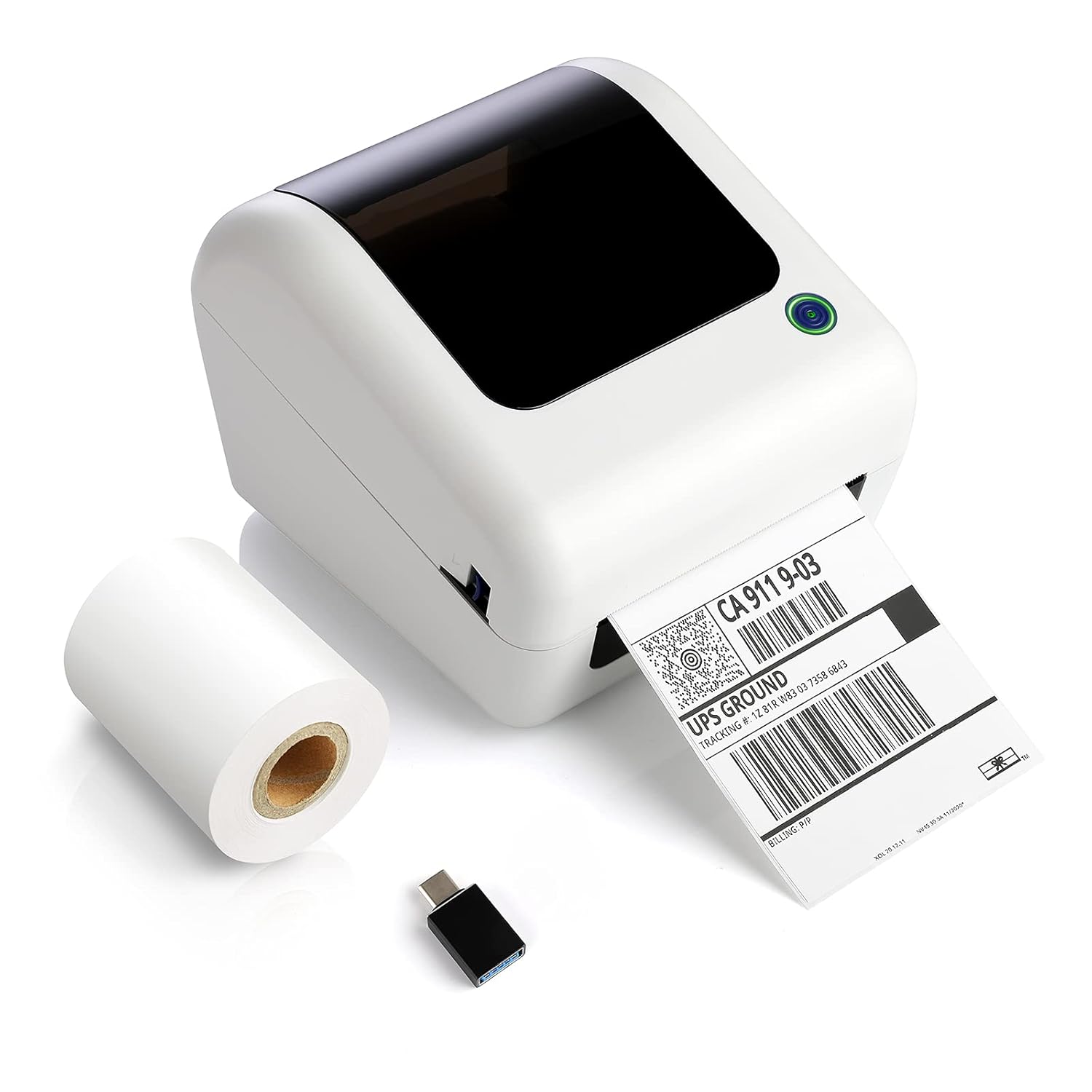
Image: The JADENS Thermal Shipping Label Printer JD-168, shown with a printed shipping label emerging from the front slot and a roll of blank thermal labels next to it. A USB adapter is also visible.
2. Kontenut tal-Pakkett
Meta tiftaħ il-pakkett, jekk jogħġbok ivverifika li l-oġġetti kollha elenkati hawn taħt huma preżenti:
- JADENS Thermal Shipping Label Printer (Model JD-168)
- Adapter tal-Enerġija
- Cable USB
- U-disk (containing drivers and instruction videos)
- Gwida Quick Start
- 1 Roll of Thermal Labels (100 sheets)
3. Karatteristiċi tal-prodott
- Stampar Termali Dirett: No ink or toner required.
- Stampar b'Veloċità Għolja: Up to 150mm/s (approximately 72 labels per minute).
- Kompatibilità Wiesgħa tat-Tikketti: Supports thermal direct labels with widths from 1.57" to 4.1".
- Automatic Label Identification: Automatically detects label properties for accurate printing.
- Built-in Paper Bin: Space-saving design for both roll and fan-fold labels.
- Broad Platform Compatibility: Works with major shipping and e-commerce platforms.

Immaġni: Wirja infografikaasing the JADENS Thermal Label Printer's features, including built-in bin, easy operation, great compatibility, fast printing, high resolution, automatic label identification, multiple paper sizes, and no ink/toner requirement.
4. System Requirements & Compatibility
The JADENS JD-168 printer is designed for use with specific operating systems and platforms:
- Sistemi Operattivi: Windows 8 or later, Mac OS X v10.9 or later.
- Konnettività: USB direct connection.
- Pjattaformi Appoġġjati: Compatible with most major shipping and e-commerce platforms such as eBay, Amazon, Etsy, Pirateship, Endicia, ShipStation, Ordoro, and Shopify.
- Unsupported Systems: This printer does le support Chromebook or Linux operating systems. Bluetooth connectivity is also le appoġġjati.

Image: The JADENS printer connected via USB to a laptop, with icons indicating compatibility with Windows 7/8/10 and Mac OS X v10.9 or later. A warning states that Chromebook and Linux are not supported.

Image: A JADENS printer on a desk with Mac and Windows logos, emphasizing compatibility. Text clearly states "Support Windows (8,10 or later), MAC" and "Not Support Chromebook" and "Not Support Bluetooth."
5. Setup
5.1 Konnessjoni tal-Istampatur
- Poġġi l-istampatur fuq wiċċ stabbli u ċatt.
- Connect the power adapter to the printer's power port and then plug it into an electrical outlet.
- Connect the USB cable to the printer's USB port and the other end to your computer.
5.2 Installazzjoni tas-sewwieq
It is crucial to install the printer driver qabel attempting to print.
- Daħħal il-U-disk provduta fil-port USB tal-kompjuter tiegħek.
- Sib u mexxi l-installatur file for your operating system (Windows or Mac) from the U-disk.
- Segwi l-istruzzjonijiet fuq l-iskrin biex tlesti l-installazzjoni tas-sewwieq.
- Instructional videos are also available on the U-disk for visual guidance.

Image: A JADENS printer connected to a laptop via USB, with a visual cue suggesting a straightforward installation process.
5.3 It-Tagħbija tat-Tikketti
The JD-168 printer supports both roll and fan-fold thermal labels.
- Iftaħ il-qoxra ta 'fuq tal-istampatur.
- For roll labels: Place the label roll into the built-in paper bin, ensuring the labels feed from the bottom and the printable side faces upwards.
- For fan-fold labels: Feed the stack of labels from the rear slot into the printer, ensuring the printable side faces upwards.
- Aġġusta l-gwidi tat-tikketti biex jaqblu sew mal-wisa' tat-tikketti tiegħek, mingħajr ma toħloq ħoss.asinġilhom.
- Close the top cover. The printer will automatically detect the label size and calibrate.

Image: An open JADENS printer revealing the internal mechanism with a roll of thermal labels correctly loaded into the built-in paper bin. Label guides are visible, and an arrow indicates automatic position detection.
6. Istruzzjonijiet Operattivi
6.1 Tixgħel/Jitfi
- Qawwa Mixgħul: Press the power button located on the side or front of the printer. The indicator light will illuminate.
- Itfi: Agħfas u żomm il-buttuna tal-qawwa sakemm id-dawl indikatur jintefa.
6.2 L-Istampar ta' Tikketta
- Kun żgur li l-istampatur ikun mixgħul u konness mal-kompjuter tiegħek.
- Open the document or application from which you wish to print (e.g., shipping software, PDF viewer).
- Select the JADENS JD-168 printer from your printer options.
- Verify print settings, especially label size, to match your loaded labels. For best quality, open PDF files with Adobe printing software.
- Initiate the print command. The printer will feed and print the label.

Image: The JADENS printer actively printing a label, with text indicating "150mm/s High Speed Printing" and "72 Labels/one minute," highlighting its efficiency.
6.3 Identifikazzjoni Awtomatika tat-Tikketta
The JD-168 features automatic label identification. After loading labels and closing the cover, the printer will briefly feed a label to detect its size and type, ensuring correct alignment and preventing misprints.

Image: The JADENS printer with a label partially fed, illustrating the automatic label identification feature with a blue light indicating the process.
6.4 Label Size Guidelines
The printer supports thermal labels with a width range of 1.57 inches (40mm) to 4.1 inches (104mm). Ensure your labels fall within this range for optimal performance.

Image: The JADENS printer with a label emerging, visually indicating the supported label width range of 1.57" to 4.1". Below, examples of various label types are shown, including nutrition facts, shipping, address, and ASIN code labels.
7. Manutenzjoni
7.1 Tindif tar-Ras tal-Istampar
Regular cleaning of the print head ensures consistent print quality and extends the printer's life. Clean the print head if print quality degrades or after every few rolls of labels.
- Itfi l-istampatur u aqla l-korda tad-dawl.
- Iftaħ il-qoxra ta 'fuq.
- Gently wipe the print head surface with an alcohol swab or a soft cloth lightly dampened b'alkoħol isopropiliku.
- Ħalli r-ras tal-istampar tinxef kompletament qabel ma tagħlaq l-għatu u tixgħel il-printer.

Immaġni: Dettaljata view of the JADENS printer's internal components, specifically highlighting the thermal print head. Text indicates "Thermal Print Head No Need of Ink Ribbon or Toner."
7.2 Kura Ġenerali
- Żomm il-printer f'ambjent nadif u ħieles mit-trab.
- Avoid exposing the printer to direct sunlight, extreme temperatures, or high humidity.
- Do not use abrasive cleaners or solvents on the printer's exterior. Use a soft, damp drapp għat-tindif.
8 Issolvi l-problemi
If you encounter issues with your JADENS JD-168 printer, refer to the following common problems and solutions:
| Problema | Kawża Possibbli | Soluzzjoni |
|---|---|---|
| Il-printer mhux qed jirrispondi | Power cable loose, USB cable disconnected, printer off. | Check power and USB connections. Ensure printer is powered on. |
| L-ebda stampar ta' tikketti | No labels loaded, labels loaded incorrectly, driver not installed. | Load labels correctly. Install printer driver. |
| Kwalità tal-istampar fqira (sfumata, imċajpra) | Print head dirty, incorrect label type, low-quality image. | Clean the print head. Ensure you are using thermal direct labels. Use high-resolution images. |
| Labels feeding incorrectly or skipping | Label guides not adjusted, labels jammed, automatic identification failed. | Adjust label guides. Clear any jams. Power cycle the printer to re-initiate auto-identification. |
| Il-printer mhux rikonoxxut mill-kompjuter | Driver not installed or corrupted, faulty USB cable. | Reinstall the driver. Try a different USB port or cable. |
If these solutions do not resolve your issue, please contact JADENS customer support.
9. Speċifikazzjonijiet
| Karatteristika | Dettall |
|---|---|
| Numru tal-Mudell | JD-168 |
| Teknoloġija tal-Istampar | Termali Diretti |
| Konnettività | USB |
| Veloċità tal-Istampar | 150 mm/s (Mass) |
| Output Printer | Monokromu |
| Wisa tat-Tikketta | 1.57" - 4.1" (40mm - 104mm) |
| Dimensjonijiet tal-Prodott (P x W x H) | 6.1" x 7.87" x 6.69" (15.5ċm x 20ċm x 17ċm) |
| Piż | 4.52 Lira (2.05 kg) |
| Kulur | Off White |
10. Informazzjoni dwar Garanzija
Specific warranty details for the JADENS Thermal Shipping Label Printer JD-168 are not provided in the product information. Please refer to the warranty card included with your product or visit the official JADENS webis-sit għall-aktar informazzjoni aġġornata dwar il-politika tal-garanzija u r-reġistrazzjoni.
11. Appoġġ għall-Klijent
For technical assistance, troubleshooting, or any inquiries regarding your JADENS Thermal Shipping Label Printer, please contact our customer support team:
- Email: (Please refer to your product packaging or JADENS website for email address)
- Telefon: (Please refer to your product packaging or JADENS websit għan-numru tat-telefon)
- Websit: JADENS Official Store on Amazon (for general information and support resources)
- Remote control assistance is also available for certain technical issues.
Our support team is available to assist you with any questions or concerns.
12. Product Application Examples
The JADENS JD-168 printer is versatile and suitable for various applications:
- Uffiċċju tad-Dar: Efficiently print shipping labels for personal use or small online sales.
- Negozju Żgħir: Ideal for e-commerce businesses needing to print shipping labels for platforms like Amazon, eBay, Etsy, and Shopify.
- Warehouse & Logistics: Suitable for printing warehouse labels, barcode labels, and product identification labels.

Image: A collage depicting four common usage scenarios for the JADENS thermal label printer: home office, shipping label creation, small business operations, and warehouse label printing.


