1. Introduzzjoni
This user manual provides comprehensive instructions for the setup, operation, and maintenance of your Sangoma P315 IP Phone. Please read this manual thoroughly to ensure proper use and to maximize the features of your device. For additional support, refer to the official Sangoma documentation and support resources.
2. Prodott Aktarview
The Sangoma P315 is a 2-line SIP IP Phone designed for clear communication with HD Voice quality. It features a 2.4-inch color display and supports Gigabit Ethernet connectivity. This phone is compatible with Sangoma's UC offerings, including Switchvox, PBXact, FreePBX, and Asterisk, offering seamless auto-provisioning.
2.1 Karatteristiċi ewlenin
- 2-line appearance keys for managing multiple calls.
- 2.4-inch (320 x 240 pixel) backlit color LCD display for clear visibility.
- High-definition call quality for superior audio.
- Power over Ethernet (PoE) support with 2 switched 10/100/1000 Mbps Gigabit Ethernet ports.
- Built-in EHS support for Sangoma H10 and H20 wireless headsets.
- Secure deployments with SRTP/TLS and VLAN support.
- Compatibility with Switchvox 7.7, FreePBX v14, PBXact v14, Asterisk v16, Endpoint Manager v14/v15, DPMA 3.6.x.
2.2 Phone Components
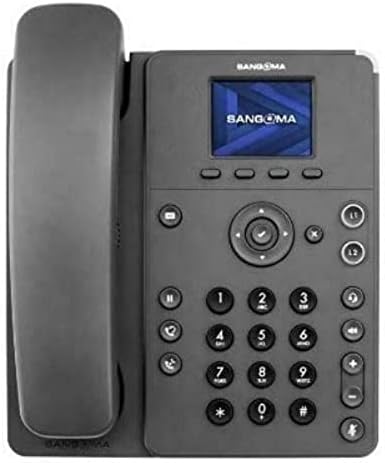
Figure 1: Sangoma P315 IP Phone Front View
The Sangoma P315 IP Phone features a standard telephone handset on the left, connected to the main unit. The main unit includes a 2.4-inch color display at the top, below which are four context-sensitive soft keys. A navigation cluster with a central 'OK' button is located below the soft keys. To the left of the navigation cluster are dedicated buttons for message, headset, and speakerphone. To the right are line keys (L1, L2) and call management buttons (hold, transfer, conference, mute, volume up/down). A standard numeric keypad (0-9, *, #) is positioned centrally on the lower part of the unit.
3. Setup
3.1 Kontenut tal-Pakkett
Qabel ma tipproċedi, kun żgur li l-komponenti kollha huma preżenti:
- Unità tat-telefon IP Sangoma P315
- Handset u korda tal-idejn
- Kejbil Ethernet
- Stand tat-telefon
- Note: A 12V Power Adapter (1TELP001LF) is not included and may be required if PoE is not available.
3.2 Konnessjoni Fiżika
- Waħħal l-Istand tat-Telefon: Align the stand with the slots on the back of the phone unit and snap it into place.
- Qabbad il-Handset: Ipplaggja tarf wieħed tal-korda mkebba tal-handset fil-handset u t-tarf l-ieħor fil-port tal-handset fuq l-unità tat-telefon (ġeneralment immarkat b'ikona ta' handset).
- Qabbad man-Netwerk:
- Jekk tuża Enerġija fuq Ethernet (PoE): Connect one end of the Ethernet cable to the LAN port on the phone and the other end to a PoE-enabled network switch or router.
- Jekk tuża Adapter AC (sold separately): Connect the AC adapter to the power port on the phone, then connect one end of the Ethernet cable to the LAN port on the phone and the other end to a standard network switch or router.
- Qabbad mal-PC (Mhux obbligatorju): Jekk tixtieq tqabbad kompjuter permezz tat-telefon, qabbad kejbil Ethernet mill-PC tiegħek mal-port tal-PC fuq it-telefon.
3.3 Initial Boot-up and Provisioning
Once connected to the network and powered on, the phone will begin its boot-up sequence. The Sangoma P315 supports auto-provisioning with Sangoma's UC platforms. The phone will attempt to obtain network settings and configuration from your PBX system automatically. This process may take a few minutes. Once complete, the display will show your line status and be ready for use.
4. Istruzzjonijiet Operattivi
4.1 Funzjonijiet Bażiċi tas-Sejħiet
- Tagħmel Sejħa:
- Pick up the handset, press the speakerphone button, or press an available line key.
- Ċempel in-numru mixtieq billi tuża t-tastiera numerika.
- Agħfas il- Ċempel soft key or wait for the call to connect automatically.
- Tweġiba għal Sejħa: When the phone rings, pick up the handset, press the speakerphone button, or press the flashing line key.
- Tmiem Sejħa: Hang up the handset, press the speakerphone button again, or press the Tmiem Sejħa soft key.
4.2 Advanced Call Features
- Żomm: Matul sejħa attiva, agħfas Żomm button. Press it again to resume the call.
- Trasferiment: Matul sejħa attiva, agħfas Trasferiment button. Dial the number to transfer to, then press the Trasferiment soft key again (blind transfer) or wait for the party to answer and then press Trasferiment (trasferiment assistit).
- Konferenza: Matul sejħa attiva, agħfas Konferenza button. Dial the number of the third party, and once connected, press the Konferenza soft key again to join all parties.
- Siekta: Agħfas il- Mute button to mute your microphone during a call. Press it again to unmute.
- Voicemail: Agħfas il- Messaġġ button to access your voicemail. Follow the voice prompts.
- Aġġustament tal-Volum: Uża l- Volum 'il fuq/'l isfel buttons to adjust the handset, headset, or speakerphone volume during a call, or the ringer volume when idle.
4.3 Navigazzjoni tal-Wiri
The 2.4-inch color display provides access to various phone features and settings. Use the navigation cluster (up, down, left, right arrows, and central OK button) to scroll through menus and select options. The soft keys below the display change their function based on the current screen or call status.
5. Manutenzjoni
5.1 Tindif tat-Telefon
Biex iżżomm id-dehra u l-funzjonalità tat-telefon tiegħek:
- Uża artab, ftit damp, lint-free cloth to wipe the phone's surface.
- Avoid using harsh chemicals, abrasive cleaners, or aerosol sprays, as these can damage the phone's finish and internal components.
- Tisprejjax prodotti tat-tindif direttament fuq it-telefon.
5.2 Aġġornamenti tas-Software
Your Sangoma P315 IP Phone may receive software updates to improve performance, add features, or address security vulnerabilities. These updates are typically managed by your system administrator through the PBX. Do not attempt to manually update firmware unless instructed by your administrator or Sangoma support.
6 Issolvi l-problemi
Jekk tiltaqa' ma' problemi bit-Telefon IP Sangoma P315 tiegħek, irreferi għall-problemi u s-soluzzjonijiet komuni li ġejjin:
| Problema | Kawża Possibbli | Soluzzjoni |
|---|---|---|
| L-ebda ton ta' telefonata / Ma nistax nagħmel jew nirċievi telefonati | Network cable disconnected, no power, incorrect network configuration, PBX issue. |
|
| Id-displej huwa vojt jew iffriżat | Kwistjoni tal-enerġija, ħsara fis-softwer. |
|
| Poor audio quality (echo, static) | Network congestion, faulty cable, environmental interference. |
|
For issues not covered here, please contact your IT department or Sangoma technical support.
7. Speċifikazzjonijiet
| Karatteristika | Dettall |
|---|---|
| Mudell | P315 |
| Numru tal-Parti | 1TELP315LF |
| Wiri | 2.4-inch (320 x 240 pixel) backlit color LCD |
| Ċwievet tal-Linja | 2 |
| Portijiet Ethernet | 2 x 10/100/1000 Mbps Gigabit Ethernet (switched) |
| Sors tal-Enerġija | PoE (Power over Ethernet) and AC Adapter (12V, not included) |
| Appoġġ għall-headset | EHS support for Sangoma H10 and H20 wireless headsets |
| Sigurtà | SRTP/TLS, VLAN support |
| Dimensjonijiet (madwar) | 27.9 x 21.3 x 8.9 ċm (10.98 x 8.39 x 3.5 pulzieri) |
| Piż (madwar) | 1.08 kg (2.38 lbs) |
| UPC | 797734603330 |
8. Garanzija u Appoġġ
8.1 Garanzija tal-Prodott
The Sangoma P315 IP Phone comes with a standard manufacturer's warranty. For detailed information regarding warranty terms, duration, and coverage, please refer to the warranty card included with your product or visit the official Sangoma websit. Żomm il-prova tax-xiri tiegħek għal talbiet ta' garanzija.
8.2 Appoġġ Tekniku
For technical assistance, troubleshooting beyond this manual, or advanced configuration, please contact your system administrator or Sangoma technical support. You can find contact information and additional resources on the official Sangoma support portal.
Riżorsi onlajn: www.sangoma.com/support


