1. Introduzzjoni
Thank you for choosing the PROXTEND X502 Full HD Webcam. This manual provides detailed instructions to help you set up, operate, and maintain your webcam for optimal performance. The X502 is designed to deliver clear 1080p video at 30 frames per second, featuring an omni-directional microphone and automatic low light correction for various lighting conditions.
2. Kontenut tal-Pakkett
Jekk jogħġbok ivverifika li l-oġġetti kollha huma preżenti fil-pakkett tiegħek:
- PROXTEND X502 Full HD Webcam (PX-CAM007)
- Integrated Universal Mounting Clip
- Manwal għall-Utent (dan id-dokument)
3. Setup
Follow these steps to set up your PROXTEND X502 Webcam:
- Immuntar tal- Webcam:
Il- webcam features an integrated universal mounting clip. You can place the webcam on top of your computer monitor, laptop screen, or a flat surface. Adjust the clip to securely hold the webcam in position. The webcam also supports mini tripod mounting (tripod not included).
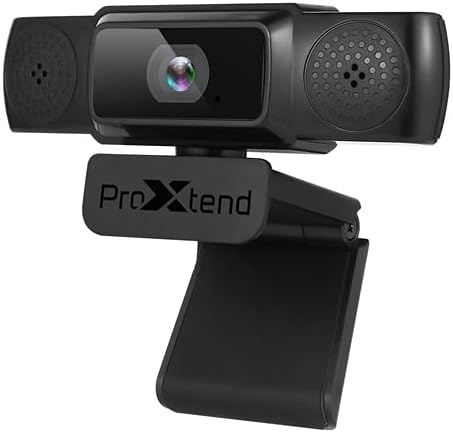
Image: The PROXTEND X502 Full HD Webcam shown with its universal mounting clip, suitable for monitors or flat surfaces.
- Konnessjoni mal-Kompjuter tiegħek:
Ipplaggja l-kejbil USB mill- webdaħal f'port USB disponibbli fuq il-kompjuter tiegħek. L- webcam is plug-and-play, meaning your operating system should automatically detect and install the necessary drivers. No additional software installation is typically required.
- Driver Installation Verification:
After connecting, allow a few moments for your computer to recognize the device. You can verify successful installation in your operating system's Device Manager (Windows) or System Information (macOS) under 'Cameras' or 'Imaging Devices'.
4. Istruzzjonijiet Operattivi
Ladarba l- webcam is set up, you can begin using it with various applications:
- Għażla tal- Webcam:
Open your preferred video conferencing, streaming, or recording application (e.g., Zoom, Microsoft Teams, Skype, OBS Studio). Navigate to the application's video and audio settings. Select "PROXTEND X502" as your camera and microphone input device.

Immaġni: Quddiem view of the PROXTEND X502 Full HD Webcam, highlighting the lens and integrated microphones.
- Kwalità tal-Vidjo:
Il- webcam automatically adjusts for optimal image quality, including auto-focus and auto low light correction. Ensure adequate lighting for the best video performance. The 1920x1080p resolution at 30fps provides clear and smooth video.
- Kwalità tal-Awdjo:
The integrated omni-directional microphone captures sound from all directions. Position yourself appropriately to ensure your voice is clearly picked up. Most applications allow you to adjust microphone input levels in their audio settings.
5. Karatteristiċi
Key features of the PROXTEND X502 Full HD Webcam include:
- Senser tal-immaġni CMOS ta '1 / 2.7 "
- 2 Megapixels
- Resolution: 1920x1080 at 30 frames per second
- Mikrofonu omnidirezzjonali
- Clip Muntaġġ Universali
- Mini Tripod Support
- Korrezzjoni awtomatika ta 'dawl baxx
6. Speċifikazzjonijiet
Detailed technical specifications for the PROXTEND X502 Full HD Webcam:

Image: A visual representation of the PROXTEND X502 Full HD Webcam's key features and technical specifications.
| Karatteristika | Speċifikazzjoni |
|---|---|
| Sensor tal-Immaġni | 1/2.7" CMOS Image Sensor |
| Megapixels | 2 MP |
| Riżoluzzjoni massima | 1920x1080 |
| Riżoluzzjoni tal-vidjo | 1920x1080 |
| Max FPS | 30 fps |
| Format ta 'Dekodifikazzjoni tal-Vidjo | H.264/MJPG |
| Mod ta 'Espożizzjoni | Auto |
| Bilanċ abjad | Auto |
| Gwadan | Auto |
| Kumpens għal Dawl Baxx | Auto |
| ViewIng Angolu | 77° |
| Distanza Fokali | 10 ċm sa l-infinità |
| Tip ta 'Focus | Auto |
| Mikrofonu | Omni-direzzjonali |
| Awdjo SampRata tal-linarda | 1 Kanal 16bit 16K 32K 44.1K 48K |
| Format Awdjo | PCM, UAC 1.0 kompatibbli |
| Interface | USB 2.0 |
| Tul tal-Cable | 1.5 m |
| OS kompatibbli | Windows XP, Windows 7 (32bit/64bit), Windows 8, Windows 10, Android V5.0 or higher OS, MAC OS 10.6 or higher |
| Dimensjonijiet tal-Prodott | 12.7 x 7.62 x 5.08 ċm |
| Piż tal-Prodott | 453.59 g |
7 Issolvi l-problemi
If you encounter issues with your PROXTEND X502 Webcam, ipprova s-soluzzjonijiet li ġejjin:
- Ebda Immaġni/Vidjo:
- Kun żgur li l-kejbil tal-USB huwa konness sew maż-żewġ webil-kamera u l-kompjuter tiegħek.
- Ipprova port USB differenti fuq il-kompjuter tiegħek.
- Ibda mill-ġdid il-kompjuter tiegħek.
- Check your application's settings to ensure the PROXTEND X502 is selected as the video input.
- Verify that no other application is currently using the webcam.
- L-ebda Awdjo/Mikrofonu Mhux Jaħdem:
- Ensure the PROXTEND X502 is selected as the microphone input in your application's audio settings.
- Check your computer's sound settings to ensure the microphone is enabled and not muted.
- Adjust the microphone input level in your system or application settings.
- Kwalità Fqira tal-Vidjo:
- Aċċerta ruħek li hemm biżżejjed dawl fl-ambjent tiegħek.
- Naddaf il- webcam lens gently with a soft, lint-free cloth.
- Check your internet connection speed if streaming, as bandwidth can affect video quality.
8. Manutenzjoni
Biex tiżgura l-lonġevità u l-aħjar prestazzjoni tiegħek webcam:
- Tindif: Imsaħ bil-mod il- webcam lens with a soft, dry, lint-free cloth. Avoid using harsh chemicals or abrasive materials.
- Ħażna: Meta ma tkunx qed tużah, aħżen webAħżen f'post nadif u niexef 'il bogħod minn temperaturi estremi u dawl tax-xemx dirett.
- Immaniġġjar: Evita li twaqqa 'l - webcam or subjecting it to strong impacts.
9. Garanzija u Appoġġ
The PROXTEND X502 Full HD Webkamera tiġi b' garanzija ta 'sena, ensuring peace of mind regarding your purchase. For warranty claims, technical support, or any inquiries not covered in this manual, please refer to the contact information provided with your product packaging or visit the official PROXTEND websit.
10. Informazzjoni dwar il-Konformità
This device complies with relevant regulatory standards for electronic equipment. For detailed compliance information, please refer to the product packaging or the official PROXTEND websit.


