Introduzzjoni
Dan il-manwal jipprovdi struzzjonijiet komprensivi għall-assemblaġġ, it-tħaddim, u l-manutenzjoni tal-Karozza tat-Tlielaq CaDA tiegħek (Kontroll Doppju). Dan il-prodott huwa replika dettaljata ta' supercar, iddisinjata għal esperjenza ta' bini ingaġġanti u gameplay ta' kontroll versatili.
Il-mudell għandu kumplessità baxxa għal bini faċli, u jikkonsisti minn 289 biċċa. Jappoġġja modi ta' kontroll doppju: kontroll remot 2.4G u konnettività Bluetooth APP, li jippermettu diversi funzjonalitajiet inkluż moviment 'il quddiem, lura, xellug, lemin, programmazzjoni grafika scratch, kontroll tal-ġiroskopju, u ppjanar tal-mogħdija.

Immaġni: Il-mudell C51074W tal-Karozza tat-Tlielaq CaDA (Kontroll Doppju), karozza safra magħmula minn blokki tal-bini, murija ħdejn il-kaxxa tal-ippakkjar tal-prodott tagħha. Il-kaxxa tenfasizza l-karatteristika ta' kontroll doppju u n-numru ta' biċċiet.
Setup
Qabel ma tħaddem il-Karozza tat-Tlielaq CaDA tiegħek, huwa meħtieġ li tiġbor u tinstalla l-batterija kif suppost.
Assemblea
Il-prodott jikkonsisti minn 289 biċċa tal-plastik. Segwi l-istruzzjonijiet tal-bini pass pass inklużi bir-reqqa biex tiġbor il-karozza tat-tlielaq. Kun żgur li l-konnessjonijiet kollha huma sikuri biex tevita li l-partijiet jinqalgħu waqt it-tħaddim.
Installazzjoni tal-batterija
Il-karozza tat-tlielaq teħtieġ żewġ batteriji AAA biex taħdem. Dawn il-batteriji mhumiex inklużi mal-prodott. Sib il-kompartiment tal-batterija, tipikament fuq in-naħa ta’ taħt jew ta’ wara tal-mudell, u daħħal il-batteriji skont l-indikaturi tal-polarità (+/-).

Immaġni: Żewġ distinti views tal-Karozza tat-Tlielaq CaDA mmuntata kompletament. Il-parti ta' fuq view juri l-karozza minn angolu kemxejn elevat, filwaqt li l-qiegħ view jippreżenta vantaġġ sekondarjufile, li juri l-bini komplut.
Istruzzjonijiet Operattivi
Il-Karozza tat-Tlielaq CaDA tiegħek toffri modi ta' kontroll doppju għal logħob versatili.
2.4G Kontroll mill-Bogħod
Ixgħel ir-remote control u l-karozza tat-tlielaq. L-apparati għandhom jingħaqdu awtomatikament. Uża l-joystick u l-buttuni fuq ir-remote control biex timmanuvra l-karozza:
- Quddiem/Lura: Uża l-joystick prinċipali biex iċċaqlaq il-karozza f'linji dritti.
- Xellug/Lemin: Uża l-kontrolli sekondarji jew il-movimenti tal-joystick biex tmexxi l-karozza.
APP Kontroll Bluetooth
Niżżel l-app uffiċjali ta' CaDA fuq l-ismartphone jew it-tablet tiegħek. Ippermetti l-Bluetooth fuq it-tagħmir tiegħek u iftaħ l-app. Agħżel il-mudell tal-Karozza tat-Tlielaq ta' CaDA biex tikkonnettja. L-app tipprovdi diversi interfejsijiet ta' kontroll:
- Interfaċċja tal-Kontroll mill-Bogħod: Joysticks u buttuni virtwali għal moviment bażiku.
- Interfaċċja tal-Kontroll tal-Ġiroskopju: Mejjel it-tagħmir tiegħek biex tmexxi l-karozza.
- Interfaċċja tal-Ippjanar tal-Mogħdijiet: Pinġi mogħdija fuq l-iskrin tiegħek biex il-karozza ssegwiha.
- Programmazzjoni Grafika Scratch: Uża l-karatteristika tal-ipprogrammar grafiku fl-app biex toħloq sekwenzi u azzjonijiet ta' moviment apposta għall-karozza.
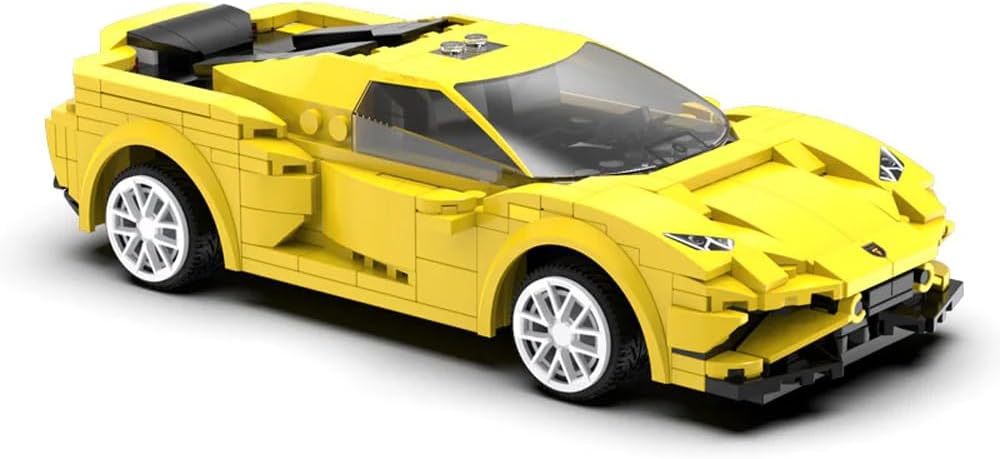
Immaġni: Close-up dettaljat tal-Karozza tat-Tlielaq CaDA mmuntata, murijaasinbil-ġisem isfar eleganti tiegħu, ir-roti bojod, u l-kostruzzjoni kumplessa tal-blokki, lest għall-operazzjoni.
Manutenzjoni
Biex tiżgura l-lonġevità u l-prestazzjoni ottimali tal-Karozza tat-Tlielaq CaDA tiegħek, segwi dawn il-linji gwida tal-manutenzjoni:
- Tindif: Uża drapp artab u niexef biex timsaħ il-karozza u r-remote control. Evita li tuża ilma jew aġenti tat-tindif ħarxa, għax dawn jistgħu jagħmlu ħsara lill-komponenti elettroniċi u lill-partijiet tal-plastik.
- Ħażna: Aħżen il-karozza u l-komponenti tagħha f'post frisk u niexef 'il bogħod mix-xemx diretta u minn temperaturi estremi.
- Kura tal-batterija: Neħħi l-batteriji mill-karozza u mir-remote control jekk ma se jintużawx għal perjodu estiż biex tevita t-tnixxija.
- Integrità tal-Parti: Iċċekkja perjodikament għal xi partijiet maħlula jew bil-ħsara. Erġa' waħħalhom jew ibdelhom kif meħtieġ biex iżżomm l-integrità strutturali.
Issolvi l-problemi
Jekk tiltaqa' ma' problemi bil-Karozza tat-Tlielaq CaDA tiegħek, irreferi għall-problemi u s-soluzzjonijiet komuni li ġejjin:
Karozza Mhux Tirrispondi
- Iċċekkja Batteriji: Kun żgur li kemm il-karozza kif ukoll ir-remote control għandhom batteriji ġodda installati b'mod korrett bil-polarità xierqa.
- Qawwa Mixgħul: Ivverifika li kemm il-karozza kif ukoll il-kontroll remot huma mixgħula.
- Tqabbil: Jekk qed tuża l-kontroll remot, kun żgur li huwa mqabbad sew mal-karozza. Għall-kontroll tal-APP, ikkonferma li l-Bluetooth huwa attivat u li l-app hija konnessa mal-mudell.
- Distanza: Kun żgur li tinsab fil-medda effettiva tat-tħaddim tal-kontroll remot jew tal-konnessjoni Bluetooth.
Partijiet li Jinqalgħu Waqt il-Logħob
- Konnessjonijiet sikuri: Eżamina mill-ġdid l-istruzzjonijiet tal-assemblaġġ u kun żgur li l-biċċiet kollha huma ppressati sew flimkien. Xi konnessjonijiet jistgħu jeħtieġu aktar forza waqt l-assemblaġġ inizjali.
- Impatt: Filwaqt li l-istruttura hija b'saħħitha, ħabtiet ripetuti jistgħu jikkawżaw li l-partijiet jinħallu. Erġa' waħħal kwalunkwe biċċa li tkun inqatgħet sew.
Kwistjonijiet ta' Konnettività tal-App
- Bluetooth: Ikkonferma li l-Bluetooth huwa attiv fuq l-apparat tiegħek.
- Aġġornament tal-App: Kun żgur li l-app CaDA hija aġġornata għall-aħħar verżjoni.
- Ibda mill-ġdid: Ipprova erġa' ixgħel kemm il-karozza kif ukoll l-apparat intelliġenti tiegħek.
Speċifikazzjonijiet
| Numru tal-Mudell tal-Oġġett | C51074W |
| Dimensjonijiet tal-Prodott | 9.6 x 20 x 5.5 ċm |
| Piż | 620 g |
| Numru ta' Biċċiet | 289 |
| Skala | 1:20 |
| Tip ta' Materjal | Plastik |
| Veloċità Massima | 3.8 km/h |
| Batteriji Meħtieġa | 2 batteriji AAA (mhux inklużi) |
| Assemblea Meħtieġa | Iva |
| Kontroll mill-bogħod Inkluż | Le (jirreferi għal remot fiżiku separat, il-kontroll isir permezz ta' app jew aċċessorju fakultattiv) |
Garanzija u Appoġġ
Għal informazzjoni dwar il-garanzija jew appoġġ tekniku rigward il-Karozza tat-Tlielaq CaDA tiegħek (Kontroll Doppju), jekk jogħġbok irreferi għad-dokumentazzjoni inkluża max-xiri tiegħek jew żur is-sit uffiċjali ta' CaDA. websit. Tista' wkoll tikkuntattja lill-bejjiegħ bl-imnut mingħand min xtrajt il-prodott għall-assistenza.


