1. Istruzzjonijiet tas-Sigurtà
Jekk jogħġbok aqra dawn l-istruzzjonijiet bir-reqqa qabel l-installazzjoni u l-użu. Żomm dan il-manwal għal referenza futura.
- Kun żgur li l-provvista tal-enerġija hija skonnettjata qabel l-installazzjoni jew il-manutenzjoni.
- This product is designed for indoor use unless otherwise specified.
- Do not expose the LED strip to direct water or excessive humidity unless it is specifically rated for such conditions (IP65 rating indicates protection against water jets, but not submersion).
- Do not cut the LED strip unless marked with designated cutting points. Cutting elsewhere may damage the strip.
- Uża biss l-adapter tal-enerġija pprovdut. L-użu ta' adapter inkompatibbli jista' jikkawża ħsara jew nar.
- Avoid bending the LED strip sharply, as this can damage the internal circuitry.
- Żomm fejn ma jintlaħaqx mit-tfal.
2. Kontenut tal-Pakkett
Ivverifika li l-komponenti kollha huma preżenti fil-pakkett:
- 1x Avide RGB LED Strip (5 meters)
- 1x Adapter tal-Enerġija (12V)
- 1x Kontroll mill-bogħod

Image: The Avide RGB LED Strip Light Kit, showing the coiled 5-meter LED strip, the included remote control, and the power adapter. Key specifications like 330 lumen/m, 7.2W/meter, 1650 lumen total, and IP65 rating are visible on the packaging.
3. Setup
- Ipprepara l-wiċċ: Ensure the surface where the LED strip will be mounted is clean, dry, and smooth. Dust or uneven surfaces can affect the adhesive.
- Unroll the LED Strip: Carefully unroll the entire 5-meter LED strip. Avoid kinking or twisting the strip.
- Connect the Strip to the Controller: Connect the 4-pin connector of the LED strip to the corresponding 4-pin port on the RGB controller (usually a small white box attached to the adapter cable). Ensure the arrows on both connectors align.
- Qabbad l-Adapter tal-Enerġija: Plug the DC output of the 12V power adapter into the input port of the RGB controller.
- Immonta l-Istrixxa LED: Peel off the protective backing from the adhesive tape on the back of the LED strip. Carefully press the strip onto the desired surface, applying even pressure along its length.
- Ipplaggja l-Enerġija: Once the strip is securely mounted and all connections are made, plug the power adapter into a standard electrical outlet.
4. Istruzzjonijiet Operattivi
Use the included remote control to operate the LED strip:
- ON/OFF: Agħfas il- ON buttuna biex tixgħel id-dwal, u l- OFF buttuna biex titfihom.
- Għażla tal-Kulur: Press the colored buttons (R, G, B, W, and other color swatches) to select a static color.
- Aġġustament tal-luminożità: Use the brightness up (▲) and brightness down (▼) buttons to adjust the intensity of the selected color or mode.
- Modi dinamiċi:
- FLASH: Jiċċikla bejn il-kuluri malajr.
- STROBE: Jteptep kulur wieħed.
- FADE: Tranżizzjonijiet bla xkiel bejn il-kuluri.
- LIXX: Provides a gradual, continuous color change.
Ensure the remote control is pointed towards the IR receiver on the LED strip controller for optimal response.
5. Manutenzjoni
- Tindif: Disconnect power before cleaning. Gently wipe the LED strip with a dry, soft cloth. Do not use harsh chemicals or abrasive cleaners.
- Ħażna: If storing the LED strip, ensure it is clean and dry. Coil it loosely to prevent damage to the internal wiring. Store in a cool, dry place.
- Spezzjoni: Periodically inspect the strip and connections for any signs of damage or wear.
6 Issolvi l-problemi
- LED strip does not light up:
- Iċċekkja jekk l-adapter tal-enerġija huwiex imdaħħal sew kemm fis-sokit tal-ħajt kif ukoll fil-kontrollur.
- Ensure the 4-pin connector between the strip and controller is correctly aligned and fully inserted.
- Iċċekkja li l-batteriji tal-kontroll remot jaħdmu u huma mdaħħla sew.
- Agħfas il-buttuna ON fuq il-remote.
- Il-kontroll remot mhux qed jaħdem:
- Ensure there are no obstructions between the remote and the IR receiver on the controller.
- Ibdel il-batterija tal-kontroll remot jekk meħtieġ.
- Ensure the remote is pointed directly at the IR receiver.
- Il-kuluri mhumiex korretti jew inkonsistenti:
- Check the 4-pin connector for proper alignment. Misalignment can cause incorrect color display.
- Ensure the strip is not damaged.
7. Speċifikazzjonijiet
| Karatteristika | Speċifikazzjoni |
|---|---|
| Mudell | Avide RGB LED Strip Light Kit |
| Input Voltage | 12V |
| Konsum tal-Enerġija | 7.2 Watts per meter |
| Konsum totali tal-Enerġija | 36 Watts (5m x 7.2W/m) |
| Tul | 5-il metru |
| Fluss Luminuż | 330 lumen/meter (1650 lumen total) |
| Klassifikazzjoni tal-IP | IP65 |
| Klassi tal-Effiċjenza tal-Enerġija | A+ |
| Dimensjonijiet tal-Prodott (Pakkett) | 27 x 21.5 x 8 ċm |
| Piż tal-oġġett | 400 gramma |
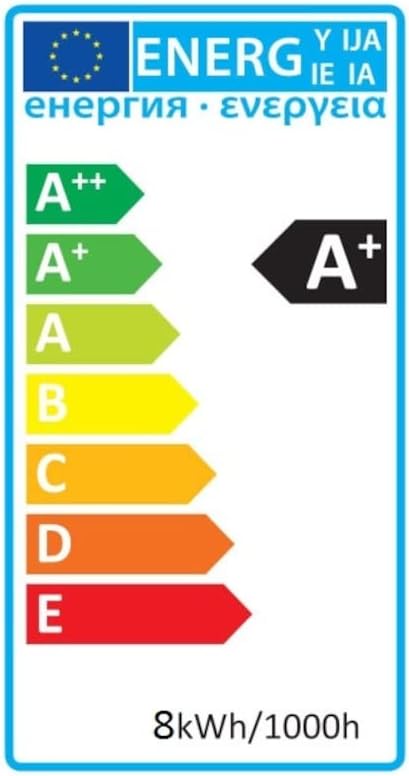
Image: Energy efficiency label indicating an A+ rating for the LED strip, with an energy consumption of 8kWh/1000h.
8. Garanzija u Appoġġ
For warranty information, technical support, or service inquiries, please refer to the documentation provided at the point of purchase or contact your retailer. Keep your proof of purchase for warranty claims.


