1. Prodott Aktarview
The JJC 30 Slots Micro SD Card Case is designed to provide secure and organized storage for your Micro SD cards. Constructed from durable ABS and silicone materials, this case offers protection against water, dust, and physical impact, ensuring the safety of your valuable data.

Figure 1: JJC 30 Slots Micro SD Card Case (closed)
Karatteristiċi ewlenin:
- Kapaċità Għolja: Stores up to 30 Micro SD cards.
- Reżistenti għall-Ilma: Features an ABS and silicone construction to protect against moisture.
- Xokk: High-impact ABS plastic material provides robust protection against drops and impacts.
- Qfil Sikur: Equipped with an ergonomic locking design for reliable closure.
- Soft Lining: Interior foam padding ensures cards are held snugly and protected from scratches.
- Daqs kompatt: Slim design for easy portability in bags or pockets.
2. Is-Setup u l-Inserzjoni tal-Kard
To begin using your JJC Micro SD Card Case, follow these steps for proper card insertion and removal.
2.1 Ftuħ tal-Każ
- Locate the latch on the side of the case.
- Gently push the latch outwards to release the cover.
- Open the case to reveal the card slots.
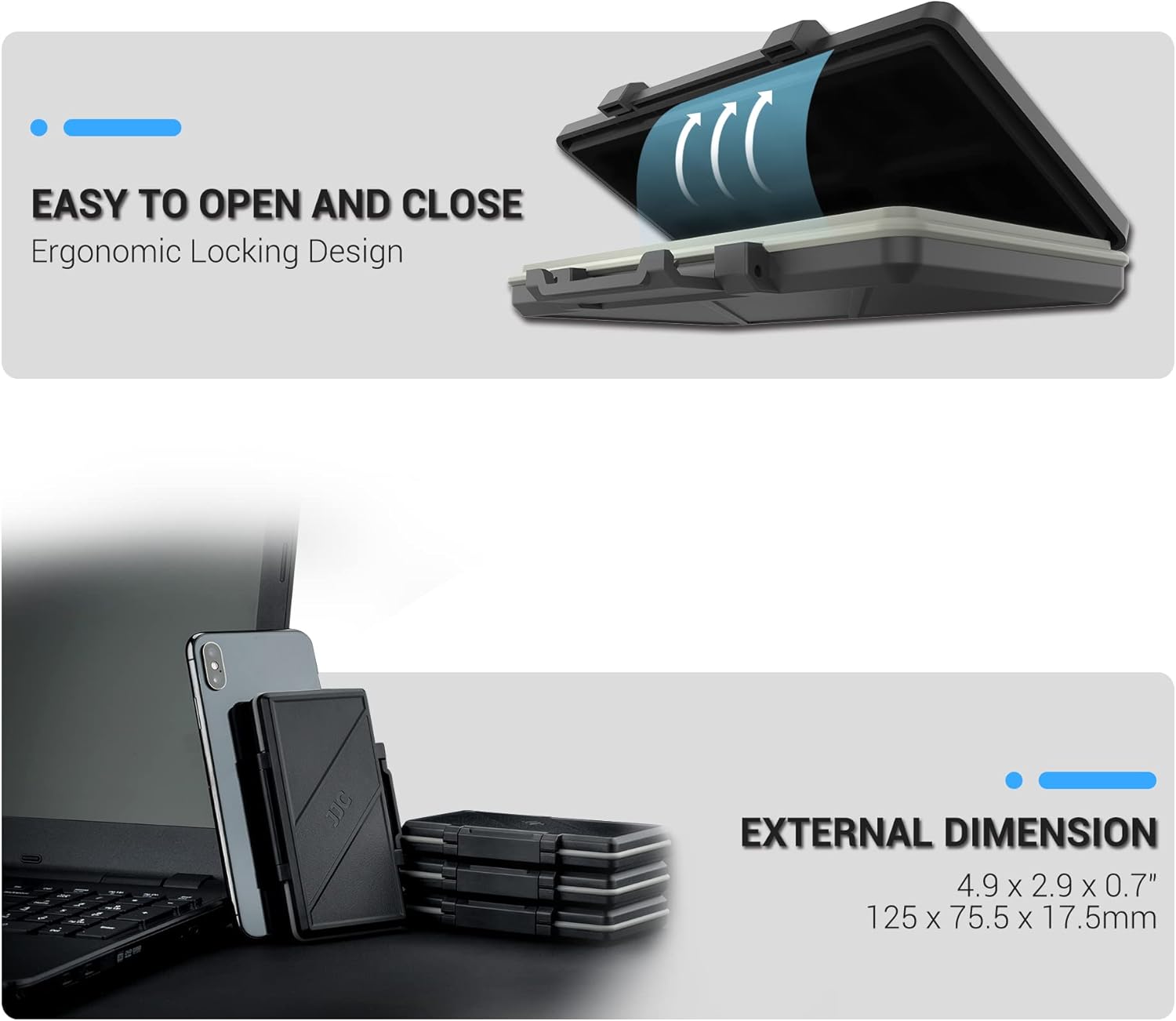
Figure 2: Opening the case using the side latch.
2.2 Inserting Micro SD Cards
- Identify the Micro SD card slots within the foam interior.
- Align your Micro SD card with an empty slot, ensuring the contact pins face downwards.
- Gently press the card into the foam slot until it is securely held. The foam is designed to provide a snug fit.
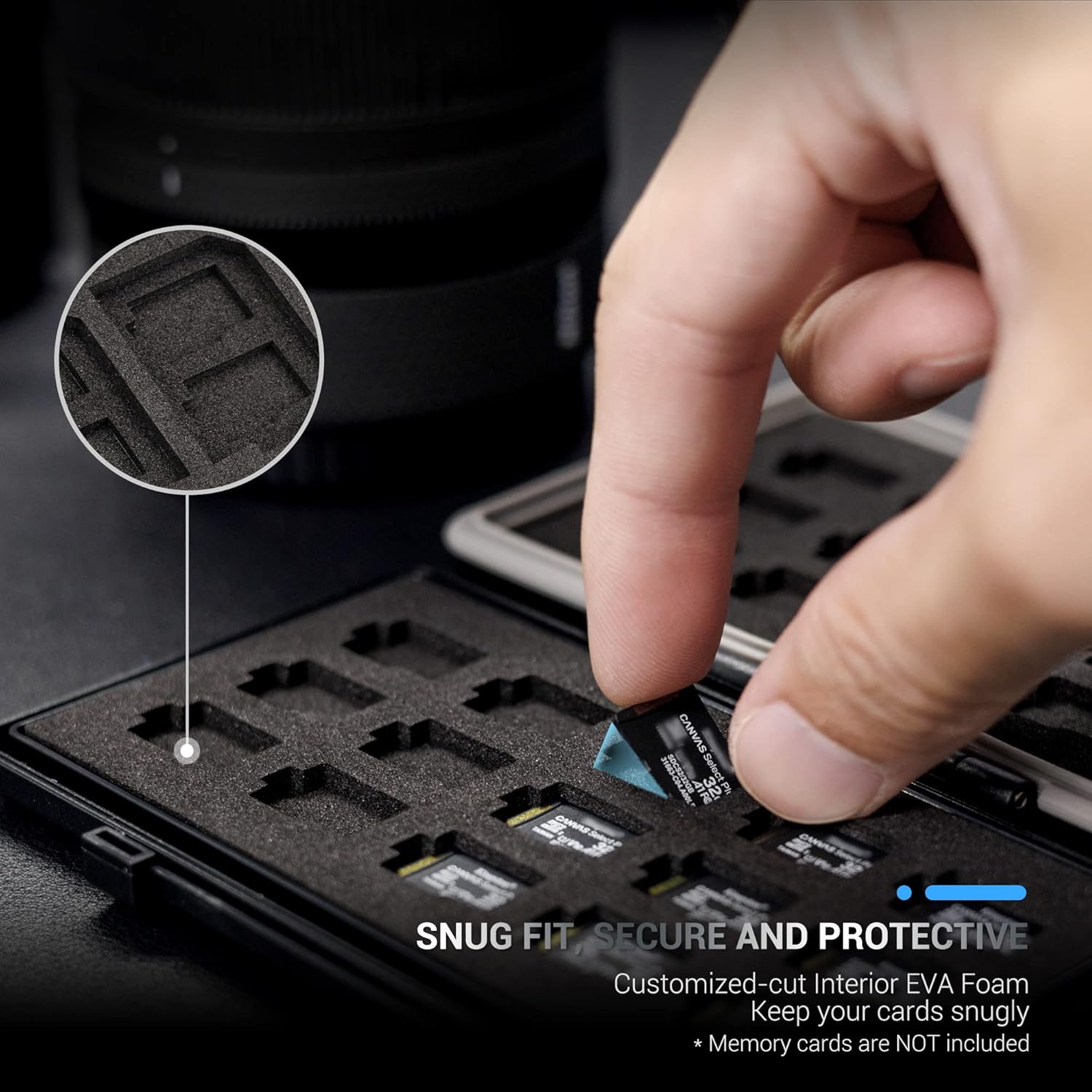
Figure 3: Inserting a Micro SD card into its designated slot.
2.3 Removing Micro SD Cards
- Gently push on the edge of the Micro SD card to slightly dislodge it from the foam.
- Carefully pull the card upwards to remove it from the slot.

Figure 4: Removing a Micro SD card from the case.
3. It-Tħaddim tal-Kaxxa
The case is designed for ease of use while ensuring maximum protection for your memory cards.
3.1 Securing the Case
- Once all cards are inserted, close the two halves of the case.
- Press firmly on the side latch until it clicks into place, indicating a secure closure.

Figure 5: Closing the case securely.
3.2 Reżistenza għall-Ilma u t-Trab
The case features a silicone O-ring seal along its perimeter, providing water and dust resistance. This seal helps protect your cards from environmental elements.

Figure 6: Water-resistant design with silicone O-ring seal.
4. Manutenzjoni
Proper maintenance ensures the longevity and effectiveness of your card case.
4.1 Tindif
- Imsaħ il-barra tal-kaxxa b'ċarruta ratba u damp drapp.
- For the interior foam, use a dry, soft brush or compressed air to remove dust and debris.
- Avoid using harsh chemicals or abrasive materials, as these may damage the case or its seal.
4.2 Ħażna
- Aħżen il-kaxxa f'post frisk u niexef 'il bogħod mix-xemx diretta u minn temperaturi estremi.
- Ensure the case is securely closed when not in use to maintain its protective properties.
5 Issolvi l-problemi
5.1 Cards Not Fitting Snugly
- Ensure you are inserting Micro SD cards into the correct slots. The foam is precisely cut for Micro SD cards.
- Apply gentle, even pressure when inserting. Do not force cards into slots.
5.2 Case Not Closing Properly
- Check that no cards or debris are obstructing the closing mechanism or the silicone seal.
- Ensure the silicone O-ring is properly seated in its groove around the case perimeter.
6. Speċifikazzjonijiet
| Karatteristika | Dettall |
|---|---|
| Dimensjonijiet tal-Prodott | 4.9 x 2.9 x 0.7 pulzieri (125 x 75.5 x 17.5mm) |
| Piż tal-oġġett | 2.19 uqija |
| Materjal | Acrylonitrile Butadiene Styrene (ABS), Silikon |
| Kapaċità | 30 Micro SD Cards |
| Karatteristiċi Speċjali | Water Resistant, Shockproof, Card Slots |

Figure 7: External dimensions and compact design.
7. Vidjows Uffiċjali tal-Prodott
Watch these official videos for additional information and demonstrations of the JJC 30 Slots Micro SD Card Case.
7.1 30 Slots Micro SD Card Case, Water Resistant & Shockproof
Vidjo 1: Overview of the JJC 30 Slots Micro SD Card Case, highlighting its water-resistant and shockproof features.
7.2 Well built, plenty of slots, labels included
Video 2: A detailed look at the construction, multiple slots, and included labels for the JJC Micro SD Card Case.
7.3 Sturdy holds micro SD cards perfectly just maybe glue in the third silicone gasket
Video 3: Demonstration of the case's sturdiness and how Micro SD cards fit securely, with a note on the silicone gasket.
8. Garanzija u Appoġġ
Għal informazzjoni dwar il-garanzija jew appoġġ għall-prodott, jekk jogħġbok irreferi għall-indirizz uffiċjali tal-manifattur. webis-sit jew ikkuntattja lis-servizz tal-konsumatur tagħhom direttament. It-termini speċifiċi tal-garanzija jistgħu jvarjaw skont ir-reġjun u l-bejjiegħ bl-imnut.


