1. Introduzzjoni
This manual provides essential information for the setup, operation, maintenance, and troubleshooting of your Beelink T4 Pro Mini PC. Please read this manual thoroughly before using the device to ensure proper functionality and longevity.
2. Kontenut tal-Pakkett
Iċċekkja li l-oġġetti kollha elenkati hawn taħt huma inklużi fil-pakkett tiegħek:
- 1 x Beelink T4 Pro Mini PC
- 1 x Cable HDMI
- 1 x Adapter tal-Enerġija
- 1 x Manwal għall-Utent
3. Prodott Aktarview
The Beelink T4 Pro is a compact mini PC designed for various computing tasks. It features a Celeron N3350 processor, 4GB of RAM, and 64GB of storage, offering a balance of performance and portability. Its small form factor makes it suitable for home entertainment, office work, or as a dedicated server for light applications.
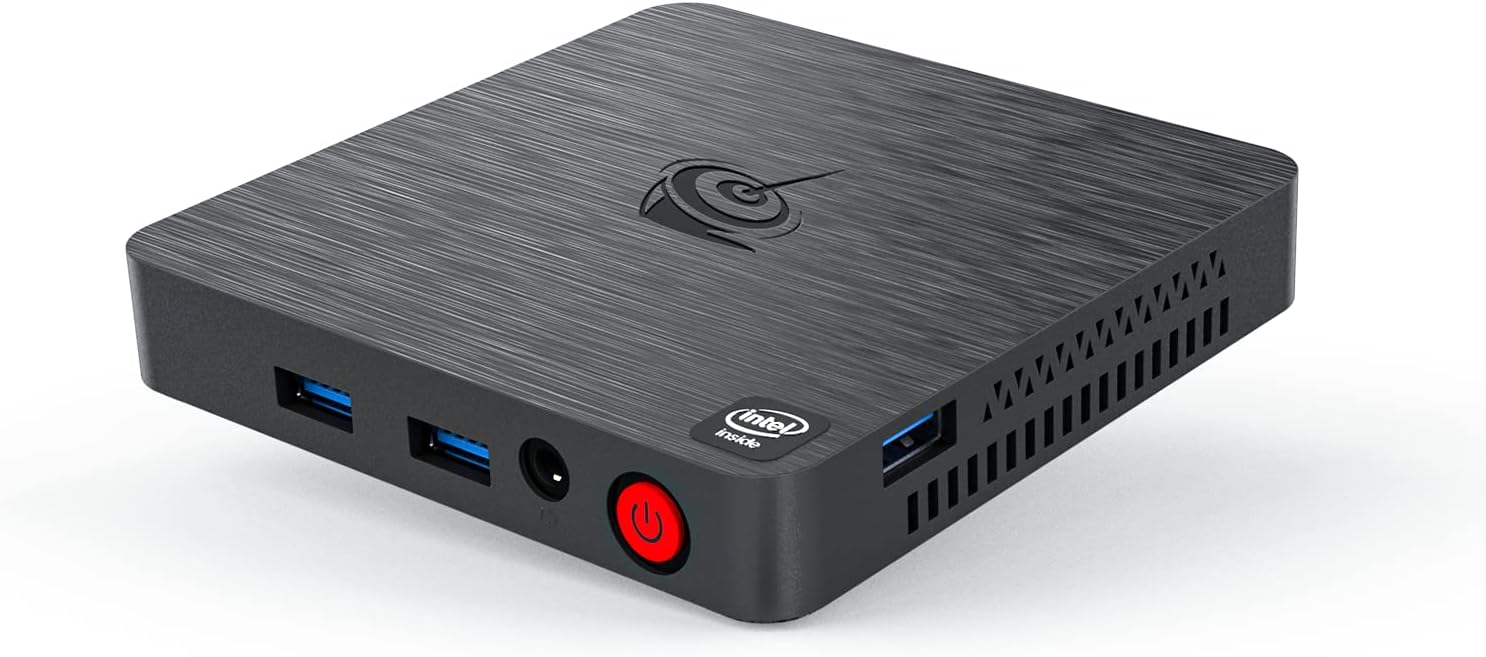
Figure 1: Beelink T4 Pro Mini PC. This image displays the compact design of the mini PC, highlighting its front and side panels with various ports including USB ports, audio jack, and power button.
4. Setup
- Qabbad mal-Display: Connect one end of the HDMI cable to the HDMI port on the Beelink T4 Pro and the other end to an HDMI input on your monitor or TV.
- Ikkonnettja l-Periferali: Plug in your USB keyboard and mouse into the available USB 3.0 ports on the mini PC.
- Qabbad l-Enerġija: Connect the power adapter to the DC 12V port on the mini PC, then plug the adapter into a power outlet.
- Qawwa Mixgħul: Press the power button located on the front panel of the mini PC. The device will boot up, and the operating system (Linux) will load.
5. Istruzzjonijiet Operattivi
5.1 Operazzjoni Bażika
- Power On/Off: Press the power button once to turn on the device. To turn off, use the operating system's shutdown option or press and hold the power button for a few seconds.
- Ibda mill-ġdid: Use the operating system's restart option.
- Modalità Sleep: Use the operating system's sleep option or briefly press the power button.
5.2 Konnessjoni mal-Internet
- Konnessjoni bil-fili: Connect an Ethernet cable from your router or modem to the LAN port on the mini PC.
- Konnessjoni bla fili: Navigate to the network settings in your operating system, select your Wi-Fi network (supports 2.4 GHz and 5.8 GHz), and enter the password.
5.3 Using USB Devices
The Beelink T4 Pro features multiple USB 3.0 ports for connecting external devices such as USB drives, external hard drives, printers, and other peripherals. Simply plug the device into an available USB port.
6. Manutenzjoni
- Tindif: Regularly clean the exterior of the mini PC with a soft, dry cloth. Avoid using liquid cleaners or solvents. Ensure ventilation holes are free from dust and obstructions.
- Aġġornamenti tas-Software: Keep your operating system and applications updated to ensure optimal performance and security. Follow the update procedures provided by your operating system.
- Backup tad-Data: Agħmel backup tad-dejta importanti perjodikament fuq apparat ta' ħażna estern jew servizz tal-cloud biex tevita t-telf tad-dejta.
7 Issolvi l-problemi
| Ħruġ | Soluzzjoni Possibbli |
|---|---|
| L-ebda wiri fuq il-monitor | Ensure HDMI cable is securely connected to both the mini PC and the monitor. Verify the monitor is set to the correct input source. Try a different HDMI cable or monitor. |
| Mini PC does not power on | Check if the power adapter is correctly connected to the mini PC and the power outlet. Ensure the power outlet is functional. |
| Ebda konnessjoni tal-internet | For wired connection, check the Ethernet cable and router/modem status. For wireless, ensure Wi-Fi is enabled in settings and the correct password is entered. Restart your router/modem. |
| Peripherals (keyboard/mouse) not working | Try connecting to a different USB port. Ensure the devices are properly connected and powered (if applicable). Restart the mini PC. |
8. Speċifikazzjonijiet
| Karatteristika | Dettall |
|---|---|
| Mudell | T4 Pro |
| Proċessur | Intel Celeron N3350 (sa 2.4GHz) |
| RAM | 4 GB LPDDR3 |
| Ħażna | 64 GB Embedded MultiMediaCard |
| Koproċessur tal-Grafika | Grafika Intel UHD |
| Sistema Operattiva | Linux |
| Tip bla fili | Frekwenza tar-Radju 2.4 GHz, Frekwenza tar-Radju 5.8 GHz |
| Portijiet USB | 3 x Portijiet USB 3.0 |
| Output tal-vidjo | hdmi, vga |
| Ethernet | 1000Mbps/LAN |
| Dimensjonijiet (LxWxH) | 3.15 x 4.72 x 4.72 pulzieri |
| Piż | 1.1 liri |
9. Garanzija u Appoġġ
The Beelink T4 Pro Mini PC comes with a manufacturer's warranty. For detailed warranty information, technical support, or service inquiries, please refer to the documentation included in your package or visit the official Beelink websit. Żomm il-prova tax-xiri tiegħek għal talbiet ta' garanzija.


