1. Introduzzjoni
Thank you for choosing the PowerLocus Bluetooth Headphones Model pwl-p2. These headphones are designed to provide a high-quality audio experience with versatile connectivity options. This manual will guide you through the features, setup, and operation to ensure optimal performance.

Image 1.1: PowerLocus Bluetooth Headphones Model pwl-p2 and its protective carry case.
2. Prodott Aktarview
2.1 Kontenut tal-Pakkett
- PowerLocus Bluetooth Headphones (Model pwl-p2)
- Cable tal-Iċċarġjar tal-USB
- Cable Awdjo 3.5mm
- Każ tal-Ġarr Protettiv
- Manwal għall-Utent (dan id-dokument)

Image 2.1: The package includes the headphones, charging cable, audio cable, and a protective case.
2.2 Headphone Features
- Bluetooth 5.0: For stable and fast wireless connection.
- Mikrofonu inkorporat: Għal sejħiet hands-free.
- Disinn li jintrewa: For portability and easy storage.
- Soft Memory Foam Earmuffs: Iddisinjat għall-kumdità u l-iżolazzjoni tal-ħoss.
- Appoġġ Multi-Modalità: Bluetooth, 3.5mm AUX wired, Micro SD/TF card, and FM Radio.
- 40mm Audio Drivers: Delivering Hi-Fi stereo sound with deep bass.
- Ħajja twila tal-batterija: Sa 22.5 siegħa ta 'logħob.
- Iċċarġjar malajr: Fast battery replenishment.

Immaġni 2.2: Fuqview of the headphone's key features including Bluetooth, multiple playback modes, and design elements.
2.3 Kontrolli u Portijiet
Familiarize yourself with the buttons and ports on your headphones:
- Buttuna tal-Qawwa: Mixgħul/Mitfi, Daqq/Pawża, Wieġeb/Tmiem is-Sejħa.
- Volum 'il fuq (+): Increase volume, Next track (long press).
- Volum 'l isfel (-): Decrease volume, Previous track (long press).
- Buttuna tal-Modalità (M): Switch between Bluetooth, FM Radio, and Micro SD modes.
- Mikro USB Charging Port: Għall-iċċarġjar tal-headphones.
- Port AUX ta' 3.5mm: Għal konnessjoni awdjo bil-fili.
- Micro SD/TF Card Slot: Għad-daqq tal-mużika direttament minn memory card.
- Indikatur LED: Juri l-istatus tal-konnessjoni u tal-iċċarġjar.
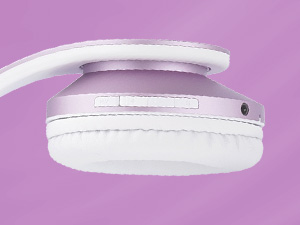
Immaġni 2.3: Dettaljata view tal-buttuni tal-kontroll u l-portijiet fuq il-earcup tal-headphones.
3. Setup
3.1 Iċċarġjar tal-Headphones
- Connect the small end of the USB charging cable to the Micro USB port on the headphones.
- Qabbad it-tarf l-akbar tal-kejbil tal-iċċarġjar USB ma' sors ta' enerġija USB (eż., port USB tal-kompjuter, adapter tal-ħajt).
- The LED indicator will illuminate during charging. It will change color or turn off once fully charged (approximately 2.5 hours).
Nota: Kun żgur li l-headphones ikunu ċċarġjati kompletament qabel l-ewwel użu għal ħajja ottimali tal-batterija.
3.2 Power On/Off
- Biex Tixgħel: Press and hold the Power Button for approximately 3 seconds until the LED indicator flashes.
- Biex Tifi: Agħfas u żomm il-Buttuna tal-Qawwa għal madwar 3 sekondi sakemm l-indikatur LED jintefa.
3.3 Tqabbil tal-Bluetooth
- Kun żgur li l-headphones huma mitfija.
- Press and hold the Power Button for about 5-7 seconds until the LED indicator flashes blue and red alternately, indicating pairing mode.
- Fuq l-apparat tiegħek (smartphone, tablet, PC), attiva l-Bluetooth u fittex apparati disponibbli.
- Select 'PowerLocus pwl-p2' from the list of devices.
- Once paired, the LED indicator will flash blue slowly.
Nota: Il-headphones jippruvaw jerġgħu jikkonnettjaw awtomatikament mal-aħħar apparat imqabbad meta jinxtegħlu.

Image 3.1: Visual representation of connecting the headphones via Bluetooth to a mobile device.
3.4 Konnessjoni bil-wajer (Modalità AUX)
If the battery is depleted or you prefer a wired connection:
- Qabbad tarf wieħed tal-kejbil tal-awdjo ta' 3.5mm mal-port AUX fuq il-headphones.
- Qabbad it-tarf l-ieħor tal-kejbil tal-awdjo ta' 3.5mm mal-jack tal-output tal-awdjo tat-tagħmir tiegħek.
- Il-headphones jaqilbu awtomatikament għall-modalità bil-fili.

Image 3.2: The headphones can be used in wired mode with the included 3.5mm audio cable.
4. Istruzzjonijiet Operattivi
4.1 Basic Audio Controls
- Play/Pawsa: Agħfas qasir il-buttuna tal-enerġija.
- Volum 'il fuq: Agħfas fil-qosor il-buttuna '+'.
- Volum 'l isfel: Agħfas fil-qosor il-buttuna '-'.
- Track li jmiss: Agħfas fit-tul il-buttuna '+'.
- Track preċedenti: Agħfas fit-tul il-buttuna '-'.
4.2 Kontrolli tas-Sejħiet bit-Telefon
- Tweġiba/Tmiem Sejħa: Agħfas qasir il-buttuna tal-enerġija.
- Irrifjuta Sejħa: Agħfas fit-tul il-buttuna tal-enerġija.
- Isemmi mill-ġdid l-Aħħar Numru: Agħfas darbtejn il-buttuna tal-enerġija.
4.3 Modi ta' Qlib
Press the 'M' (Mode) button to cycle through the available modes:
- Modalità Bluetooth
- Modalità tar-Radju FM
- Micro SD/TF Card Mode
4.4 Micro SD/TF Card Mode
- Insert a Micro SD/TF card (with MP3 audio files) into the card slot.
- Switch to Micro SD/TF Card Mode using the 'M' button.
- Playback will begin automatically. Use the basic audio controls for playback.
4.5 Modalità tar-Radju FM
- Switch to FM Radio Mode using the 'M' button.
- Long press the Power Button to automatically scan and save available FM stations.
- Use the '+' and '-' buttons to navigate between saved stations.

Image 4.1: The headphones support multiple playback options including Bluetooth, wired, Micro SD, and FM radio.
5. Manutenzjoni
5.1 Tindif
- Imsaħ il-headphones b'ċarruta ratba u niexfa.
- Tużax tindif jew solventi li joborxu.
- Żomm il-port tal-iċċarġjar u l-jack tal-awdjo ħielsa mit-trab u l-fdalijiet.
5.2 Ħażna
- When not in use, store the headphones in the provided protective carry case.
- Evita li tesponi l-headphones għal temperaturi estremi, umdità, jew dawl tax-xemx dirett.
- Aħżen f'post frisk u niexef.

Image 5.1: The foldable design and included carry case make the headphones easy to store and transport.
6 Issolvi l-problemi
| Problema | Kawża Possibbli | Soluzzjoni |
|---|---|---|
| Il-headphones ma jixegħlux. | Batterija baxxa. | Iċċarġja l-headphones bis-sħiħ. |
| Ma tistax tqabbad permezz tal-Bluetooth. | Il-headphones mhumiex fil-modalità ta' tqabbil; il-Bluetooth tal-apparat huwa mitfi; wisq 'il bogħod mill-apparat. | Ensure headphones are in pairing mode (flashing blue/red). Turn on device Bluetooth. Move headphones closer to device (within 36 feet). |
| L-ebda ħoss. | Volume too low; incorrect mode; wired cable not fully inserted. | Increase volume. Check if headphones are in the correct mode (Bluetooth, AUX, SD, FM). Ensure 3.5mm cable is fully inserted in both devices. |
| Il-mikrofonu mhux qed jaħdem. | Mhux konness permezz tal-Bluetooth; is-settings tal-apparat. | Ensure headphones are connected via Bluetooth. Check microphone settings on your connected device. |
| FM Radio not receiving stations. | Poor signal; stations not scanned. | Move to an area with better FM reception. Long press the Power Button in FM mode to auto-scan and save stations. |
7. Speċifikazzjonijiet
| Karatteristika | Speċifikazzjoni |
|---|---|
| Numru tal-Mudell | pwl-p2 |
| Teknoloġija tal-Konnettività | Mingħajr fili (Bluetooth 5.0), Bil-fili (Jack ta' 3.5mm) |
| Daqs tas-Sewwieq tal-Awdjo | 40 mm |
| Medda ta' Frekwenzi | 20 Hz - 20,000 Hz |
| Impedenza | 32 Ohm |
| Sensittività | 105 dB |
| Medda Bluetooth | Sa 36 pied (12 metri) |
| Ħajja tal-batterija | Sa 22.5 sigħat |
| Ħin tal-Iċċarġjar | Madwar sagħtejn |
| Piż | 5.1 uqija |
| Karatteristiċi Speċjali | Foldable, Built-in Microphone, Micro SD/TF Card Slot, FM Radio, Sound Isolation |
| Apparati Kompatibbli | iOS, Android, PC, Laptops, TV, Tablets, devices with 3.5mm audio jack or Bluetooth connectivity |
8. Garanzija u Appoġġ
8.1 Informazzjoni dwar Garanzija
PowerLocus provides a Garanzija sħiħa ta '24 xhur for the Model pwl-p2 headphones. This warranty covers manufacturing defects and ensures your smooth purchase experience. Please retain your proof of purchase.
8.2 Appoġġ għall-Klijent
For any questions, concerns, or warranty claims regarding your PowerLocus Bluetooth Headphones, please contact our friendly support team. Refer to the contact information provided in your product packaging or visit the official PowerLocus websit għall-għajnuna.


