1. Informazzjoni Importanti dwar is-Sigurtà
Jekk jogħġbok aqra l-istruzzjonijiet kollha bir-reqqa qabel l-assemblaġġ u l-użu. Żomm dan il-manwal għal referenza futura.
- TWISSIJA: Always assemble the desk according to the provided instructions to ensure stability.
- Teċċedix il-kapaċità massima tal-piż ta' 177 lbs (80 kg).
- Be cautious when using the height adjustment feature to avoid injury from moving parts.
- Keep hands and fingers away from the moving parts during operation.
- Ensure the power cord is not pinched or damaged during assembly or operation.
- Dan il-prodott huwa maħsub għall-użu fuq ġewwa biss.
2. Prodott Aktarview
The FLEXISPOT E1L is a dual-motor, L-shaped electric standing desk designed for home and office use. It features adjustable height, a quiet operation, and a customizable control panel.

Image 2.1: The FLEXISPOT E1L desk frame demonstrating its adjustable height capabilities.

Image 2.2: The FLEXISPOT E1L desk in a typical office setup, showcasing its L-shape and functionality.
3. Setup u Assemblea
Assembly of the FLEXISPOT E1L desk is designed to be straightforward, typically taking less than 30 minutes. All necessary tools are included.
3.1 Żpakkjar u Kontroll tal-Komponenti
Carefully unpack all components and verify against the packing list. Ensure all parts are present and undamaged before proceeding.
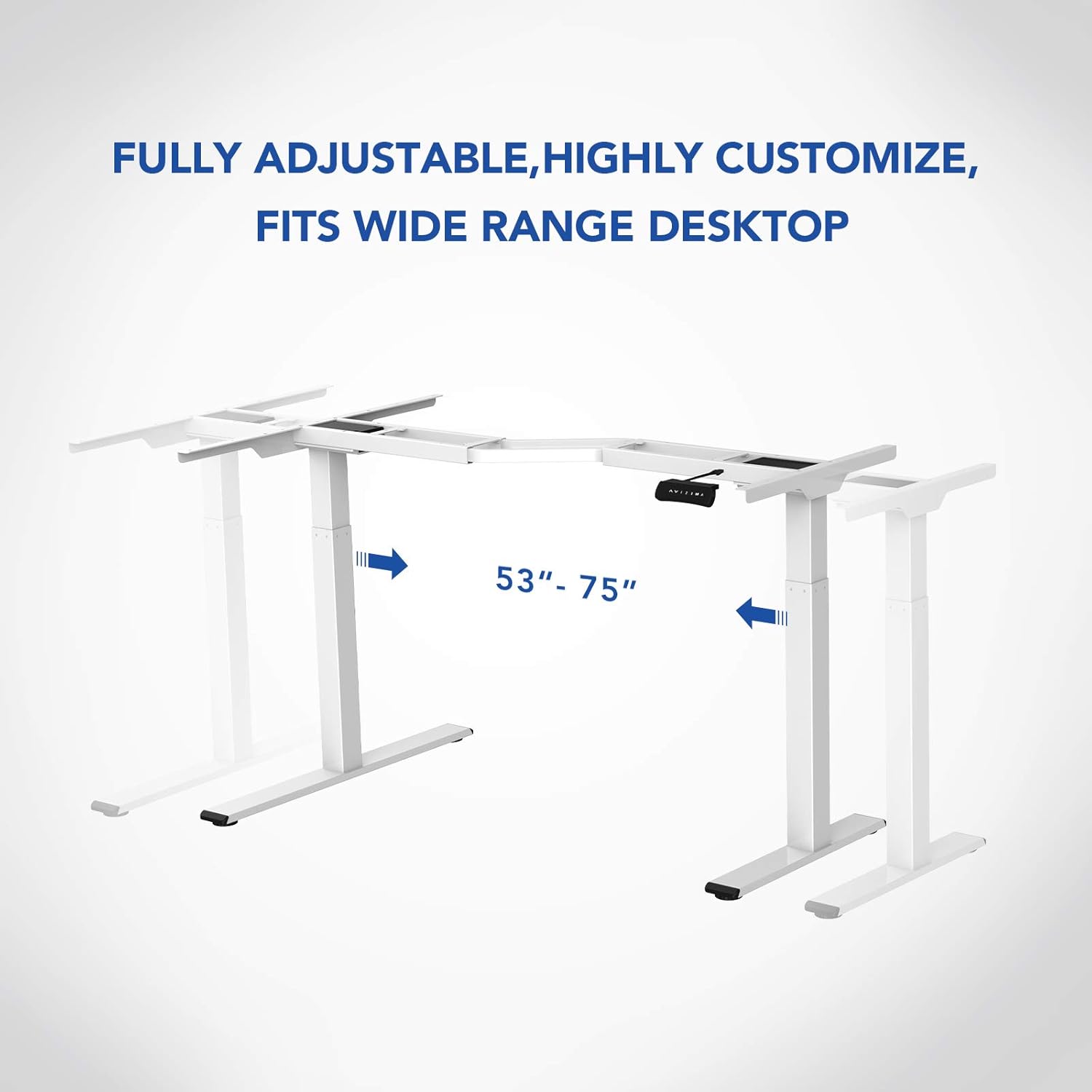
Immaġni 3.1: Fuqview of the FLEXISPOT E1L desk frame components prior to assembly.
3.2 Passi tal-Assemblea
- Attach the lifting columns to the desktop frame.
- Secure the feet to the bottom of the lifting columns.
- Connect the control box and motor cables as per the detailed diagram in the included assembly guide.
- Mount the control panel to the desired location on the desk.
- Place the desktop surface onto the assembled frame and secure it.
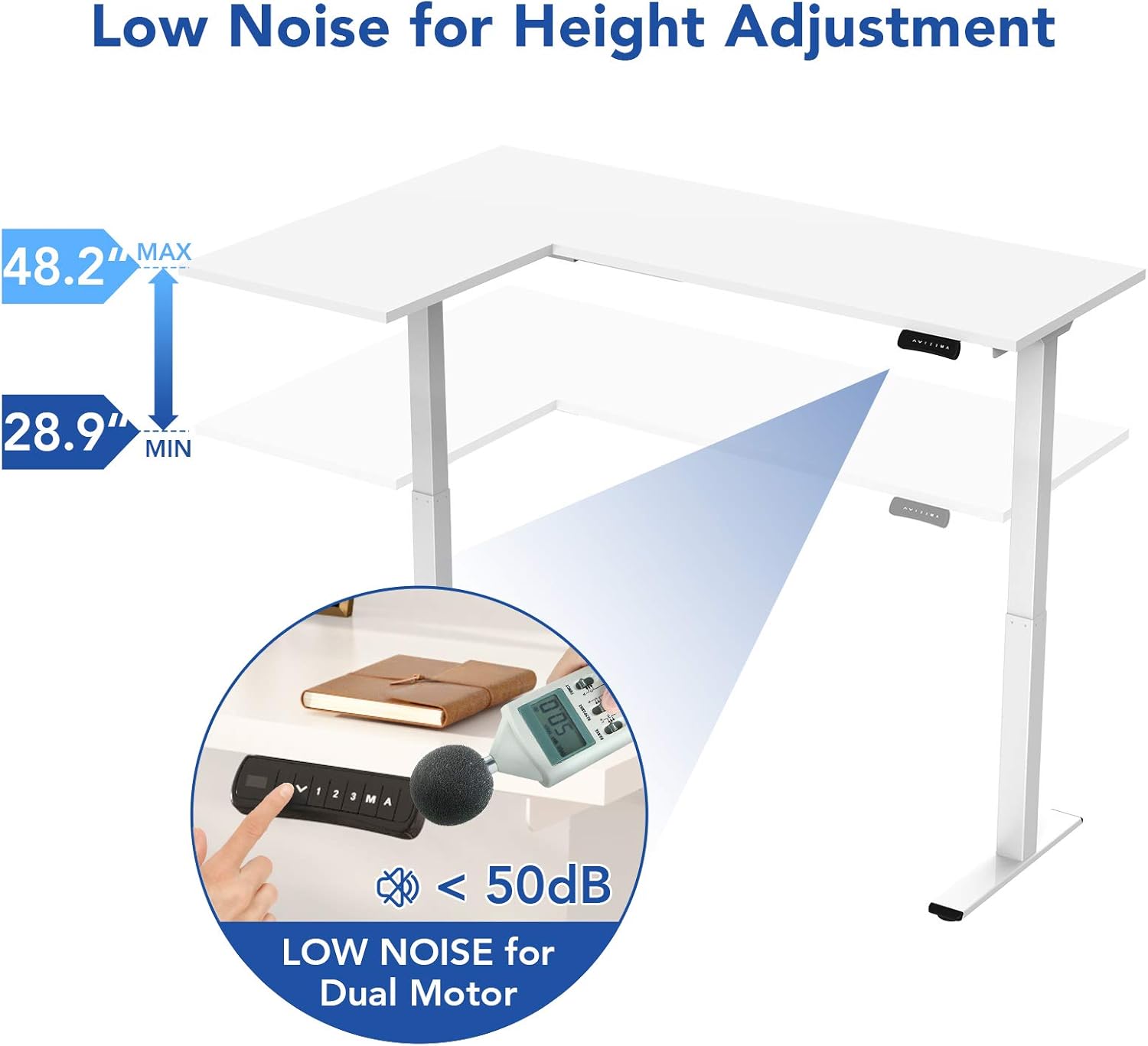
Image 3.2: An assembly step illustrating the connection of the L-shaped desk frame components.

Image 3.3: The desk frame nearing completion, with the control panel attached.
3.3 Reversible L-Shape Configuration
The L-shaped configuration of the desk is reversible, allowing you to set up the longer side on either the left or right, depending on your preference and workspace layout. This flexibility is determined during the assembly process.

Image 3.4: Visual representation of the desk's reversible L-shape, allowing for left or right-hand configurations.
4. Istruzzjonijiet Operattivi
4.1 Aġġustament tal-Għoli
The desk features a dual-motor lift mechanism for smooth and quiet height adjustments. The height can be adjusted from 27.9 inches (70.9 cm) to 47.2 inches (120 cm).
- Uża l- Up (▲) u Down (▼) buttons on the control panel to manually adjust the desk height.
- The desk operates at a speed of 1 inch per second and maintains a noise level under 50 dB during movement.

Image 4.1: Illustration highlighting the low noise operation (under 50 dB) of the desk's dual motor system.
4.2 Funzjonijiet tal-Panew tal-Kontroll
The built-in LED control panel allows for easy customization and programming of desk height settings.

Image 4.2: Close-up of the control panel, detailing its buttons and functions.
- Up/Down Buttons (▲, ▼): Manually adjust the desk height.
- Presets tal-Memorja (1, 2, 3): Store and recall up to three preferred height settings. To save a height, adjust the desk to the desired position, then press the 'M' button followed by the desired number (1, 2, or 3).
- Memory Button (M): Used to save height presets.
- Sit-Stand Reminder (A): Activate a programmable timer to remind you to switch between sitting and standing postures. Refer to the full assembly guide for detailed programming instructions.
4.3 Anti-Collision System
The desk is equipped with a built-in anti-collision system. If the desk encounters an obstruction during height adjustment, it will automatically stop and reverse slightly to prevent damage or injury.

Image 4.3: Visual explanation of the anti-collision system, showing the desk reversing upon contact with an obstacle.
5. Manutenzjoni
Regular maintenance ensures the longevity and optimal performance of your FLEXISPOT E1L desk.
- Tindif: Imsaħ il-wiċċ tal-iskrivanija u l-qafas b'ċarruta ratba u damp drapp. Evita prodotti tat-tindif jew solventi li joborxu li jistgħu jagħmlu ħsara lill-finitura.
- Ġestjoni tal-Kejbil: Periodically check all cables to ensure they are securely connected and not pinched or frayed. Use the included cable management tray to keep wires organized.
- Qafliet: Iċċekkja l-viti u l-boltijiet kollha minn żmien għal żmien biex tiżgura li huma ssikkati sew. Erġa' ssikkahom jekk meħtieġ.
- Spezzjoni tal-Mutur: Listen for any unusual noises during operation. If you notice any, discontinue use and consult the troubleshooting section or contact customer support.
6 Issolvi l-problemi
If you encounter issues with your desk, refer to the following common troubleshooting steps:
| Problema | Kawża Possibbli | Soluzzjoni |
|---|---|---|
| L-iskrivanija ma tiċċaqlaqx. | Power cable disconnected; control box error; overload. | Check power connections. Unplug and replug the power cord. Reduce weight on the desk. |
| L-iskrivanija tiċċaqlaq b'mod irregolari. | Uneven load; motor synchronization issue. | Distribute weight evenly. Perform a reset (refer to the full manual for specific reset procedures). |
| Kodiċi ta' żball muri. | Ħsara speċifika tas-sistema. | Refer to the detailed error code list in the complete user manual or contact customer support. Often, a power cycle (unplugging for 10 seconds and replugging) can resolve temporary errors. |
| Anti-collision system triggers too easily. | Sensitivity setting too high. | Adjust the anti-collision sensitivity setting via the control panel (refer to the full manual for instructions). |
If these steps do not resolve the issue, please contact FLEXISPOT customer support.
7. Speċifikazzjonijiet
| Karatteristika | Speċifikazzjoni |
|---|---|
| Brand | FLEXISPOT |
| Numru tal-Mudell | E1L |
| Disinn ta' l-Iskrivanija | L-Shape Computer Desk |
| Materjal tal-qafas | Industrial-grade Steel |
| Mekkaniżmu ta 'rfigħ | Dual Electric Motor |
| Medda ta 'Aġġustament Għoli | 27.9" sa 47.2" (70.9 ċm sa 120 ċm) |
| Veloċità tal-irfigħ | 1"/second |
| Livell ta' Storbju | Taħt 50 dB |
| Kapaċità massima tal-piż | 177 lbs (80 kg) |
| Panel tal-Kontroll | LED with 3 Memory Presets & Sit-Stand Reminder |
| Karatteristiċi Speċjali | Anti-Collision System, Corded Operation, Reversible L-Shape |
| Assemblea Meħtieġa | Iva (Jinkludi l-għodda kollha tal-assemblaġġ) |
| Nies Rakkomandati għall-Assemblea | 1 |
8. Garanzija u Appoġġ
8.1 Informazzjoni dwar Garanzija
The FLEXISPOT E1L desk comes with a Limited Warranty. Please refer to the warranty card included with your product or visit the official FLEXISPOT website for detailed terms and conditions regarding parts and labor coverage.
8.2 Appoġġ għall-Klijent
For technical assistance, warranty claims, or any questions regarding your FLEXISPOT E1L desk, please contact FLEXISPOT customer support through their official webis-sit jew l-informazzjoni ta' kuntatt ipprovduta fl-imballaġġ tal-prodott tiegħek.
Tista 'wkoll iżżur il- FLEXISPOT Store on Amazon għal aktar informazzjoni dwar il-prodott u riżorsi ta' appoġġ.


