Introduzzjoni
Grazzi tax-xiriasing the Marvo Scorpion HG9055 USB Gaming Headset. This manual provides detailed instructions for setup, operation, maintenance, and troubleshooting to ensure optimal performance and longevity of your device. Please read this manual thoroughly before using the headset.
Informazzjoni dwar is-Sigurtà
- Avoid exposing the headset to extreme temperatures, humidity, or dust.
- Do not disassemble or attempt to repair the headset yourself. This may void the warranty and cause damage.
- Clean the headset with a soft, dry cloth. Do not use liquid cleaners.
- Prolonged listening at high volume levels may cause hearing damage. Adjust volume to a comfortable level.
- Żomm il-headset 'il bogħod mit-tfal u l-annimali domestiċi.
Kontenut tal-Pakkett
Jekk jogħġbok iċċekkja l-kontenut tal-pakkett meta tiftaħ il-kaxxa. Jekk xi oġġetti huma nieqsa jew bil-ħsara, ikkuntattja lill-bejjiegħ tiegħek.
- Marvo Scorpion HG9055 USB Gaming Headset
- Manwal għall-Utent (dan id-dokument)
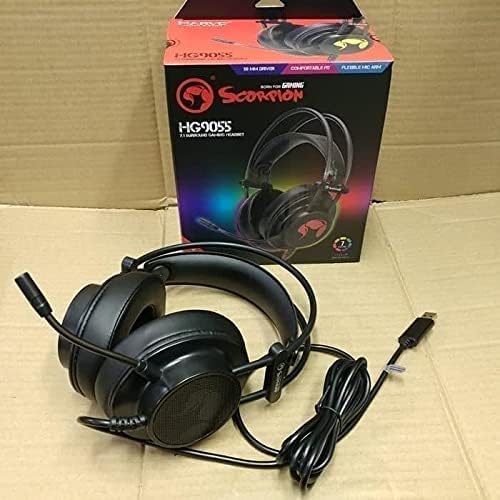
Image: The Marvo Scorpion HG9055 headset displayed next to its retail packaging, showing the product and its box.
Prodott Overview
The Marvo Scorpion HG9055 is a USB gaming headset designed for PC and laptop use, featuring 7.1 virtual surround sound, 50mm drivers, and a noise-cancelling microphone.

Image: A promotional view of the Marvo Scorpion HG9055 headset, detailing its 7.1 surround sound, USB connection, and customizable 7-color lighting features.
Komponenti Ewlenin:
- Faxxa tar-ras aġġustabbli: Għal tajbin komdu.
- Tazzi tal-widna li jdawru l-widnejn: Padded for comfort during extended use.
- Mikrofonu flessibbli: Noise-cancelling for clear communication.
- Konnettur USB: For digital audio and power.
Setup Istruzzjonijiet
- Qabbad il-Headset: Plug the USB connector of the HG9055 headset into an available USB port on your PC or laptop.
- Installazzjoni tas-sewwieq: The operating system (Windows/macOS) should automatically detect and install the necessary drivers. Allow a few moments for this process to complete.
- Verify Audio Output:
- Windows: Right-click the speaker icon in the system tray, select "Sound Settings" or "Playback devices." Ensure "Marvo Scorpion HG9055" or a similar device name is selected as the default playback device.
- macOS: Go to "System Preferences" > "Sound" > "Output." Select "Marvo Scorpion HG9055" as the output device.
- Verify Microphone Input:
- Windows: In "Sound Settings" or "Recording devices," ensure "Marvo Scorpion HG9055" is selected as the default recording device.
- macOS: In "System Preferences" > "Sound" > "Input," select "Marvo Scorpion HG9055" as the input device.
- Aġġusta Fit: Adjust the headband and earcups for a comfortable and secure fit. Position the microphone approximately 2-3 cm from your mouth for optimal voice clarity.

Image: The Marvo Scorpion HG9055 headset resting on a stand, demonstrating its over-ear design and flexible microphone, ready for use.
Istruzzjonijiet Operattivi
Daqq tal-awdjo:
Once connected and configured, the headset will function as your primary audio output device.
- Kontroll tal-Volum: Adjust the volume using the in-line control wheel on the headset cable or through your operating system's sound settings.
- 7.1 Ħoss Virtwali Surround: The headset supports 7.1 virtual surround sound. This feature may require specific software or settings within your game or audio application for full utilization. Refer to your game's audio settings for configuration.
Użu tal-mikrofonu:
- Attivazzjoni tal-Mikrofonu: The microphone is active by default when connected. Use the in-line microphone mute switch (if present) to toggle the microphone on/off.
- Kanċellazzjoni tal-Istorbju: The integrated noise-cancelling microphone reduces background noise for clearer voice communication. Ensure the microphone is positioned correctly near your mouth.
- Volum tal-mikrofonu: Adjust microphone sensitivity through your operating system's sound settings (Input/Recording devices).
Manutenzjoni
- Tindif: Use a soft, dry, lint-free cloth to wipe the earcups and headband. Do not use abrasive cleaners, alcohol, or solvents.
- Ħażna: When not in use, store the headset in a clean, dry place, away from direct sunlight and extreme temperatures. Avoid tangling the cable.
- Kura tal-Cable: Do not pull on the cable to disconnect the headset. Always grasp the USB plug.
Issolvi l-problemi
| Problema | Soluzzjoni |
|---|---|
| L-ebda ħoss mill-headset. |
|
| Il-mikrofonu mhux qed jaħdem. |
|
| Il-kwalità tal-ħoss hija fqira jew distorta. |
|
Speċifikazzjonijiet
| Isem tal-Mudell | HG9055 |
| Konnettività | USB (fili) |
| Fattur tal-Forma tal-Headphones | Fuq il-widnejn |
| Sewwieqa | 50MM |
| Surround Sound | 7.1 Sound Surround Virtwali |
| Mikrofonu | Noise Cancellation, Included |
| Kontroll tal-Ħoss | Kanċellazzjoni Attiva tal-Istorbju (Mikrofonu) |
| Kompatibbli ma ' | PC, Laptop |
| Kulur | Iswed |
| Materjal | Plastik |
| Manifattur | Marvo |
Garanzija u Appoġġ
For warranty information and technical support, please refer to the warranty card included with your product or visit the official MARVO websit. Żomm il-prova tax-xiri tiegħek għal kwalunkwe talba ta' garanzija.
Manifattur: Marvo
Mudell: HG9055


