1. Introduzzjoni
The OWON SP6103 is a high-performance single-channel linear DC power supply designed for various applications requiring stable and precise power. This unit provides a maximum output of 60V and 10A, with a total power output of 300W. It features a 3.7-inch TFT LCD for clear display of parameters, low ripple and noise, and essential protection functions such as over-voltage (OVP) and over-current (OCP) protection. The SP6103 supports both Constant Voltage (CV) and Constant Current (CC) output modes and includes an RS232 port for remote control via SCPI commands.
2. Istruzzjonijiet tas-Sigurtà
To ensure safe operation and prolong the lifespan of your OWON SP6103 power supply, please read and adhere to the following safety guidelines:
- Sors tal-Enerġija: Connect the unit only to a power source that matches the voltage and frequency specified on the product label. Ensure the power cord is properly grounded.
- Ventilazzjoni: Do not block the ventilation openings on the sides and rear of the unit. Adequate airflow is essential to prevent overheating.
- Ambjent: Operate the power supply in a dry, well-ventilated indoor environment. Avoid exposure to moisture, dust, direct sunlight, or extreme temperatures.
- Konnessjoni tat-Tagħbija: Always connect the load to the output terminals before turning on the output. Ensure correct polarity.
- Terminali tal-ħruġ: Do not touch the output terminals when the output is active. High voltage and current can cause electric shock.
- Manutenzjoni: Refer all servicing to qualified personnel. Do not attempt to open or repair the unit yourself.
- Tindif: Disconnect the power cord before cleaning. Use a soft, dry cloth. Do not use liquid cleaners or aerosols.
3. Prodott Aktarview
3.1 Panel ta 'Quddiem
The front panel provides all controls and the display for operating the power supply.

Figura 3.1: Layout tal-Panew ta 'quddiem
- Wiri: 3.7-inch TFT LCD showing output voltage, current, power, OVP/OCP settings, and status indicators.
- Swiċċ tal-Enerġija: Main power toggle for the unit.
- Buttuna tas-Sistema: Accesses system settings and configurations.
- Buttuna tal-memorja: Used to save and recall output settings.
- Keylock Button: Locks the front panel controls to prevent accidental changes.
- Buttuni tan-Navigazzjoni ('Il fuq, 'l isfel, Xellug, Lemin, OK): Used for menu navigation and parameter adjustment.
- Pum: Aġġustament fin ta' voltage u parametri kurrenti.
- Buttuna mixgħul/mitfi: Toggles the output power to the terminals.
- Terminali tal-ħruġ: Red (+) for positive, Green (Ground) for chassis ground, Black (-) for negative output.
3.2 Ġenb View u Ventilazzjoni
The side panels feature ventilation grilles to ensure proper cooling of the internal components.

Figure 3.2: Side Ventilation
4. Setup
Follow these steps to set up your OWON SP6103 power supply:
- Spakkjar: Carefully remove the power supply from its packaging. Inspect the unit for any signs of damage during transit.
- Pjazzament: Place the unit on a stable, level surface, ensuring adequate space around the ventilation openings for proper airflow.
- Konnessjoni tal-Enerġija: Connect the provided AC power cord to the power input on the rear panel of the SP6103, then plug the other end into a grounded AC outlet.
- Qawwa Inizjali Mixgħula: Flip the main power switch on the front panel to the 'ON' position. The display should illuminate.
- Konnessjoni tat-Tagħbija: Before activating the output, connect your load to the output terminals. Connect the positive (+) terminal of your load to the red (+) terminal of the power supply, and the negative (-) terminal of your load to the black (-) terminal of the power supply. If grounding is required, connect to the green (Ground) terminal.
5. Istruzzjonijiet Operattivi
5.1 Issettjar Voltage u Kurrenti
To set the desired output voltage u kurrenti:
- Ensure the output is OFF (the 'On/Off' button LED is off).
- Use the navigation buttons (Left/Right) to select the parameter you wish to adjust (Voltage or Current). The selected parameter will be highlighted.
- Dawwar il- Pum to adjust the value. Press the OK button to confirm the value or move to the next digit for fine adjustment.
- Repeat for both voltage u limiti kurrenti.
5.2 Activating Output
After setting the desired voltage and current limits, press the Mixgħul/Mitfi button to activate the output. The LED on the button will illuminate, and the actual output voltage u kurrenti se jintwerew.
5.3 Vol kostantitage (CV) / Constant Current (CC) Mode
The SP6103 automatically operates in either Constant Voltage (CV) or Constant Current (CC) mode depending on the load. If the load resistance is high, the unit will operate in CV mode, maintaining the set voltage. If the load resistance is low, causing the current to reach the set limit, the unit will switch to CC mode, maintaining the set current and reducing the output voltage.
5.4 Voltage Protection (OVP) and Over-Current Protection (OCP)
The SP6103 includes OVP and OCP features to protect the connected load and the power supply itself.
- Setting OVP/OCP: Access the OVP/OCP settings through the System menu or dedicated display area. Use the navigation buttons and knob to set the desired protection thresholds.
- Triggering Protection: Jekk l-output voltage or current exceeds the set OVP or OCP limits, the output will automatically shut down, and an indicator will appear on the display.
- Resetting Protection: To clear a protection trigger, turn off the output, resolve the condition that caused the trigger, and then turn the output back on.
5.5 Funzjonijiet tal-Memorja
Il- Memorja button allows you to save and recall frequently used voltage and current settings. Consult the on-screen prompts for saving to and recalling from memory slots.
5.6 Keylock Function
Agħfas il- serratura taċ-ċavetta button to disable the front panel controls, preventing accidental changes to the output settings during operation. Press it again to unlock.
5.7 Komunikazzjoni RS232
The SP6103 features an RS232 port for remote control and data logging. It supports Standard Commands for Programmable Instruments (SCPI). Refer to the detailed programming manual (if available from the manufacturer) for specific SCPI commands and communication protocols.
6. Manutenzjoni
The OWON SP6103 requires minimal maintenance to ensure optimal performance:
- Tindif: Regularly clean the exterior of the unit with a soft, dry, lint-free cloth. Do not use abrasive cleaners or solvents. Ensure the unit is powered off and unplugged before cleaning.
- Ventilazzjoni: Periodically check that the ventilation openings are free from dust and debris. Use compressed air to gently clear any blockages if necessary.
- Ħażna: When not in use for extended periods, store the power supply in a cool, dry place, away from direct sunlight and extreme temperatures.
7 Issolvi l-problemi
If you encounter issues with your OWON SP6103, refer to the following common problems and solutions:
| Problema | Kawża Possibbli | Soluzzjoni |
|---|---|---|
| L-unità ma tixgħelx | No AC power; Power cord loose; Main power switch off | Check AC outlet; Ensure power cord is securely connected; Turn main power switch ON |
| L-ebda output voltage/kurrent | Output is OFF; OVP/OCP triggered; Load disconnected or faulty | Press 'On/Off' button; Check OVP/OCP settings and reset if triggered; Verify load connection and functionality |
| Vol. Tal-ħruġtage/current unstable | Poor load connection; Overheating | Ensure secure load connections; Check ventilation, reduce load if necessary |
| Display juri messaġġ ta 'żball | Internal fault; Protection triggered | Note error code and consult manufacturer support; Reset protection as described in section 5.4 |
8. Speċifikazzjonijiet
The following table outlines the key technical specifications for the OWON SP6103 DC Power Supply:
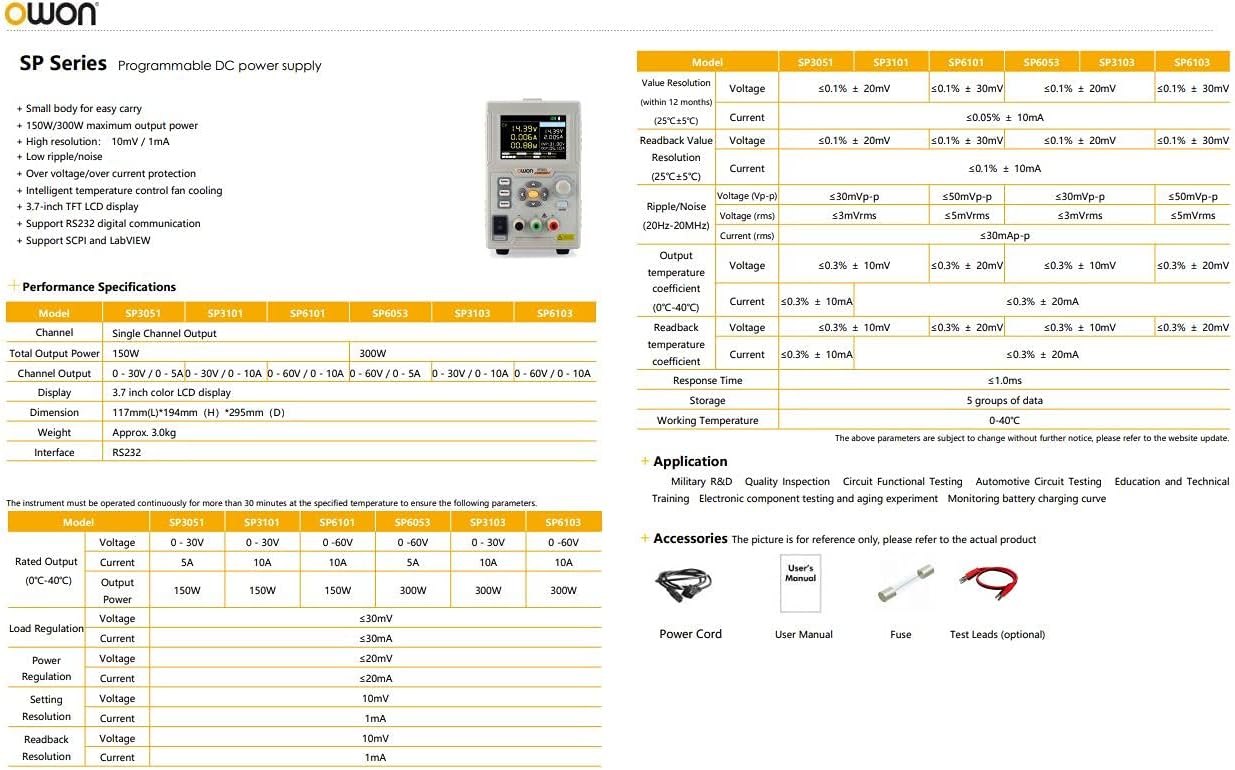
Figure 8.1: OWON SP Series Specifications Overview
| Parametru | Specification (SP6103) |
|---|---|
| Numru tal-Mudell | SP6103 |
| Kanal | Kanal Uniku |
| Ħruġ Voltage | 0-60V |
| Kurrent tal-Ħruġ | 0-10A |
| Qawwa tal-Ħruġ | 300W |
| Voltage Riżoluzzjoni | 10mV |
| Riżoluzzjoni kurrenti | 10mA |
| Wiri | 3.7 pulzier TFT LCD |
| Ripple/Noise (Vp-p) | ≤30mVp-p |
| Ripple/Noise (rms) | ≤3mVrms |
| Protezzjoni | Over-Voltage Protection (OVP), Over-Current Protection (OCP) |
| Interface | RS232 (SCPI support) |
| Dimensjonijiet (W×H×D) | 117mm × 194mm × 295mm |
| Piż | Appross. 2.3kg (5.07 lbs) |
| Temperatura operattiva | 0-40°C |
| Input Voltage | 220-240V AC |
9. Garanzija u Appoġġ
For warranty information, technical support, or service inquiries, please contact your authorized OWON dealer or the manufacturer directly. Keep your purchase receipt as proof of purchase for warranty claims. Specific warranty terms and conditions may vary by region and retailer.


