Introduzzjoni
This manual provides comprehensive instructions for the setup, operation, and maintenance of your Gen Game S6 Wireless Bluetooth Gamepad. This device is designed to enhance your gaming experience on compatible Android smartphones, tablets, PCs, and TV boxes.
Prodott Overview
Kontenut tal-Pakkett
- Gen Game S6 Wireless Bluetooth Gamepad
- Cable tal-Iċċarġjar tal-USB
- Manwal għall-Utent (dan id-dokument)
Identifikazzjoni tal-Komponent
Familiarize yourself with the various buttons and features of your gamepad:

Immaġni: Quddiem view of the Gen Game S6 Wireless Bluetooth Gamepad, showing the D-pad, left and right analog joysticks, action buttons (A, B, X, Y), Start, Select, and Home buttons, and the 'GEN GAME' logo.
- Joystick Analogu tax-Xellug: Għall-kontroll direzzjonali.
- Joystick Analogu tal-Lemin: For camera control or additional directional input.
- D-Pad: Digital directional pad for precise movements.
- Buttuni ta' Azzjoni (A, B, X, Y): Għal azzjonijiet fil-logħba.
- Buttuni tal-ispalla (L1, R1): Buttuni mmuntati fuq nett.
- Trigger Buttons (L2, R2): Bottom-mounted buttons.
- Buttuna START: Typically for pausing or menu access.
- Buttuna Agħżel: Għal diversi funzjonijiet fil-logħba.
- Buttuna HOME: To power on/off or return to the main menu.
- Detentur tat-Telefown: Integrated adjustable clip for mounting smartphones.
- Port tal-Iċċarġjar: Għall-konnessjoni tal-kejbil tal-iċċarġjar USB.
- Dwal indikaturi: To show connection status, charging status, or mode.
Setup
1. Iċċarġjar tal-Gamepad
- Qabbad it-tarf iż-żgħir tal-kejbil tal-iċċarġjar USB mal-port tal-iċċarġjar fuq il-gamepad.
- Connect the larger end of the USB charging cable to a USB power source (e.g., computer, USB wall adapter).
- Id-dawl indikatur tipikament juri aħmar waqt l-iċċarġjar u jintefa jew jibdel il-kulur meta jkun iċċarġjat kompletament.
- Ħalli madwar 2-3 sigħat għal ċarġ sħiħ qabel l-ewwel użu.
2. Tqabbil tal-Bluetooth
The Gen Game S6 supports various pairing modes for different devices. Refer to your device's specific requirements for optimal connection.
- Qawwa Mixgħul: Agħfas u żomm il- HOME button for 3 seconds to power on the gamepad. The indicator lights will flash.
- Daħħal il-Mod tat-Tqabbil: Depending on your device, you may need to press a specific button combination while powering on (e.g., HOME + X for Android, HOME + A for PC). Refer to the quick start guide included with your gamepad for specific mode instructions. The indicator lights will flash rapidly, indicating it's searching for a device.
- Ippermetti l-Bluetooth fuq l-Apparat Tiegħek: On your Android smartphone, tablet, PC, or TV Box, go to the Bluetooth settings and ensure Bluetooth is enabled.
- Skennja għal Apparati: Your device will scan for available Bluetooth devices. Look for "Gen Game S6" or a similar name in the list.
- Qabbad: Select the gamepad from the list to initiate pairing. Once successfully paired, the indicator light on the gamepad will typically become solid.
- Konnessjoni tat-Test: Open a compatible game or a gamepad testing application to verify the connection and button functionality.
Istruzzjonijiet Operattivi
Operazzjoni Bażika
- Qawwa Mixgħul: Agħfas u żomm il- HOME buttuna għal 3 sekondi.
- Itfi: Agħfas u żomm il- HOME button for 5 seconds until the indicator lights turn off. The gamepad will also automatically power off after a period of inactivity to conserve battery.
- Konnessjoni mill-ġdid: Once paired, the gamepad should automatically reconnect to the last paired device when powered on and Bluetooth is active on the device. If not, manually select it from your device's Bluetooth settings.
L-użu tad-Detentur tat-Telefon
- Gently extend the integrated phone holder upwards.
- Carefully place your smartphone into the holder, ensuring it is securely gripped without obstructing any buttons or ports.
- Aġġusta l-angolu għall-aħjar viewwaqt il-logħba.
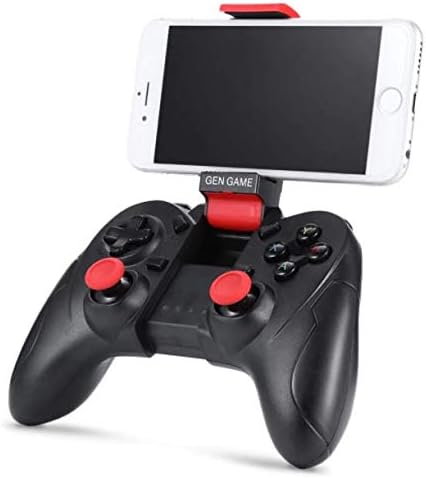
Image: The Gen Game S6 Gamepad with a smartphone securely mounted in the integrated holder, demonstrating its use for mobile gaming.
Manutenzjoni
- Tindif: Use a soft, dry cloth to wipe the surface of the gamepad. Avoid using harsh chemicals or abrasive materials.
- Ħażna: Aħżen il-gamepad f'post frisk u niexef 'il bogħod mix-xemx diretta u minn temperaturi estremi.
- Kura tal-batterija: Biex ittawwal il-ħajja tal-batterija, evita li tiċċarġja l-gamepad kompletament ta' spiss. Iċċarġjah regolarment, anke jekk ma tkunx qed tużah għal perjodi twal.
- Evita Qtar: Ipproteġi l-gamepad minn waqgħat u impatti, li jistgħu jagħmlu ħsara lill-komponenti interni.
Issolvi l-problemi
| Problema | Kawża Possibbli | Soluzzjoni |
|---|---|---|
| Il-gamepad ma jixgħelx. | Batterija baxxa. | Iċċarġja l-gamepad kompletament. |
| Ma tistax tqabbad mat-tagħmir. | Bluetooth not enabled on device; Gamepad not in pairing mode; Device out of range. | Ensure Bluetooth is on; Put gamepad in pairing mode (refer to Setup); Move gamepad closer to device (within 8 meters). |
| Il-gamepad jiskonnettja spiss. | Low battery; Interference; Device out of range. | Charge the gamepad; Avoid strong electromagnetic interference; Stay within Bluetooth range. |
| Buttons are unresponsive or incorrect. | Incorrect pairing mode; Game not compatible; Software glitch. | Ensure correct pairing mode for your device; Verify game compatibility; Restart gamepad and device. |
Speċifikazzjonijiet
- Mudell: S6
- Ditta: Ġen Logħba
- Konnettività: Bluetooth 3.0 Wireless
- Apparati Kompatibbli: Android Smartphones, Tablets, PCs, TV Boxes
- Piż tal-oġġett: 240 g
- Dimensjonijiet tal-pakkett: 20 x 14.2 x 7.2 ċm
- Kulur: Iswed
Garanzija u Appoġġ
Għal informazzjoni dwar il-garanzija jew appoġġ tekniku, jekk jogħġbok irreferi għad-dokumentazzjoni pprovduta fil-ħin tax-xiri jew ikkuntattja lill-bejjiegħ tiegħek. Żomm il-prova tax-xiri tiegħek għal kwalunkwe talba ta' garanzija.


