1. Introduzzjoni
The TOPDON Phoenix Plus 2 is a professional-grade automotive diagnostic scan tool designed for comprehensive vehicle system analysis, maintenance, and advanced functions. This manual provides detailed instructions for setting up, operating, and maintaining your device to ensure optimal performance and accurate diagnostics.
2. Karatteristiċi ewlenin
- Kodifikazzjoni tal-ECU: Compatible with various brands including Benz, BMW, and V.A.G, allowing for customization and module replacement.
- Bidirectional Control (Active Test): Perform specific tests on vehicle components to identify issues directly.
- 41+ Hot Reset Services: A wide range of maintenance functions such as AdBlue Reset, Oil Reset, SAS Reset, EPB Reset, TPMS Reset, BMS Reset, and more.
- Id-Dijanjostika tas-Sistema Kollha: Comprehensive scanning of all available onboard systems (e.g., transmission, engine, body) to retrieve Diagnostic Trouble Codes (DTCs).
- Topology Map: Visual representation of the vehicle's full system status for easy fault identification.
- AutoVIN u AutoScan: Quickly identify vehicle information and perform automatic system scans.
- AutoAuth for FCA SGW: Bypass Security Gateway Module in FCA vehicles for advanced diagnostics.
- V.A.G Guided Function: Streamlined procedures for V.A.G vehicles.
- Ħardwer Avvanzat: Android 10.0 OS, 10.1-inch touchscreen, 64GB ROM, and 2 years of free software updates.
3. X'hemm fil-Kaxxa
Upon unboxing your TOPDON Phoenix Plus 2, you should find the following components:
- 1x Phoenix Plus 2 Diagnostic Tablet
- 1x VCI Dongle
- 1x Carry Case
- 1x Manwal għall-Utent
- Various Diagnostic Connectors (e.g., BMW-20, Fiat-3, GM/VAZ-12, Benz-38, Honda-3, Toyota-17, Toyota-22, Nissan-14+16, Mitsubishi/Hyundai-12+16)
- OBD I Adapter
- OBD II Extension Cable
- Kejbil tat-Tip Ċ għal USB
- Kejbil tal-Lighter tas-Sigaretti
- Batterija Clamps Cable
- Power Adaptors (UK, EU, US Gauge)
- Ittra tal-Password

Image: The TOPDON Phoenix Plus 2 Scanner, VCI dongle, and various cables neatly organized within its protective carry case.
Video: An unboxing demonstration of the TOPDON Phoenix Plus 2, showcasing the tablet, VCI, and included accessories.
4. Setup u Konfigurazzjoni Inizjali
4.1. Device Overview and Charging
Before first use, ensure the Phoenix Plus 2 tablet is fully charged using the provided power adapter and Type-C USB cable. The tablet features a robust design with protected ports.

Image: Close-up of the TOPDON Phoenix Plus 2 tablet highlighting the USB port and Type C charging slot.
4.2. Reġistrazzjoni u Attivazzjoni
To access all features and receive software updates, you must register and activate your device.
- Connect the tablet to a Wi-Fi network.
- Navigate to "User Info" > "Settings" > "Login".
- Select "New Registration" and follow the on-screen prompts to create an account. You will need to input a username, password, and email address.
- A verification code will be sent to your email. Enter this code when prompted.
- Locate the "PASSWORD LETTER" included in your package. This contains the Serial Number and Activation Code for your VCI (Vehicle Communication Interface) dongle.
- Input the Serial Number and Activation Code into the device.
- Tap "Activate" to complete the registration process.
Video: A step-by-step guide on how to register and activate your TOPDON Phoenix Plus 2 device.
4.3. Konnessjoni ma' Vettura
The Phoenix Plus 2 uses a VCI dongle for wireless communication with the vehicle. For older vehicles, various diagnostic connectors are provided.
- Locate the vehicle's OBD-II port (typically under the dashboard).
- Plug the VCI dongle directly into the OBD-II port. For non-standard OBD-II ports, use the appropriate diagnostic connector and cable from the kit.
- Ensure the VCI dongle's indicator light is on, signifying a successful connection to the vehicle's power.
- The tablet will automatically connect to the VCI via Bluetooth within a 10-meter range.

Image: A selection of diagnostic connectors, including BMW-20, Fiat-3, GM/VAZ-12, and Benz-38, for various vehicle models.
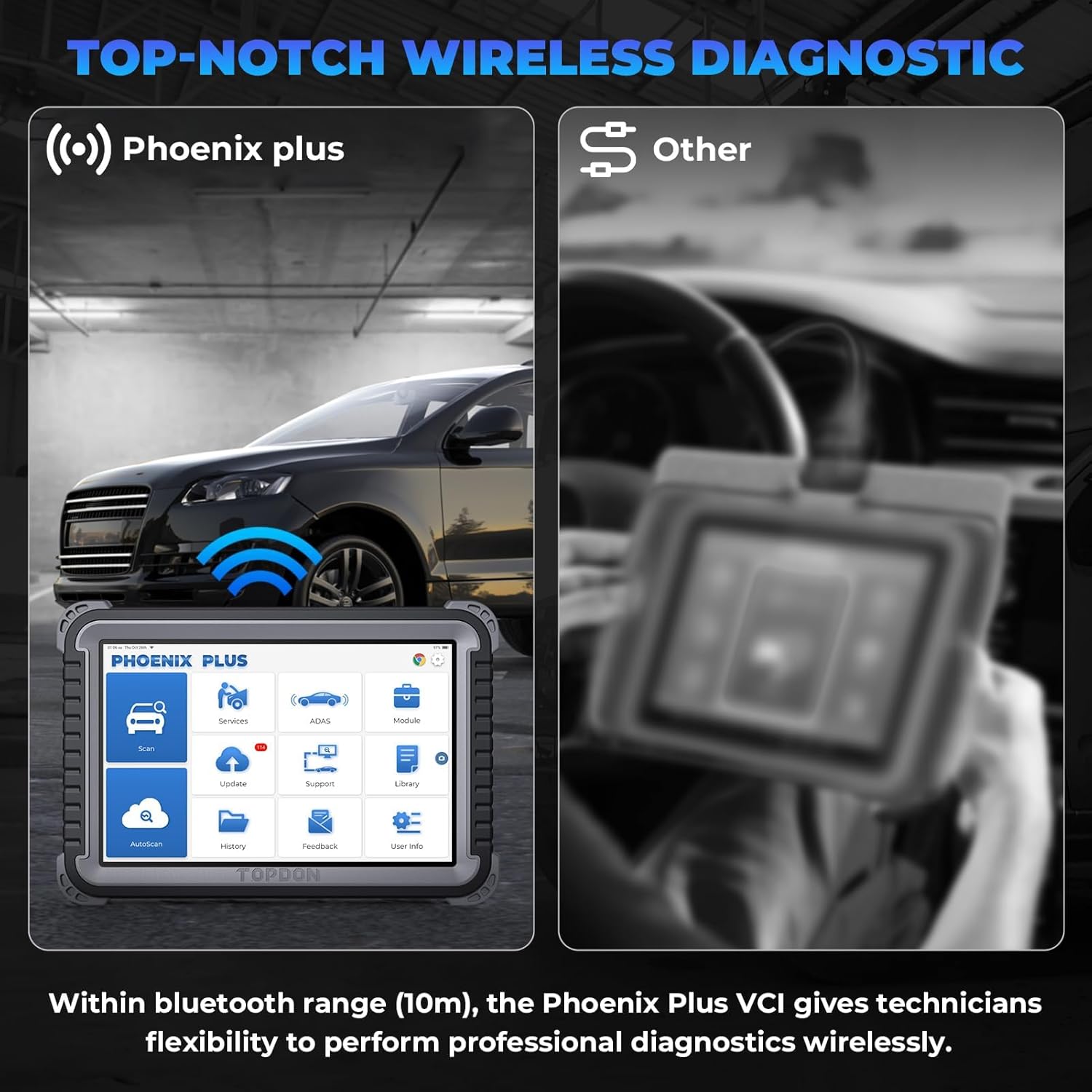
Image: The Phoenix Plus 2 tablet performing wireless diagnostics with a vehicle, illustrating the 10m Bluetooth range.
5. Istruzzjonijiet Operattivi
5.1. Navigazzjoni fl-Interface
The Phoenix Plus 2 operates on Android 10.0 with a user-friendly 10.1-inch touchscreen interface. The main screen provides access to key functions:
- Skennja: Initiate a diagnostic scan.
- Servizzi: Access various maintenance and reset functions.
- ADAS: Advanced Driver-Assistance Systems calibration.
- Modulu: Specific module functions.
- Aġġornament: Download and install software updates.
- Appoġġ: Access technical support and resources.
- Librerija: Contains OBD Fault Code Library, Coverage List, and Learning Materials.
- AutoScan: Automatic vehicle identification and full system scan.
- Storja: Review rapporti dijanjostiċi tal-passat.
- Feedback: Send feedback to TOPDON.
- Informazzjoni dwar l-Utent: Manage account settings and device information.
5.2. Performing a Diagnostic Scan
The device offers both manual and automatic scanning options.
- Ensure the VCI is connected to the vehicle and the tablet is powered on.
- Tektek "AutoScan" on the home screen for automatic vehicle identification and a comprehensive scan of all available systems.
- Inkella, tektek "Skennja" to manually select vehicle make, model, and year, then proceed with a system-specific scan.
- Il- Topology Map feature will display the vehicle's system status, highlighting any faulty areas for quick identification.

Image: The Topology Map function on the Phoenix Plus 2 screen, showing a visual overview of a vehicle's electronic control units and their status.

Image: The device demonstrating Topology Mapping to quickly locate faults and AutoVIN for rapid vehicle identification.
5.3. ECU Coding and Bidirectional Control
These advanced functions allow for in-depth vehicle customization and component testing.
- Kodifikazzjoni tal-ECU: Access the ECU Coding menu to activate or deactivate hidden functions, match new ECUs after replacement, and perform variant coding. This is compatible with various vehicle brands.
- Bidirectional Control (Active Test): From the diagnostic menu, select the desired system and then choose "Active Test" to command specific components (e.g., turn on radiator fan, test fuel injectors, operate windows).

Image: The Phoenix Plus 2 illustrating ECU coding capabilities, such as activating hidden functions and matching new ECUs.

Image: The device demonstrating bidirectional control by activating various vehicle components like the radiator fan and windows.

Immaġni: Dettaljata view of bidirectional control functions, including testing fuel injectors, coolant pumps, windows, and windshield wipers.
5.4. Servizzi ta' Manutenzjoni
The Phoenix Plus 2 offers over 41 maintenance and reset services. Access these via the "Services" icon on the home screen.
- Common services include: Oil Reset, SAS (Steering Angle Sensor) Reset, EPB (Electronic Parking Brake) Reset, TPMS (Tire Pressure Monitoring System) Reset, BMS (Battery Management System) Reset, AdBlue Reset, Gearbox Reset, Sunroof Reset, Suspension Reset, AFS (Adaptive Front-lighting System) Headlamp Reset, and more.
- Follow the on-screen instructions for each specific service.

Image: The Phoenix Plus 2 screen showing a selection of over 41 maintenance services, including Oil Reset, Adblue Reset, and EPB Reset.

Image: A more detailed list of the 41+ maintenance services available, such as SRS, ABS, Transport, Suspension Reset, and more.
5.5. Vehicle Coverage Inquiry
To check specific functions supported for a particular vehicle, use the Vehicle Coverage feature:
- Mill-iskrin tad-dar, tektek "Library".
- Agħżel "Coverage List" to go to the Coverage List page.
- Select the make of the vehicle or the service function you wish to inquire about.
- Select or enter the vehicle model, year, and other relevant details to check the specific service functions covered.
Video: A demonstration on how to use the Vehicle Coverage feature to check supported functions for specific vehicle models and years.
6. Manutenzjoni
6.1. Aġġornamenti tas-Software
Regular software updates are crucial for maintaining optimal performance, expanding vehicle coverage, and adding new features. The Phoenix Plus 2 includes 2 years of free software updates.
- Kun żgur li l-apparat huwa konness ma' netwerk Wi-Fi stabbli.
- Tektek il- "Update" ikona fuq l-iskrin tad-dar.
- Select the available updates and follow the on-screen instructions to install them.
6.2. Kura Ġenerali
- Żomm l-apparat nadif u ħieles mit-trab u l-umdità. Uża drapp artab u niexef għat-tindif.
- Store the device in its protective carry case when not in use to prevent damage.
- Evita li tesponi l-apparat għal temperaturi estremi jew dawl tax-xemx dirett għal perjodi twal.
- Tippruvax iżarma jew isewwi l-apparat lilek innifsek. Ikkuntattja l-appoġġ tal-klijent għall-assistenza.
7 Issolvi l-problemi
If you encounter issues with your TOPDON Phoenix Plus 2, refer to the following common solutions:
- Apparat mhux mixgħul: Kun żgur li l-batterija hija ċċarġjata. Qabbad l-apparat mal-adapter tal-enerġija u erġa' pprova.
- Il-VCI mhux qed jikkonnettja: Check if the VCI dongle is securely plugged into the vehicle's OBD-II port and the vehicle's ignition is on. Verify Bluetooth is enabled on the tablet.
- Iffriżar/kraxxjar tas-softwer: Restart the tablet. Ensure the software is up to date. If the issue persists, contact technical support.
- Inaccurate diagnostic results: Ensure the correct vehicle make, model, and year are selected. Verify all connections are secure.
- Update failures: Check your Wi-Fi connection stability. Ensure sufficient storage space on the device.
For further assistance, refer to the "Support" section on your device or visit the official TOPDON websit.
8. Speċifikazzjonijiet
| Karatteristika | Speċifikazzjoni |
|---|---|
| Mudell | Phoenix Plus |
| Sistema Operattiva | Android 10.0 |
| Dimensjonijiet tal-Prodott | 27 x 19 x 4.4 ċm |
| Piż tal-oġġett | 5.93 kg |
| Batteriji | 1 batterija tal-jone tal-litju meħtieġa |
| Ħażna (ROM) | 64GB |
| Daqs tal-Iskrin | 10.1 pulzieri |
| Aġġornamenti tas-Software | Aġġornament B'Xejn għal 2 Snin |
9. Garanzija u Appoġġ
TOPDON provides a product assurance period. For specific warranty details, please refer to the documentation included with your device or contact TOPDON customer service directly. Technical support is available to assist with any operational or technical queries.
For support, visit the official TOPDON website or use the "Support" feature within the device's interface.


