1. Introduzzjoni
This manual provides essential instructions for the safe and efficient use of your Xiaomi Poco F3 smartphone. It covers device setup, basic operations, maintenance guidelines, and troubleshooting tips. Please read this manual thoroughly before using your device to ensure optimal performance and longevity.
2. Kontenut tal-Pakkett
Upon unboxing your Xiaomi Poco F3, please verify that all the following items are included:
- Xiaomi Poco F3 Smartphone
- Adapter tal-Enerġija
- Kejbil USB Type-C
- Għodda Eject SIM
- Protective Case (availability may vary by region)
- Gwida Quick Start
- Karta ta' Garanzija
3. It-Tqassim u l-Komponenti tal-Apparat
Familiarize yourself with the physical components of your Xiaomi Poco F3.

Figura 3.1: Angolat view of the Poco F3, highlighting the display and rear camera setup.
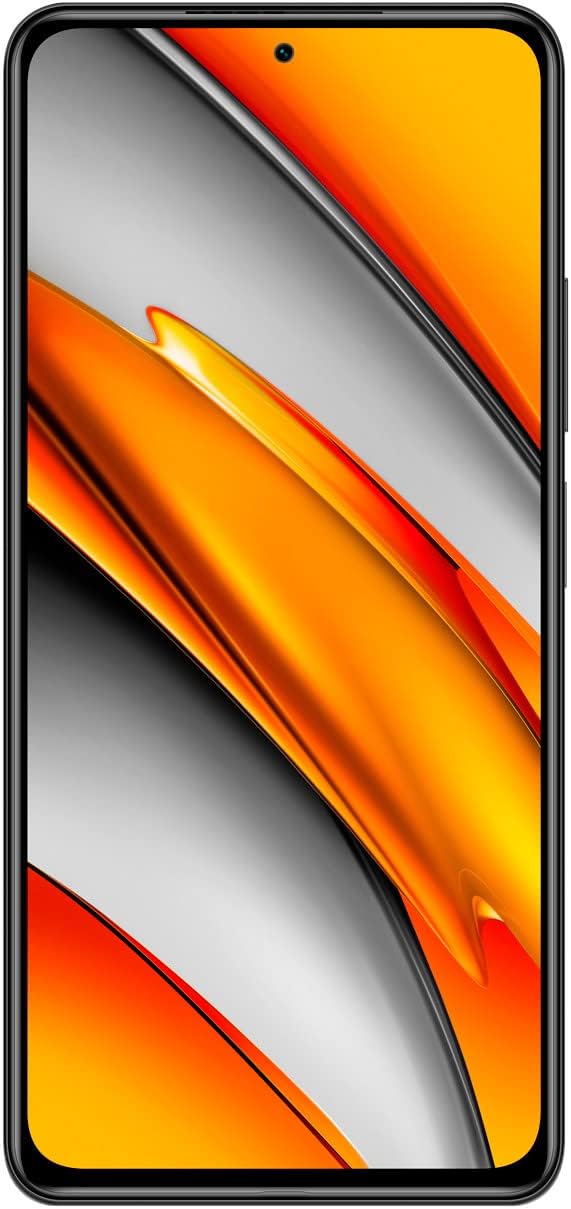
Figura 3.2: Quddiem view of the Poco F3, showing the full display and front camera.

Figura 3.3: Wara view of the Poco F3, detailing the triple camera system and branding.

Figura 3.4: In-naħa tal-lemin view of the Poco F3, illustrating the power button and volume controls.

Figura 3.5: Xifer tal-qiegħ view of the Poco F3, displaying the SIM tray, USB-C port, and speaker.

Figura 3.6: Xifer ta 'fuq view of the Poco F3, showing the secondary speaker, microphone, and IR blaster.
Komponenti Ewlenin:
- Wiri: Large AMOLED screen for vibrant visuals.
- Kamera ta' quddiem: Located at the top center of the display for selfies and video calls.
- Modulu tal-Kamera ta' wara: Houses the triple camera setup and LED flash.
- Buttuna tal-Enerġija/Sensor tal-Marki tas-Swaba': On the right side, used for power control and biometric authentication.
- Volum Rocker: Located above the power button, for adjusting audio levels.
- Trej tal-SIM Card: On the bottom edge, for inserting Nano-SIM cards.
- Port USB tat-Tip Ċ: Fit-tarf t'isfel, għall-iċċarġjar u t-trasferiment tad-dejta.
- Lawdspikers: Stereo speakers located on the top and bottom edges for enhanced audio.
- Mikrofoni: Primary microphone on the bottom, secondary microphone on the top for noise cancellation.
- IR Blaster: On the top edge, for controlling compatible home appliances.
4. Setup
4.1. Daħħal is-SIM Card
- Locate the SIM card tray on the bottom edge of your device.
- Daħħal l-għodda tal-ħruġ tas-SIM provduta fit-toqba ż-żgħira fuq it-trej tas-SIM. Agħfas sew sakemm it-trej joħroġ 'il barra.
- Poġġi l-kard(s) Nano-SIM tiegħek fit-trej bil-kuntatti tad-deheb iħarsu 'l isfel. Kun żgur li l-orjentazzjoni hija korretta kif indikat fuq it-trej.
- Carefully push the SIM tray back into the slot until it is flush with the device.
4.2. Kif Tixgħel l-Apparat Tiegħek
Agħfas u żomm il- Buttuna tal-Qawwa (located on the right side) for a few seconds until the Xiaomi logo appears on the screen.
4.3. Konfigurazzjoni Inizjali
Upon first startup, follow the on-screen instructions to set up your device. This typically includes:
- L-għażla tal-lingwa u r-reġjun tiegħek.
- Konnessjoni ma 'netwerk Wi-Fi.
- Idħol bil-kont Google tiegħek.
- Setting up screen lock (PIN, pattern, password, or fingerprint).
- Reviewing u aċċettazzjoni tat-termini u l-kundizzjonijiet.
5. Tħaddim tat-Tagħmir Tiegħek
5.1. Ixgħel, Itfi, u Erġa' Ibda
- Qawwa Mixgħul: Press and hold the Power Button until the device vibrates and the logo appears.
- Itfi: Press and hold the Power Button until the power menu appears, then tap 'Power off'.
- Ibda mill-ġdid: Press and hold the Power Button until the power menu appears, then tap 'Restart'.
5.2. Navigazzjoni tal-Iskrin
Your Poco F3 features a touch-sensitive display. Use the following gestures for navigation:
- Tektek: Agħżel oġġett jew iftaħ app.
- Swipe: Skrollja 'l fuq minn skrins jew listi.
- Oqros: Iżżumja 'l ġewwa jew 'il barra fuq ritratti u web paġni.
- Stampa Twila: Aċċessa l-menus kuntestwali jew iċċaqlaq l-ikoni.
5.3. Konnettività
Manage your device's network connections:
- Wi-Fi: Mur fuq Settings > Wi-Fi biex tikkonnettja man-netwerks mingħajr fili disponibbli.
- Bluetooth: Mur fuq Settings > Bluetooth biex tqabbad ma' apparati Bluetooth bħal headphones jew speakers.
- Mobile Data/5G: Mur fuq Settings > SIM cards u netwerks mobbli to enable or disable mobile data and manage 5G connectivity.
5.4. Camera Basics
Biex tuża l-kamera:
- Iftaħ il- Kamera app mill-iskrin tad-dar tiegħek jew mill-kexxun tal-apps.
- Tektek il-buttuna tax-shutter biex tieħu ritratt.
- Swipe left or right to switch between different camera modes (e.g., Photo, Portrait, Video).
- Tektek l-ikona tas-swiċċ tal-kamera biex taqleb bejn il-kameras ta' quddiem u ta' wara.
5.5. Marki tas-swaba 'Nisfruttaw
To set up fingerprint unlock:
- Mur fuq Settings > Passwords u sigurtà > Sblokkjar bil-marka tas-swaba'.
- Segwi l-istruzzjonijiet fuq l-iskrin biex tirreġistra l-marki tas-swaba' tiegħek.
- Once registered, you can unlock your device by placing your finger on the power button.
6. Manutenzjoni
6.1. Tindif tal-Apparat Tiegħek
To maintain the appearance and functionality of your Poco F3:
- Uża drapp artab u mingħajr suf biex timsaħ bil-mod l-iskrin u l-qafas.
- Evita li tuża kimiċi ħarxa, materjali li joborxu, jew sprejs tal-ajrusol.
- Żomm il-portijiet ħielsa mit-trab u l-fdalijiet.
6.2. Aġġornamenti tas-Software
Iċċekkja u installa aġġornamenti tas-softwer regolarment biex tiżgura li t-tagħmir tiegħek ikollu l-aħħar karatteristiċi, irqajja tas-sigurtà, u titjib fil-prestazzjoni.
- Mur fuq Settings > Dwar it-telefon > Verżjoni MIUI.
- Tap 'Check for updates' and follow the prompts if an update is available.
6.3. Kura tal-batterija
Biex ittawwal il-ħajja tal-batterija:
- Uża biss il-ċarġer u l-kejbil oriġinali pprovduti mat-tagħmir tiegħek.
- Evita li tesponi l-apparat għal temperaturi estremi (sħan jew kesħin).
- Ottimizza s-settings tal-batterija fi Settings > Batterija u prestazzjoni.
- Evita li l-batterija tixxotta kompletament ta' spiss.
7 Issolvi l-problemi
This section addresses common issues you might encounter with your Poco F3.
7.1. Apparat Mhux Tixgħel
- Kun żgur li l-batterija hija ċċarġjata. Qabbad l-apparat mal-ċarġer tiegħu għal mill-inqas 30 minuta.
- Attempt a force restart by pressing and holding the Power Button for approximately 10-15 seconds.
7.2. Kwistjonijiet ta' Konnettività tan-Netwerk
- Iċċekkja jekk il-kard tas-SIM hijiex imdaħħla u attivata sew.
- Toggle Airplane Mode on and off from the Quick Settings panel.
- Ibda mill-ġdid it-tagħmir tiegħek.
- Verify your mobile data plan is active and you have coverage.
7.3. L-Applikazzjonijiet Jiġġarraf jew Jiffriża
- Neħħi l-cache u d-dejta tal-app problematika permezz ta' Settings > Applikazzjonijiet > Immaniġġja l-applikazzjonijiet.
- Kun żgur li l-app hija aġġornata għall-aħħar verżjoni tagħha mill-Google Play Store.
- If the issue persists, try uninstalling and reinstalling the app.
7.4. Prestazzjoni bil-mod
- Agħlaq applikazzjonijiet fl-isfond mhux meħtieġa.
- Clear cached data regularly via Settings > Dwar it-telefon > Ħażna.
- Kun żgur li t-tagħmir tiegħek għandu biżżejjed spazju ta' ħażna ħieles.
- As a last resort, consider a factory reset (back up your data first). Go to Settings > Dwar it-telefon > Reset tal-fabbrika.
8. Speċifikazzjonijiet
Below are the key technical specifications for the Xiaomi Poco F3 (Model: M2012K11AG):
| Karatteristika | Speċifikazzjoni |
|---|---|
| Isem tal-Mudell | Poco F3 |
| Numru tal-Mudell tal-Oġġett | M2012K11AG |
| Sistema Operattiva | MIUI 12 |
| RAM | 8 GB |
| Kapaċità tal-Ħżin tal-Memorja | 256 GB (Intern) |
| Daqs tal-Iskrin | 6.67 Pulzier |
| Teknoloġija tal-Wiri | AMOLED |
| Riżoluzzjoni | 1080 x 2400 pixel |
| Riffriskar Rata | 120 Hz |
| Kapaċità tal-batterija | 4520 Milliamp Sigħat (tipiċi) |
| Dimensjonijiet tal-Prodott | 6.44 x 3.01 x 0.31 pulzieri |
| Piż tal-oġġett | 6.9 uqija (196 Grammi) |
| Teknoloġiji tal-Konnettività | Wi-Fi, 5G, Bluetooth, GPS |
| Kulur | Lejl Iswed |
| Manifattur | Xiaomi |
9. Garanzija u Appoġġ
Your Xiaomi Poco F3 is covered by a limited warranty. Please refer to the warranty card included in your package for detailed terms and conditions, including warranty period and coverage.
For technical support, service, or further assistance, please visit the official Xiaomi support website or contact their customer service. Contact information can typically be found on the Xiaomi official webis-sit jew fil-Gwida ta' Bidu Mgħaġġel tiegħek.


