Introduzzjoni
The COVERT SCOUTING CAMERAS MP32 Trail Camera is designed to capture high-quality still photos and videos of wildlife and activity in outdoor environments. Featuring a 32MP camera for still images and 1080p video recording capabilities, it utilizes 40 low-glow LEDs for an invisible flash up to 100 feet. The camera is equipped with a passive infrared motion sensor that detects movement up to 85 feet away, triggering the lens in just 0.4 seconds. This manual provides essential information for setting up, operating, maintaining, and troubleshooting your MP32 camera.
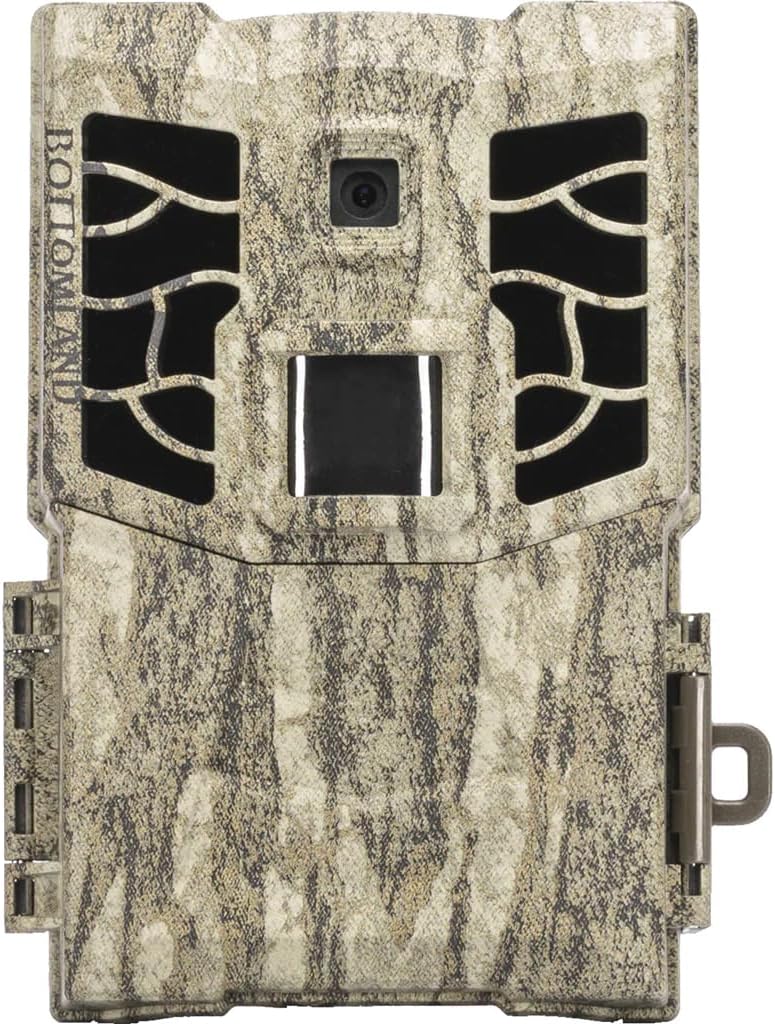
Quddiem view of the COVERT SCOUTING CAMERAS MP32 Trail Camera, featuring its Mossy Oak camouflage finish, lens, infrared LEDs, and motion sensor.
Setup
1. Installazzjoni tal-batterija
The MP32 camera operates on AA batteries. Ensure the camera is powered off before installing or replacing batteries.
- Open the battery compartment latch, typically located on the side or bottom of the camera.
- Insert the required number of AA batteries (refer to the camera's internal markings for polarity) into the battery slots.
- Agħlaq il-kompartiment tal-batterija sew biex tiżgura siġill li ma jgħaddix ilma minnu.
2. Installazzjoni tal-Kard SD
The camera supports SD cards up to 32GB for storing photos and videos.
- Locate the SD card slot, usually inside the camera's main compartment.
- Insert a formatted SD card into the slot with the metal contacts facing down, until it clicks into place.
- To remove, push the SD card in slightly until it springs out.
3. Immuntar tal-Kamera
Proper mounting ensures optimal performance and capture.
- Choose a sturdy tree or post at the desired height, typically 3-6 feet off the ground.
- Use the included mounting strap or a compatible mounting accessory to secure the camera firmly.
- Angle the camera to cover the intended area, avoiding direct sunlight or heat sources that might cause false triggers.
Istruzzjonijiet Operattivi
1. Tixgħil / Mitfi
Locate the power switch inside the camera's main compartment. Toggle it to the 'ON' position to power on the camera and to 'OFF' to power it down.
2. Għażla tal-Mod
The MP32 camera typically offers different operating modes, such as Photo, Video, or Photo+Video. Use the internal controls or menu system to select your desired mode.
3. Konfigurazzjoni tas-Settings
Access the camera's internal menu to adjust various settings:
- Riżoluzzjoni tar-Ritratti: Set to 32MP for maximum detail.
- Riżoluzzjoni tal-vidjo: Set to 1080p for high-definition video.
- Fqigħ tar-Ritratti: Configure the camera to take 1 to 5 photos per trigger event.
- Intervall ta' Trigger: Adjust the delay between consecutive triggers.
- Ħin u Data: Set the correct time and date for accurate timestamps on your captures.
- Sensittività: Adjust the motion sensor sensitivity based on environmental conditions.
4. Retrieving Images and Videos
To access your captured media:
- Itfi l-kamera.
- Remove the SD card from its slot.
- Insert the SD card into a computer's SD card reader or a compatible device.
- Fittex il- files on the SD card to view or transfer your photos and videos.
Manutenzjoni
1. Tindif
- Imsaħ il-lenti tal-kamera bil-mod b'ċarruta ratba u mingħajr suf biex tneħħi t-trab jew it-tbajja'.
- Clean the camera's exterior casing b'reklamaramp drapp. Evita prodotti tat-tindif jew solventi li joborxu.
- Ensure the battery compartment and SD card slot are free of debris.
2. Ġestjoni tal-batterija
- Regularly check battery levels, especially before deploying the camera for extended periods.
- Replace all batteries simultaneously with new ones to ensure consistent power.
- Remove batteries if the camera will not be used for a long duration to prevent leakage.
3. Aġġornamenti tal-Firmware
Periodically check the COVERT SCOUTING CAMERAS website for any available firmware updates. Firmware updates can improve camera performance and add new features. Follow the instructions provided with the update carefully.
Issolvi l-problemi
| Problema | Kawża Possibbli | Soluzzjoni |
|---|---|---|
| Il-kamera ma tixgħelx | Dead or incorrectly installed batteries; Power switch off. | Replace batteries, ensuring correct polarity. Turn power switch to 'ON'. |
| Kwalità fqira tal-immaġni/vidjow | Dirty lens; Incorrect resolution settings; Low light conditions. | Clean the lens. Check resolution settings in the menu. Ensure adequate lighting or proper flash range. |
| No triggers or missed events | PIR sensor blocked; Sensitivity too low; Incorrect placement. | Clear any obstructions from the PIR sensor. Increase sensitivity. Reposition camera for optimal detection. |
| Żball tal-karta SD | Unformatted or incompatible SD card; Full SD card. | Format the SD card in the camera or on a computer. Use a compatible SD card (up to 32GB). Delete old files or use a new SD card. |
Speċifikazzjonijiet
- Isem tal-Mudell: CC8021
- Ditta: CAMERAS TA’ SCOUTING MOĦTI
- Riżoluzzjoni tal-Immaġni: 32 Megapixels
- Riżoluzzjoni tal-vidjo: 1080p
- Tip ta' flash: 40 Low-Glow LEDs
- Medda tal-Flash: Sa 100 pied
- Firxa ta' sejbien: Sa 85 pied
- Veloċità ta' Trigger: 0.4 sekonda
- Appoġġ għall-Kard SD: Sa 32GB (karta SD mhux inkluża)
- Sors tal-Enerġija: Batteriji AA (mhux inklużi)
- Dimensjonijiet tal-oġġett (LxWxH): 6 x 2.75 x 8.5 pulzieri
- Dimensjonijiet tal-Pakkett tal-Oġġett (LxWxH): 9.25 x 5 x 3.15 pulzieri
- Piż tal-Pakkett: 0.38 Kilogrammi
- Kulur: Multi (Mossy Oak)
- Materjal: Taħlita
- Manifattur: FeraDyne Outdoors
- UPC: 850022648021
Informazzjoni dwar Garanzija
The COVERT SCOUTING CAMERAS MP32 Trail Camera comes with a Limited Warranty. For specific details regarding warranty coverage, duration, and claims procedures, please refer to the warranty card included with your product or visit the official COVERT SCOUTING CAMERAS websit.
Appoġġ għall-Klijent
For further assistance, technical support, or inquiries regarding your COVERT SCOUTING CAMERAS MP32 Trail Camera, please contact the manufacturer, FeraDyne Outdoors, or visit the official COVERT SCOUTING CAMERAS websit għal informazzjoni ta' kuntatt u riżorsi.
Uffiċjali Websit: www.feradyne.com (or search for Covert Scouting Cameras)


