Introduzzjoni
This manual provides comprehensive instructions for the installation, operation, and maintenance of your AeroCool Miragebk ATX PC Case. The Miragebk features an ARGB LED strip on the front panel, a hinged tempered glass side panel, and a 12 cm ARGB fan, designed for optimal component visibility and cooling performance.
Kontenut tal-Pakkett
- AeroCool Miragebk ATX PC Case
- Accessory kit (screws, standoffs, cable ties)
- Manwal għall-Utent (dan id-dokument)
Informazzjoni dwar is-Sigurtà
Please read and understand all safety instructions before installing or operating this product. Failure to do so may result in injury or damage to the product.
- Always disconnect the power supply from the wall outlet before performing any installation or maintenance.
- Evita li tpoġġi l-kaxxa fid-dawl tax-xemx dirett jew ħdejn sorsi ta’ sħana.
- Keep the case away from water and excessive humidity.
- Handle the tempered glass panel with care to prevent breakage.
- Żgura ertjar xieraq biex tevita perikli elettriċi.
Setup u Installazzjoni
Follow these steps to set up your AeroCool Miragebk PC case and install components.
1. Tħejjija tal-Każ
- Poġġi l-kaxxa fuq wiċċ stabbli u ċatt.
- Carefully open the hinged tempered glass side panel. This panel provides full access to the interior.
- Remove any protective films from the glass and other surfaces.

Figura 1: Quddiem view of the AeroCool Miragebk PC case, showcasing the ARGB LED strip and tempered glass panel.
2. Installazzjoni tal-Motherboard
- Installa l-ilqugħ tal-I/O fil-ftuħ ta' wara tal-kaxxa.
- Allinja l-motherboard ATX, Micro ATX, jew Mini ITX tiegħek mal-istandoffs ġewwa l-kaxxa.
- Waħħal il-motherboard billi tuża l-viti pprovduti.
3. Installazzjoni ta 'Provvista ta' Enerġija
- Install the power supply unit (PSU) into the dedicated compartment at the bottom of the case.
- Waħħal il-PSU bil-viti minn wara tal-kaxxa.
4. Storage Drive Installation (HDDs/SSDs)
The case supports up to 7 HDDs and SSDs.
- Locate the drive bays or mounting points.
- Mount your 2.5" SSDs or 3.5" HDDs using the appropriate screws.
5. Installazzjoni tal-Karta tal-Grafika (GPU)
Il-kaxxa tappoġġja karti grafiċi sa 356mm fit-tul.
- Neħħi l-għata tas-slott ta' espansjoni meħtieġa minn wara tal-kaxxa.
- Insert your graphics card into the PCIe slot on the motherboard.
- Waħħal il-karta grafika bil-viti.
6. Cooling System Installation (Fans/Liquid Cooling)
The case supports up to 8 fans and liquid cooling on the front, top, and rear.
- Install additional fans as needed for optimal airflow.
- For liquid cooling, mount radiators to the designated areas (front, top, or rear).
- The case includes one 12 cm ARGB fan.
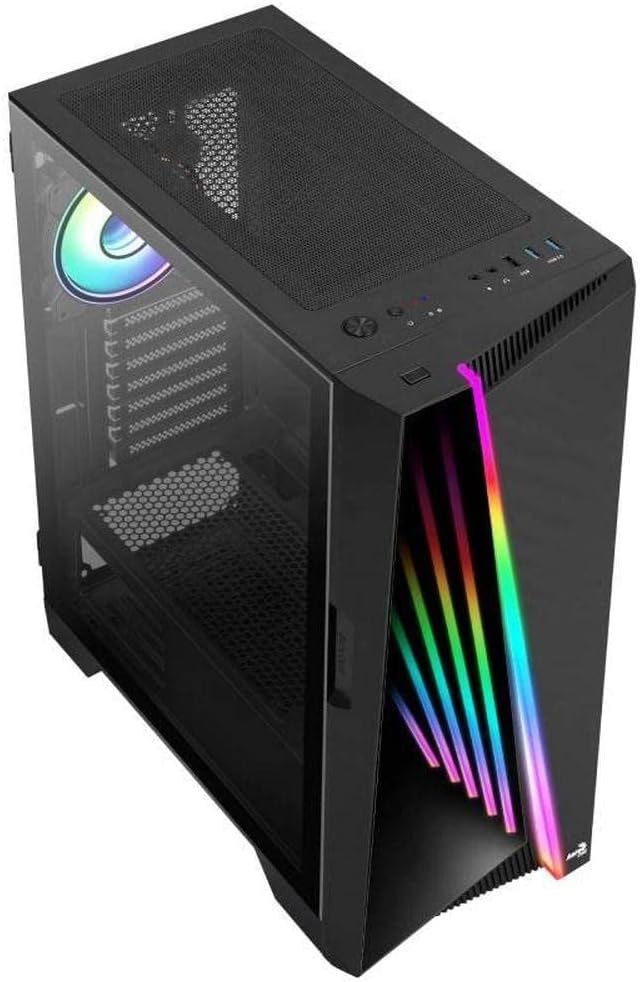
Figura 2: Angolat view of the AeroCool Miragebk PC case, highlighting the top mesh for ventilation and the front panel design.
7. Ġestjoni tal-Kejbil
Utilize the cable routing cutouts and tie-down points behind the motherboard tray to manage cables for improved airflow and aesthetics.
8. Closing the Case
Once all components are installed and cables are managed, close the tempered glass side panel and secure it.
Istruzzjonijiet Operattivi
Front Panel I / O
The top panel of the AeroCool Miragebk provides convenient access to essential ports and controls:
- Buttuna tal-Qawwa: Turns the PC on/off.
- Buttuna Irrisettja: Restarts the PC.
- Buttuna tal-Kontroll tal-LED: Cycles through ARGB lighting modes or syncs with the motherboard.
- Portijiet USB 3.0 (x2): Għat-trasferiment tad-dejta b'veloċità għolja.
- Port tal-USB 2.0 (x1): Għal apparati USB standard.
- HD Audio & Microphone Jacks: Għad-dħul u l-ħruġ tal-awdjo.
Kontroll tad-Dawl ARGB
The ARGB lighting on the front panel and included fan can be controlled in two ways:
- Buttuna tal-Kontroll tal-LED: Press the dedicated LED button on the top panel to cycle through various pre-set ARGB lighting effects.
- Sinkronizzazzjoni tal-Motherboard: Connect the ARGB lighting to a compatible 3-pin +5V ARGB header on your motherboard. This allows software control of 16.8 million colors and synchronization with other ARGB components. The Mirage control hub supports up to 6 ARGB fans and 2 additional 3-pin ARGB accessories.
Manutenzjoni
Manutenzjoni regolari tgħin biex tiżgura prestazzjoni ottimali u lonġevità tal-kaxxa tal-PC tiegħek.
- Filtri tat-Trab: Neħħi u naddaf il-filtri tat-trab (jekk preżenti) perjodikament biex iżżomm fluss tal-arja tajjeb u tevita li jinġabar trab ġewwa l-kaxxa.
- Tindif ta' barra: Imsaħ l-uċuħ ta 'barra b'artab, damp drapp. Evita prodotti tat-tindif jew solventi li joborxu.
- Tindif ta 'ġewwa: Use compressed air to remove dust from internal components and fans. Ensure the PC is powered off and unplugged before cleaning.
- Ħġieġ ittemprat: Clean the tempered glass panel with a microfiber cloth and a glass cleaner designed for electronics.
Issolvi l-problemi
If you encounter issues with your AeroCool Miragebk case, refer to the following common solutions:
- Il-PC Mhux qed Jixgħel:
- Ensure the power supply is properly connected to the wall outlet and switched on.
- Verify all internal power cables (24-pin ATX, CPU, GPU) are securely connected.
- Check that the front panel power switch cable is correctly connected to the motherboard.
- Id-Dawl ARGB Mhux Jaħdem:
- Confirm the ARGB cables are correctly connected to the motherboard's 3-pin +5V ARGB header or the internal control hub.
- If using motherboard sync, ensure the motherboard's ARGB software is installed and configured correctly.
- Try pressing the LED control button on the top panel to see if pre-set modes function.
- Fluss tal-Arja Fqir/Tisħin Żejjed:
- Check if all installed fans are spinning correctly.
- Naddaf kwalunkwe filtru tat-trab u l-komponenti interni.
- Ensure proper fan orientation (intake/exhaust) for optimal airflow.
Speċifikazzjonijiet
| Karatteristika | Dettall |
|---|---|
| Brand | AeroCool |
| Isem tal-Mudell | MIRAGEBK |
| Tip ta' Każ | Tower (Semitower) |
| Kompatibbiltà tal-motherboard | ATX, Mikro ATX, Mini ITX |
| Materjal | Ħġieġ ittemprat |
| Kulur | Iswed |
| Piż tal-oġġett | 12.98 liri |
| Dimensjonijiet tal-Prodott (LxWxH) | 19.65 x 8.5 x 16.46 pulzieri |
| Numru ta 'USB 3.0 Ports | 2 |
| Numru ta 'USB 2.0 Ports | 1 |
| Tip ta' Immuntar tal-Provvista tal-Enerġija | Mount tal-qiegħ |
| Metodu tat-tkessiħ | Arja |
| Fan Size (Included) | 12 Centimeters (ARGB) |
| Max CPU Cooler Għoli | 162mm |
| Max GPU Tul | 356mm |
| Drive Bays | 7 (HDDs and SSDs) |
Garanzija u Appoġġ
For warranty information or technical support, please refer to the official AeroCool webis-sit jew ikkuntattja lid-dipartiment tas-servizz tal-konsumatur tagħhom. Żomm il-prova tax-xiri tiegħek għal talbiet ta’ garanzija.


