1. Introduzzjoni
This manual provides detailed instructions for the installation, operation, and maintenance of the Hanwha Techwin LNO-6012R 2MP IR WDR Outdoor Network PoE Bullet Camera. This camera is designed for outdoor surveillance applications, offering high-resolution video capture and robust features for various security needs. Please read this manual thoroughly before using the product to ensure proper setup and functionality.
2. Informazzjoni dwar is-Sigurtà
Osserva l-prekawzjonijiet ta' sigurtà li ġejjin biex tevita korriment jew ħsara lill-prodott:
- Installation must be performed by qualified personnel and comply with all local codes.
- Kun żgur li s-sors tal-enerġija huwa stabbli u jissodisfa r-rekwiżiti tal-kamera (PoE).
- Tesponix il-kamera għal temperaturi estremi, umdità, jew ambjenti korrużivi lil hinn mill-kundizzjonijiet operattivi speċifikati tagħha.
- Avoid direct exposure of the lens to strong light sources, such as the sun, as this may damage the image sensor.
- Skonnettja l-enerġija qabel ma tagħmel xi manutenzjoni jew tindif.
3. Kontenut tal-Pakkett
Ivverifika li l-komponenti kollha huma preżenti fil-pakkett:
- Hanwha Techwin LNO-6012R Bullet Camera
- Aċċessorji tal-immuntar (viti, ankri)
- Gwida Quick Start
- Waterproof cap for RJ45 connector
4. Prodott Aktarview
The LNO-6012R is a 2-megapixel outdoor bullet camera featuring a 2.8mm fixed lens, providing a wide field of view. It supports Power over Ethernet (PoE) for simplified installation and is rated IP66 for weather resistance. Key features include:
- Riżoluzzjoni: 2 Megapixel (1920 x 1080) at 30 frames per second.
- Lenti: Built-in 2.8mm fixed lens.
- Kompressjoni tal-vidjo: H.264, MJPEG codec supported, with WiseStream II for efficient bandwidth usage.
- Jum u Lejl: Automatic Day/Night (ICR) functionality with IR LEDs for up to 30m (98ft) night vision.
- Medda Dinamika Wiesgħa (WDR): 120dB WDR għal immaġni ċari f'dawl b'kuntrast għoli.
- Sejbien: Tampering and Motion detection capabilities.
- Ħażna: Micro SD/SDHC memory slot (Max. 32GB) for on-board recording.
- Ambjentali: Weatherproof IP66 rating for outdoor use.
- Karatteristiċi Speċjali: Hallway view appoġġ.
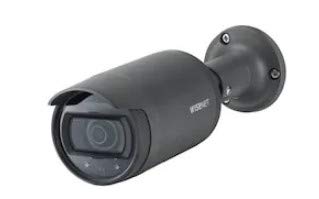
Figura 1: Quddiem view of the LNO-6012R camera, showing the lens and IR illuminators.
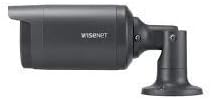
Figura 2: Ġenb view of the LNO-6012R camera, illustrating the bullet form factor and integrated mounting bracket.
5. Setup
5.1. Installazzjoni
The LNO-6012R camera is designed for outdoor installation. Select a mounting location that provides the desired field of view and is structurally sound to support the camera's weight. The camera's IP66 rating ensures protection against dust and water ingress.
- Mark the drilling points on the mounting surface using the provided template or the camera's base.
- Ħaffer toqob pilota u daħħal ankri tal-ħajt jekk meħtieġ.
- Secure the camera's mounting bracket to the surface using the supplied screws.
- Adjust the camera's angle and orientation for optimal coverage.
5.2. Il-wajers
The camera supports Power over Ethernet (PoE), allowing both power and data transmission over a single Ethernet cable. This simplifies wiring and installation.
- Connect a standard RJ45 Ethernet cable from a PoE-enabled switch or injector to the camera's RJ45 port.
- Ensure the waterproof cap is properly installed over the RJ45 connector to maintain the IP66 rating.
- Verify that the network connection is active and the PoE source is providing power.

Figure 3: An RJ45 Ethernet cable, used for both data and Power over Ethernet (PoE) connection to the camera.
5.3. Konfigurazzjoni Inizjali
After physical installation and wiring, access the camera's web interface for initial network configuration and settings adjustment.
- Use a network scanner tool to discover the camera's IP address on your local network.
- Iftaħ a web il-browser u daħħal l-indirizz IP tal-kamera.
- Log in using the default credentials (refer to the Quick Start Guide for default username and password).
- Ibdel il-password default immedjatament għal skopijiet ta 'sigurtà.
- Configure network settings (e.g., static IP, DNS) as required by your network environment.
6. Istruzzjonijiet Operattivi
6.1. Operazzjoni Bażika
Once configured, the camera streams video over the network. You can view foo ħajtage and access recordings through a compatible Network Video Recorder (NVR), Video Management Software (VMS), or directly via the camera's web interface.
- Live View: Aċċessa l-kamera web interface or VMS to view vidjo f'ħin reali.
- Modalità Jum/Lejl: The camera automatically switches between color (day) and monochrome (night) modes based on ambient light, utilizing its IR LEDs for illumination in low-light conditions up to 30 meters.
- Reġistrazzjoni: Configure recording schedules and events via the web interface or VMS. Recordings can be stored on an NVR, VMS server, or the camera's local Micro SD/SDHC card (up to 32GB).
6.2. Karatteristiċi Avvanzati
The LNO-6012R offers several advanced features to enhance surveillance capabilities:
- Sejbien tal-Moviment: Configure specific areas within the camera's view to trigger alerts or recordings when motion is detected.
- TampSejbien ta' ering: The camera can detect attempts to obstruct or redirect its view, triggering an alarm.
- WDR (Medda Dinamika Wiesgħa): This feature balances exposure in scenes with both very bright and very dark areas, ensuring details are visible across the entire image.
- Hallway View: Optimizes the video stream for vertically oriented areas like corridors, maximizing coverage and reducing bandwidth usage.
- WiseStream II: An advanced compression technology that dynamically controls encoding, reducing data size by up to 99% compared to current H.264 technology when combined with H.265, or up to 75% with H.264, without compromising image quality.
7. Manutenzjoni
Manutenzjoni regolari tiżgura prestazzjoni ottimali u lonġevità tal-kamera tiegħek.
- Tindif: Naddaf il-lenti u l-kaxxa tal-kamera perjodikament b'drapp artab u dryer.amp drapp. Tużax kimiċi ħarxa jew materjali li joborxu.
- Aġġornamenti tal-Firmware: Check the Hanwha Techwin website for the latest firmware updates. Keeping the firmware updated ensures access to new features, performance improvements, and security patches.
- Spezzjoni tal-Cable: Periodically inspect the Ethernet cable and connections for any signs of wear or damage, especially in outdoor environments.
8 Issolvi l-problemi
Irreferi għat-tabella li ġejja għal kwistjonijiet komuni u s-soluzzjonijiet tagħhom:
| Problema | Kawża Possibbli | Soluzzjoni |
|---|---|---|
| L-ebda enerġija għall-kamera | PoE switch/injector off or faulty; cable disconnected or damaged. | Check PoE power source. Verify Ethernet cable connection. Test with a known good cable. |
| Ebda feed video | Network connectivity issue; incorrect IP address; camera not configured. | Verify network connection. Confirm camera's IP address. Ensure camera is properly configured in VMS/NVR. |
| Kwalità ta 'immaġni fqira | Dirty lens; improper focus (though fixed lens, check for obstructions); low light conditions. | Clean the lens. Ensure sufficient lighting or proper IR operation. Adjust image settings in the web interface. |
| Ma jistax jaċċessa web interface | Incorrect IP address; network firewall blocking access; browser compatibility. | Confirm IP address. Check network settings and firewall rules. Try a different web browser. |
9. Speċifikazzjonijiet
Detailed technical specifications for the Hanwha Techwin LNO-6012R camera:
| Karatteristika | Speċifikazzjoni |
|---|---|
| Numru tal-Mudell | LNO-6012R |
| Riżoluzzjoni tal-Qbid tal-Vidjo | 2 MP (1920 x 1080) |
| Frame Rata | 30 fps (at all resolutions, H.264) |
| Lenti | Lenti Fissa 2.8mm |
| Teknoloġija tal-Konnettività | Wired (PoE, RJ45) |
| Protokoll tal-Konnettività | RTSP |
| Format tal-Qbid tal-Vidjo | H.264, MJPEG (MPEG-4) |
| Karatteristiċi Speċjali | Motion Sensor, Night Vision (IR viewable length 30m), WDR (120dB), Tampering Detection, Hallway View, WiseStream II |
| Użu fuq ġewwa/barra | Barra |
| Klassifikazzjoni tal-Protezzjoni Internazzjonali | IP66 |
| Ħażna | Micro SD/SDHC memory slot (Max. 32GB) |
| Sors tal-Enerġija | Elettriku bil-Fili (PoE) |
| UPC | 764227644491 |
10. Garanzija u Appoġġ
For warranty information, technical support, or service inquiries, please refer to the official Hanwha Techwin webis-sit jew ikkuntattja lin-negozjant awtorizzat tiegħek. Żomm l-irċevuta tax-xiri tiegħek għal talbiet ta' garanzija.


