Introduzzjoni
Thank you for choosing the Eurom Cool-Eco 120 A+ Mobile Air Conditioner. This manual provides important information regarding the safe operation, installation, maintenance, and troubleshooting of your new appliance. Please read this manual thoroughly before using the air conditioner and keep it for future reference.
Informazzjoni Importanti dwar is-Sigurtà
TWISSIJA: Biex tnaqqas ir-riskju ta’ nar, xokk elettriku, jew korriment, dejjem segwi l-prekawzjonijiet bażiċi ta’ sigurtà meta tuża dan l-apparat.
- Żgura li l-provvista tal-enerġija taqbel mal-voltage speċifikat fuq it-tikketta tal-klassifikazzjoni.
- Tħaddimx il-kondizzjonatur tal-arja b'korda jew plagg bil-ħsara.
- Daħħalx is-swaba 'jew oġġetti barranin fid-daħla jew l-iżbokk tal-arja.
- Keep the appliance away from flammable materials and open flames.
- Dejjem aqla 'l-unità qabel it-tindif jew is-servizz.
- Dan l-apparat mhuwiex maħsub għall-użu minn persuni (inklużi tfal) b’kapaċitajiet fiżiċi, sensorji jew mentali mnaqqsa, jew nuqqas ta’ esperjenza u għarfien, sakemm ma jkunux ingħataw superviżjoni jew istruzzjoni dwar l-użu tal-apparat minn persuna responsabbli għas-sigurtà tagħhom.
- It-tfal għandhom ikunu sorveljati biex jiżguraw li ma jilagħbux bl-apparat.
Prodott Overview
Unità Prinċipali
The Eurom Cool-Eco 120 A+ is a compact and portable air conditioning unit designed for efficient cooling. It features a sleek white design with integrated wheels for easy mobility.

This image shows the front of the Eurom Cool-Eco 120 A+ mobile air conditioner, highlighting its clean, white design and the Eurom logo at the bottom.

Din l-immaġni turi l-pro tal-ġenbfile of the air conditioner, revealing the connection point for the exhaust hose and the unit's compact dimensions.
Panel tal-Kontroll
The control panel is located on the top of the unit, providing easy access to all functions and settings.

This image shows a close-up of the air conditioner's top control panel, featuring buttons for power, mode, fan speed, timer, sleep, and swing, along with LED indicators.

Din l-immaġni tipprovdi deskrizzjoni dettaljata view of the digital display on the unit, showing the current temperature setting.
Kontroll mill-bogħod
A convenient remote control is included for operating the air conditioner from a distance.

This image displays the remote control, which includes a small screen and buttons for adjusting temperature, mode, fan speed, and other functions.
Aċċessorji
The package includes essential accessories for installation and operation.

This image shows the various accessories provided, such as the flexible exhaust hose, window slider kit, and a small drainage tube.
Setup
Spakkjar
Neħħi l-arja kondizzjonata u l-aċċessorji kollha mill-imballaġġ bir-reqqa. Żomm l-imballaġġ għal ħażna jew trasport fil-futur.
Pjazzament
Place the air conditioner on a flat, stable surface. Ensure there is at least 30 cm (12 inches) of space around the unit for proper airflow. Do not block the air inlets or outlets.
Installazzjoni tal-pajp tal-egżost
- Screw one end of the exhaust hose onto the exhaust port on the back of the unit.
- Estendi l-pajp sal-eqreb tieqa jew fetħa.
- Waħħal l-adapter tat-tieqa mat-tarf l-ieħor tal-pajp tal-egżost.
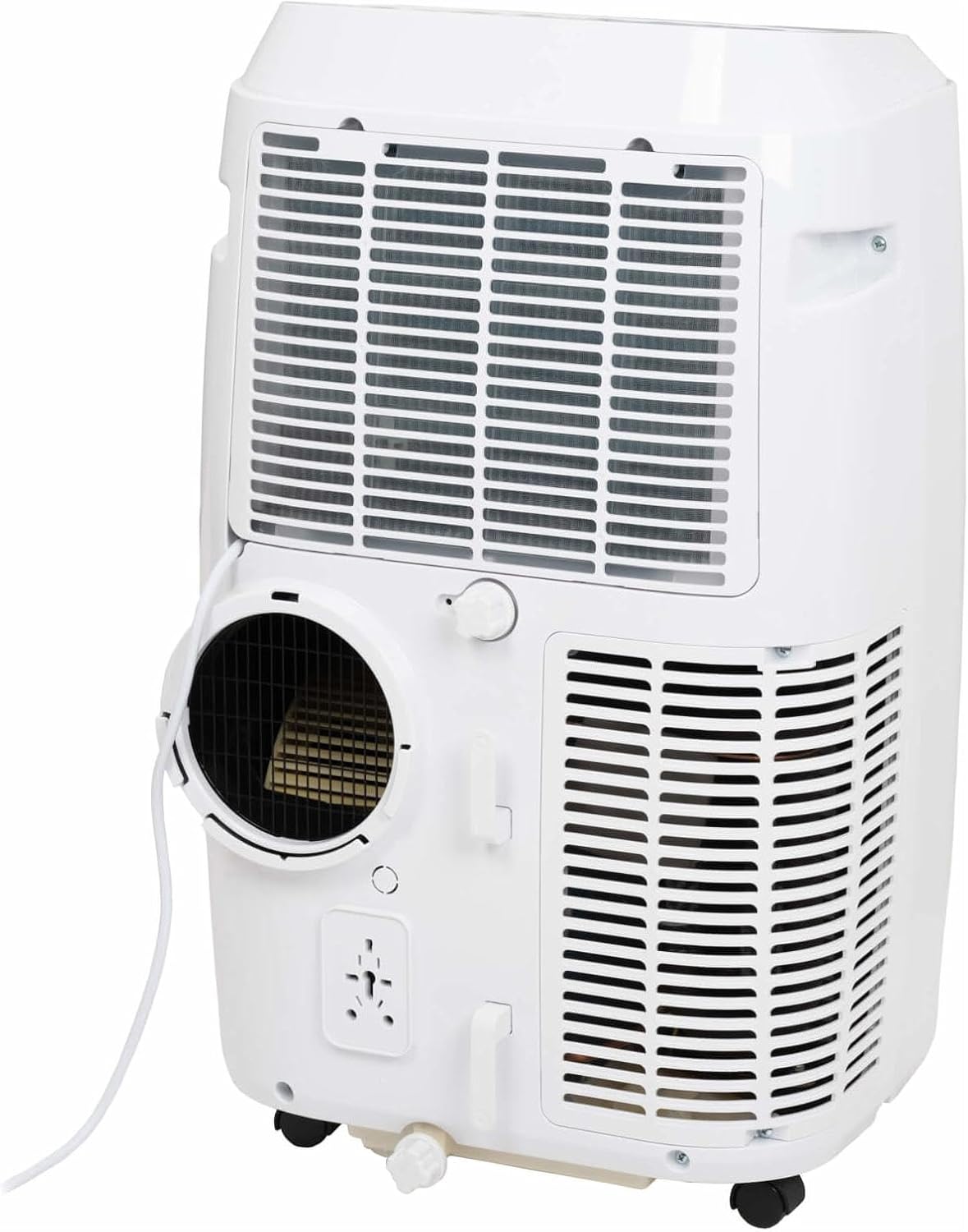
This image shows the rear of the air conditioner, illustrating where the exhaust hose connects to the unit.
Installazzjoni tal-Kit tat-Tieqa
Use the provided window sealing kit to secure the exhaust hose in a window opening. Adjust the slider kit to fit your window, then place the window adapter into the opening.
It-Tħaddim tal-Air Conditioner Tiegħek
Funzjonijiet tal-Panew tal-Kontroll
The control panel on top of the unit allows you to manage all settings. Press the QAWWA button to turn the unit on or off. Use the MODALITÀ button to cycle through cooling, fan, and dehumidification modes.
- QAWWA: Ixgħel jew jitfi l-unità.
- MODALITÀ: Selects operating mode (Cool, Fan, Dry/Dehumidify).
- Vleġeġ 'il fuq/'l isfel: Adjusts temperature setting or timer.
- VELOĊITÀ: Changes fan speed (Low, Medium, High).
- TIMER: Jissettja l-ħin tal-mixgħul jew tat-tifi awtomatiku.
- SWING: Activates or deactivates the automatic louver swing.
- Rqad: Jattiva l-modalità rqad għal tħaddim aktar kwiet u aġġustament gradwali tat-temperatura.
Funzjonijiet ta 'Kontroll mill-bogħod
The remote control duplicates most functions available on the control panel, offering convenience. Ensure the remote control is pointed towards the unit's receiver when pressing buttons.
The remote control features a display showing the current settings and buttons for power, mode selection, temperature adjustment, fan speed, timer, and sleep mode.
Modi Operattivi
- Modalità Kessaħ: Provides cooling. Set your desired temperature using the UP/DOWN arrows.
- Modalità Fan: Jiċċirkola l-arja mingħajr ma jkessaħ. Aġġusta l-veloċità tal-fann kif mixtieq.
- Modalità Niexfa (Deumidifikazzjoni): Reduces humidity in the room. The fan speed is fixed in this mode.
Kontroll tal-App Smart
This model supports Smart App Control. Refer to the separate Smart App manual or the manufacturer's website for detailed instructions on connecting and controlling your unit via the app.
Kura u Manutenzjoni
Tindif tal-Filtru tal-Arja
The air filter should be cleaned every two weeks or more frequently depending on usage. A dirty filter can reduce efficiency and airflow.
- Skonnettja l-arja kondizzjonata mill-plagg tal-elettriku.
- Sib il-pannell tal-filtru tal-arja (ġeneralment fuq wara jew fuq il-ġenb tal-unità).
- Neħħi l-filtru.
- Aħsel il-filtru b'ilma sħun u bis-sapun. Laħlaħ sew u ħallih jinxef kompletament bl-arja qabel ma terġa' ddaħħalh.
Ixxotta l-Ilma
During dehumidification or in very humid conditions, water will accumulate inside the unit. The unit has an internal water tank that will trigger a "Full" indicator when full. You will need to drain the water manually.
- Place a shallow pan or container under the drainage port at the bottom rear of the unit.
- Neħħi t-tapp tad-drenaġġ.
- Allow all water to drain out.
- Ibdel il-plagg tad-drenaġġ sew.
Ħażna
Before storing the unit for an extended period, ensure the water tank is completely drained. Clean the air filter and store the unit in a dry, cool place, preferably in its original packaging.
Gwida dwar is-sejbien ta 'problemi
| Problema | Kawża Possibbli | Soluzzjoni |
|---|---|---|
| L-unità ma tixgħel. | Bla enerġija; il-korda tal-enerġija skonnettjata; is-circuit breaker qabad. | Iċċekkja l-konnessjoni tal-enerġija; irrisettja s-circuit breaker. |
| L-unità mhux qed tkessaħ b'mod effettiv. | Filtru tal-arja maħmuġ; pajp tal-egżost mhux installat sew; kamra kbira wisq; twieqi/bibien miftuħa. | Clean air filter; ensure hose is sealed; close windows/doors; check room size suitability. |
| Water tank full indicator is on. | It-tank tal-ilma intern huwa mimli. | Drain the water from the unit. |
| L-unità hija storbjuża. | L-unità mhix fuq wiċċ ċatt; ostruzzjoni tal-fann. | Place on a flat surface; check for obstructions in fan area. |
Speċifikazzjonijiet Tekniċi
| Karatteristika | Speċifikazzjoni |
|---|---|
| Brand | Eurom |
| Numru tal-Mudell | 262845 |
| Kapaċità tat-tkessiħ | 12000 BTU |
| Sors tal-Enerġija | Kejbil Elettriku |
| Water Capacity (Internal Tank) | 1.2 Litru |
Garanzija u Appoġġ għall-Klijent
Informazzjoni dwar Garanzija
This product comes with a manufacturer's warranty. Please refer to the warranty card included with your purchase or visit the official Eurom websit għal termini u kundizzjonijiet dettaljati tal-garanzija. Żomm il-prova tax-xiri tiegħek għal talbiet ta' garanzija.
Appoġġ għall-Klijent
For technical assistance, spare parts, or service, please contact Eurom customer support. Contact details can typically be found on the Eurom website or in the product packaging. When contacting support, please have your model number (262845) and serial number ready.


