1. Introduzzjoni
The TechniSat DIGITRADIO 21 is a compact DAB+ and FM radio designed for under-cabinet installation, ideal for kitchens or other spaces where a space-saving audio solution is desired. It features digital radio reception (DAB+), traditional FM radio, Bluetooth audio streaming, and a clear color display. This manual provides essential information for the safe and efficient use of your device.
2. Informazzjoni dwar is-Sigurtà
- Aqra l-istruzzjonijiet kollha bir-reqqa qabel ma tħaddem l-apparat.
- Żomm l-apparat 'il bogħod mill-ilma, l-umdità, u sorsi diretti tas-sħana.
- Żgura ventilazzjoni xierqa madwar l-unità biex tevita sħana żejda.
- Uża biss l-adapter tal-enerġija pprovdut.
- Tippruvax tiftaħ jew issewwi l-apparat int stess. Irreferi għal kull manutenzjoni f'idejn persunal kwalifikat.
- Naddaf l-apparat b'ċarruta ratba u niexfa. Tużax prodotti tat-tindif likwidi.
3. Kontenut tal-Pakkett
Ivverifika li l-oġġetti kollha huma preżenti fil-pakkett:
- TechniSat DIGITRADIO 21 Unit
- Adapter tal-Enerġija
- Mounting Material (screws, mounting plate)
- Manwal għall-Utent (dan id-dokument)
4. Prodott Aktarview
4.1 Kontrolli u Wiri tal-Panew ta' Quddiem
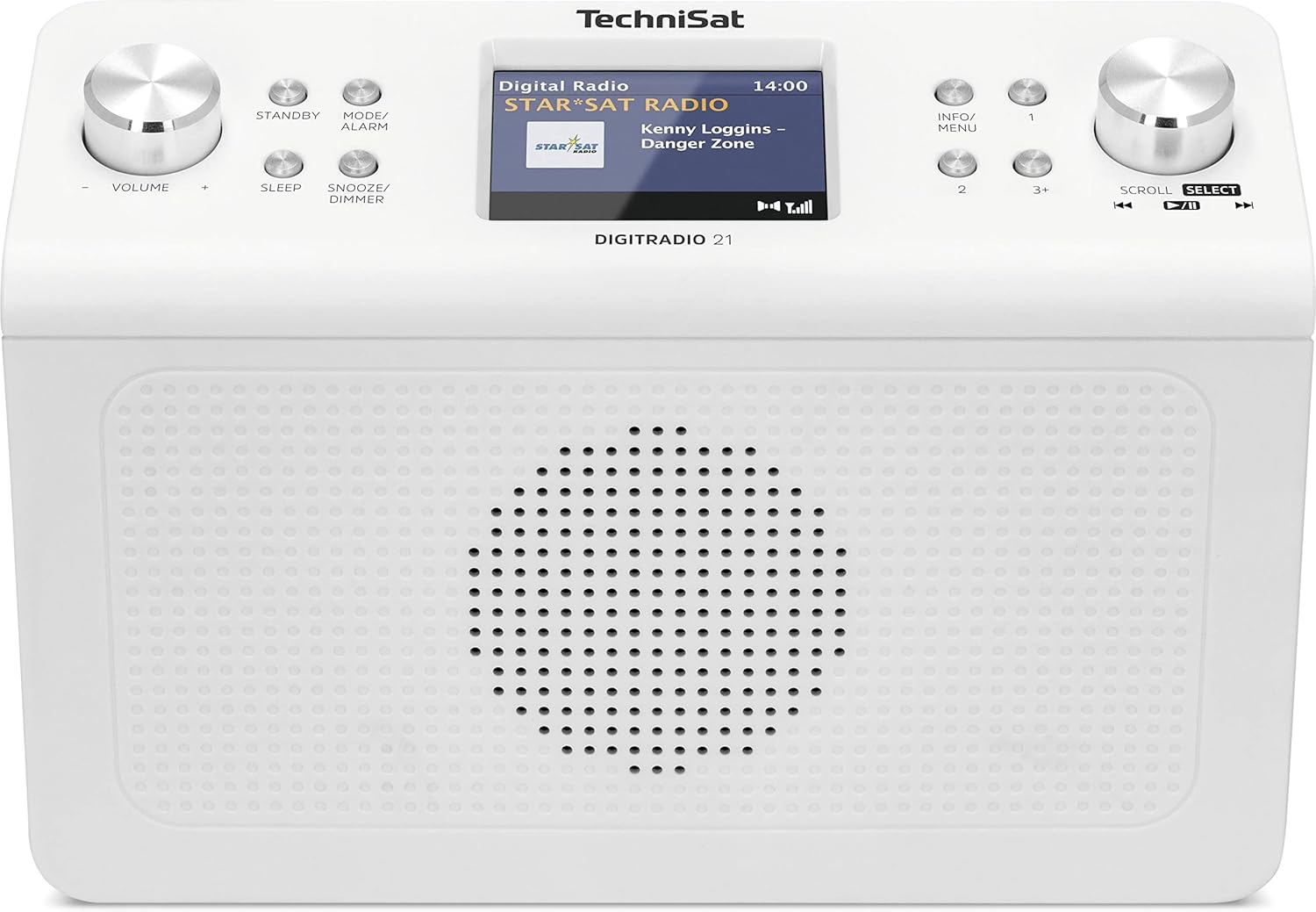
Stampa 4.1: Quddiem view of the TechniSat DIGITRADIO 21. This image displays the central 2.8-inch color TFT display, the large volume knob on the left, and the scroll/select knob on the right. Surrounding buttons include Standby, Mode/Alarm, Sleep, Snooze/Dimmer, Info/Menu, and preset buttons 1, 2, 3+.
- Wiri: 2.8-inch TFT color display for showing station information, time, and menu options.
- Buttuna tal-Volum: Dawwar biex taġġusta l-volum.
- Buttuna Standby: Jixgħel jew jitfi l-unità.
- Mode/Alarm Button: Switches between radio modes (DAB+, FM, Bluetooth) and accesses alarm settings.
- Buttuna Sleep: Jattiva l-funzjoni tat-tajmer tal-irqad.
- Buttuna Snooze/Dimmer: Snoozes the alarm or adjusts display brightness.
- Buttuna Info/Menu: Displays additional information or accesses the main menu.
- Buttuni Predefiniti (1, 2, 3+): Aċċessa malajr l-istazzjonijiet favoriti maħżuna.
- Scroll/Select Knob: Rotate to navigate menus or tune stations, press to confirm selection.
4.2 Konnessjonijiet tal-Panew ta' wara

Stampa 4.2: Wara view of the TechniSat DIGITRADIO 21. This image highlights the power input port (DC IN) and the 3.5mm headphone jack located on the back of the unit.
- DC IN: Power adapter connection port.
- Jack tal-headphone (3.5mm): Għall-konnessjoni tal-headphones għal smigħ privat.
5. Setup
5.1 Immuntar tar-Radju
The DIGITRADIO 21 is designed for under-cabinet mounting. The included mounting plate and screws facilitate installation.
- Select a suitable location under a cabinet or shelf, ensuring sufficient space for the unit and access to controls.
- Position the mounting plate and mark the screw holes.
- Drill toqob pilota jekk meħtieġ.
- Secure the mounting plate to the underside of the cabinet/shelf using the provided screws.
- Slide the DIGITRADIO 21 onto the mounted plate until it clicks securely into place.
Alternatively, the radio can be used as a standalone unit on a flat surface.
5.2 Konnessjoni tal-Enerġija
- Connect the power adapter cable to the "DC IN" port on the rear of the DIGITRADIO 21.
- Ipplaggja l-adapter tal-enerġija f'sokit tal-ħajt adattat.
- L-unità tixgħel jew tidħol fil-modalità standby.
6. Istruzzjonijiet Operattivi
6.1 Power On/Off
- Agħfas il- Standby buttuna biex tixgħel jew titfi r-radju.
6.2 Għażla tal-Modalità
- Agħfas il- Mode/Alarm button repeatedly to cycle through available modes: DAB+, FM, Bluetooth.
6.3 Tħaddim tar-Radju DAB+
- Agħżel il-modalità DAB+ billi tuża l-buttuna Mode/Alarm buttuna.
- The radio will automatically scan for available DAB+ stations upon first use or if no stations are found.
- Dawwar il- Skrollja/Agħżel knob to browse the list of available stations.
- Agħfas il- Skrollja/Agħżel knob to select and listen to a station.
- To store a favorite station: While listening, press and hold one of the Preset buttons (1, 2, 3+) until "Preset Saved" appears on the display.
- To recall a favorite station: Briefly press the corresponding Buttuna ssettjata minn qabel.
6.4 Tħaddim tar-Radju FM
- Agħżel il-modalità FM billi tuża l-buttuna Mode/Alarm buttuna.
- Dawwar il- Skrollja/Agħżel pum biex tirranġa manwalment ma' frekwenza.
- Biex tiskennja awtomatikament għall-istazzjon disponibbli li jmiss, agħfas u żomm il-buttuna Skrollja/Agħżel pum.
- To store a favorite station: While listening, press and hold one of the Preset buttons (1, 2, 3+) until "Preset Saved" appears on the display.
- To recall a favorite station: Briefly press the corresponding Buttuna ssettjata minn qabel.
6.5 Streaming tal-Awdjo Bluetooth
- Agħżel il-modalità Bluetooth billi tuża l- Mode/Alarm button. The display will show "Bluetooth Pairing".
- Fuq l-apparat tiegħek li jaħdem bil-Bluetooth (eż. smartphone, tablet), attiva l-Bluetooth u fittex apparati disponibbli.
- Select "DIGITRADIO 21" from the list of devices to pair.
- Ladarba jkun imqabbad, tista' tixxandar l-awdjo mit-tagħmir tiegħek għar-radju.
6.6 Alarm, Sleep Timer, and Snooze
- Allarm: Agħfas u żomm il- Mode/Alarm button to enter alarm settings. Use the Skrollja/Agħżel knob to set time, source, and volume.
- Timer ta 'l-Irqad: Agħfas il- Irqad button repeatedly to set a sleep timer (e.g., 15, 30, 60 minutes) after which the radio will automatically turn off.
- Tnaqqis Meta l-allarm jinstema ', agħfas il-buttuna Snooze / Dimmer buttuna biex is-silenzju tagħha temporanjament għal perjodu stabbilit.
6.7 Settings tal-wiri
- Agħfas il- Snooze / Dimmer button (when not snoozing an alarm) to adjust the display brightness.
- Agħfas il- Info/Menu button to cycle through different display information (e.g., program type, frequency, date/time).
7. Manutenzjoni
- Tindif: Wipe the radio with a soft, dry, lint-free cloth. Do not use abrasive cleaners, waxes, or solvents.
- Ħażna: Jekk se taħżen l-unità għal perjodu estiż, skonnettjaha mill-provvista tal-enerġija u aħżenha f'post frisk u niexef.
8 Issolvi l-problemi
| Problema | Kawża Possibbli | Soluzzjoni |
|---|---|---|
| Ebda qawwa | L-adapter tal-enerġija mhux imqabbad jew is-sokit difettuż. | Kun żgur li l-adapter tal-enerġija huwa konness sew u li s-sokit jaħdem. |
| Riċeviment DAB+ / FM fqir | Weak signal, antenna position. | Adjust the position of the wire antenna for better reception. Perform a full scan for stations. |
| Kwistjonijiet ta 'tqabbil tal-Bluetooth | Device not in pairing mode, radio not discoverable. | Ensure the radio is in Bluetooth pairing mode. Check your device's Bluetooth settings and try re-pairing. |
| L-ebda ħoss | Volum baxx wisq, headphones imqabbda. | Increase volume. Disconnect headphones if external sound is desired. |
9. Speċifikazzjonijiet
- Mudell: DIĠITTRADJU 21
- Ditta: TechniSat
- Numru tal-Mudell: 0001/3964
- Bands tar-Radju: DAB+, FM (with RDS and PLL)
- Verżjoni Bluetooth: 4.2
- Kelliem: 2 W (RMS) Mono Speaker
- Wiri: Wiri bil-Kulur TFT ta' 2.8 pulzieri
- Favorite Station Memory: 10 for DAB+, 10 for FM
- Konnessjonijiet: 3.5mm Headphone Jack, DC IN
- Karatteristiċi Speċjali: Clock, Alarm, Sleep Timer, Snooze Function, Display Dimmer, Bluetooth Audio Streaming
- Provvista tal-Enerġija: External Power Adapter (DC 5.9 V / 1000 mA)
- Dimensjonijiet (W x H x D): 22.5 x 7.2 x 15.1 ċm (madwar 8.86 x 2.83 x 5.94 pulzieri)
- Kulur: Abjad (newtrali)
10. Garanzija u Appoġġ
Specific warranty details are not provided in the product information. For warranty claims or technical support, please refer to the official TechniSat website or contact your retailer. Keep your proof of purchase for any warranty-related inquiries.
Għal aktar għajnuna, żur il- TechniSat official websit.


