1. Introduzzjoni
This manual provides comprehensive instructions for the installation, operation, and maintenance of your CALEX Smart Mini Indoor IP Camera. Please read this manual thoroughly before using the product to ensure proper functionality and safety.
The CALEX Smart Mini Indoor IP Camera is a Wi-Fi surveillance camera offering 1080P Full HD resolution, night vision capabilities, two-way audio communication, and flexible storage options via MicroSD card or cloud.
2. Kontenut tal-Pakkett
Ivverifika li l-oġġetti kollha huma preżenti fil-pakkett:
- 1 x CALEX Smart Mini Indoor IP Camera
- 1 x Power Adapter (AC 220-240 V, 50/60 Hz input; DC 5 V output)
- 1 x USB Cable
- 1 x Manwal tal-Utent (dan id-dokument)
- Mounting accessories (if applicable, not explicitly listed but common for cameras)

Figure 2.1: CALEX Smart Mini Indoor IP Camera and its retail packaging. The packaging highlights 1080P Full HD, Wi-Fi 2.4 GHz, and compatibility with the Calex Smart app.
3. Prodott Aktarview
Familiarize yourself with the components of your CALEX Smart Mini Indoor IP Camera.
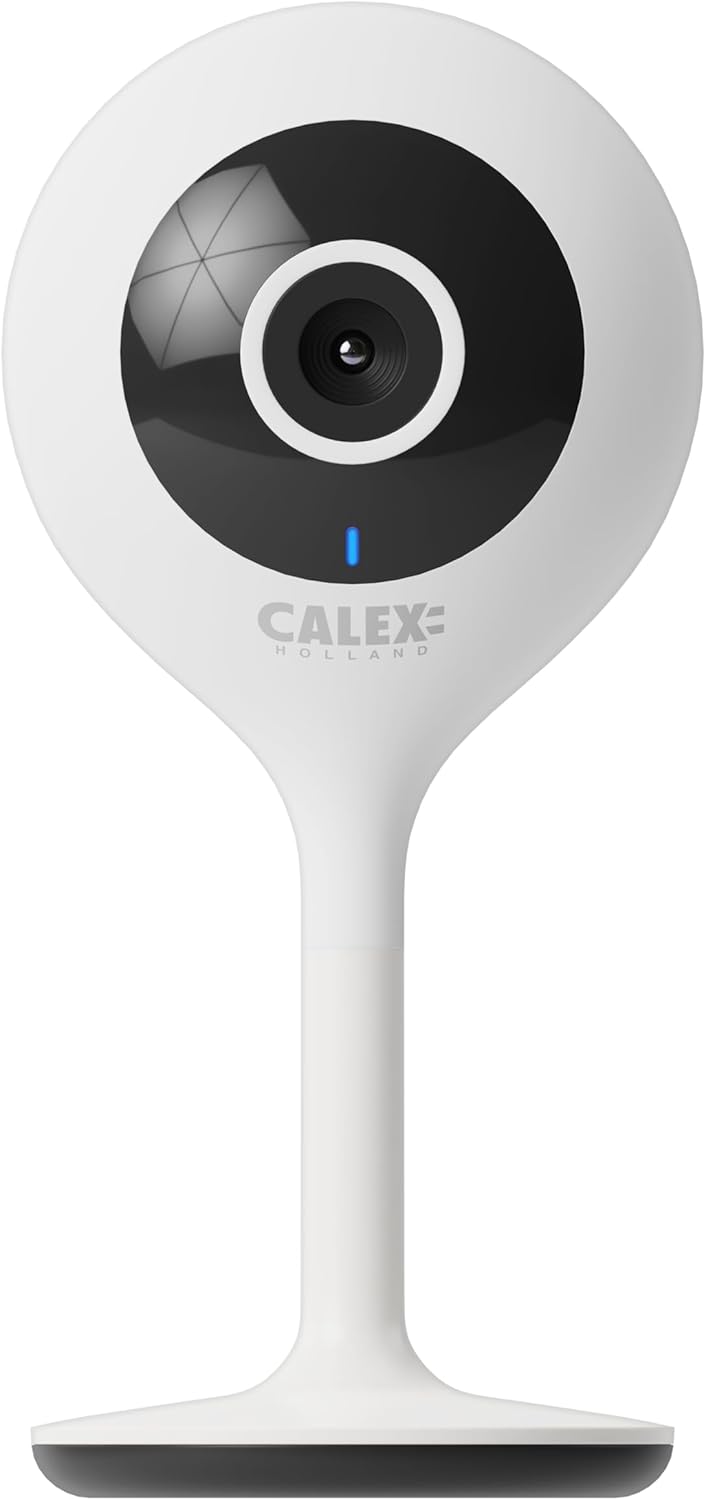
Figura 3.1: Quddiem view of the CALEX Smart Mini Indoor IP Camera. It features a central lens, an indicator light, and the CALEX HOLLAND logo.

Figura 3.2: Wara view of the CALEX Smart Mini Indoor IP Camera. This view shows the speaker grille, a reset button, and the MicroSD card slot. The USB power input is located at the base.
Karatteristiċi ewlenin:
- Riżoluzzjoni Full HD 1080P: Jipprovdi foo video ċara u dettaljatatage.
- Viżjoni bil-lejl: Equipped with infrared LEDs for clear monitoring in low-light or dark conditions.
- Awdjo f'żewġ direzzjonijiet: Mikrofonu u kelliem integrati għall-komunikazzjoni.
- Konnettività Wi-Fi: Connects to your home Wi-Fi network (2.4 GHz only).
- Ħażna Lokali: Supports MicroSD card for continuous recording or event-triggered recording.
- Ħażna Cloud: Servizz ta' ħażna fuq il-cloud mhux obbligatorju għal reġistrazzjoni sigura barra mis-sit.
- Sejbien tal-Moviment: Alerts and records upon detecting movement.
- Kontroll tal-App mobbli: Immaniġġja u view live feed via the Calex Smart app.
- Kompatibbiltà tal-Assistent tal-Vuċi: Jaħdem ma' Amazon Alexa u Google Home.
4. Setup u Installazzjoni
4.1 Qabel ma Tibda
- Kun żgur li n-netwerk Wi-Fi tiegħek huwa 2.4 GHz. Il-kamera ma tappoġġjax Wi-Fi ta' 5 GHz.
- Żomm l-isem tan-netwerk Wi-Fi tiegħek (SSID) u l-password lesti.
- Download the "Calex Smart" app from your mobile device's app store.
- Place the camera within range of your Wi-Fi router.

Figure 4.1: QR codes for downloading the Calex Smart app. Scan the appropriate QR code for your device (iOS or Android) to download the application.
Download the Calex Smart app here: iOS App Store | Google Play Store
4.2 Passi Inizjali tas-Setup
- Qawwa Mixgħul: Connect the camera to a power outlet using the provided USB cable and power adapter. The camera's indicator light will begin to flash, indicating it is ready for pairing.
- Open Calex Smart App: Launch the Calex Smart app on your smartphone. If you are a new user, register an account. If you already have an account, log in.
- Żid Apparat: Tap the "+" icon in the top right corner of the app to add a new device. Select "Security & Video Surveillance" and then "Smart Camera".
- Ikkonferma l-Istatus tal-Indikatur: Follow the in-app instructions. Confirm that the indicator light on your camera is flashing rapidly.
- Daħħal id-dettalji tal-Wi-Fi: Enter your 2.4 GHz Wi-Fi network name and password when prompted.
- Skennja l-Kodiċi QR: The app will generate a QR code. Hold your phone with the QR code approximately 15-20 cm (6-8 inches) in front of the camera lens. The camera will emit a sound when it successfully scans the QR code.
- Konnessjoni: Tap "I heard a prompt" in the app. The camera will then attempt to connect to your Wi-Fi network. Once connected, the indicator light will turn solid blue.
- Isem l-Apparat: Once connected, you can name your camera (e.g., "Living Room Camera", "Nursery Camera").


Figura 4.2: Eżamples of the Calex Smart app interface. The left image shows a live camera feed with options for screenshot, speaking, and recording. The right image shows a settings screen within the app.
5. Kif Tħaddem il-Kamera Tiegħek
5.1 Ħaj View
Open the Calex Smart app and select your camera from the device list to access the live video feed. You can view the feed in portrait or landscape mode.

Figura 5.1: Utent viewing the live feed from the CALEX Smart Mini Indoor IP Camera on their smartphone.
5.2 Awdjo b'żewġ direzzjonijiet
Waqt li tkun ħaj view, tap the microphone icon to speak through the camera's speaker. Tap the speaker icon to listen to audio from the camera's microphone.
5.3 Reġistrazzjoni u Daqq
- Reġistrazzjoni manwali: Tap the "Record" button in the live view interface to start or stop manual recording. Recordings are saved to your phone's gallery.
- Screenshot: Tap the "Screenshot" button to capture a still image from the live feed.
- Reġistrazzjoni tal-Kard MicroSD: Insert a MicroSD card (up to 128GB, not included) into the camera's slot for continuous or event-triggered recording. Ensure the card is formatted within the app settings.
- Ħażna Cloud: Subscribe to the cloud storage service via the app for secure, off-site storage of event recordings.
- Daqq: Aċċess irreġistrat footage from the "Playback" section within the camera's settings in the app.

Figure 5.2: The Calex Smart app interface displaying options for cloud storage and video playback. This allows users to review avvenimenti rreġistrati.
5.4 Sejbien tal-Mozzjoni u Twissijiet
Configure motion detection sensitivity and alert settings in the app. You will receive push notifications on your smartphone when motion is detected.
5.5 Kontroll tal-Vuċi (Alexa/Google Home)
To integrate your camera with Amazon Alexa or Google Home, follow the instructions in the respective voice assistant app to enable the "Calex Smart" skill/action. You can then use voice commands to view il-feed tal-kamera fuq displays intelliġenti kompatibbli.

Figure 5.3: A couple using voice commands with an Amazon Echo device, demonstrating the camera's compatibility with smart home ecosystems like Alexa and Google Home.
6. Manutenzjoni
- Tindif: Uża drapp artab u niexef biex tnaddaf il-lenti u l-qafas tal-kamera. Tużax prodotti tat-tindif likwidi jew aerosols.
- Aġġornamenti tal-Firmware: Periodically check the Calex Smart app for available firmware updates for your camera. Keeping the firmware updated ensures optimal performance and security.
- Irrisettjar il-Kamera: If you experience connectivity issues or need to reconfigure the camera, locate the reset button on the back of the device (refer to Figure 3.2). Use a pin or a straightened paperclip to press and hold the reset button for approximately 5-10 seconds until the indicator light flashes rapidly. This will restore the camera to factory settings.
7 Issolvi l-problemi
| Problema | Kawża Possibbli | Soluzzjoni |
|---|---|---|
| Il-kamera ma tirnexxilhiex tikkonnettja mal-Wi-Fi. | Incorrect Wi-Fi password; 5 GHz Wi-Fi network; camera too far from router; Wi-Fi signal interference. |
|
| L-ebda xandir dirett tal-vidjow. | Camera offline; poor internet connection; app issue. |
|
| Il-karta MicroSD mhux rikonoxxuta. | Card not inserted correctly; card corrupted; unsupported card size/format. |
|
| L-awdjo f'żewġ direzzjonijiet mhux qed jaħdem. | Microphone/speaker muted in app; low volume; app permissions. |
|
8. Speċifikazzjonijiet
| Karatteristika | Dettall |
|---|---|
| Isem tal-Mudell | Sigurtà Intelliġenti |
| Numru tal-Mudell | 5501000300 |
| Riżoluzzjoni | Full HD ta '1080p |
| Konnettività | Wi-Fi (2.4 GHz biss) |
| Input tal-Enerġija | AC 220-240 Volts, 50/60 Hz |
| Output tal-Enerġija (Adapter) | DC 5 Volts |
| Konsum tal-Enerġija | 5 Watts |
| Dimensjonijiet (L x W x H) | 3.2 x 5.3 x 11 ċm (1.26 x 2.09 x 4.33 pulzieri) |
| Piż | 167 Gramma (0.37 libbra) |
| Materjal | Plastik |
| Kulur | Abjad |
| Għażliet ta' Ħażna | MicroSD (up to 128GB), Cloud Storage |
| Karatteristiċi Speċjali | Night Vision, Two-Way Audio, Motion Detection, Compatible with Alexa/Google Home |
| Użu Ambjent | Ġewwa |
9. Garanzija u Appoġġ
CALEX products are designed and manufactured to the highest quality standards. For warranty information and technical support, please refer to the official CALEX webis-sit jew ikkuntattja lis-servizz tal-klijenti tagħhom direttament.
Manifattur: CALEX
Għal aktar għajnuna, żur il- CALEX Official Websit.
10. Informazzjoni dwar is-Sigurtà
- Do not expose the camera to water or moisture. This product is designed for indoor use only.
- Tippruvax tiżżarma jew issewwi l-kamera int stess. Irreferi għal kull manutenzjoni f'idejn persunal kwalifikat.
- Use only the provided power adapter and cable to prevent damage or fire.
- Keep the camera away from direct sunlight, heat sources, and strong magnetic fields.
- Ensure the camera is placed on a stable surface to prevent it from falling.


