1. Introduzzjoni
This manual provides instructions for the Sharp Digital Alarm Clock, Model SPC547AJAMZ. This device features an easy-to-read LED display, a high-speed USB charging port, and essential alarm functions. Please read this manual thoroughly before use to ensure proper operation and to maximize the product's lifespan.

Figure 1: Sharp Digital Alarm Clock (Model SPC547AJAMZ) front view.
2. Karatteristiċi tal-prodott
The Sharp Digital Alarm Clock offers the following key features:
- Wirja faċli biex tinqara: Large, clear green LED digits for visibility from a distance.
- High-Speed USB Charging Port: A 2 AMP USB port for rapid charging of compatible devices such as smartphones and tablets.
- Volum ta' Allarm Aġġustabbli: Select between high and low alarm volume settings.
- Operazzjoni sempliċi: Intuitive button controls for setting time and alarm.
- Backup tal-batterija: Maintains time and alarm settings during power outages (requires 2 AAA batteries, not included). The display will be blank during battery backup mode, but the internal clock will continue to run, and the alarm will sound at the set time.

Figure 2: Alarm clock with a smartphone connected to the USB charging port.
3. Kontenut tal-Pakkett
Ivverifika li l-oġġetti kollha huma preżenti fil-pakkett:
- Sharp Digital Alarm Clock (Model SPC547AJAMZ)
- Adapter tal-Qawwa AC
- Manwal għall-Utent (dan id-dokument)
Note: 2 AAA batteries for backup are not included and must be purchased separately.
4. Informazzjoni dwar is-Sigurtà
Jekk jogħġbok osserva l-prekawzjonijiet tas-sigurtà li ġejjin:
- Tesponix l-unità għall-ilma jew għal umdità eċċessiva.
- Evita li tpoġġi l-unità ħdejn sorsi ta’ sħana jew fid-dawl tax-xemx dirett.
- Use only the provided AC power adapter.
- Tippruvax iżarma jew timmodifika l-unità.
- Żomm fejn ma jintlaħaqx mit-tfal.
- Żgura ventilazzjoni xierqa madwar l-unità.
5. Setup
5.1 Konnessjoni tal-Enerġija
- Plug the AC power adapter into the DC IN jack located on the back of the alarm clock.
- Plug the other end of the AC power adapter into a standard wall outlet (120V AC, 60Hz).
- The display will illuminate, and the clock will be ready for time setting.
5.2 Installazzjoni ta' Backup tal-Batterija
To ensure time and alarm settings are retained during a power outage:
- Sib il-kompartiment tal-batterija fil-qiegħ tal-unità.
- Iftaħ l-għatu tal-kompartiment tal-batterija.
- Insert two (2) new AAA batteries, observing the correct polarity (+ and -) as indicated inside the compartment.
- Agħlaq l-għatu tal-kompartiment tal-batterija sew.
Note: Batteries are for backup only. The clock display will not be lit during a power outage when operating on battery backup, but the internal clock will continue to run, and the alarm will sound at the set time.
6. Istruzzjonijiet Operattivi
Familiarize yourself with the control buttons located on the top of the unit:
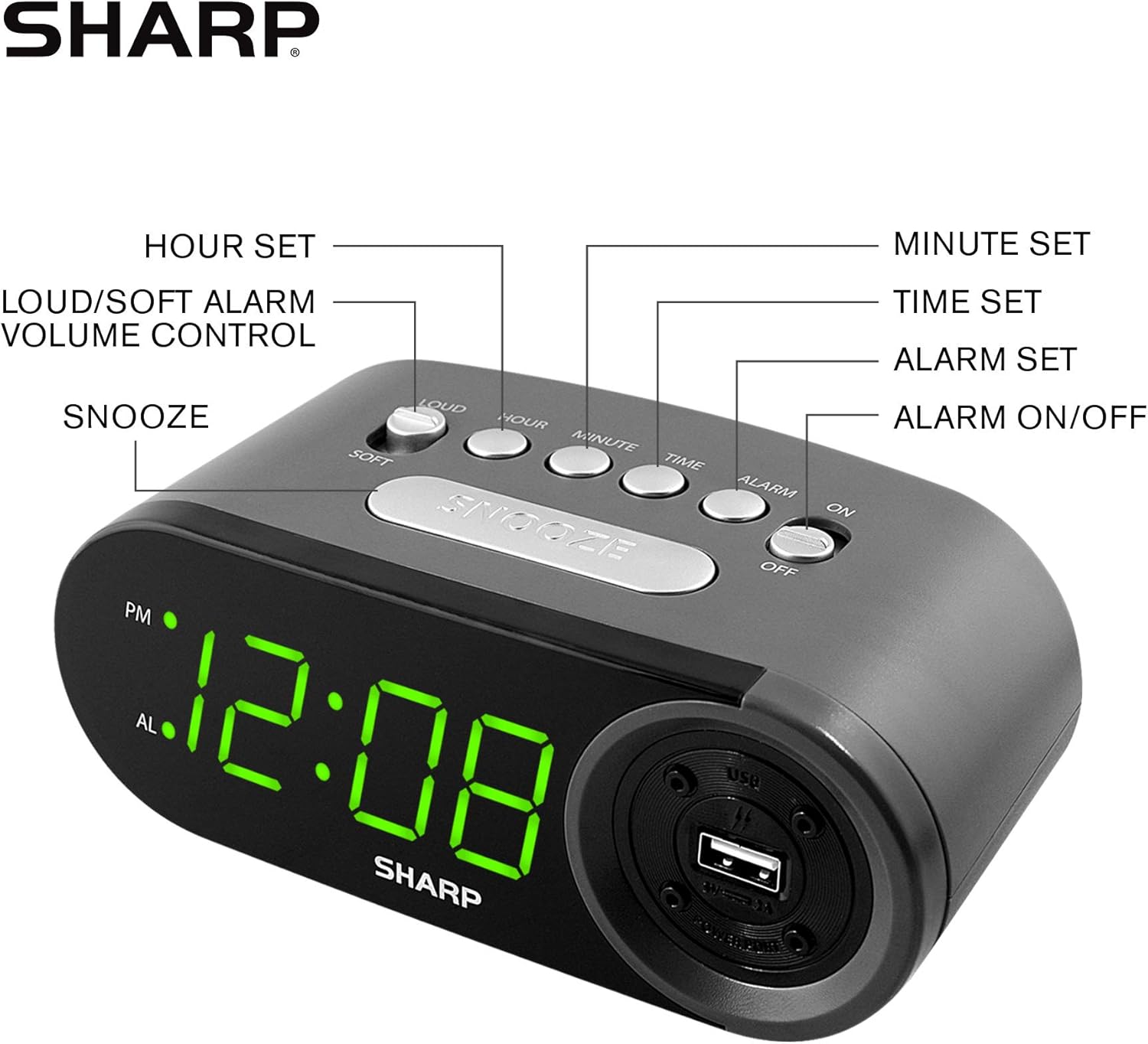
Figure 3: Top panel controls and their functions.
6.1 Issettjar tal-Ħin Attwali
- Agħfas u żomm il- ĦIN button until the display begins to flash.
- Agħfas il- SIEGĦA button repeatedly to set the hour. Observe the PM indicator for afternoon hours.
- Agħfas il- MINUTA button repeatedly to set the minutes.
- Ladarba l-ħin mixtieq ikun issettjat, agħfas il-buttuna ĦIN Agħfas il-buttuna mill-ġdid biex tikkonferma u toħroġ mill-modalità tal-issettjar tal-ħin.
6.2 Issettjar tal-Ħin tal-Allarm
- Agħfas u żomm il- ALLARM button until the alarm time display begins to flash. The "AL" indicator will also flash.
- Agħfas il- SIEGĦA button repeatedly to set the alarm hour. Observe the PM indicator.
- Agħfas il- MINUTA button repeatedly to set the alarm minutes.
- Ladarba l-ħin tal-allarm mixtieq ikun issettjat, agħfas il-buttuna ALLARM Agħfas il-buttuna mill-ġdid biex tikkonferma u toħroġ mill-modalità tas-settings tal-allarm.
6.3 Attivazzjoni/Diżattivazzjoni tal-Allarm
- Biex tixgħel l-allarm ON, slide il- ALLARM ON / OFF switch to the "ON" position. The "AL" indicator will appear on the display.
- Biex tixgħel l-allarm OFF, slide il- ALLARM ON / OFF switch to the "OFF" position. The "AL" indicator will disappear.
6.4 Funzjoni Snooze
Meta jdoqq l-allarm, agħfas il-buttuna l-kbira SNOOZE button. The alarm will temporarily stop and sound again after approximately 9 minutes.
6.5 Stopping the Alarm
To stop the alarm completely after it sounds (without using snooze), slide the ALLARM ON / OFF switch to the "OFF" position. The alarm will reset for the next day if the switch is moved back to "ON".
6.6 Aġġustament tal-Volum tal-Allarm
Agħfas il- LOUD/SOFT button to toggle between high and low alarm volume settings.
6.7 L-Użu tal-Port tal-Iċċarġjar tal-USB
It-2 AMP USB charging port is located on the right side of the unit.
- Connect your device's USB charging cable (not included) to the USB port on the alarm clock.
- Connect the other end of the cable to your smartphone, tablet, or other compatible USB-powered device.
- Ensure the alarm clock is connected to AC power for the USB port to function.
Note: Charging speed may vary depending on your device and cable.
7. Manutenzjoni
To keep your alarm clock in optimal condition:
- Tindif: Imsaħ l-unità b'ċarruta ratba u niexfa. Tużax prodotti tat-tindif jew solventi li joborxu.
- Sostituzzjoni tal-batterija: Replace AAA backup batteries annually or when the battery low indicator (if present) appears, to ensure reliable backup functionality.
- Ħażna: If storing the unit for an extended period, remove the backup batteries to prevent leakage.
8 Issolvi l-problemi
| Problema | Kawża Possibbli | Soluzzjoni |
|---|---|---|
| L-arloġġ jidher vojt. | No AC power; power outage; unit unplugged. | Ensure AC adapter is securely plugged into the unit and a working wall outlet. Check for power outages. |
| L-allarm ma jdoqqx. | Alarm is not activated; alarm time is incorrect; volume is too low. | Slide ALARM ON/OFF switch to "ON". Verify alarm time is set correctly. Adjust alarm volume using the LOUD/SOFT button. |
| Il-port tal-iċċarġjar USB mhux qed jaħdem. | Clock not connected to AC power; device not compatible; faulty cable. | Ensure the clock is plugged into AC power. Try a different USB cable or device to confirm compatibility. |
| Time/Alarm settings lost after power outage. | Il-batteriji tal-backup huma mejta jew mhux installati. | Install two fresh AAA batteries in the battery compartment, ensuring correct polarity. |
9. Speċifikazzjonijiet
- Ditta: Sharp
- Mudell: SPC547AJAMZ
- Tip ta' wiri: Digital LED (Green)
- Sors tal-Enerġija: Corded Electric (AC 120V, 60Hz)
- Backup tal-batterija: 2 x batteriji AAA (mhux inklużi)
- Port tal-Iċċarġjar tal-USB: 2 AMP (5V)
- Dimensjonijiet tal-Prodott: Madwar 6.2" W x 2.3" H x 3.25" D
- Piż tal-oġġett: Madwar 9.6 uqija
- Materjal: Plastik
- UPC: 049353006000

Figura 4: Dimensjonijiet tal-prodott.
10. Garanzija u Appoġġ
10.1 Informazzjoni dwar Garanzija
This Sharp product is covered by a limited manufacturer's warranty. For specific warranty terms and conditions, please refer to the warranty card included with your purchase or visit the official Sharp websit. Żomm l-irċevuta tax-xiri tiegħek bħala prova tax-xiri.
10.2 Appoġġ għall-Klijent
If you have any questions, require assistance, or need to report an issue with your Sharp Digital Alarm Clock, please contact Sharp customer support. Contact details can typically be found on the official Sharp webis-sit jew fuq l-imballaġġ tal-prodott.
Għal aktar informazzjoni, żur il- Sharp Store on Amazon.


