1. Introduzzjoni
This manual provides detailed instructions for the setup, operation, and maintenance of your AULA H512 Wired Gaming Mouse. Please read this manual thoroughly before using the product to ensure optimal performance and longevity.

Figure 1: AULA H512 Wired Gaming Mouse
2. Kontenut tal-Pakkett
- AULA H512 Wired Gaming Mouse
- Manwal għall-Utent (dan id-dokument)
- 3 x 4g adjustable weights (pre-installed or included separately)

Figure 2: AULA H512 Wired Gaming Mouse and its packaging.
3. Istruzzjonijiet ta' Setup
- Qabbad il-Maws: Plug the USB connector of the AULA H512 mouse into an available USB port on your computer.
- Installazzjoni tas-sewwieq: The mouse is typically plug-and-play. Your operating system (Windows 7/8/10/Vista/XP or Mac) should automatically detect and install the necessary drivers.
- Installazzjoni tas-Softwer (Mhux obbligatorja): For advanced customization, including macro programming and detailed DPI settings, download and install the official AULA H512 software from the manufacturer's website. Refer to the customization section for more details.
4. Istruzzjonijiet Operattivi
4.1 Funzjonijiet tal-buttuni
The AULA H512 mouse features 12 programmable buttons for enhanced control. Refer to the diagram below for button identification.

Figure 3: AULA H512 Button Layout and Functions.
- 1 - Left Button: Funzjoni standard tal-ikklikkjar tax-xellug.
- 2 - Right Button: Funzjoni standard tal-ikklikkjar tal-lemin.
- 3 - Scroll Wheel: Scrolls content up/down. Can also be pressed for middle-click.
- 4 - DPI+: Increases DPI sensitivity.
- 5 - DPI-: Decreases DPI sensitivity.
- 6 - Double Click Button: Performs a double-click action.
- 7 - Forward Button: Jinnaviga 'l quddiem ġewwa web browsers jew file esploraturi.
- 8 - Backward Button: Jinnaviga lura ġewwa web browsers jew file esploraturi.
- 9-12 - Numeric/Macro Keys: These side buttons are programmable and can be assigned various functions, including specific gun keys (e.g., M416, AK47, M16) or other macros via software.
4.2 Aġġustament tas-Sensittività tad-DPI
The mouse features 6 adjustable DPI levels: 400, 800, 1600, 2400, 3200, and 5000 DPI. Use the DPI+ (4) and DPI- (5) buttons to cycle through these settings. Each DPI level may correspond to a different LED lighting color for quick identification.
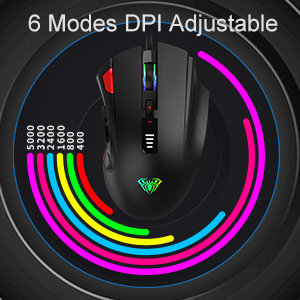
Figure 4: DPI Adjustment Modes.
4.3 Effetti tad-Dawl RGB
The AULA H512 mouse includes 6 RGB lighting effects. These effects can be changed or turned off/on using the dedicated software or specific button combinations as detailed in the software interface. The lighting often changes with DPI settings.

Figure 5: RGB Breathing Lighting Effect.
5. Customization via Software
The AULA H512 mouse supports advanced customization through its dedicated software. This software allows you to:
- Program all 12 buttons with custom functions or macros.
- Adjust DPI settings with finer control.
- Ippersonalizza l-effetti tad-dawl u l-kuluri RGB.
- Oħloq u ssejvja diversi profiles għal logħob jew applikazzjonijiet differenti.
Please visit the official AULA website to download the latest version of the H512 customization software.
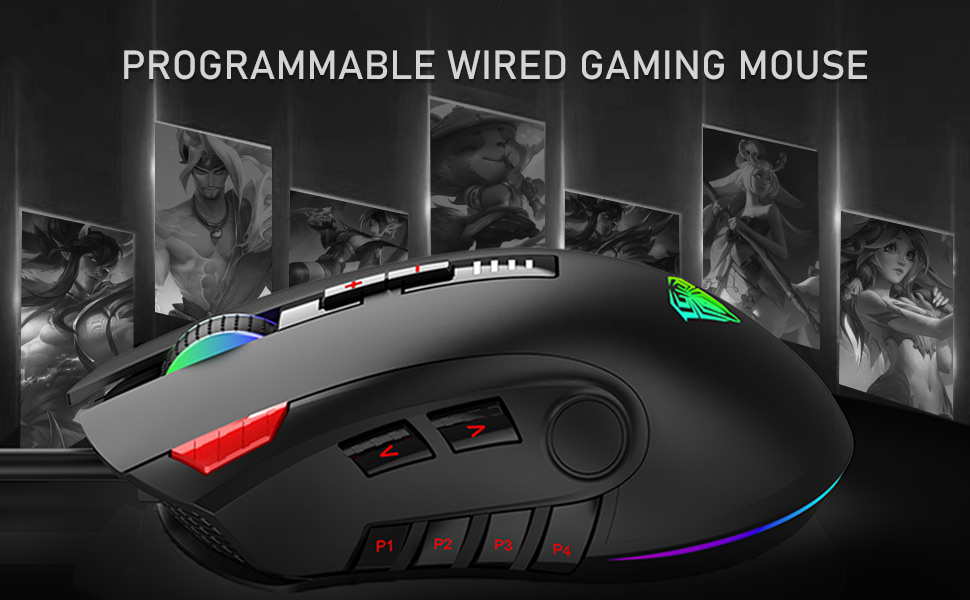
Figure 6: Software Interface for Customization.
6. Manutenzjoni
- Tindif: Uża drapp artab u niexef biex tnaddaf il-wiċċ tal-maws. Għal ħmieġ iebes, neħħi ftit drapp.amp cloth can be used, ensuring no liquid enters the mouse. Avoid harsh chemicals or abrasive cleaners.
- Kura tas-Sensor: Żomm is-senser ottiku fuq in-naħa ta' taħt tal-maws nadif u ħieles mit-trab jew mill-fdalijiet biex tiżgura traċċar preċiż.
- Ġestjoni tal-Kejbil: Evita liwjiet qawwija jew ġbid eċċessiv tal-kejbil USB biex tevita l-ħsara.
7 Issolvi l-problemi
| Problema | Soluzzjoni Possibbli |
|---|---|
| Il-ġurdien ma jirrispondix |
|
| Traċċar mhux preċiż jew dewmien tal-cursor |
|
| Il-buttuni mhux qed jaħdmu kif mistenni |
|
| Dawl RGB mhux qed jaħdem |
|
8. Speċifikazzjonijiet
| Karatteristika | Dettall |
|---|---|
| Mudell | H512 |
| Konnettività | USB bil-fili |
| Numru ta' Buttuni | 12 (Programmabbli) |
| Livelli DPI | 400 / 800 / 1600 / 2400 / 3200 / 5000 DPI |
| Tip tas-Sensor | Ottiċi |
| Dawl | RGB Backlit (6 effett) |
| Tul tal-Cable | 1.6 metri (madwar 5.25 piedi) |
| Dimensjonijiet (LxWxH) | 12.4 x 7.9 x 4.4 ċm (4.88 x 3.11 x 1.73 pulzieri) |
| Piż | 147 g (Adjustable with 3x4g weights) |
| Sistemi Operattivi Appoġġjati | Windows 7/8/10/Vista/XP, Mac |

Figure 7: Product Dimensions and Parameters.
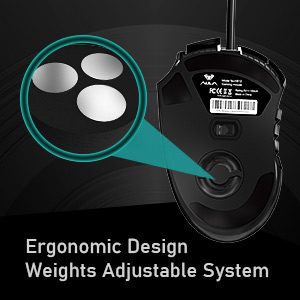
Figure 8: Adjustable Weight System.
9. Garanzija u Appoġġ
The AULA H512 Wired Gaming Mouse comes with a standard warranty. For specific warranty terms and conditions, please refer to the warranty information provided at the time of purchase or contact AULA customer support.
Kuntatt tal-manifattur:
- Kumpanija: Dongguan Suoai Electronics Co., Ltd.
- Email: info@aulapro.in
- Importatur (l-Indja): Odio Zone Private Limited, S-4/63, 2nd Floor, Agasthya Complex, Shettihalli Main Road, Jalahalli West, Bengaluru 560015, Karnataka, India. Email: support@odiozone.com
For further assistance or technical support, please contact the manufacturer or your local distributor.


