Istruzzjonijiet Importanti dwar is-Sigurtà
Please read all safety instructions carefully before using this product. Failure to follow these instructions may result in electric shock, fire, or other hazards.
- Tesponix il-proġekter għax-xita jew l-umdità biex tevita n-nar jew xokk elettriku.
- Tiftaħx il-proġettazzjoni casing. Ġewwa m'hemm l-ebda partijiet li jistgħu jiġu rranġati mill-utent. Irreferi għal kull manutenzjoni għand persunal tas-servizz kwalifikat.
- Aċċerta ruħek li jkun hemm ventilazzjoni xierqa. Timblokkax xi fetħiet tal-ventilazzjoni.
- Place the projector on a stable, flat surface to prevent it from falling.
- Uża biss l-adapter tal-enerġija li jiġi mal-proġettur.
- Evita l-espożizzjoni diretta tal-għajnejn għal-lenti tal-proġettazzjoni meta tkun qed taħdem.amp hija mixgħula.
- Unplug the projector from the power outlet during lightning storms or when unused for long periods.
- Keep the projector away from heat sources such as radiators, heat registers, stoves, or other apparatus that produce heat.
Prodott Overview
Kontenut tal-Pakkett
Iċċekkja li l-oġġetti kollha elenkati hawn taħt huma inklużi fil-pakkett tiegħek:
- RCA 480P Home Movie Projector
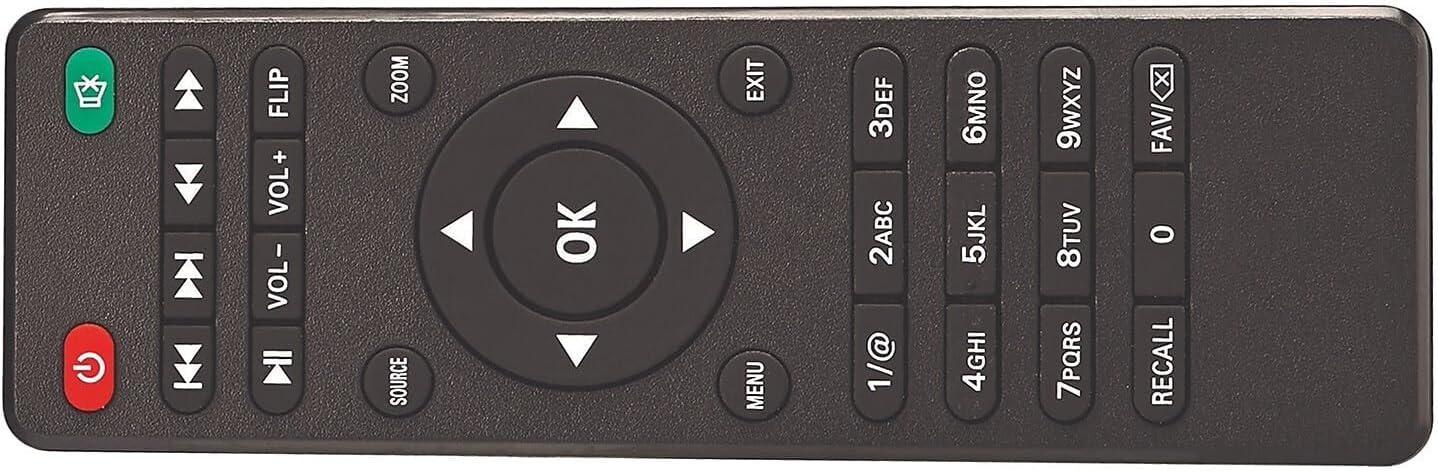
- Kontroll mill-bogħod (batteriji mhux inklużi)
- Qoxra tal-Lenti
- Adapter tal-Qawwa AC
- Manwal għall-Utent (dan id-dokument)

Komponenti tal-projector
Familiarize yourself with the various parts of your projector:


Setup
Pjazzament
Position the projector on a flat, stable surface. The distance from the projection surface (wall or screen) will determine the image size. The projector offers flexible projection sizes from 30 inches to 150 inches. For optimal viewing, a picture size between 37 inches and 100 inches is recommended.

Konnessjoni tal-Enerġija
Connect the supplied AC power adapter to the projector's DC IN port, then plug the adapter into a standard electrical outlet. The power indicator light on the projector will illuminate.
Adjusting Image
- Aġġustament tal-Focus: Dawwar iċ-ċirku tal-fokus fuq il-lenti tal-proġettazzjoni sakemm l-immaġni tidher qawwija u ċara.
- Aġġustament Keystone: Use the keystone adjustment knob (if available) to correct trapezoidal distortion, ensuring the image is rectangular.
- Aġġustament Għoli: Extend the footpad at the bottom of the projector to adjust the projection angle and height as needed.
Istruzzjonijiet Operattivi
Apparat li jgħaqqad
The projector supports various input sources. Ensure the projector is powered on before connecting devices.

- HDMI: Connect devices like laptops, DVD players, gaming consoles, or streaming sticks using an HDMI cable to one of the two HDMI ports. Select the corresponding HDMI input source on the projector.
- USB: Daħħal flash drive tal-USB fil-port tal-USB biex tilgħab il-midja files (video, audio, pictures). Select the USB input source.
- VGA: Connect a computer or laptop using a VGA cable to the VGA port. Select the VGA input source.
- TA’: Use the A/V input for older devices like VCRs or some DVD players. Select the AV input source.
- TF/MicroSD Card: Insert a TF or MicroSD card into the designated slot to play media files. Select the TF/MicroSD input source.
Konnessjoni Awdjo Bluetooth
The projector features built-in Bluetooth 4.2, allowing you to connect to external Bluetooth-enabled speakers or headphones for an enhanced audio experience.
- Kun żgur li l-apparat awdjo Bluetooth tiegħek jinsab fil-modalità ta' tqabbil.
- Fuq il-proġettazzjoni, mur fil-menù tas-settings tal-Bluetooth.
- Select your Bluetooth device from the list of available devices to pair.
- Once connected, audio will be routed through your external Bluetooth device.

Daqq tal-Midja
After selecting the appropriate input source, the projector will display the content from your connected device or media storage. Use the remote control or onboard buttons to navigate menus, play/pause, adjust volume, and select media files.
Manutenzjoni
- Tindif tal-Lenti: Use a soft, lint-free cloth specifically designed for optical lenses to gently clean the projector lens. Avoid abrasive materials or harsh chemicals.
- Tneħħija tat-Trab: Periodically clean the projector's ventilation openings with a soft brush or compressed air to prevent dust buildup, which can affect performance and lifespan.
- Ħażna: When not in use, store the projector in a cool, dry place, away from direct sunlight and extreme temperatures. Always replace the lens cover to protect the lens from dust and scratches.
- Korda tal-Enerġija: Inspect the power cord regularly for any damage. If damaged, discontinue use and replace with an authorized power adapter.
Issolvi l-problemi
Jekk tiltaqa' ma' problemi bil-proġettur tiegħek, irreferi għall-problemi u s-soluzzjonijiet komuni li ġejjin:
- Ebda Qawwa:
- Ensure the power adapter is securely connected to both the projector and a working electrical outlet.
- Iċċekkja jekk is-sokit tal-enerġija hux qed jaħdem billi tqabbad apparat ieħor.
- Agħfas il-buttuna tal-qawwa fuq il-proġekter jew il-kontroll mill-bogħod.
- No Image / Blank Screen:
- Verify that the correct input source is selected (e.g., HDMI1, USB, AV).
- Check the connection cable (HDMI, VGA, etc.) between the projector and the source device. Try a different cable if possible.
- Ensure the source device is powered on and outputting video.
- Poor Image Quality (Blurry/Distorted):
- Adjust the focus ring on the lens until the image is clear.
- Use the keystone adjustment knob to correct any trapezoidal distortion.
- Kun żgur li l-wiċċ tal-projezzjoni jkun ċatt u lixx.
- Check the distance to the screen; adjust for optimal size (recommended 37-100 inches).
- Ebda Ħsejjes:
- Increase the volume on both the projector and the connected source device.
- If using Bluetooth, ensure the external audio device is properly paired and its volume is up.
- Check audio settings on the source device to ensure audio is being sent to the correct output.
- Kwistjonijiet ta' Konnessjoni Bluetooth:
- Ensure the Bluetooth audio device is in pairing mode and within range.
- Turn off and on the Bluetooth function on both the projector and the audio device, then try pairing again.
- Clear previous Bluetooth connections on both devices if necessary.
Speċifikazzjonijiet
| Karatteristika | Speċifikazzjoni |
|---|---|
| Numru tal-Mudell | 008-06-8991 |
| Riżoluzzjoni tal-Wiri | Native 800 x 480 (Supports 1080p, 1080i, 720p, 576i, 480p, 480i via HDMI) |
| Luminożità abjad | 33 Lumens |
| Daqs tal-Projezzjoni | 30 - 150 inches (Recommended: 37 - 100 inches) |
| Teknoloġija tal-Konnettività | Bluetooth 4.2, HDMI (x2), USB, VGA, A/V, TF/MicroSD Card |
| Dimensjonijiet tal-Prodott | 7.9 in. L x 6.1 in. D x 3.3 in. H (6.1 x 7.9 x 3.3 inches) |
| Piż tal-oġġett | 1 lira |
| Użu Rakkomandat | Home Cinema |
Garanzija u Appoġġ
For warranty information or technical support, please refer to the documentation provided at the time of purchase or visit the official RCA support websit. Żomm il-prova tax-xiri tiegħek għal talbiet ta' garanzija.


