1. Introduzzjoni
The Aeotec Water Sensor 7 Pro (ZWA019) is a Z-Wave Plus enabled device designed to detect water leaks, monitor ambient temperature, and measure humidity levels. This sensor integrates into your Z-Wave smart home system, providing timely alerts and data to help protect your property from water damage and maintain optimal environmental conditions. It features Z-Wave 700 series technology for enhanced performance and security.
2. Informazzjoni dwar is-Sigurtà
- Aqra l-istruzzjonijiet kollha bir-reqqa qabel l-installazzjoni u l-użu.
- Dan l-apparat huwa maħsub għall-użu fuq ġewwa biss.
- Tesponix l-apparat għal temperaturi estremi, umdità, jew dawl tax-xemx dirett.
- Use only the specified battery type (CR2, 3V). Incorrect battery usage may result in damage or fire.
- Żomm il-batteriji fejn ma jintlaħaqx mit-tfal. Jekk tibela', fittex attenzjoni medika immedjata.
- This device is not a life-saving appliance. It is intended to provide alerts for potential water leaks.
3. Kontenut tal-Pakkett
Ivverifika li l-komponenti kollha huma preżenti fil-pakkett:
- Aeotec Water Sensor 7 Pro (ZWA019) main unit
- Water sensing probe with cable
- 1 x CR2 Lithium Metal battery
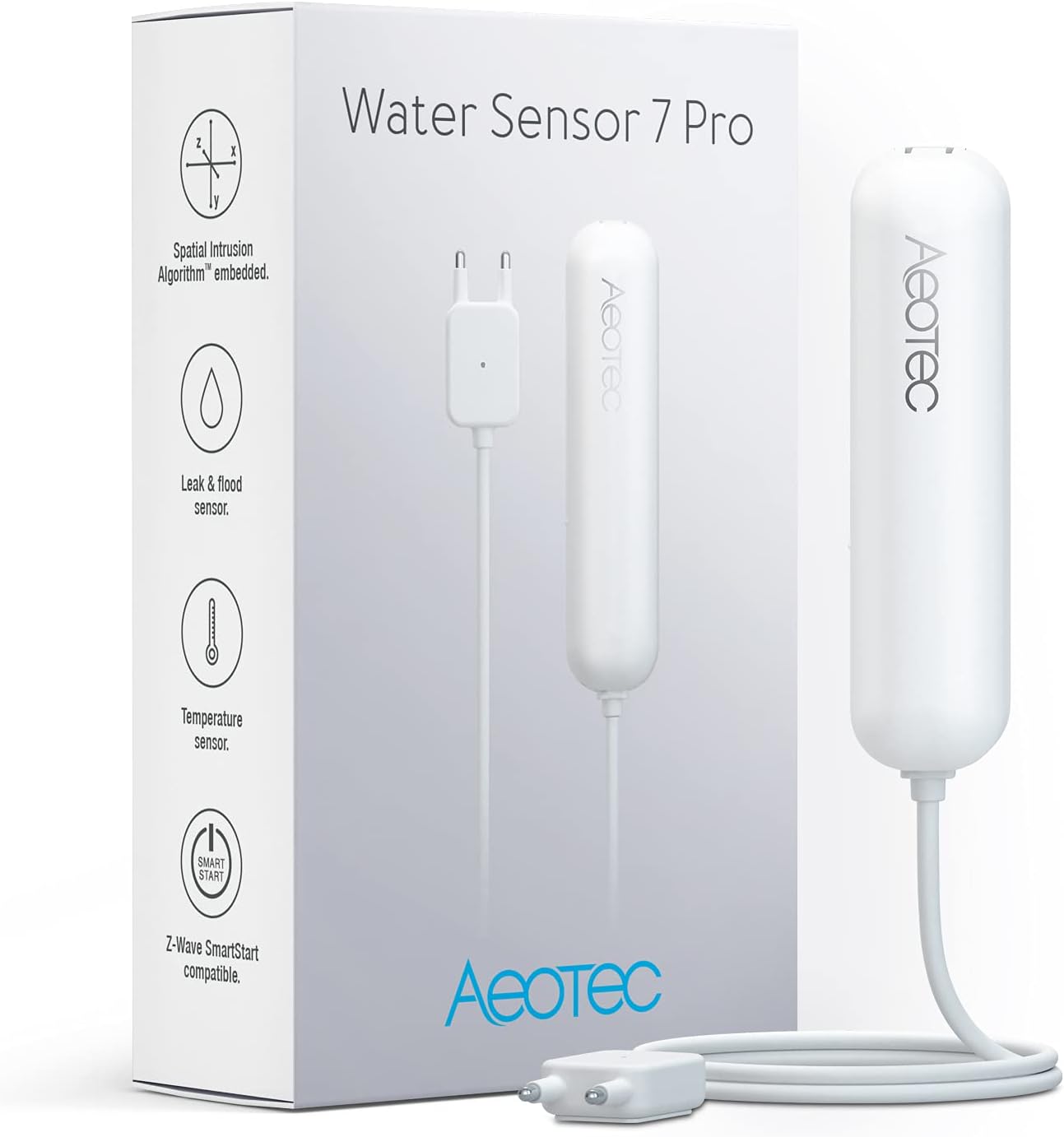
Image: The Aeotec Water Sensor 7 Pro packaging and the sensor unit with its water sensing probe.
4. Prodott Aktarview
The Water Sensor 7 Pro consists of a main unit and an external water sensing probe. The main unit houses the Z-Wave communication module, temperature, and humidity sensors. The external probe is designed for precise water leak detection.
4.1 Karatteristiċi ewlenin
- Water Leak Detection: Detects as little as 0.02 inches of water.
- Sensor tat-temperatura: Tissorvelja t-temperatura ambjentali.
- Senser tal-Umdità: Measures relative humidity.
- Z-Wave 700 Series Chip: Offers faster communication, enhanced security (S2), and extended battery life.
- SmartStart Compatible: Simplifies inclusion into Z-Wave networks.

Immaġni: Ġenb view of the Aeotec Water Sensor 7 Pro main unit connected to its external water sensing probe.

Immaġni: Minn fuq għal isfel view of the Aeotec Water Sensor 7 Pro main unit and its external water sensing probe.
5. Setup
5.1 Installazzjoni tal-batterija
- Gently open the main unit's casing.
- Insert the provided CR2 (3V) Lithium Metal battery, ensuring correct polarity.
- Agħlaq il-ċasing b'mod sigur.
5.2 Pairing with a Z-Wave Hub (Inclusion)
The Water Sensor 7 Pro requires a Z-Wave hub to function within a smart home system. Ensure your Z-Wave hub is in inclusion mode before proceeding.
SmartStart Inclusion (Recommended)
If your Z-Wave hub supports SmartStart, follow these steps:
- Scan the QR code located on the sensor or its packaging using your Z-Wave hub's app or interface.
- The sensor will automatically join the network within 10 minutes of being powered on and within range of the hub.

Image: A smartphone scanning the QR code on the Aeotec Water Sensor 7 Pro for SmartStart setup.
Inklużjoni Manwali
If your hub does not support SmartStart, or if SmartStart fails:
- Put your Z-Wave hub into 'inclusion' or 'add device' mode. Refer to your hub's manual for specific instructions.
- Press the Action Button on the Water Sensor 7 Pro once. The LED indicator will flash to confirm inclusion mode.
- If successful, the LED will turn solid for a few seconds, and your hub will confirm the device has been added.
Compatible Z-Wave Gateways: AutoPilot, Hubitat, Fibaro Home Centre, Vera, HomeSeer, Zipato, and other certified Z-Wave gateways.
5.3 Tqegħid u Immuntar
Position the main unit in a suitable location, typically wall-mounted, ensuring it is within Z-Wave network range. The external water sensing probe should be placed directly where water leaks are most likely to occur.
- Under sinks or near water heaters.
- Behind toilets or washing machines.
- In basements or utility rooms.
- Near bathtubs or showers.

Immaġni: Erba' eksamples showing optimal placement for the water sensor probe: near a toilet, next to a bathtub, under a sink, and beside a washing machine.

Image: Illustration indicating that a smart hub is required for the sensor to operate, showing two types of Aeotec hubs.
6. Istruzzjonijiet Operattivi
Once successfully paired with your Z-Wave hub, the Water Sensor 7 Pro will begin monitoring its environment.
- Sejbien tal-Ilma: When the external probe detects water, it will send an immediate alert to your Z-Wave hub. Your hub can then trigger automations such as sending notifications, sounding alarms, or shutting off water valves (if integrated).
- Monitoraġġ tat-temperatura: The sensor reports ambient temperature data to your hub, allowing you to track environmental conditions.
- Monitoraġġ tal-umdità: The sensor reports ambient humidity data, useful for managing ventilation or preventing mold growth in damp żoni.

Image: Close-up of the water sensing probe with a water drop, illustrating its function.

Image: Graphic depicting a thermometer alongside water droplets, representing the temperature and humidity sensing capabilities.
7. Manutenzjoni
7.1 Sostituzzjoni tal-batterija
The sensor is powered by one CR2 (3V) Lithium Metal battery. When the battery level is low, your Z-Wave hub will typically report this status. To replace the battery:
- Open the main unit's casing.
- Neħħi l-batterija l-qadima.
- Insert a new CR2 (3V) battery, observing correct polarity.
- Agħlaq il-ċasing.
Armi l-batteriji qodma skont ir-regolamenti lokali.
7.2 Tindif
Wipe the sensor and probe with a soft, dry cloth. Do not use abrasive cleaners or immerse the main unit in water.
8 Issolvi l-problemi
- Sensor not pairing: Ensure your Z-Wave hub is in inclusion mode and the sensor is within range. Try performing a factory reset on the sensor before attempting inclusion again.
- False water alerts: Check the water sensing probe for any debris, dust, or foreign objects (e.g., spider webs) that might bridge the contacts and trigger a false alarm. Clean the probe if necessary.
- No alerts despite water detection: Verify the sensor's battery level. Ensure the sensor is properly paired with your Z-Wave hub and that your hub's automation rules for water detection are correctly configured.
- Z-Wave Frequency Compatibility: Note that Z-Wave devices operate on specific regional frequencies. This product (ZWA019) is designed for the American Z-Wave frequency (908.4 MHz, 916 MHz). It will not function with Z-Wave hubs operating on European (CEPT) frequencies (868.4 MHz, 869.85 MHz). Ensure your hub's frequency matches the sensor's.
8.1 Irrisettja l-Fabbrika
A factory reset will remove the sensor from its Z-Wave network and restore it to its default settings. This procedure is typically used when moving the sensor to a new hub or troubleshooting persistent issues.
- Press and hold the Action Button for approximately 20 seconds.
- The LED indicator will flash rapidly, then turn solid for a few seconds to confirm the reset.
- Release the Action Button. The sensor is now reset and ready for a new inclusion process.
9. Speċifikazzjonijiet
| Numru tal-Mudell | ZWA019 |
| Brand | AEOTEC |
| Dimensjonijiet (Unità Prinċipali) | 4.72 x 2.83 x 1.26 pulzieri (120 x 72 x 32 mm) |
| Piż tal-oġġett | 2.89 uqija (82 gramma) |
| Sors tal-Enerġija | 1 x CR2 Lithium Metal battery (3V) |
| Teknoloġija bla fili | Z-Wave Plus (700 series) |
| Metodu ta' Kontroll | App (via Z-Wave hub) |
| Tip ta 'Immuntar | Mount Wall |
| UPC | 810667025335 |
| Apparati Kompatibbli | Z-Wave gateways and controllers |
10. Garanzija u Appoġġ
Aeotec products are designed for reliability and performance. For warranty information and technical support, please refer to the official Aeotec webis-sit jew ikkuntattja lid-distributur lokali tiegħek.
- Manifattur: Aeotec
- Official Product Page: aeotec.com/z-wave-water-sensor/
- EU Spare Part Availability: 3 Snin
For further assistance, consult the support section of the Aeotec webis-sit jew ikkuntattja lis-servizz tal-klijenti tagħhom direttament.


