1. Introduzzjoni
This manual provides detailed instructions for the safe and efficient use of your Hoco HC3 Bounce Sports Wireless Speaker. Please read this manual thoroughly before operating the device and retain it for future reference. The Hoco HC3 is a versatile portable speaker supporting Bluetooth, FM radio, TF card, USB, AUX, and TWS modes.

Figure 1: Hoco HC3 Bounce Sports Wireless Speaker. This image displays the speaker in a vertical orientation, showcasing its black mesh grille, the 'hoco' logo at the bottom right, and a braided carrying strap attached to the top left side. The control buttons are visible on the side panel.
2. Kontenut tal-Pakkett
Kun żgur li l-oġġetti kollha huma preżenti meta tiftaħ il-kaxxa:
- Hoco HC3 Bounce Sports Wireless Speaker
- Cable tal-Iċċarġjar tal-USB
- Manwal għall-Utent (dan id-dokument)
- AUX Audio Cable (if included with your model)
3. Prodott Aktarview
3.1 Komponenti tal-Ispeaker

Figure 2: Rear panel of the Hoco HC3 speaker. This image highlights the various input ports and control buttons located on the back of the speaker. Visible elements include the power switch, USB port, TF card slot, AUX input, and LED indicator.
Iffamiljarizza ruħek mal-kontrolli u l-portijiet tal-ispiker:
- Buttuna tal-Qawwa: Long press to power on/off. Short press to switch modes.
- Buttuna Play/Pause: Ilgħab jew waqqaf l-awdjo. Wieġeb/temm is-sejħiet.
- Buttuna tal-Volum 'il Fuq / tat-Trakka li Jmiss: Agħfas qasir għat-trakka li jmiss, agħfas twil biex tgħolli l-volum.
- Buttuna Volum 'l isfel / Trakka Preċedenti: Agħfas qasir għat-trakka ta' qabel, agħfas twil biex tnaqqas il-volum.
- Buttuna tal-Modalità (M): Short press to cycle through Bluetooth, FM, TF card, USB, and AUX modes.
- Port USB: Għall-plejbek minn USB drive.
- Slott tal-Karta TF: Għall-plejbek ta' karta TF (MicroSD).
- Input AUX: Jack ta' 3.5mm għal konnessjoni awdjo bil-fili.
- Port tal-Iċċarġjar: Port mikro USB għall-iċċarġjar tal-ispiker.
- Indikatur LED: Displays charging status and operating mode.
3.2 Karatteristiċi ewlenin
- Bluetooth V5.0: Jipprovdi konnettività mingħajr fili stabbli u effiċjenti.
- Modi ta' Daqq multipli: Supports Bluetooth, FM radio, TF card, USB drive, and AUX input.
- Stereo bla fili veru (TWS): Allows two HC3 speakers to connect wirelessly for a stereo sound experience.
- Ħajja twila tal-batterija: 2400mAh battery capacity offers up to 5 hours of music playback.
- Kelliema Doppji: Equipped with two 45mm speaker units, each with 5W power output.
- Kompatt u portabbli: Dimensions of 202*60*60mm and weight of 561g for easy transport.
4. Setup
4.1 Iċċarġjar tal-Ispeaker
- Qabbad il-kejbil tal-iċċarġjar USB ipprovdut mal-port tal-iċċarġjar tal-ispiker.
- Connect the other end of the USB cable to a 5V USB power adapter (not included) or a computer's USB port.
- The LED indicator will illuminate to show charging status. It typically takes about 3 hours for a full charge.
- Once fully charged, the LED indicator will change or turn off (refer to specific LED behavior in the troubleshooting section if unsure).
Note: For optimal battery life, fully charge the speaker before first use.
4.2 Tixgħel/Jitfi
- Biex Tixgħel: Long press the Power button until you hear an audible prompt and the LED indicator lights up.
- Biex Tifi: Long press the Power button again until you hear an audible prompt and the LED indicator turns off.
5. Istruzzjonijiet Operattivi
5.1 Tqabbil tal-Bluetooth
- Ensure the speaker is powered on and in Bluetooth mode (the LED indicator will typically flash blue, indicating it's ready for pairing). If not, short press the Mode (M) button to switch to Bluetooth mode.
- Ippermetti l-Bluetooth fuq l-apparat mobbli tiegħek (smartphone, tablet, kompjuter).
- Fittex għal available Bluetooth devices. You should see "HC3" or "Hoco HC3" in the list.
- Select "HC3" to connect. Once paired, the speaker will emit an audible confirmation, and the LED indicator will stop flashing and remain solid blue.
- Issa tista' ddoqq l-awdjo mit-tagħmir tiegħek permezz tal-ispiker.
Note: The speaker will automatically attempt to reconnect to the last paired device when powered on, if that device's Bluetooth is active and within range.
5.2 Modalità tar-Radju FM
- Qawwa fuq il-kelliem.
- Short press the Mode (M) button repeatedly until you enter FM radio mode.
- To auto-scan and save available FM stations, short press the Play/Pause button. The speaker will scan and store stations.
- Use the Volume Up / Next Track and Volume Down / Previous Track buttons to navigate between saved stations.
5.3 TF Card / USB Playback
- Qawwa fuq il-kelliem.
- Insert a TF (MicroSD) card into the TF card slot or a USB flash drive into the USB port.
- The speaker should automatically switch to TF card or USB mode and begin playing audio files. If not, short press the Mode (M) button to select the correct mode.
- Use the Play/Pause, Volume Up / Next Track, and Volume Down / Previous Track buttons to control playback.
Note: Ensure your TF card or USB drive contains compatible audio files (e.g., MP3 format).
5.4 Modalità AUX
- Qawwa fuq il-kelliem.
- Connect one end of a 3.5mm audio cable (if included) to the speaker's AUX input port.
- Qabbad it-tarf l-ieħor tal-kejbil tal-awdjo mal-jack tal-output tal-awdjo tat-tagħmir estern tiegħek (eż., MP3 player, kompjuter).
- The speaker should automatically switch to AUX mode. If not, short press the Mode (M) button to select AUX mode.
- Ikkontrolla l-plejbek mill-apparat estern tiegħek. Il-volum jista' jiġi aġġustat kemm fuq l-ispiker kif ukoll fuq l-apparat estern.
Funzjoni 5.5 TWS (Stereo Veru Mingħajr Fili)
The TWS function allows you to pair two Hoco HC3 speakers together for a true stereo sound experience.
- Ensure both HC3 speakers are powered off.
- Power on both speakers simultaneously. They should both enter Bluetooth pairing mode.
- On wieħed of the speakers (this will become the primary speaker), long press the Mode (M) button or a dedicated TWS button (if present, otherwise try the Play/Pause button for 3-5 seconds) until you hear a pairing tone. The speakers will attempt to connect to each other.
- Once successfully paired, you will hear a confirmation tone, and one speaker's LED will indicate it's the primary (e.g., flashing slowly), while the other's LED will be solid.
- Issa, qabbad l-apparat mobbli tiegħek mal- primarja speaker via Bluetooth as described in section 5.1.
- L-awdjo issa se jindaqq b'mod stereo miż-żewġ kelliema.
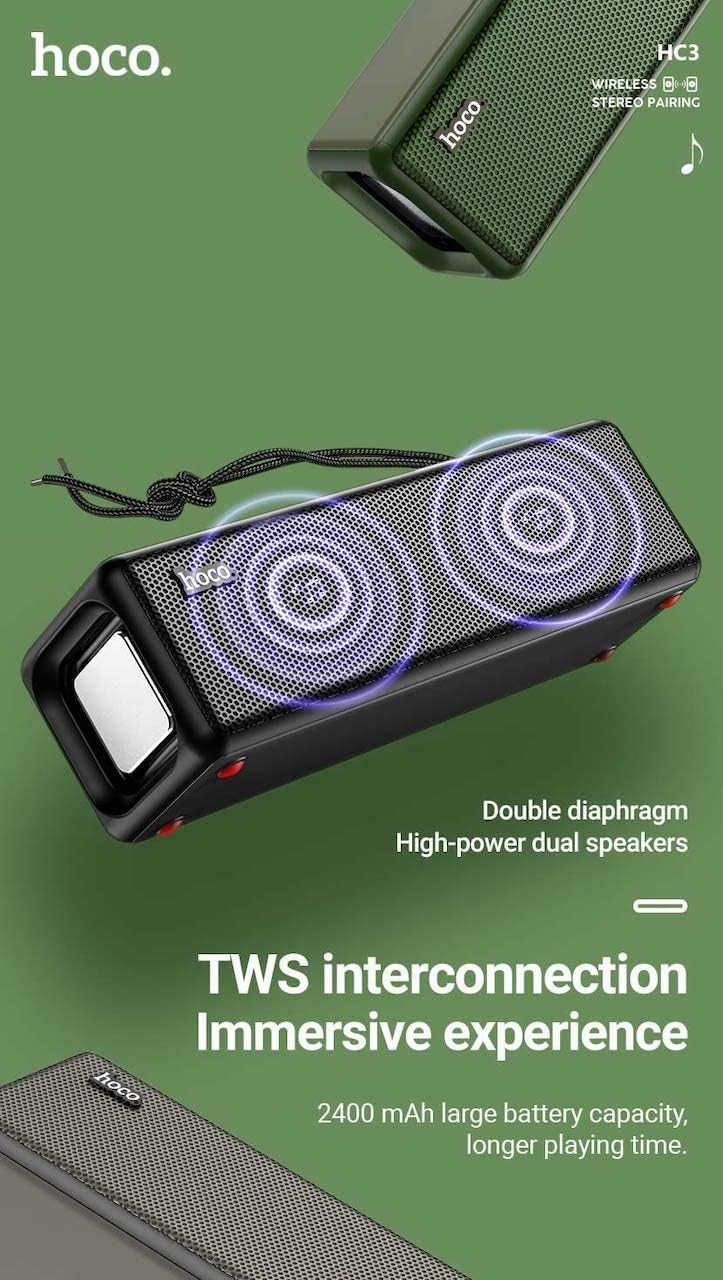
Figure 3: TWS Interconnection. This image illustrates the concept of two Hoco HC3 speakers wirelessly connected to provide a stereo audio experience, highlighting the dual speaker setup and the 2400 mAh battery capacity.
5.6 Immaniġġjar tas-Sejħiet
Meta tkun imqabbad permezz tal-Bluetooth ma' smartphone:
- Irrispondi Sejħa: Agħfas qasir il-buttuna Play/Pause.
- Tmiem Sejħa: Agħfas qasir il-buttuna Play/Pause waqt telefonata.
- Irrifjuta Sejħa: Agħfas fit-tul il-buttuna Play/Pause meta dieħla telefonata.
- Isemmi mill-ġdid l-Aħħar Numru: Agħfas darbtejn il-buttuna Play/Pause.
6. Manutenzjoni
- Tindif: Use a soft, dry cloth to clean the speaker's surface. Do not use abrasive cleaners, alcohol, or other chemical solvents.
- Ħażna: Aħżen l-ispiker f'post frisk u niexef 'il bogħod mix-xemx diretta u minn temperaturi estremi.
- Kura tal-batterija: To prolong battery life, charge the speaker regularly, even if not in use for extended periods (e.g., once every 3 months). Avoid fully discharging the battery frequently.
- Reżistenza għall-Ilma: While designed for sports, avoid submerging the speaker in water. Refer to product specifications for any IP rating.
- Evita l-Impatt: Protect the speaker from drops and strong impacts.
7 Issolvi l-problemi
If you encounter issues with your Hoco HC3 speaker, refer to the following table for common problems and solutions:
| Problema | Kawża Possibbli | Soluzzjoni |
|---|---|---|
| L-ispiker ma jixgħelx. | Batterija baxxa. | Iċċarġja l-ispiker għal mill-inqas 30 minuta. |
| Ma tistax tqabbad permezz tal-Bluetooth. | Il-Bluetooth mhux attivat fuq l-apparat; l-ispiker mhux fil-modalità ta' tqabbil; wisq 'il bogħod mill-apparat. | Ensure Bluetooth is on, speaker is in pairing mode (flashing blue LED), and devices are within 10 meters. Forget "HC3" on your device and try pairing again. |
| L-ebda ħoss. | Volum baxx wisq; mod mhux korrett magħżul; apparat mhux qed idoqq l-awdjo. | Increase volume on both speaker and connected device. Verify correct mode (Bluetooth, AUX, TF, USB). Ensure audio is playing on the source device. |
| Ir-riċeviment tar-radju FM huwa fqir. | Sinjal dgħajjef; interferenza ambjentali. | Move the speaker to a location with better reception. Re-scan for stations. |
| TF card/USB playback not working. | Card/drive not inserted correctly; incompatible file format; korrott files. | Ensure card/drive is fully inserted. Check file formats (MP3 recommended). Try another card/drive. |
| It-tqabbil tat-TWS ifalli. | Speakers not in TWS pairing mode; too far apart. | Ensure both speakers are powered on and in TWS pairing mode. Keep them close during pairing. Refer to section 5.5. |
8. Speċifikazzjonijiet
| Karatteristika | Dettall |
|---|---|
| Mudell | HC3 |
| Dimensjonijiet | 202 x 60 x 60 mm |
| Piż | 561 g |
| Verżjoni Bluetooth | V5.0 (Chip: JLAC6928B) |
| Kapaċità tal-batterija | 2400mAh |
| Ħin tal-Iċċarġjar | Madwar sagħtejn |
| Ħin ta’ Taħdita/Mużika | Sa 5 sigħat |
| Unità tal-Ispeaker | 45mm * 2 |
| Output tal-Enerġija tal-Ispeaker | 5W * 2 |
| Modi ta' Konnettività | Bluetooth, FM, TF card, USB, AUX, TWS |
| Modalità tal-Ħruġ tal-Awdjo | Jdawru |
| Manifattur | Ħoko |
| Pajjiż ta' Oriġini | Iċ-Ċina |
9. Garanzija u Appoġġ
Hoco products are manufactured to high quality standards. For information regarding warranty coverage, please refer to the warranty card included with your purchase or contact your local Hoco distributor or retailer. Keep your proof of purchase for any warranty claims.
For technical support or further assistance, please visit the official Hoco website or contact their customer service department. Contact details are typically available on the product packaging or the official websit.


